The 7 best Discord alternatives for 2026


Last edited June 24, 2026

Table of Contents
- What are community chat platforms?
- Why Discord doesn't always cut it: the need for Discord alternatives
- How I picked the best Discord alternatives
- At a glance: the best Discord alternatives in 2026
- The 7 best Discord alternatives for communities and support in 2026
- How to choose the right Discord alternative for you
- Supercharge your community support, no matter where it lives
Let's be honest, if you spend any real time online, you've probably found yourself in a Discord server. It has become the default online hangout for everything from planning a gaming night with friends to running huge fan communities. It's familiar, it's free, and for a while, it's all you really need.
But then your community starts to grow. Suddenly you're not just chatting; you're welcoming new people, answering the same question for the tenth time this week, and maybe trying to make a little money from all your hard work. That's when you start bumping up against Discord's limits. The hunt for better moderation, real ways to earn, and a support system that isn't pure chaos is why so many of us go looking for Discord alternatives.
I write about this from a specific seat. I've spent the last few years building eesel AI and watching teams bolt AI support onto tools like Slack and Microsoft Teams, and the one lesson that sticks is this: the platform you pick matters far less than whether you can answer questions reliably on top of it. So this isn't a generic clone list. I looked at the 7 platforms that genuinely do something different, and where each one leaves a support gap that an AI agent can fill.
What are community chat platforms?
At their heart, community chat platforms are just dedicated online clubhouses. They're spaces built for real-time conversation, mixing text, voice, and video to connect groups of people who share a hobby, game, or project.
Unlike a simple group chat on your phone, these platforms are made for lots of people talking at once. They use "servers" or "workspaces" as the main building, broken down into "channels" for specific topics. That setup stops conversations becoming one giant, messy stream. They usually come with user roles (admins, mods, members) and the ability to plug in other apps, much like a modern AI chatbot platform does for support teams.
Why Discord doesn't always cut it: the need for Discord alternatives
Looking for an alternative doesn't mean Discord is bad. It just means your community might be outgrowing what it was designed for. It's like running a small business out of a garage; eventually you need a proper office. Here are the most common reasons people start looking around.
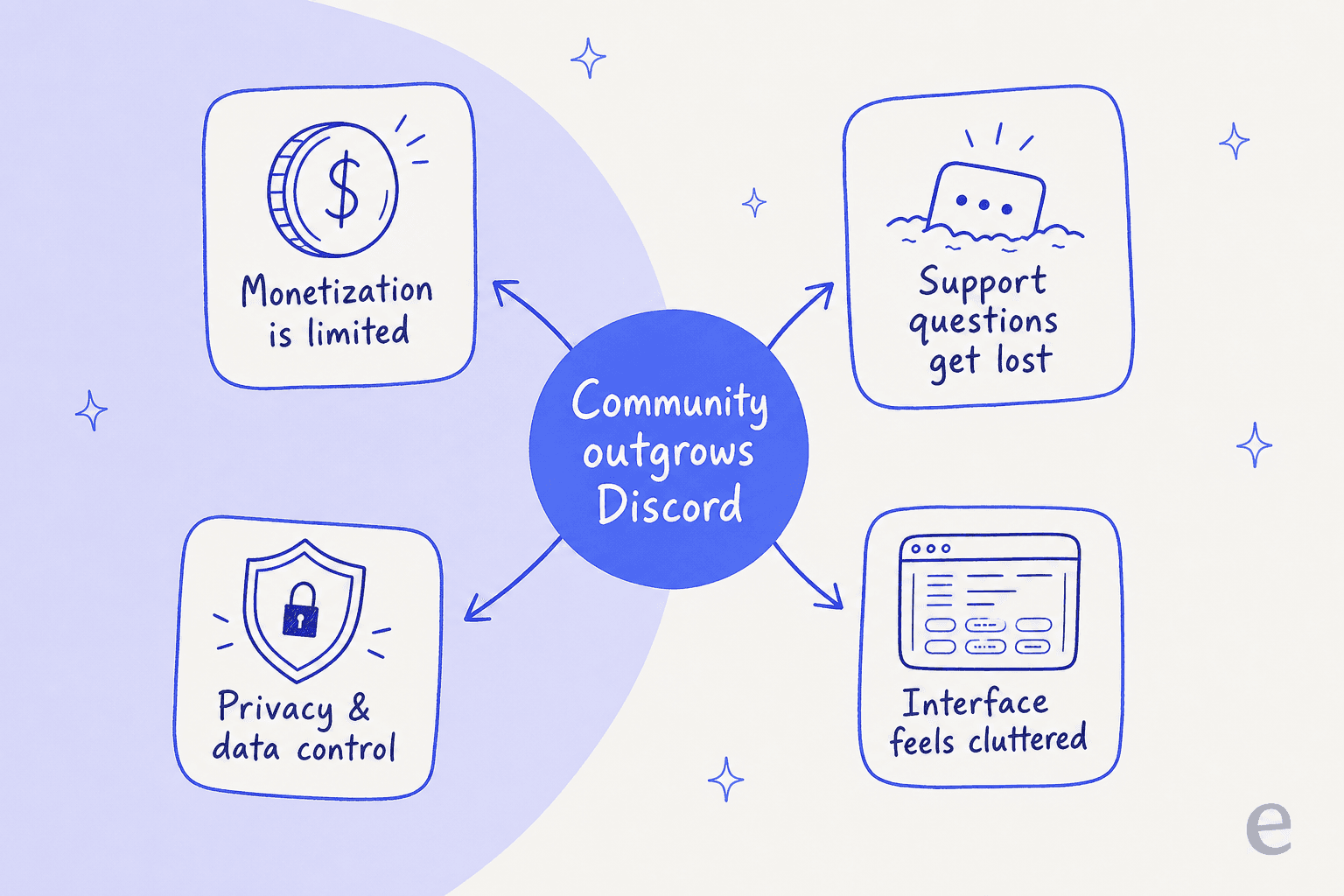
Making money is tough Discord's main monetization tools, Nitro subscriptions and server boosts, mostly benefit Discord itself, not the people building the communities. If you're trying to build something sustainable, you need more direct ways to earn.
Support feels like shouting into the void In a busy server, a new member's important question gets buried in minutes. There's no good system for tracking problems or making sure everyone gets a reliable answer. It's frustrating for members and a headache for moderators, which is exactly the gap AI customer service software is built to close.
Privacy is a growing question mark People are more aware than ever of how platforms track and use their data. For communities discussing sensitive topics, or members who just value privacy, Discord's data policies can be a real reason to seek out a more private or self-hosted option.
It's getting a little cluttered in there Discord keeps trying to be the one app for everything, so it's packed with features. For groups that just want a straightforward place to talk, the interface can feel busy. Sometimes simpler is better.
How I picked the best Discord alternatives
So how did I land on these seven? I didn't just look for Discord clones. I had a specific checklist to make sure I was recommending tools that solve real problems for community builders.
First, the core features: does it handle text, voice, and video well, and is it reliable and simple to use? Then the community management tools: good moderation, flexible roles, and intuitive ways to stay organized. I also weighed who each platform is really built for, whether that's gamers, businesses, or privacy-focused users. Because no tool exists in a vacuum, I checked integrations, including how easily you can add an AI chatbot for support. Finally, price, and whether the model scales sensibly as your community grows.
At a glance: the best Discord alternatives in 2026
For those who want to skip to the good stuff, here's a quick summary of my top picks.
| Platform | Best for | Key feature | Pricing model | Free tier | AI support ready? |
|---|---|---|---|---|---|
| Slack | Businesses & professional communities | Powerful integrations & workflows | Freemium, per-user/month | Yes (90-day history) | Yes (with eesel AI) |
| Microsoft Teams | Microsoft 365 organizations | Deep Microsoft 365 integration | Freemium, per-user/month | Yes | Yes |
| Guilded | Gaming communities | Tournament & calendar tools | Free | Yes (fully free) | No |
| Element | Privacy-conscious users & teams | End-to-end encryption, decentralized | Freemium, per-user/month | Yes (public servers) | No |
| TeamSpeak | High-fidelity voice chat | Low-latency VoIP & reliability | Free client, server licensing | Yes (client) | No |
| Rocket.Chat | Teams needing control & customization | Open-source & self-hosting | Freemium / quote-based | Yes (self-hosted Starter) | Yes |
| Google Chat | Google Workspace teams | Seamless Google app integration | Freemium, per-user/month | Yes | Yes |
The 7 best Discord alternatives for communities and support in 2026
Alright, let's get into the details. Each platform brings something different, and one of them might be the perfect fit for your community.
1. Slack
Chances are, if you've worked an office job in the last decade, you've used Slack. It's the standard for workplace communication, and for good reason. The clean interface, threaded conversations, and a fantastic search function make it a great choice for professional communities where productivity matters.
People love it for its massive library of integrations and mature automation features. The whole environment feels polished, and many of your members will already know how to use it. The downside? The per-user pricing adds up fast as your community grows, and it wasn't built for managing large public groups or handling member support. (If Slack itself feels like overkill, my Slack alternatives guide covers the lighter options.)
That support gap is a big one. Member questions get lost in channels, and there's no way to track them. This is where an AI agent earns its keep. eesel AI connects to your Slack and acts as an automated support agent, learning from your help docs and wikis to answer questions for you. It turns Slack from a chat app into a smart support center, without switching platforms. Before it goes live, eesel simulates every rollout against your historical conversations, so you see the resolution rate before a customer ever does.

Pricing: Slack has a free plan, but it only keeps 90 days of message history.
-
Pro: $8.75 per user/month (billed monthly; $7.25 billed annually).
-
Business+: $18 per user/month (billed monthly; $15 billed annually).
-
Enterprise+: Custom pricing. (For the full breakdown, see Slack AI pricing.)
Best for: Businesses and professional groups that need a clean communication hub and want to add serious AI support power.
2. Microsoft Teams
If your organization already lives and breathes Microsoft 365, then Microsoft Teams is the obvious pick. It's more than a chat app; it's a central hub woven into everything from Outlook and SharePoint to Word and Excel. That connection makes working on documents and projects together genuinely smooth.
The integration with the Microsoft suite is its biggest selling point, along with solid video conferencing and enterprise-level security. On the flip side, the interface can feel clunky if you're not used to Microsoft's way of doing things, and it's geared more toward internal teams than public communities. If Teams isn't quite right, I've rounded up the Microsoft Teams alternatives too.
Pricing: There's a free version of Teams. For all the features, it's included with Microsoft 365 plans.
-
Teams Essentials: $4.00 per user/month.
-
Microsoft 365 Business Basic: $6.00 per user/month.
-
Microsoft 365 Business Standard: $12.50 per user/month.
Best for: Companies and teams already all-in on Microsoft products. Pair it with the best AI for Microsoft Teams support and member questions stop slipping through.
3. Guilded
Guilded feels like it was designed by gamers who wrote down every little thing they wished Discord did better. It's a direct competitor zeroed in on gaming communities, with built-in calendars for scheduling raids and events, forum sections for deeper discussions, and tools for organizing tournaments.
The organizational tools are a real step up for gaming guilds, and the server structure handles different kinds of content better. Plus it's completely free. The main drawback is a much smaller user base, so convincing people to join a new platform can be tough. It's also so focused on gaming that it's not a great fit for other community types. (Want bots on top? My Discord AI guide still applies to most game servers.)
Pricing: Guilded is totally free. One quirk: you need a Roblox account to sign up, which might be a strange barrier for some.
Best for: Serious gaming communities and esports teams who need more organization than Discord offers.
4. Element
If privacy and owning your data sit at the very top of your list, Element is the one to look at. It runs on the decentralized Matrix protocol, so you keep total control over your information. Every conversation is end-to-end encrypted from the start, making it one of the most secure platforms out there.
Being open-source, with the option to host your own server for complete data control, is a huge plus. The trade-off is that it's a bit more complex to get started with, the user base is smaller, and the experience can feel less polished than its bigger, centralized competitors.
Pricing: Using Element on public servers is free. For professional use or private hosting, you'll need a paid plan.
-
Enterprise: Custom quote based on seats.
-
Sovereign: Custom quote for completely isolated networks.
Best for: Privacy-focused users, journalists, activists, and tech teams who need a platform they can fully control and trust.
5. TeamSpeak
Long before Discord came along, there was TeamSpeak. It built its reputation on one thing: amazing audio quality. For groups where crystal-clear, low-lag voice chat is the most important thing, it's still a top contender.
The voice performance is second to none, and you get a ton of control over your server with a detailed permissions system. But let's be real, the interface looks straight out of 2005. The text chat and other features are basic, making it feel more like a utility than a modern community hub.
Pricing: The TeamSpeak app is free. You just need a license to host a server.
- Gamer License: Free for one server with up to 32 people. Paid licenses for more slots start at $30/year.
Best for: Gaming groups where voice chat quality is the number-one priority, period.
6. Rocket.Chat
Rocket.Chat is a powerful, open-source platform that gives you a Slack-like experience with one huge advantage: you can host it yourself. That means complete control over your data, security, and customizations. It's a favorite for companies and tech communities with strict privacy or compliance rules.
The full data control and customization options are excellent, and the security features are strong out of the box. The main challenge is that setting up and running your own server takes technical know-how, and the free version has limits compared to the paid plans.
-
Starter: Free for small teams if you self-host.
-
Pro / Enterprise: Quote-based; Rocket.Chat moved its paid plans to custom pricing, so check the live page for a current figure rather than trusting an old per-seat number.
Best for: Companies and tech-savvy communities that want total control, security, and the ability to customize. It's also one of the few here you can wire an AI helpdesk chatbot into directly.
7. Google Chat
As part of Google Workspace, Google Chat is a simple, clean messaging tool for teams already using Google's other apps. Its real power is how smoothly it works with Gmail, Drive, Calendar, and Meet. You can share files and schedule meetings without ever switching tabs.
The tight integration with other Google apps is a huge productivity win, and the interface is dead simple. But it's missing the more advanced community management features you'd find elsewhere. It's built for internal teams, not for hosting big public communities.
Pricing: Google Chat comes with Google Workspace plans.
-
Business Starter: $7 per user/month.
-
Business Standard: $14 per user/month.
-
Business Plus: $22 per user/month.
For the full tier breakdown, see my Google Workspace pricing guide.
Best for: Small teams and businesses that already rely on the Google Workspace ecosystem.
How to choose the right Discord alternative for you
Okay, that's a lot of options. If you're not sure where to start, let's walk through a few questions to figure out what you actually need.
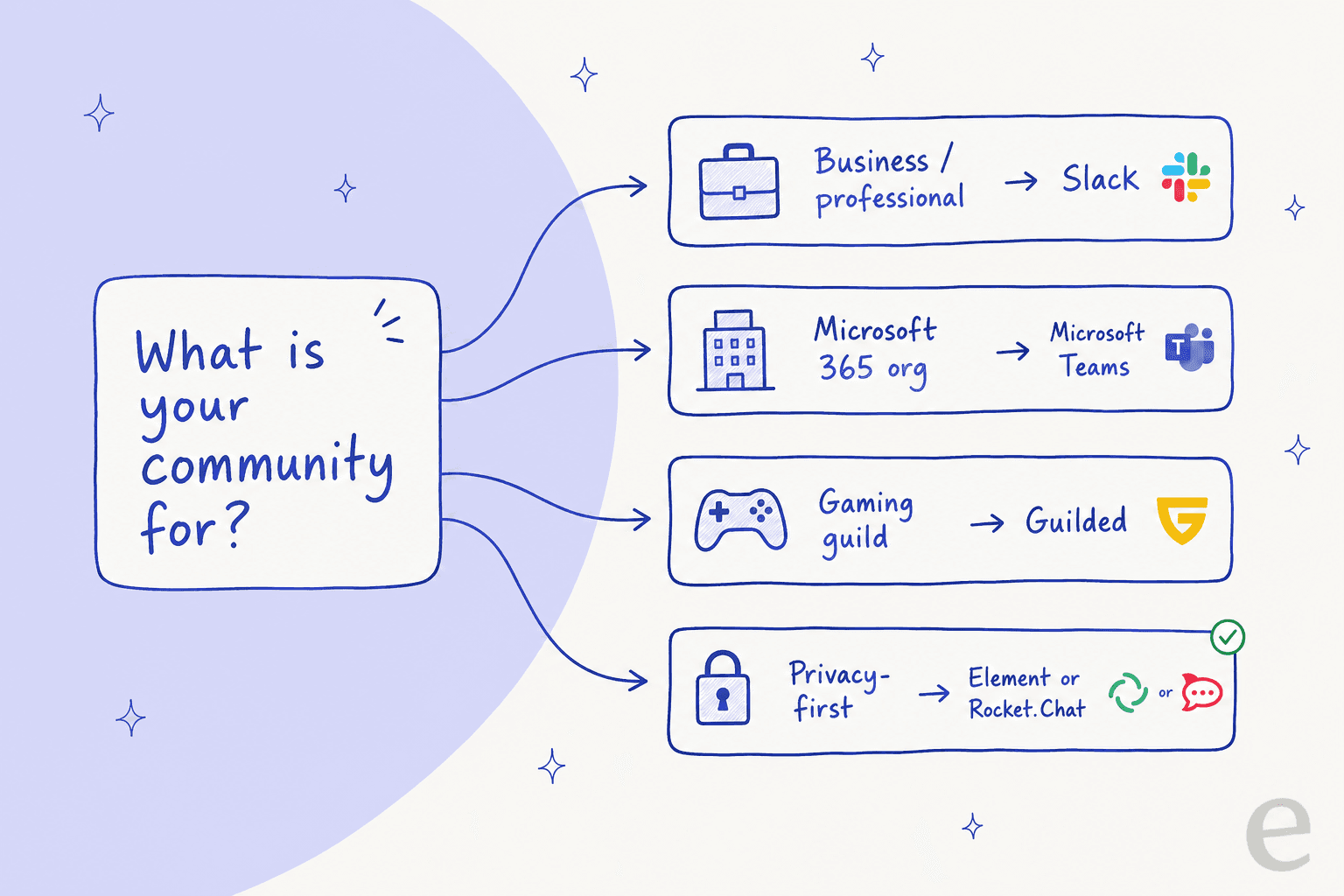
First, what's the main goal of your community? If you're building a competitive gaming guild, a specialized tool like Guilded is probably your best bet. If it's a professional network, the organized nature of Slack is likely a better fit. Your primary goal points you in the right direction.
Next, how much do you care about privacy? If end-to-end encryption and owning your data are must-haves, look closely at decentralized, open-source options like Element or Rocket.Chat.
Also think about support. Do you expect a lot of questions from members, like for a product or service? A regular chat app turns into a support nightmare fast. Choosing a platform that works with an AI tool, like Slack paired with eesel AI, can automate answers and save your moderators hours. It's the same playbook behind any good AI customer service chatbot.
Finally, what's your budget? A free tool is tempting, but a platform that charges per user gets expensive as you grow. It's worth planning for success from the start so you don't get hit with a surprise bill. (My Discord pricing breakdown is a handy baseline to compare against.)
Supercharge your community support, no matter where it lives
Look, there's no single "best" platform for everyone. The best of these Discord alternatives is simply the one that fits what you're building. Whether you're running a small gaming clan, a busy professional network, or a fan club, the right tool makes a real difference in creating a space people actually want to be part of.
But one thing every community manager deals with is answering questions. No matter which platform you land on (even if you stick with Discord), giving people quick, accurate help is hard.
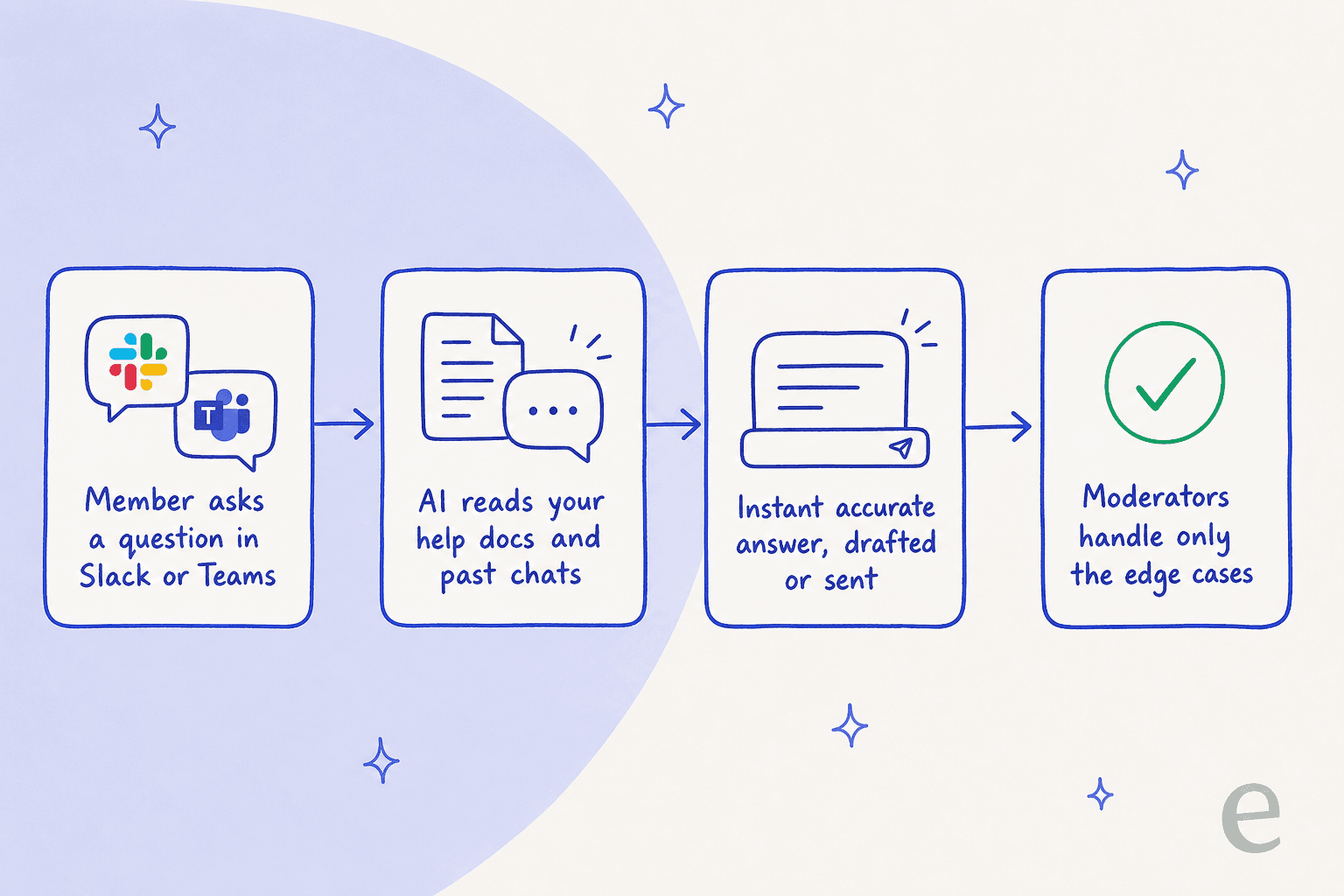
That's where a layer of smart automation changes the math, giving you your time back to actually build the community. If that sounds good, here's what eesel AI does in this exact situation: it plugs into Slack, Microsoft Teams, or your helpdesk, learns from your existing knowledge base, and starts answering member questions on day one, no rebuild required. You can try eesel free and simulate it on your own past conversations before it ever touches a live channel.
Frequently asked questions

Share this article