How to automate Freshdesk tickets in 2026: a practical guide


Last edited June 14, 2026

Table of Contents
- The four ways to automate tickets in Freshdesk
- Start with classic automation rules
- Bundle repetitive actions with scenario automations
- Route tickets automatically with Omniroute
- Hand the repetitive replies to Freddy AI
- What Freddy AI actually costs
- Where native Freshdesk automation hits a wall
- Try eesel on top of your Freshdesk
The four ways to automate tickets in Freshdesk
Before you touch a single setting, it helps to know what's actually on the menu. Freshdesk stacks automation in four distinct layers, and they range from "set it once and forget it" to "an autonomous agent that reads and replies on its own."
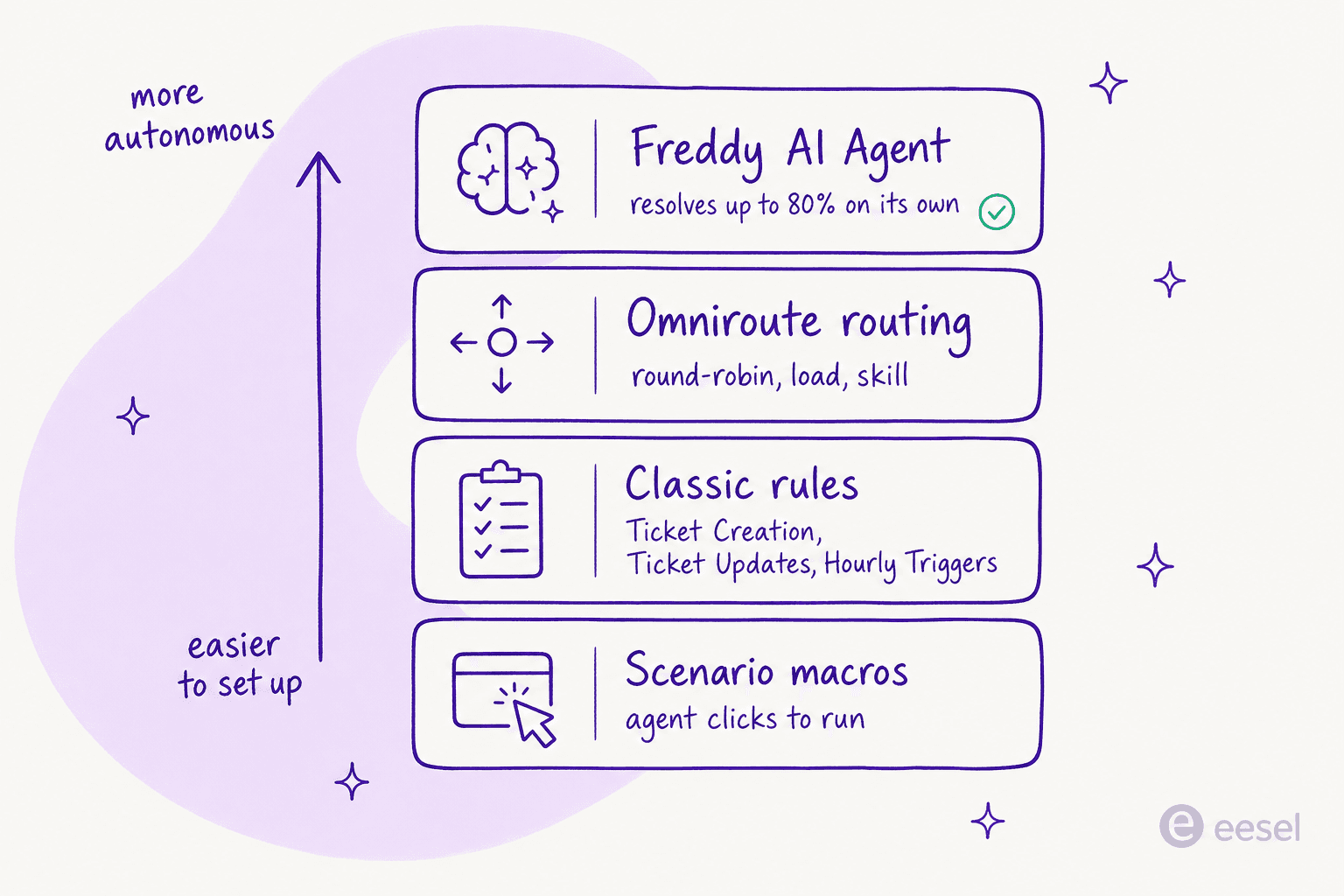
- Classic automation rules are the condition-and-action engine: when X happens, do Y. They're free, available on every plan (at least in part), and they do the unglamorous heavy lifting of triage and routing.
- Scenario automations are manual macros. An agent clicks once, and a bundle of actions fires on the ticket.
- Omniroute is the routing brain that decides which agent gets which ticket, by round-robin, load, or skill.
- Freddy AI is the autonomous layer that reads a customer's message and resolves or drafts a reply without a human.
The order matters. Rules and scenarios cost nothing and remove a surprising amount of busywork, so start there. AI is where the meter starts running, so save it for the tickets where it pays for itself. The rest of this guide walks each layer in that order.
Start with classic automation rules
This is the layer worth setting up on day one, because it's free and it's where the bulk of repetitive triage lives. Everything sits under Admin > Workflows > Automation Rules, and Freshdesk splits it into three rule types, each on its own tab.
One naming note before you start: if you've read older Freshdesk tutorials, you'll see the terms Dispatch'r, Supervisor, and Observer. Those are gone. The current names are Ticket Creation, Ticket Updates, and Hourly Triggers (the last is literally labelled "FKA Time Triggers" in the docs), so don't go hunting for menus that no longer exist.
Ticket Creation rules (triage on arrival)
Ticket Creation rules fire the instant a ticket lands. This is your front door: assign to the right group or agent, set priority and type, send an auto-reply, or mark obvious spam. Build conditions on ticket fields, contact properties, or company properties, with nested AND/OR blocks. Freshdesk even ships a sample rule that routes refund and return tickets to a billing group, so you can clone and edit rather than start blank.
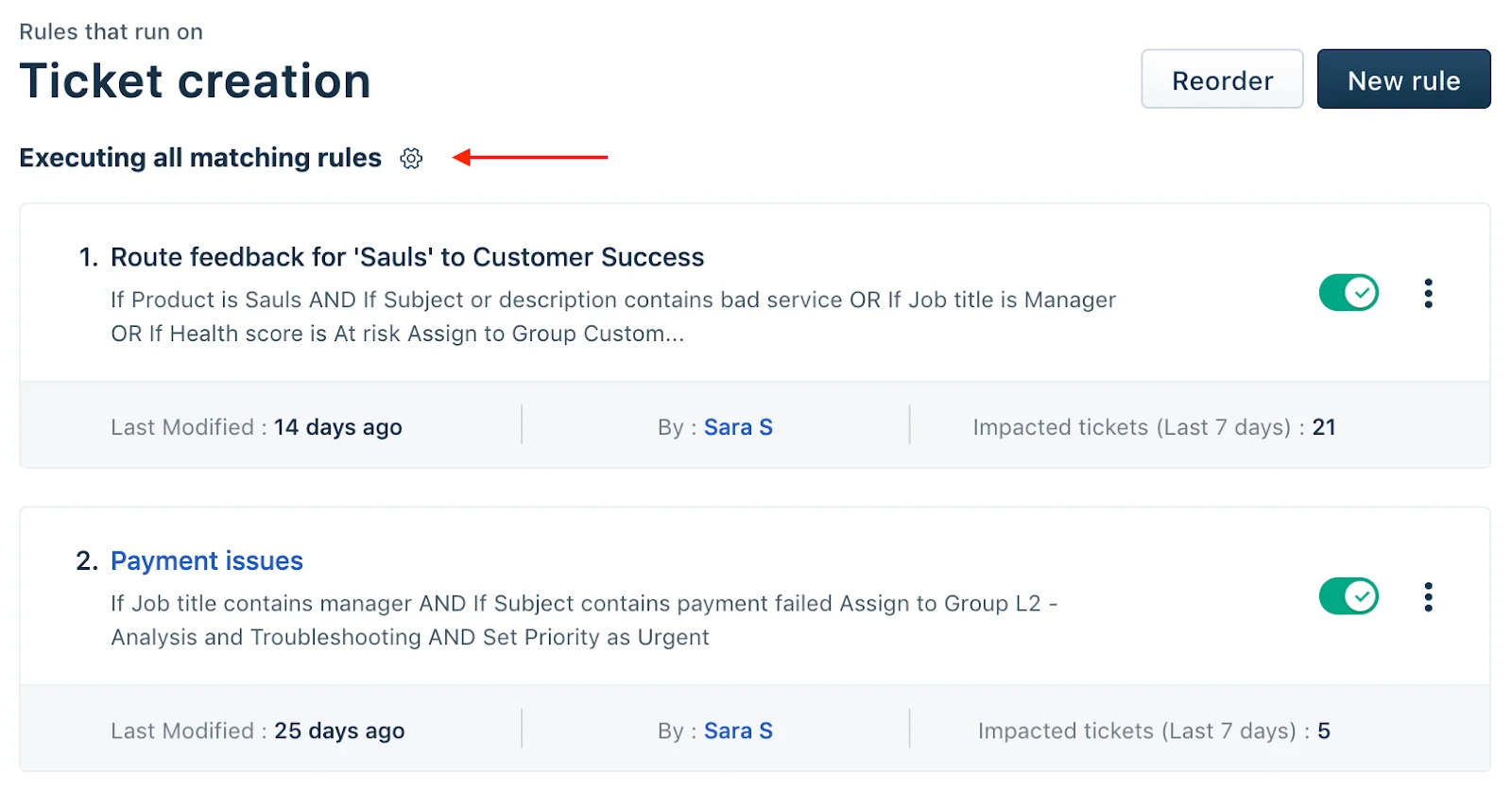
Here's the single most common gotcha, and it trips up almost everyone: by default, only the first matching Ticket Creation rule runs. Freshdesk's own troubleshooting answer to "why isn't my rule working" is usually that a higher rule matched first. If you want every matching rule to fire, click the gear above the rules list and switch to "Execute all matching rules." Order your rules deliberately, most specific at the top.
Ticket Updates rules (react to what happens next)
Ticket Updates rules listen for events on an existing ticket and react. They're built from an Event block (unique to this rule type), Conditions, and Actions. Classic uses: reopen a resolved ticket when the customer replies, fire a CSAT survey when a ticket is resolved, or email a supervisor when a VIP leaves a bad rating.
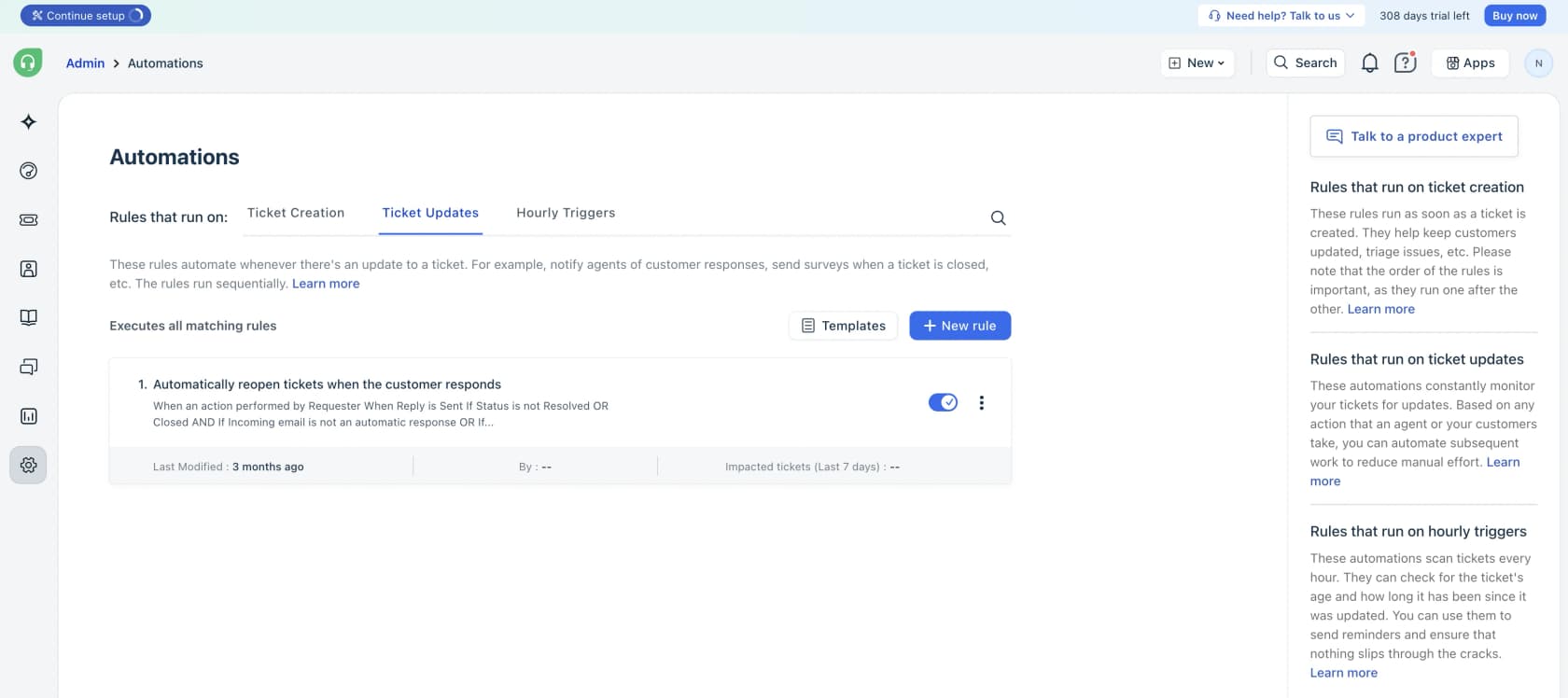
Unlike creation rules, there's no first-match-only setting here: all matching update rules execute top to bottom. There's also a Trigger webhook action, which is your escape hatch for pushing events out to external systems. Worth knowing: update rules aren't available on the free tier, they start on Growth.
Hourly Triggers (time-based cleanup)
Hourly Triggers scan all your tickets once an hour and act on anything that's been sitting in a given state too long, escalate a ticket unattended for 48 hours, bump an aging ticket to high priority, that sort of thing.
Three limits are worth committing to memory before you build one, because they quietly break otherwise-correct rules:
- They run once per hour, so any time threshold has to be one hour or more.
- They only match against tickets updated in the last 30 days.
- They run on ticket properties only, not contact or company fields, and can't use conditions on the subject, description, requester email, CC, tags, or attachments.
Together, the three classic rule types handle most of what people mean by "ticket automation". For the heavier triage logic (sorting by intent rather than keyword), this is also where Freshdesk's limits start to show, and where AI ticket classification and smarter support ticket triage tend to pick up the slack.
Bundle repetitive actions with scenario automations
Rules fire automatically. Scenario automations are the opposite: they're manual macros an agent runs with a click. Instead of an agent tagging a ticket as "Refund," assigning it to the Refunds group, and setting status to "Processing Refund" by hand every time, you bundle those steps into one scenario.
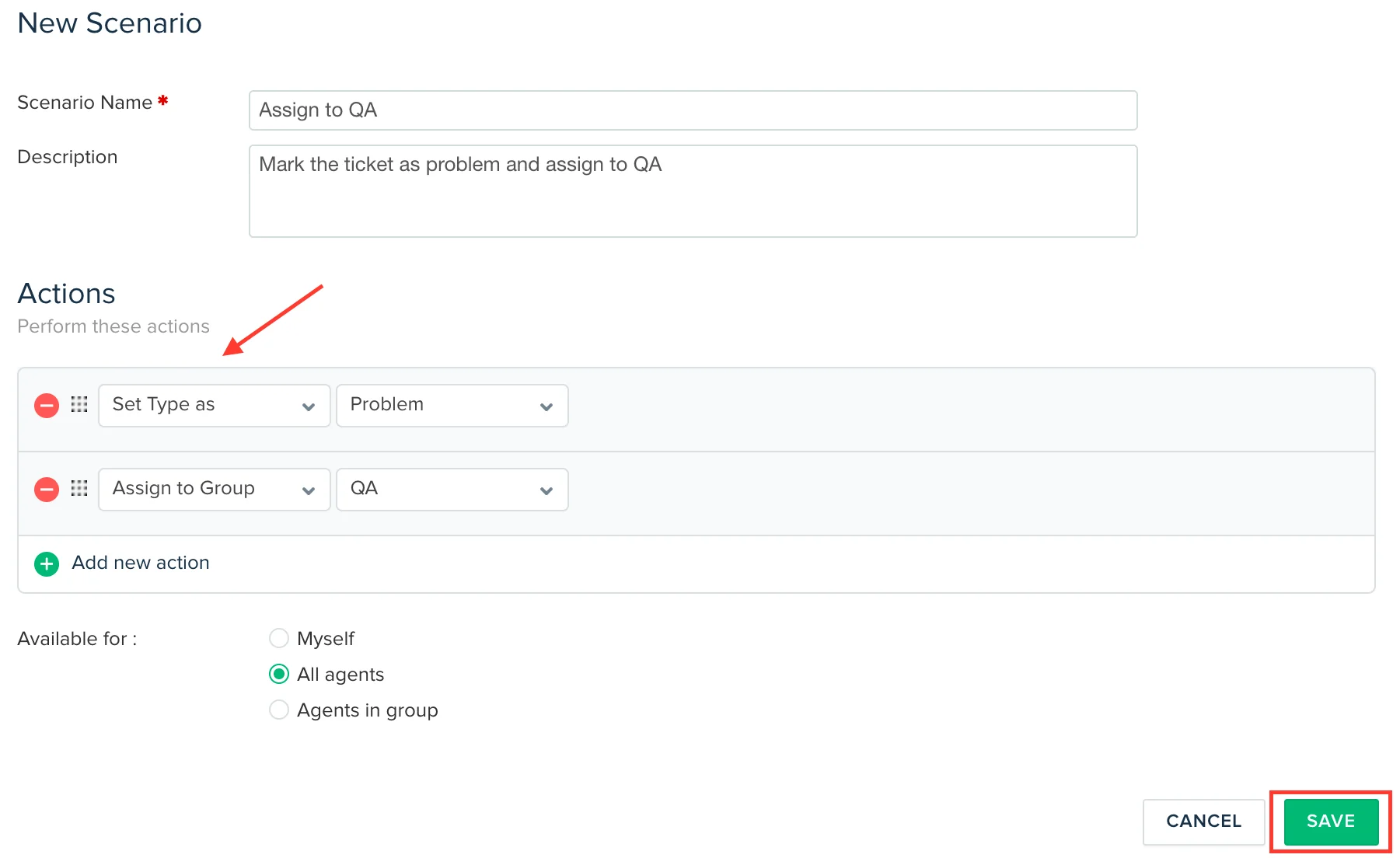
You build them under Admin > Agent Productivity > Scenario Automations > New Scenario, then add ordered actions: set priority, type, or status, prefill a canned reply (for the agent to review, it does not auto-send), add public or private notes, assign, add tags, even mark as spam. Set visibility to just you, your group, or all agents, and you can run a scenario on a single ticket or bulk-execute it across many selected tickets at once, which is the part that saves real time on a Monday-morning backlog.
If macros are central to how your team works, our deeper guides to macro templates and macro actions are worth a read. Like Ticket Updates rules, scenarios start on the Growth plan, not the free tier.
Route tickets automatically with Omniroute
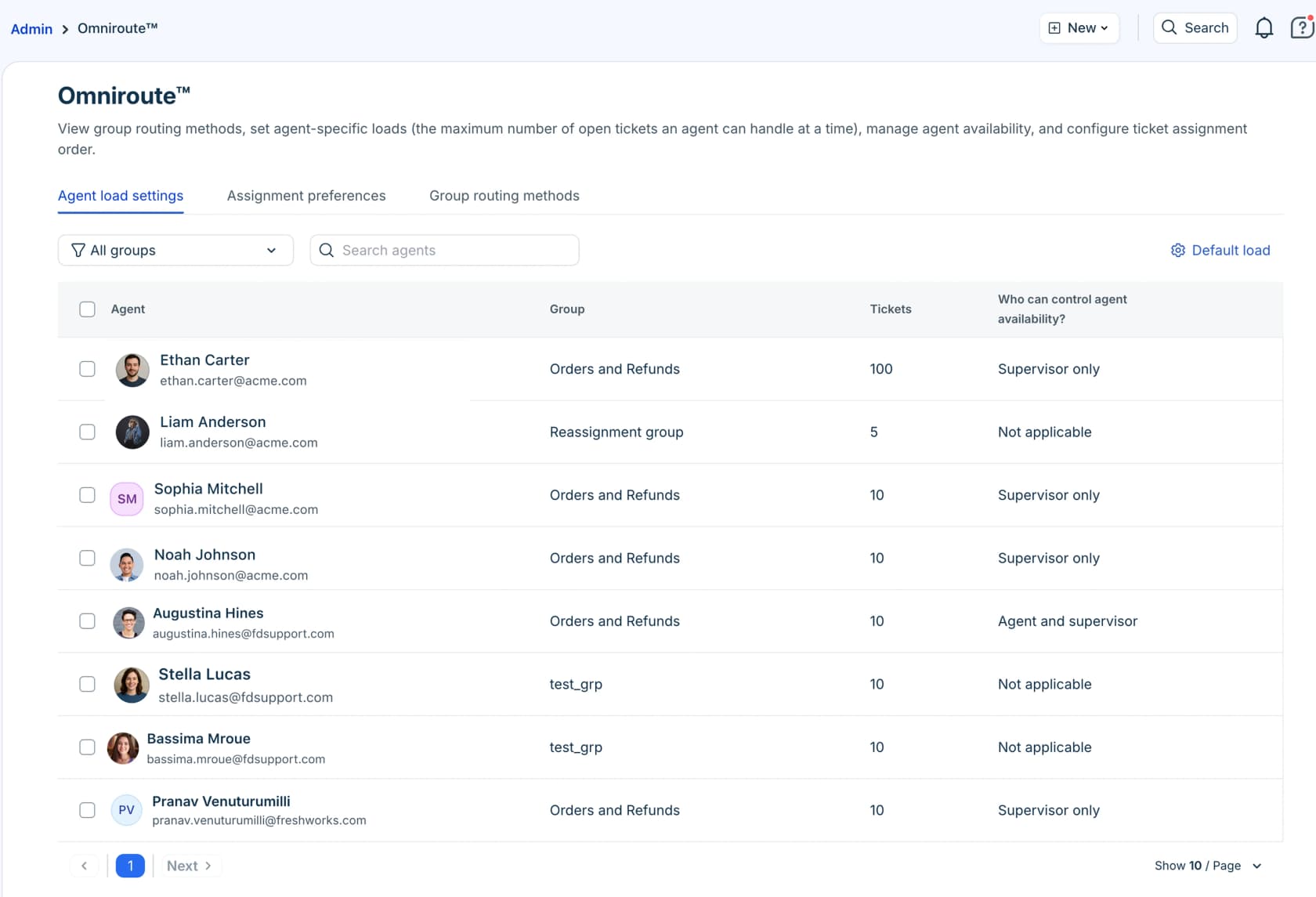
Deciding which agent gets a ticket is its own automation problem, and Freshdesk solves it with Omniroute, its routing engine. You turn it on per group by enabling Advanced Automatic Routing, then pick a method.
| Routing method | How tickets get assigned | Best for |
|---|---|---|
| Round-robin | In a circular order, factoring each agent's capacity | Small teams, transactional queries like order status |
| Load-based | By how many tickets each agent can handle at once | Higher-volume teams chasing faster resolutions |
| Skill-based | To agents whose skills (language, product) match the ticket | Multilingual support, specialist or technical escalations |
All three respect each agent's capacity (the number of tickets they can hold at once) and only assign to agents who are online. The catch worth flagging up front: Omniroute is Pro and Enterprise only. On Growth, you route with Ticket Creation rules instead. If routing is your main reason for automating, our ticket routing automation guide covers the patterns that carry across helpdesks.
Hand the repetitive replies to Freddy AI
Rules, scenarios, and routing move tickets around. They don't answer them. That's the job of Freddy AI, Freshworks' AI suite, which splits into three parts: Freddy AI Agent (autonomous, customer-facing resolution), Freddy AI Copilot (reply suggestions and summaries for your human agents), and Freddy AI Insights (analytics for leaders).
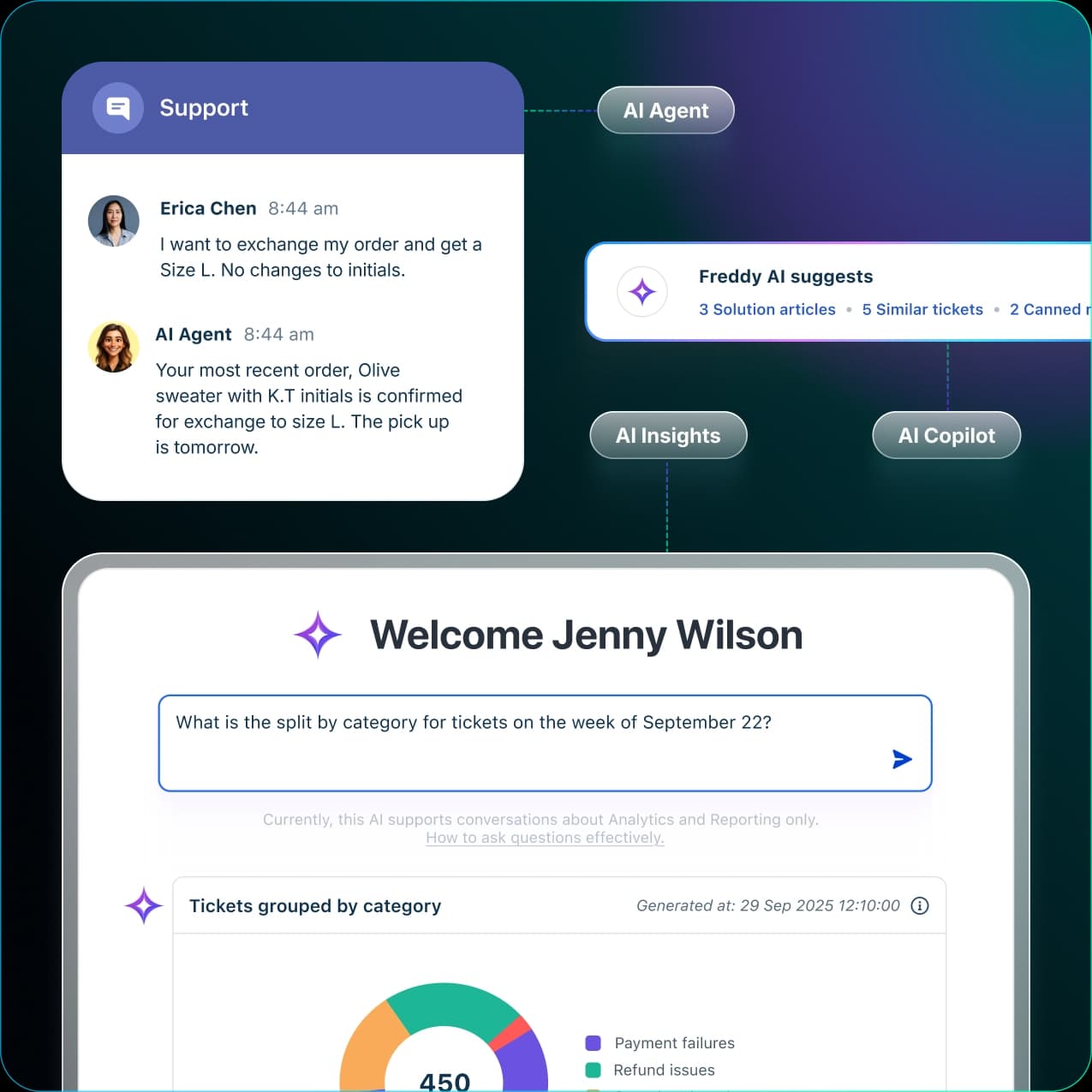
Freshworks says the AI Agent resolves up to 80% of queries on chat, messaging, and email, with a sub-2-minute average resolution time. Our honest Freddy AI review digs into how those headline numbers hold up in practice. The autonomous part is what you set up in the no-code AI Agent Studio, and the build follows a clean six-step flow.
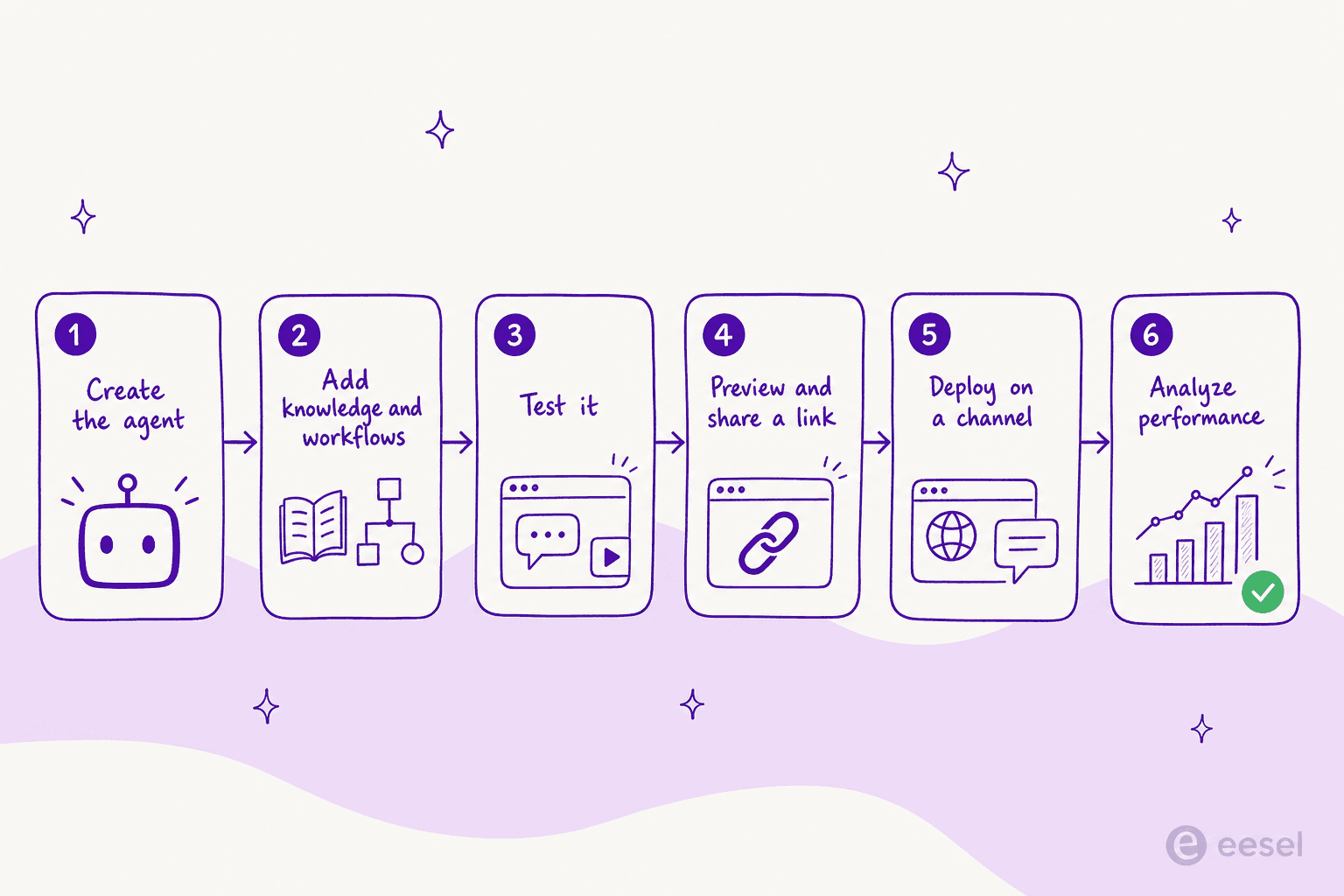
- Create the agent in AI Agent Studio: name, avatar, and a primary language.
- Build its capabilities: add knowledge (solution articles, files, URLs, custom Q&As), build workflows for tasks like order cancellations, and write plain-language business context and custom instructions.
- Test it by simulating real scenarios before going live.
- Preview and share a link so stakeholders without agent licenses can try it and give feedback.
- Deploy on a channel (Web Chat, WhatsApp, Facebook, Instagram, and more).
- Analyze performance from the Analyze tab, which surfaces engagement metrics and ticket logs.
A few knowledge limits are worth knowing before you load it up: the bot learns from up to 200 files (max 35MB each) and 10 URLs per agent, and it reads static text only, not video or screenshots. If you want the full setup detail, our guide to the Freddy AI knowledge base and the conversational knowledge base goes step by step, and the reply suggestions guide covers the Copilot side.
What Freddy AI actually costs
This is where teams get surprised, so it's worth being precise. Freshdesk's plans are seat-priced, but Freddy AI Agent is billed on top, by session. If you're weighing that spend against simply hiring, our AI agent vs human agent cost comparison is a useful sanity check.
| Plan (billed annually) | Price | What you get for automation |
|---|---|---|
| Free | $0 (1-2 agents, 6 months) | Ticket Creation rules only |
| Growth | $19/agent/mo | + Ticket Updates, Hourly Triggers, scenario macros, Email AI Agent (500 free sessions) |
| Pro (most popular) | $55/agent/mo | + Omniroute routing, custom objects, advanced reporting |
| Enterprise | $89/agent/mo | + skills-based routing, audit logs, approval workflows |
On top of that sits the Freddy AI pricing you'll actually feel:
- Freddy AI Agent sessions: 500 included on Growth and up (one-time), then $49 per 100 additional sessions. A session is a unique end-user interaction; for the Email AI Agent, it's a 72-hour window from the customer's first email, and every AI reply inside that window counts as one session.
- Freddy AI Copilot: a separate per-agent add-on, with no day passes.
The session model is the most-cited friction point in community discussions, because sessions are consumed whether or not the AI actually resolved the ticket, and the per-session rate climbs fast at volume. As one support-ops lead put it after hands-on testing:
"Freshdesk Freddy: for early stage teams that want something simple, it covers the basics auto assignment, suggested replies, FAQ deflection. It's reliable and affordable, nothing crazy."
That's a verbatim take from r/AgentsOfAI, and it's a fair summary: fine for the basics, priced for more. For the full math at different team sizes, see our breakdowns of pricing per agent and pricing per resolution.
Where native Freshdesk automation hits a wall
Here's the part most setup guides skip. The rule engine and Freddy will carry you a long way, but three walls show up consistently once you push past the basics, and they're worth planning around rather than discovering in production.
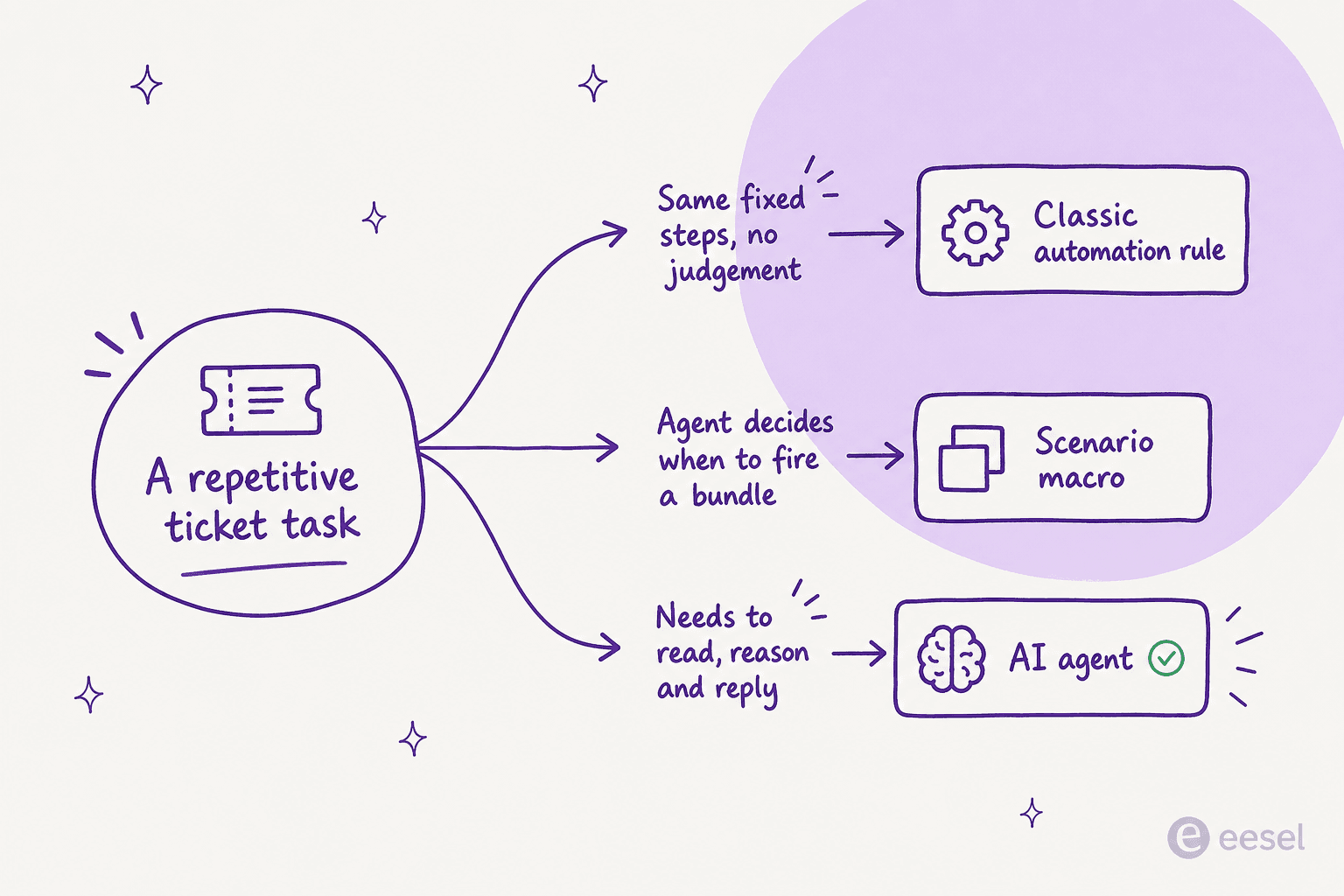
Rules only know what you tell them. Every condition is something you wrote by hand. That's perfect for "if priority is urgent, assign to tier 2," but it falls apart on intent. A keyword rule can't tell a billing complaint from a billing question, which is why teams keep reaching for AI on customer service for the messy, free-text tickets that rules can't read.
Freddy's accuracy drops on complex tickets. The recurring theme in real-user reports is that it's solid on FAQ-style questions and shaky on anything with nuance. One operator described testing AI inside Freshdesk like this:
"We tested an ai integration in freshdesk and had almost the exact same experience. it worked for very simple tickets but anything slightly complex got misclassified. agents ended up spending more time fixing errors than before, so we had to rethink our approach."
That's from a thread on r/AiAutomations, and the pattern repeats: confident-but-wrong answers, a CSAT dip, then a rollback to "assist mode" where the AI only drafts and a human sends.
You don't get fine-grained control over what the AI touches. This is the one that stalls real rollouts. Teams don't want an AI replying to everything on day one, they want it on the safe ticket types first. A DTC supplements CX lead we spoke with framed the whole ask in one line: the AI will never answer 100% of questions, so they wanted "an AI who is only handling the tickets that it's confident to handle, and all the other ones, leave them alone." That confidence-based scoping is exactly what a hard-coded session bot struggles to give you.
When Freddy can't be scoped that tightly, or when Freshdesk's API throttling and a support team that keeps steering you back to Freddy get in the way, that's usually the cue to look at a third-party AI helpdesk agent that runs on top of the same Freshdesk. It's also why the Freshdesk AI free alternatives and AI automation apps for Freshdesk clusters get so much search traffic.
Try eesel on top of your Freshdesk
If you've hit those walls, eesel is built to sit directly inside the Freshdesk you already run, no migration, no new inbox to learn. It connects as an AI teammate that reads incoming tickets, trains on your past tickets and help articles, drafts or fully resolves replies, and escalates the edge cases.
The two things that tend to matter most after a Freddy trial are exactly the walls above. First, control: you decide which ticket types the AI handles and which it leaves alone, so you can start narrow and widen as you trust it. Second, pricing you can predict: eesel charges a flat $0.40 per resolved ticket with no per-seat fees and no sessions that burn whether or not they helped, and you can route just a slice of your volume to start.
It scales, too. Design.com runs 50,000+ tickets a month through eesel in Freshdesk across a multi-agent setup trained on 1,000+ help articles. And in head-to-head evaluations it holds up on the accuracy point: one Italy-based email-security company on Freshdesk found eesel more precise than Freddy AI in its own testing.
If you want the wider field first, our roundups of the best customer service AI and the cheapest AI apps for helpdesk put it in context. Then get started free on your own Freshdesk inbox.
Frequently Asked Questions

Share this article

Article by
Riellvriany Indriawan
Riell is a designer and writer at eesel AI with about two years of experience researching CX platforms, AI chatbots, and helpdesk software. She combines her design background with a sharp eye for how these tools actually look and feel in practice — making her comparisons unusually visual and user-focused.