Using AI with Zendesk and Freshdesk: challenges and solutions


Last edited June 15, 2026
Table of Contents
- Why teams reach for AI in Zendesk and Freshdesk in the first place
- Challenge 1: The hidden cost stack
- Challenge 2: Knowledge base hygiene is the real ceiling
- Challenge 3: Setup and configuration takes longer than the demo suggests
- Challenge 4: Confident but wrong answers
- Challenge 5: The free tier doesn't feel like AI
- Challenge 6: Multilingual and multi-brand setups
- Solution 1: Simulate on past tickets before going live
- Solution 2: Audit and close knowledge gaps continuously
- Solution 3: Pick a billing model that doesn't punish volume
- Solution 4: Start in copilot mode, graduate to autonomous
- Solution 5: Use an AI layer that sits on top of both helpdesks
- Try eesel for Zendesk and Freshdesk
Why teams reach for AI in Zendesk and Freshdesk in the first place
Both vendors lead with the same headline: more resolutions, fewer humans, faster CSAT. Zendesk pitches 80%+ automation rates, an 82% productivity lift from Copilot, and 5.5 admin hours saved every week. Freshdesk's Freddy AI page claims up to 80% of queries resolved autonomously, sub-two-minute conversational resolution, and 75% reduction in ticket resolution time. The numbers are real enough when the conditions are right - and the conditions are where every team gets stuck.
Beyond the headline metrics, both stacks now ship the same general shape of AI: a customer-facing autonomous agent, an agent-side copilot for human reps, and intelligent triage for routing. Zendesk's AI Agents (formerly Answer Bot, then Ultimate.ai post-acquisition) and Freshdesk's Freddy AI Agent are direct counterparts. Zendesk Copilot and Freddy AI Copilot are the agent-side equivalents. Both lean on a unified knowledge layer that pulls from help-center articles, past tickets, and connected docs.
The pitch is honest as a description of what the tools can do under best-case conditions. What it skips is everything between "demo" and "production". That's what the rest of this post is about.
Challenge 1: The hidden cost stack
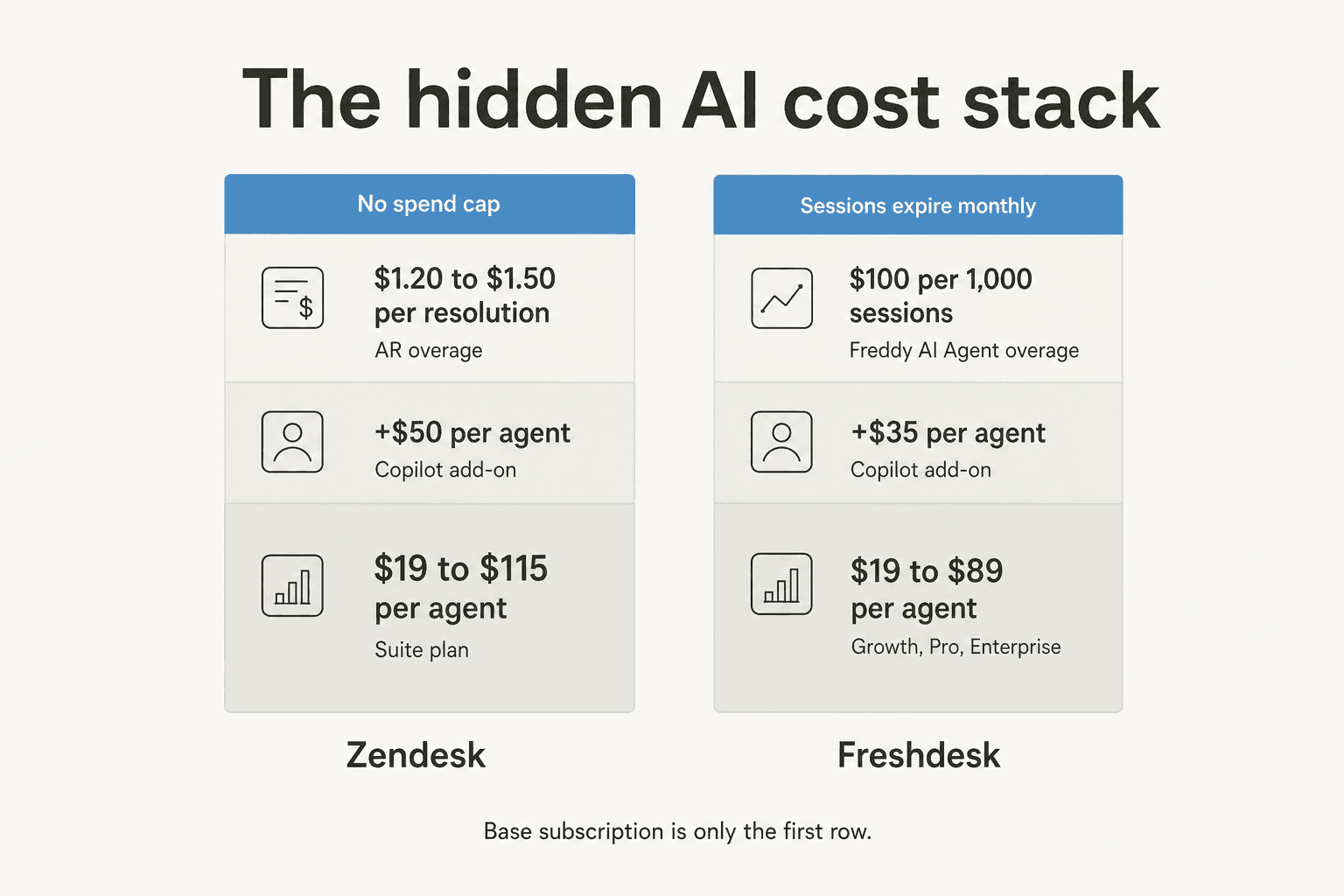
Both vendors lead with a friendly seat price, then layer the real AI bill on top.
How Zendesk's stack compounds
The Suite ladder is $19 to $115 per agent per month annual, climbing from Support Team to Suite Enterprise. Copilot is bundled at Enterprise and sold as a $50/agent/month add-on below that. The AI billing unit is the automated resolution, and overages above your commit price out at roughly $1.20 to $1.50 per resolution according to multiple third-party teardowns and a canonical Reddit thread on the AR model. There's no graceful spend cap. The only emergency brake is pausing the AI entirely.
That stack tends to land at 2-3x the base subscription once you turn the AI on at any real volume, which is why teams find themselves on Reddit running the math:
"From what I can see in regards to this new 'Automated Resolution' pricing model, we'll be paying about $1.50-$1.20 per resolution."
r/Zendesk thread on AR pricing, original post

And when the math doesn't land:
"No, it's just terrible and a rip off. You can't even export the data on like what people ask the bot so you can sort it or manipulate it how you want. We stopped using it because ARs are a rip off, and it's a rushed product to get into the AI hype."
The May 2026 three-tier resolution model softens this a little: only Verified Resolutions draw from your allowance now, with Assisted Escalation and Contained Resolution coming back free. It's better, but the per-resolution gambling layer is still there, and the cap is still binary.
How Freshdesk's stack compounds
Freshdesk's pricing ladder runs $19 to $89 per agent per month annual (Growth, Pro, Enterprise). Freddy AI Copilot is a seat-based add-on around $35 per agent per month, and Freddy AI Agent (the customer-facing bot) ships 500 free sessions, then charges roughly $0.10 to $0.12 per additional session - sold in packs of around 1,000 sessions for $100, with sessions expiring each billing cycle. A session is one customer thread within a 72-hour window. The session model has its own version of the same trap:
"I do like the UI of Freshservice seems easy to use. The freddy AI is an add on so expensive for what it can do and only available at enterprise."
We've heard the same friction inside our own sales calls. One email-security company on Freshdesk scaling to roughly 20,000 tickets per year burned 200 API calls in a single test day and went straight to the per-interaction math; the conversation never recovered. A fintech doing 7-8K escalated tickets a month on Zendesk wrote off per-interaction billing outright when their calculation hit ~2,000 interactions per day from a 500-tickets-a-day base. Per-interaction pricing systematically punishes the customers who handle the most volume - the ones who'd most benefit from automation in the first place.
The deeper read on this whole cost layer: AI billing on both stacks is built to capture upside when you succeed (handling more tickets = more revenue for the vendor) without any matching downside protection when you don't (a quiet month still ticks the seat fee). That's the vendor's favoured shape of a contract. It's not the buyer's, and it explains why "pricing was too high after the demo" appears as a churn reason on so many lost-deal notes.
For the full Zendesk math, our Zendesk AI pricing guide walks through it. For Freshdesk, the Freshdesk AI pricing breakdown does the same.
Challenge 2: Knowledge base hygiene is the real ceiling
The most reliable predictor of how well AI works inside either helpdesk isn't the LLM, isn't the orchestration, isn't the channel - it's how clean the knowledge base is. Teams without a curated, well-tagged help center cap out at roughly 20% automation in the first month and climb toward 70% only after sustained KB cleanup. The numbers we've seen on our own customer side track that band closely, and the Reddit consensus is blunt about it:
"The Co-Pilot stuff is decent, but we found its effectiveness really depends on having a perfectly curated Zendesk knowledge base, which... ours isn't, lol."
u/ToastBix, r/Zendesk thread on AI Agents
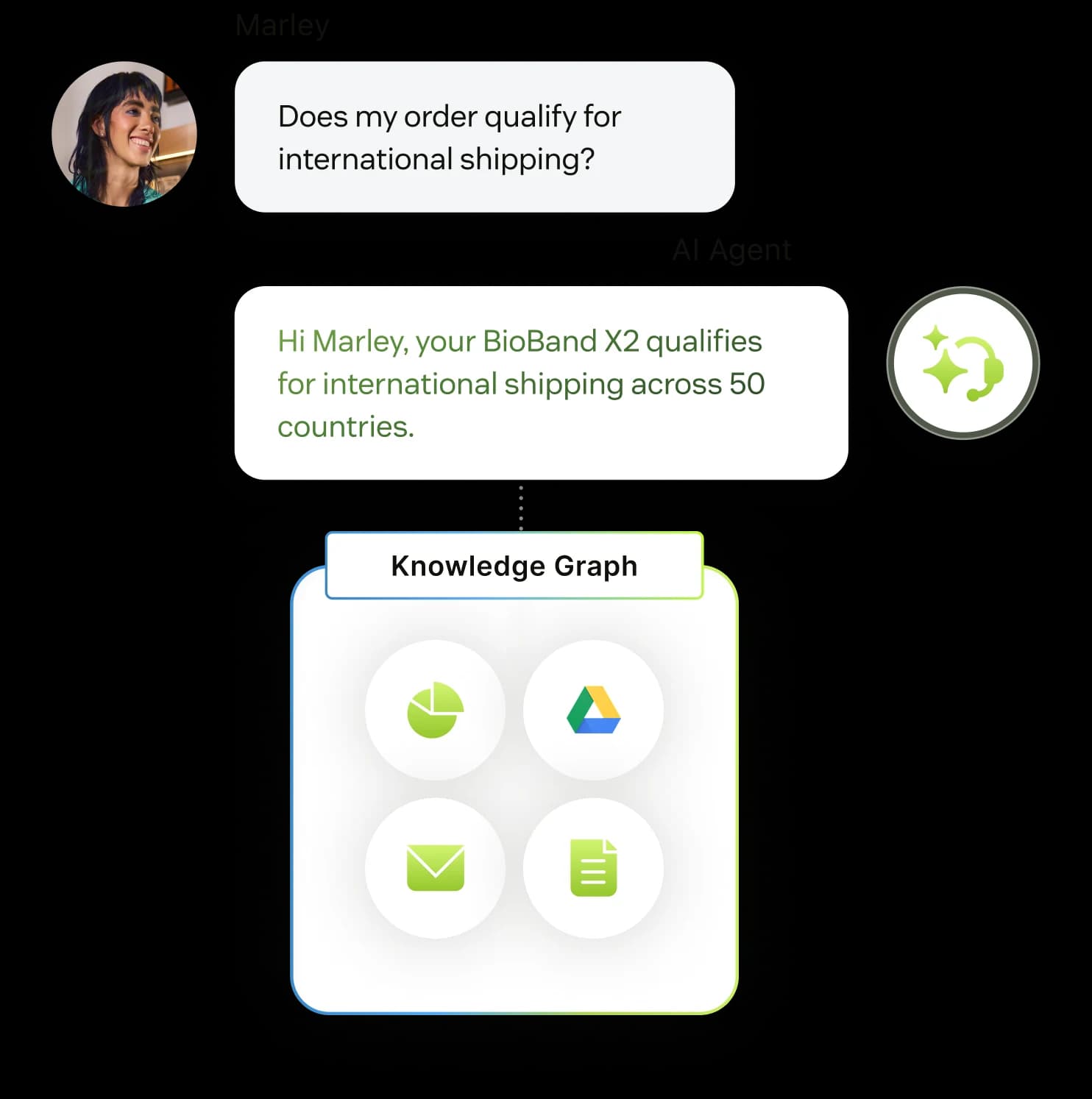
AI Agents on both platforms read from the connected knowledge source and only from the connected source. They can't browse the open web, follow external links, or pull from the deeper-corner FAQ you keep on Notion. So a knowledge base with stale articles, conflicting answers, or missing topics doesn't just limit the AI - it actively misleads it. Worse, the misleading is invisible until a customer hits the failure mode and you find the bad reply in the audit log a week later.
Both vendors will tell you to "curate your knowledge base before turning on AI." That advice is correct and useless. Nobody knows in advance which articles are missing - you only learn when the AI starts answering and you watch where it fumbles. The teams that actually get past 20% deflection are the ones that treat the KB as a living artefact: weekly review of low-confidence AI responses, a working backlog of articles to write, and someone whose job includes closing those gaps.
That's a real operating discipline, and it's the missing chapter in most "AI in Zendesk / Freshdesk" content.
Challenge 3: Setup and configuration takes longer than the demo suggests
The demo is twenty minutes. Production rollout is rarely under three months on either platform, and the bottleneck isn't the AI - it's the surrounding configuration.
For Zendesk, Copilot, Intelligent Triage, and the Advanced AI Agents dialogue builder each carry their own admin surface, each with its own settings. The Reddit consensus on the dialogue builder is unkind:
"The most annoying interface in the world."
r/Zendesk comment thread on the Ultimate.ai-derived flow builder
The G2 chorus on admin-side configuration is similar: "burdensome," "requires technical knowledge," and "could feel like a full time job in the backend" - phrasing that recurs across multiple reviews. Even when teams praise the agent UX, the admin configuration is the moment momentum dies.
Freshdesk's setup feels lighter early on but compounds in the same way. Freddy AI Agent's no-code Studio is fine for the first agentic workflow. Building 50 of them - one per real customer scenario - looks closer to onboarding software than configuring an AI. And the gating across plans means you find out mid-build that the feature you need is on Enterprise, which is the price-discrimination version of "the demo skipped this part."
The deeper issue is that "AI in your helpdesk" requires three separate jobs:
- Decide what AI should handle (which ticket types, which channels, which language).
- Connect knowledge (help center, past tickets, external docs, product data).
- Configure escalation, tone, and edge cases (when to hand off, how to phrase, what to never say).
Native AI products tend to make job #3 dominate the setup time because so much of it lives in rules-engine UI. Plain-language configuration ("here's what I want this agent to do") is what shortens the curve, and it's an underrated feature when comparing tools.
Challenge 4: Confident but wrong answers
The single most damaging failure mode of AI in a helpdesk isn't slow replies or bad UX - it's a confident answer that turns out to be wrong, sent before a human gets a chance to catch it. The pattern is so common it shows up as the load-bearing line in nearly every "we tried AI" thread on Reddit:
"Auto-replies sounded great in theory, but once real tickets came in, it started giving confident but wrong answers. CSAT dipped quick. What worked better for us was using it as an agent assist, draft replies, summaries, tagging, not full auto mode."
Responsible_Rub_4491, r/AiAutomations thread on integrating AI into helpdesks
The same thread carries an even sharper version from someone running it on Freshdesk:
"We tested an ai integration in freshdesk and had almost the exact same experience. it worked for very simple tickets but anything slightly complex got misclassified. agents ended up spending more time fixing errors than before, so we had to rethink our approach."
Timely_Aside_2383, r/AiAutomations comment
And from the OP of the same thread, running it on Zendesk:
"The ai kept misclassifying things like warranty claims as general inquiries... customers complained the responses felt too robotic and sometimes gave wrong info on returns. we rolled it back partially and now our agents are using it as an assist."
Fun-Training9232, r/AiAutomations OP
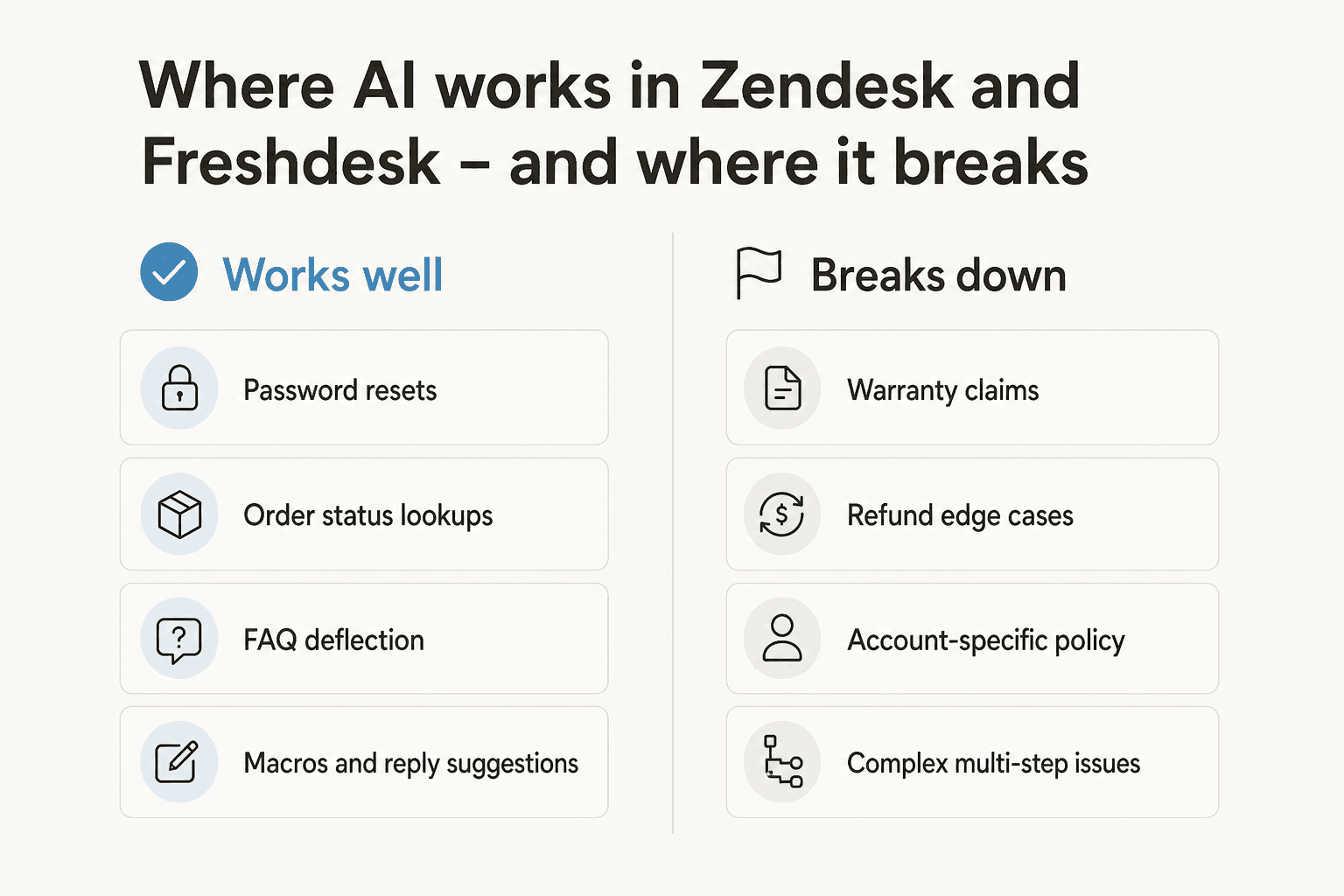
The pattern is consistent: AI inside both platforms handles password resets, order status, FAQ deflection, and simple macro-style replies well. It breaks on anything that requires interpretation - a warranty claim that depends on purchase date and product class, a refund request that's actually three intertwined issues, a policy question where the customer's account history matters more than the help-center article.
A subtler version of this failure mode shows up at the platform level. From one of our own customer transcripts:
"We have kicked the tires in zendesk AI solutions and found it largely inadequate and overpriced. So we're looking for other options that we might have to bring some automation to to that whole process that I just described."
CX lead at a US healthcare/PT platform, anonymised from sales-call transcripts
Inadequate and overpriced are doing different work here. The inadequacy is the warranty-claim failure mode. The overpricing is what happens when you're paying per resolution on the tickets it does handle, while still paying humans to fix the ones it doesn't.
Challenge 5: The free tier doesn't feel like AI
Both platforms ship a bundled, no-add-on AI tier. Neither is what a buyer typically pictures when they hear "AI in my helpdesk."
Zendesk AI Agents Essential (the legacy bundled tier, sunsetting Dec 31, 2026) is essentially the old Answer Bot with a generative paint job. No dialogues, no authorized actions, no API calls. The r/Zendesk verdict:
"Doesn't feel like AI at all."
Freshdesk's equivalent is the 500 free Freddy AI Agent sessions on Pro and Enterprise. Plenty of teams hit the cap inside a single billing cycle - more for anyone past a few thousand tickets a month - and then face the per-session add-on or the Enterprise gate.
The structural pattern here is the same on both platforms: the bundled tier is a taste, calibrated to be useful enough that you keep clicking but constrained enough that the moment you want real automation, you're funnelled into the paid add-on. That's not malicious, but it's worth naming, because comparison posts that treat the free tier as the AI offering on either platform are setting buyers up for a surprise.
Challenge 6: Multilingual and multi-brand setups
If you run support in more than one language or across more than one brand, the native AI layers on both platforms add specific friction that the marketing pages don't lead with.
On Zendesk, AI Agents Advanced supports 80+ languages at native fluency, but the dialogue builder, the connected knowledge base, and the tone/formality controls all configure per agent. Multi-brand teams end up rebuilding the same agent N times, one per brand, and keeping them in sync becomes a maintenance job.
Freddy AI on Freshdesk handles multilingual through live translation rather than per-language agents, which is leaner but introduces the translation-quality variable on top of the AI-answer-quality variable. For high-stakes verticals (regulated industries, financial services, healthcare), a translated AI reply is two layers of risk stacked on one another.
A real example from our own customer base: Smava, a German loan-comparison platform, runs a fully automated Zendesk agent processing 100,000+ support tickets per month in German. They didn't get there with native Zendesk AI - they got there with one AI Agent built specifically to handle German-language tier 1 tickets, with simulation against historical German tickets, and ongoing knowledge-gap detection in German. The lesson isn't "Zendesk AI can't do German." It's that hitting that level of automation in a non-English vertical requires more deliberation than the demo suggests.
For multi-brand teams, the right shape is one AI per brand with its own knowledge, tone, and escalation rules - not one AI per language glued to one master configuration. The native AI products on both platforms make that harder than it should be.
That covers the challenges. The rest of this piece is what teams are actually doing about them.
Solution 1: Simulate on past tickets before going live
The single biggest workflow change that separates teams who succeed with AI in their helpdesk from teams who roll it back: they run the AI against historical tickets before pointing it at live ones. Treat it like a backtest. Pick the last 30 days of tickets, run the AI through them as if it were live, and measure where it would have answered well, where it would have escalated, and where it would have answered confidently and wrong.
This single step solves four problems at once: you find KB gaps before customers do, you tune escalation thresholds against real data, you build a believable forecast of cost-per-ticket and deflection rate before any spend hits, and you get the AI's own hit rate from your own data instead of the vendor's slideware number.
Both Zendesk's flow builder and Freshdesk's Freddy AI Studio ship with sandbox modes, but neither has a first-class "replay against last 30 days of tickets" workflow. That's the missing piece, and it's where third-party AI layers tend to win - simulation as a deployment step, not a feature buried in a settings page.
Solution 2: Audit and close knowledge gaps continuously
KB hygiene isn't a one-time pre-launch task. It's an ongoing operating discipline, and it deserves a named owner.
The mechanics that work:
- Pull the AI's low-confidence responses every week (both Zendesk and Freshdesk surface confidence scores or "escalation reasons" in their audit logs).
- Cluster those responses by topic to find the underlying missing article, not just the individual ticket.
- Draft the article, add it to the knowledge base, retest against the same cluster of tickets.
- Track KB coverage as a metric distinct from AI deflection rate. The two correlate, but treating them separately makes the bottleneck obvious.
Teams that automate this loop go further - the AI itself surfaces themes from recent ticket volume and proposes the new article it would have needed. That's where AI starts to compound: it doesn't just answer tickets, it improves the knowledge base it's drawing from. For more on the operational side, our guide to AI-powered ticketing and our AI ticket deflection guide go into the workflow shapes.
The deeper change here is cultural: a clean KB isn't a documentation project, it's an AI training project. Treating it that way - with a real budget, a real owner, and a real review cadence - is what separates 20% deflection teams from 70% ones.
Solution 3: Pick a billing model that doesn't punish volume
The pricing trap on both platforms is the same. You succeed with AI, more tickets get handled, the bill grows linearly (Zendesk) or step-wise in $100 chunks (Freshdesk). Below a certain volume, both models look fine. Above it, the AI tax compounds on top of the seat licence in a way that quietly erodes the business case.
The shape that works: a flat per-ticket price with no platform fee and no per-seat charge - one price that covers all back-and-forth, not separate billing units for "interactions" or "sessions" or "resolutions". The eesel pricing model is built around this: $0.40 per ticket handled, where one ticket covers every reply and follow-up, with no monthly minimum and no separate AI add-on tax. The math at 1,000 tickets a month is $400, full stop. The math at 100,000 tickets a month is $40,000, with no AR overage and no expiring-session resets.
The reason this matters more than it sounds: per-interaction or per-resolution pricing creates a perverse incentive for the AI itself. The vendor's revenue is maximised when the AI handles more interactions - including the ones it shouldn't, the ones where escalating would have been cheaper for the customer. Flat per-ticket pricing aligns the AI vendor with the buyer: handle the ticket well, escalate the ones it shouldn't try, and the price is the same either way. That's not just cheaper, it's honest.
For a side-by-side, our Freshdesk AI alternatives and Zendesk AI alternatives roundups walk through what billing shapes look like across the field.
Solution 4: Start in copilot mode, graduate to autonomous
The pattern that works almost universally: start the AI as a drafter, not as the auto-responder. Let it write the reply, let a human agent approve or edit, then send. Watch the approval rate over a few hundred tickets. Identify the ticket types where approval rate is >95% (these are usually password resets, order status, FAQ deflection). Flip just those to autonomous. Leave everything else in copilot mode.
This gets you the cost win on the easy tickets, the quality safety net on the hard ones, and a daily feedback loop where humans are continuously training the AI by approving or rejecting drafts. It also avoids the worst failure mode - the "confident but wrong" auto-reply hitting a customer before anyone could catch it. The Reddit consensus on this approach is consistent enough to read as a pattern, not an opinion:
"Some tools created more work because they escalated too aggressively or hallucinated product-specific answers."
Heavy_Plan7527, r/AgentsOfAI on AI customer support agents
The reverse failure mode - too eager to auto-resolve and silent on the edge cases - is the one that erodes CSAT fastest.
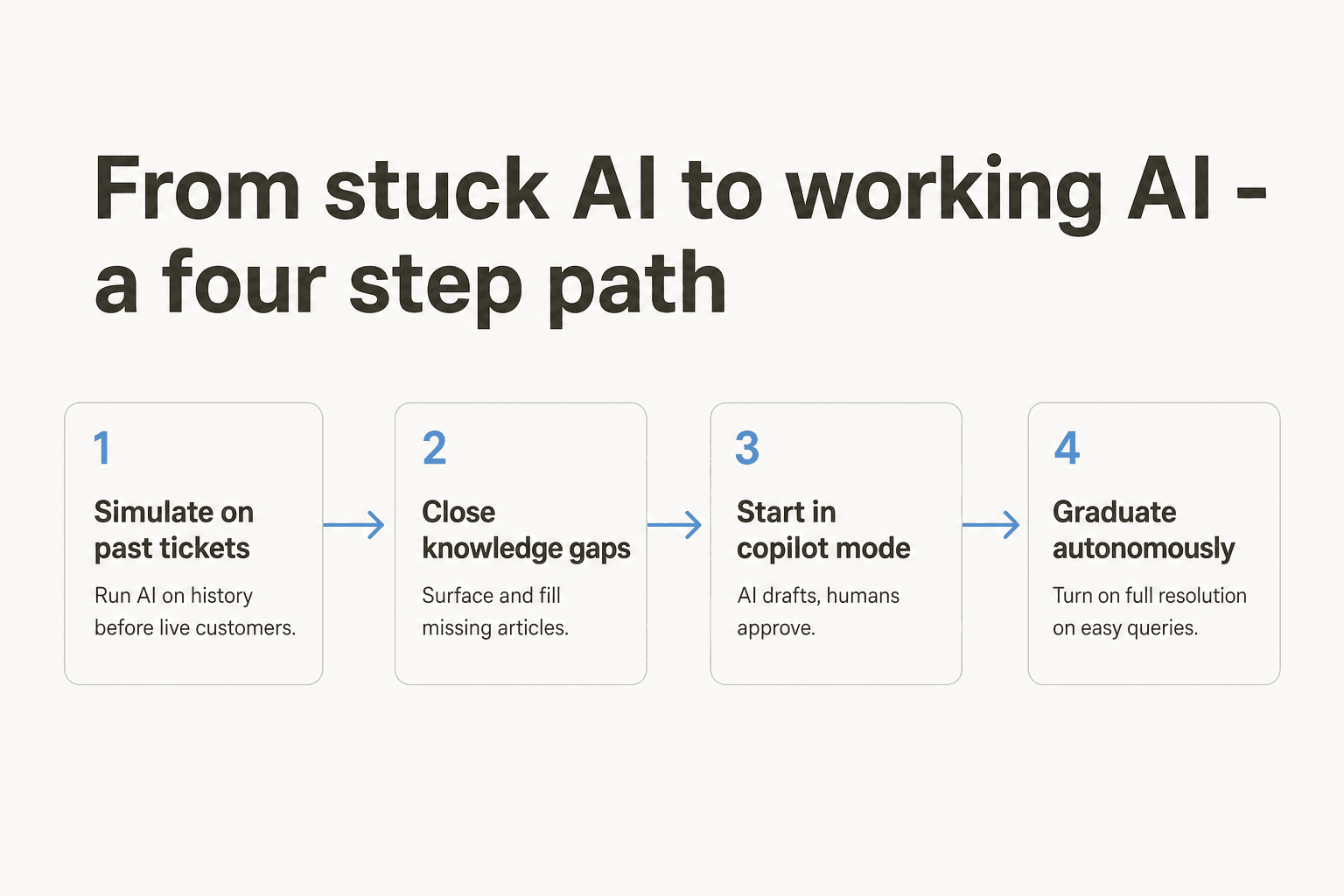
The four-step path is rarely described in the AI vendor's onboarding doc, because steps 1 and 2 don't generate AR billing for the vendor. They generate confidence for the buyer. That asymmetry is worth noticing.
Solution 5: Use an AI layer that sits on top of both helpdesks
The last and arguably the most important shift: stop thinking of "AI in Zendesk" and "AI in Freshdesk" as the question. Think of "AI on top of my helpdesk(s)" instead. The reason is structural.
Native AI is built to lock you into the platform. Switch helpdesks, lose the AI training. Pay per resolution, the vendor's revenue grows when yours grows. Configure the agent inside Zendesk's flow builder, your investment in that configuration is portable to no other platform. That's the deal you sign when you turn on the native AI.
An AI layer that sits on top of both helpdesks inverts each of those:
- One knowledge base across Zendesk and Freshdesk (and Slack, Notion, Confluence, Google Docs, your past tickets) instead of one per platform.
- One AI Agent per brand, not per platform, so multi-brand and multi-helpdesk teams configure once.
- One billing relationship instead of two AR meters running in parallel.
- Portable training data - if you migrate from Zendesk to Freshdesk (or vice versa) in the future, the AI's accumulated learning travels with you.
This is the strategic version of the best Freshdesk AI alternatives and best Zendesk AI alternatives decision: not "which third-party AI is best on this platform" but "should the AI be platform-bound at all."
Try eesel for Zendesk and Freshdesk
eesel AI is the AI layer we built for the buyers who arrived at this conclusion the hard way - usually after a surprise AR bill or a Freddy session-cap surprise mid-quarter. It connects to Zendesk and Freshdesk in under 30 minutes (no professional services required), learns from your past tickets, help-center articles, and macros automatically, and starts drafting on-brand replies that you can either approve manually (copilot mode) or autonomously send on the ticket types where it's already earning a >95% approval rate.
The differentiators worth knowing:
- Simulation on past tickets is a first-class workflow - run the AI against your last 30 days before any live customer ever sees it.
- Knowledge gap detection - eesel surfaces the topics your KB doesn't cover and drafts the new articles for you.
- $0.40 per ticket, flat - no platform fee, no per-seat licence, no separate "resolution" or "session" meter. One ticket = one task, regardless of how many replies it takes.
- One AI Agent, multiple brands and helpdesks - the same agent can run across multiple Zendesk brands, multiple Freshdesk instances, or both.
Customers running it at scale include Smava, processing 100,000+ German-language tickets per month autonomously on Zendesk; Ecosa, handling 10,000+ tickets a month across Zendesk, Slack, and their website; and CartonCloud, running 717 knowledge items across helpdesk and internal Q&A.

The trial is $50 of usage credit, no card required, on the full product. Pick a brand or a ticket type, simulate against your historical tickets first, and only switch to live when the numbers look right. Try eesel: start free or book a 30-minute demo.
Frequently Asked Questions

Share this article

Article by
Riellvriany Indriawan
Riell is a designer and writer at eesel AI with about two years of experience researching CX platforms, AI chatbots, and helpdesk software. She combines her design background with a sharp eye for how these tools actually look and feel in practice — making her comparisons unusually visual and user-focused.