Zendesk pricing for small teams: what it really costs in 2026


Last edited June 19, 2026

Table of Contents
- Why I'm writing this (and where the numbers come from)
- What Zendesk actually costs: the plan-by-plan breakdown
- The part the sticker price hides: AI billed per resolution
- Add-ons: the $50-a-seat stack
- What a small team actually pays: two worked examples
- So is Zendesk worth it for a small team?
- Cheaper alternatives for small teams
- Try eesel for Zendesk
Why I'm writing this (and where the numbers come from)
I work on the team behind eesel, and we've spent the last three-plus years putting AI agents on live support queues, a lot of them running inside Zendesk. So when a buyer tells me native Zendesk AI felt expensive, I usually already know which line item they're staring at.
One that stuck with me: a CX lead at a US healthcare platform with a few thousand patients and around 500 Zendesk tickets a month told us on a call that they'd "kicked the tires on Zendesk AI solutions and found it largely inadequate and overpriced," and were shopping for something else to bring automation to that queue. That's the exact small-team situation this post is about: the plans look affordable until the AI and add-ons land.
Everything below is pulled from Zendesk's own pricing page and its help docs on automated resolutions, with real numbers from r/Zendesk, G2, and Capterra where the price is something only customers can see. No third-party "top 10" guesswork.
What Zendesk actually costs: the plan-by-plan breakdown
Zendesk is seat-based: you pay per agent, per month, and annual billing is cheaper than monthly. Here are the Customer Service plans as they're listed today, plus the add-ons that sit alongside them.
| Plan | Price (per agent/mo, billed annually) | AI included? | Best for |
|---|---|---|---|
| Support Team | $19 | No AI agents | A small team that has outgrown a shared inbox and just needs ticketing |
| Suite Team | $55 | AI agents, AI knowledge base, AI action builder | The realistic small-team starting point with automation |
| Suite Professional | $115 (Most Popular) | Adds admin Copilot, AI writing tools, skills routing, IVR | Teams optimizing ops with more automation and routing |
| Suite Enterprise + Copilot | Talk to Sales | Adds intelligent triage, auto assist, generative voice AI | Larger orgs needing security, governance, sandbox |
| Copilot (add-on) | $50 | Agent-assist AI | Any plan wanting AI reply suggestions for human agents |
| Workforce Engagement (add-on) | $50 | QA + workforce management | Teams adding quality scoring and scheduling |
| Contact Center (add-on) | $50 | Voice/digital contact center | Phone-heavy support |
| AI agents | Per Automated Resolution (not publicly priced) | Included on Suite/Support; billed on resolutions over allowance | Autonomous deflection |
A few things jump out for a small team.
First, the $19 Support Team plan has no AI agents. If you came to Zendesk for AI deflection, the real floor is Suite Team at $55. That's not a knock, it's just the number to budget from. We walk through the tiers in more detail in our guide to how Zendesk licensing works.
Second, the gap between Suite Team and Suite Professional is more than double the price ($55 to $115), and a lot of the "smarter" AI, like the admin Copilot and AI writing tools, lives up there or in the $50 add-on. As one Capterra reviewer put it, "some useful and more advance features are locked behind higher plans" (Ifra S., Dec 2025).
Third, Suite Enterprise pricing is hidden behind "Talk to Sales," so you can't self-serve your way to a number. For a small team, that's usually fine because you'll live on Suite Team or Professional, but it's worth knowing the ceiling isn't public.
The part the sticker price hides: AI billed per resolution
This is the line item that surprises people, and it's the one the CX lead I mentioned was reacting to.
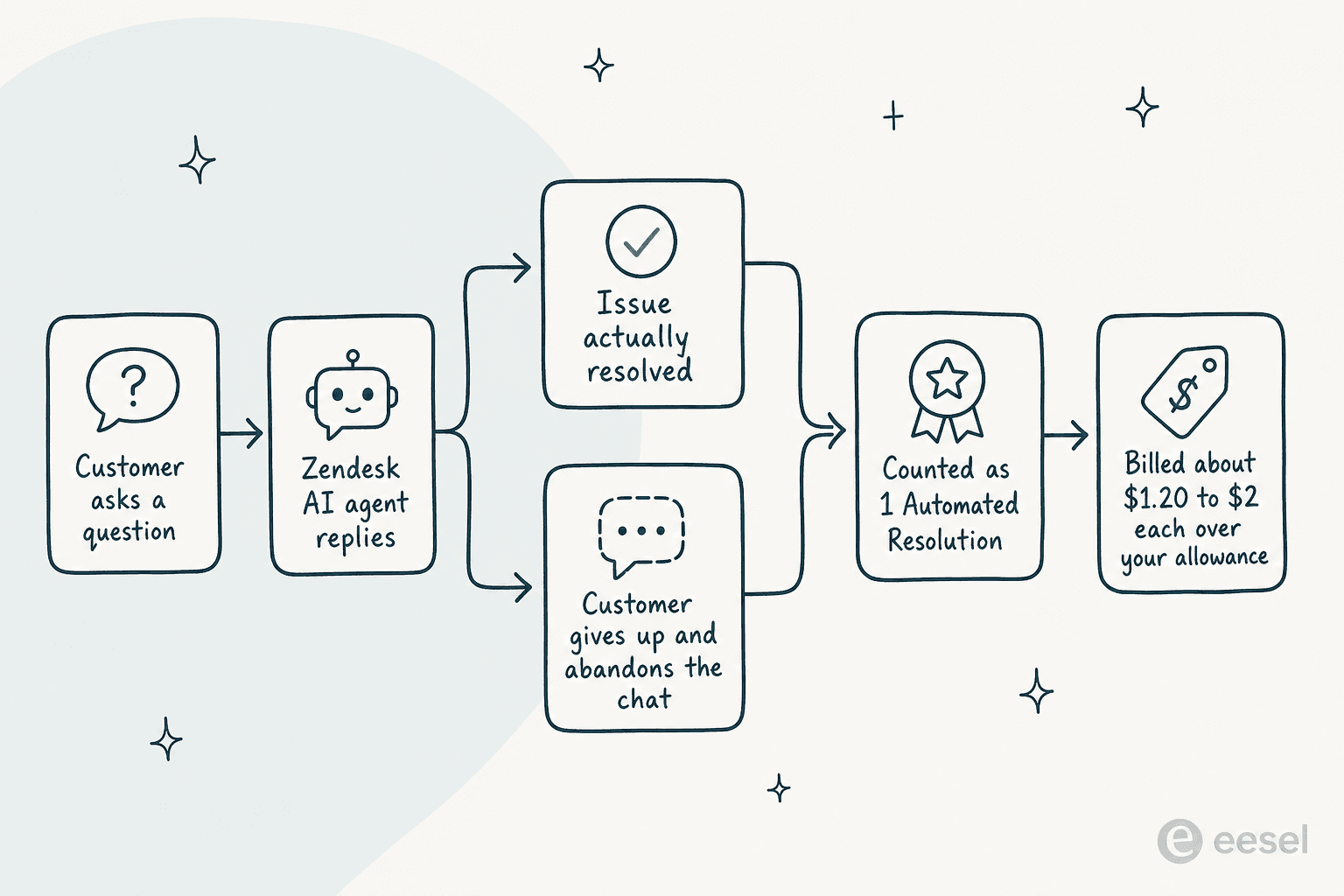
Zendesk's AI agents aren't bundled into your seat price as "unlimited." They're billed by Automated Resolution: in Zendesk's words, "you pay only for customer requests that were successfully resolved by the AI agent, without any escalation to a human agent." You get an allowance, and resolutions over that allowance are billed on top of everything else. We broke the model down in full in our pay-per-resolution guide.
Two things make this hard to budget for a small team.
The per-resolution number isn't on the pricing page, so buyers reverse-engineer it. One r/Zendesk thread worked it out from contract docs:
"From what I can see in regards to this new 'Automated Resolution' pricing model, we'll be paying about $1.50 ~ $1.20 per resolution... If you have 500 AR per week, the bill blows out to be $650, where there wasn't a charge before."

And without a committed plan, the same user noted the overage rate climbs to "$2 per resolution after overages."
Then there's what counts as a "resolution." Several operators flag that a customer who gives up can be billed as a resolved ticket:
"who knows if the bot is just leaving the customer hanging and marking it as a resolution... they got agitated and abandoned the chat and it was considered a resolution"
To be fair, this sits inside an overall-positive product: Zendesk's Essential and Advanced AI agents do real work, and its AI ticketing is mature. The complaint isn't that the AI is broken, it's that the meter is hard to predict and the definition of "resolution" runs in Zendesk's favor. If you want to model your own number, our Zendesk AI pricing calculator walkthrough is a good place to start.
Add-ons: the $50-a-seat stack
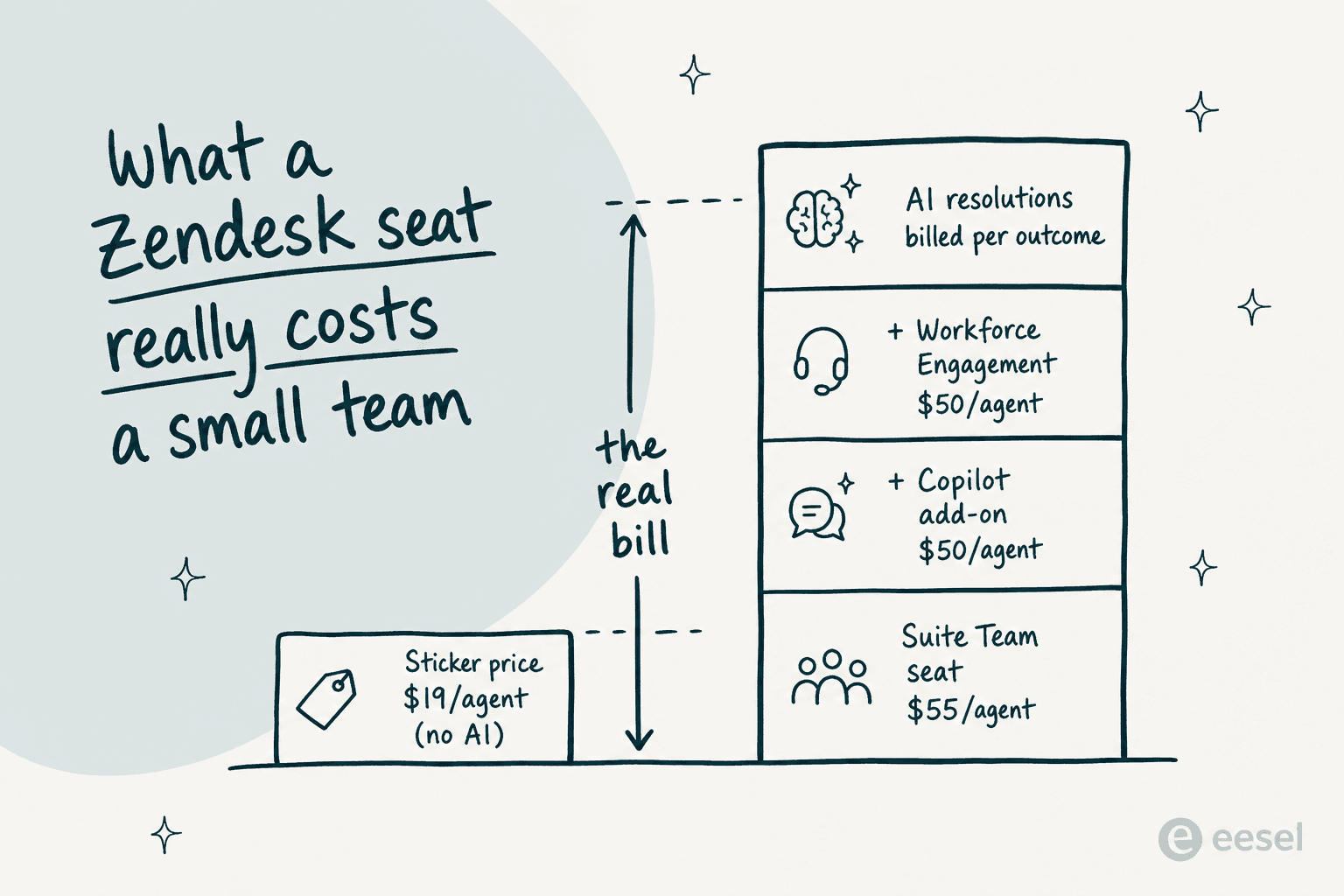
Beyond seats and AI resolutions, Zendesk's headline add-ons are each $50 per agent per month: Copilot, the Workforce Engagement bundle, and Contact Center. On a 5-agent team, turning on even one of those is another $250/month.
This is where the "stacking" reputation comes from. A Capterra reviewer summed it up: "setting up add ons can add more to it and could feel like a full time job in the backend" (Vibhore S., Apr 2026). And a large-company admin on Reddit was blunter about the model:
"Even if you spend a million dollars a year, they will still nickel and dime the shit out of you because it's their model... Want automation? That costs more. Want their latest AI feature? Cost more."
Here's the shape of it, visually: the price you quote in a budget meeting versus the price you actually pay once AI and add-ons are on.
What a small team actually pays: two worked examples
Sticker prices are abstract, so let's run two realistic small-team scenarios. Both assume annual billing.
A 3-agent team on Suite Team, light AI use. Base seats are 3 × $55 = $165/month. Add a few hundred AI resolutions a month at the ~$1.20-$1.50 range that Reddit users report, and you're realistically at $300-$500/month once you're past your allowance. Skip the add-ons and you stay near the floor.
A 5-agent team on Suite Professional with Copilot. Base seats are 5 × $115 = $575/month, plus the Copilot add-on at 5 × $50 = $250, so $825/month before a single AI resolution is billed. Layer in resolutions and a busy month can clear $1,000.
For comparison, a usage-based tool charges on tickets handled, not seats. At eesel's ~$0.40 per ticket, a team handling 500 tickets a month pays about $200, whether that's 3 agents or 15. The chart below puts the three side by side.
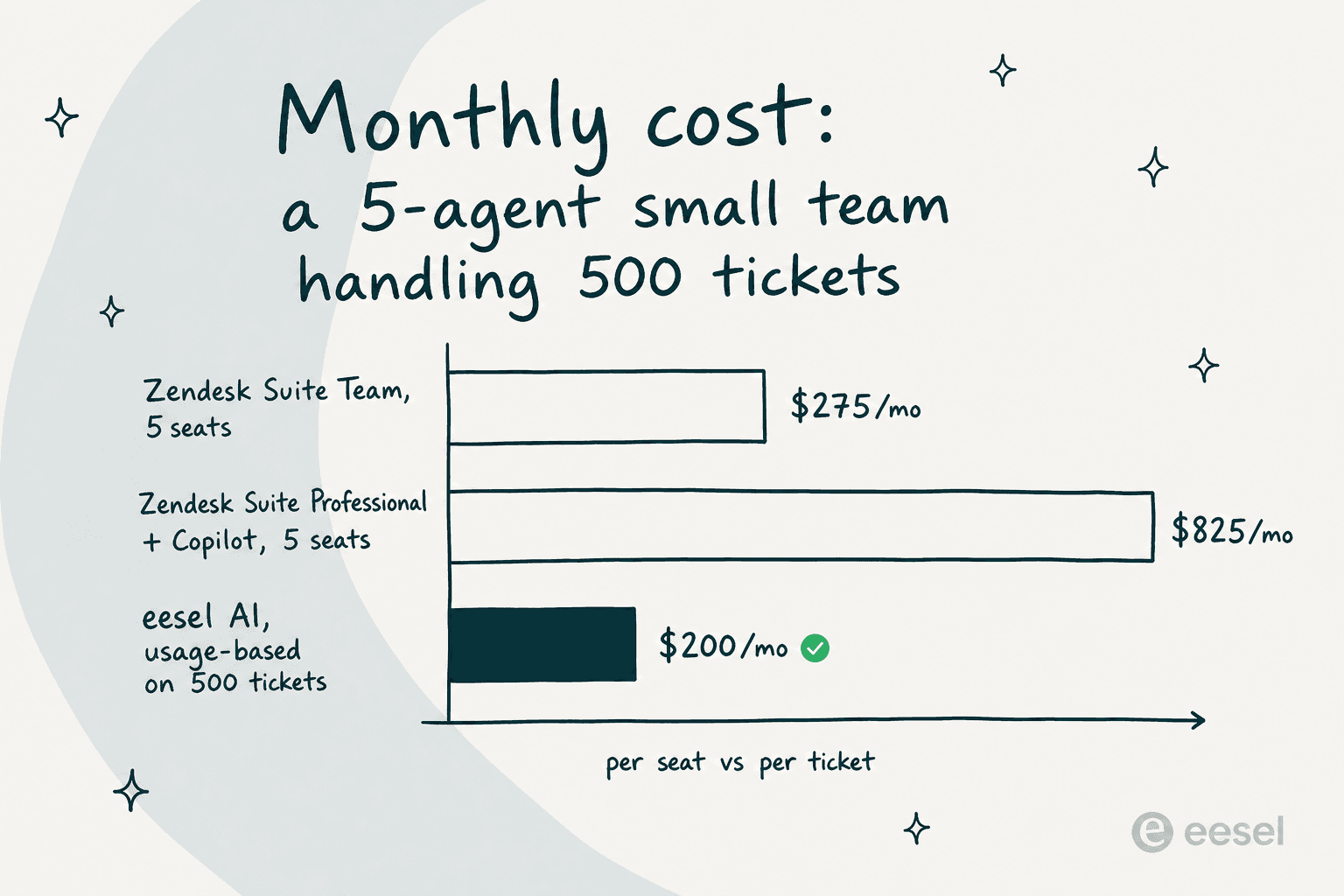
The point isn't that Zendesk is always more expensive, it's that seat-based plus per-resolution pricing scales with your headcount and your success, while usage-based pricing scales with your actual volume. For a small team that's growing, those two curves diverge fast. It's the same complaint behind the r/Zendesk thread where a team's bill "climbed to around $5,000 per month (not including add-ons)" as they grew from a few users to a couple dozen.
So is Zendesk worth it for a small team?
Yes, with a caveat. The product itself is well-liked: Zendesk for Customer Service holds 4.3/5 across 6,964 G2 reviews and 4.4/5 on Capterra, with about 92% of reviewers rating it four or five stars. It's a 2025 Gartner Magic Quadrant leader, the core platform is mature, and the 1,800+ app marketplace is hard to match. The gripe in almost every "leaving Zendesk" thread is the bill, not the reliability.
So the honest verdict for a small team:
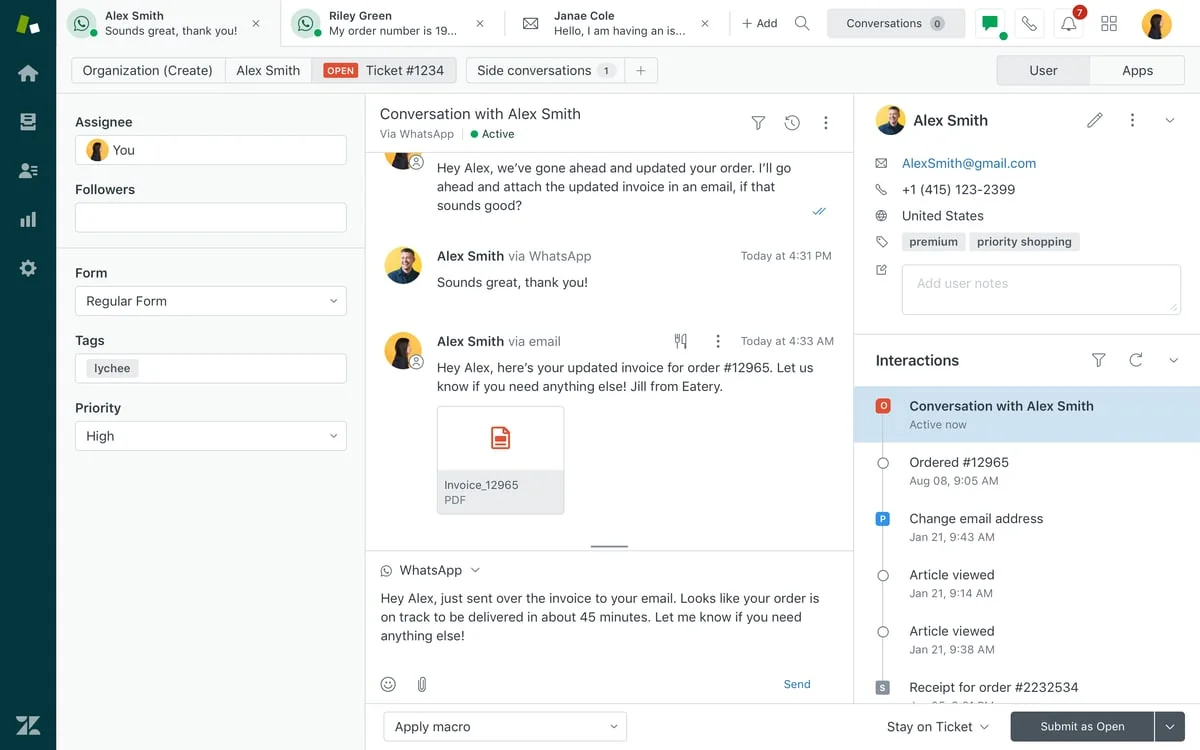
- Pick Zendesk if you need deep omnichannel (email, chat, voice, social in one place), a huge integration library, or you're planning to scale into a contact center and want one vendor for all of it. Our rundown of Zendesk's advantages and disadvantages goes deeper on the trade-offs.
- Think twice if your pain is specifically the AI cost, your volume is spiky, or you're a 3-5 person team that just wants tier-1 tickets handled without managing a per-resolution meter and a stack of $50 add-ons.
One more thing the reviews flag: Zendesk's AI is only as good as your help center. As one r/Zendesk user put it, the Copilot "effectiveness really depends on having a perfectly curated Zendesk knowledge base, which... ours isn't, lol" (u/ToastBix). That's true of most AI support tools, but it's worth knowing before you pay per resolution for answers your KB can't support. We covered this in our Zendesk AI review.
Cheaper alternatives for small teams
If the cost math doesn't work, you've basically got two moves: switch the whole helpdesk, or keep your helpdesk and add a cheaper AI layer.
On the helpdesk side, the names that come up most in switching threads are Freshdesk (the most-cited "natural switch"), Help Scout for smaller teams that want simplicity, and Zoho Desk for budget-conscious buyers. They all sit cheaper than Zendesk at the entry level, and each has its own AI story.
If you want the full field, our AI customer service software guide compares them properly, and the Zendesk AI alternatives roundup focuses on the deflection angle specifically.
The other move, and the one a lot of small teams actually take, is to keep Zendesk for ticketing and bolt on a usage-based AI agent instead of paying Zendesk's per-resolution rate. That's where eesel fits.
Try eesel for Zendesk
If your problem with Zendesk pricing is the AI bill specifically, you don't have to rip out Zendesk to fix it. eesel AI is a native AI agent for Zendesk that connects in under 30 minutes, learns from your past tickets, help center, and macros, and starts drafting and resolving tier-1 tickets, no data labeling or long onboarding.
The pricing is the part that matters here: eesel charges about $0.40 per ticket with no per-seat fee, no platform fee, and no per-resolution meter, so a team handling 500 tickets pays around $200/month whether they're 3 agents or 15 (full pricing here). You can run it in simulation mode against your past Zendesk tickets first to see exactly what it would have resolved (and what it would have cost) before going live, which is the opposite of finding out via an overage invoice.
For a small team that wants the deflection without the unpredictable bill, it's worth a look. It's free to try on your own tickets, no credit card required.
Frequently Asked Questions

Share this article