|
VOOZH | about |
|
VOOZH | about |
This is an exciting time, as the usage of JavaScript has changed from a limited knowledge subject to a significant web development skill over the past few years. Today, JavaScript has become so indispensable to the web that most internet browsers implement a dedicated engine just to run it.
JavaScript is a wonderful technology to use on the web, and disabling it for all websites on your browser is never recommended. Most popular websites are JavaScript based, which means they make use of JavaScript to run interactive features that provide an enjoyable user experience.
With JavaScript disabled, your browser will be unable to run or show interactive elements like display ads, animations or audio. However, the good news here is that JavaScript is quite simple to activate. Besides, there are also specific ways that you can disable JavaScript on a per-site basis, instead of turning it off completely.
So, if you have disabled JavaScript in your browser and now wish to enable it, we are here to help. We’ve written this guide to walk you through activating JavaScript in six of the most commonly used browsers. In addition to this, we’ll also walk you through what JavaScript is, what JavaScript is used for and what you can actually do with JavaScript.
You may want to consider linking to this site, to educate any script-disabled users on how to enable JavaScript in six most commonly used browsers. You are free to use the code below and modify it according to your needs.
<noscript>
For full functionality of this site it is necessary to enable JavaScript.
Here are the <a href="https://www.enablejavascript.io/">
instructions how to enable JavaScript in your web browser</a>.
</noscript>
On enablejavascript.io we optimize the script-disabled user experience as much as we can:
We want your visitors to have JavaScript enabled just as much as you do!
Click HERE to learn more about JavaScript on Firefox!
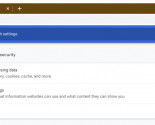
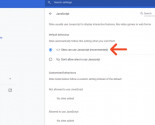
Congratulations, you’ve just enabled JavaScript on your Google Chrome browser.
Click HERE to learn more JavaScript on Google Chrome!
Click HERE to learn more about JavaScript on Internet Explorer!
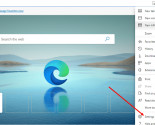
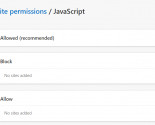
Click HERE to learn more about JavaScript on Microsoft Edge!
Click HERE to learn more about JavaScript on Opera!
JavaScript is a “client-side” scripting language that is primarily used to create and add all kinds of dynamic interactions to web pages. With its rapid evolution in the tech world, JavaScript has become the cornerstone of modern web development.
It works nicely with traditional software design languages and includes unique features that make it distinct from them. Where CSS and HTML are languages that add style and structure to web pages, JavaScript provides web pages with interactive elements that enhance user experiences.
So, anything that changes, or pops up on your device without web page reloads during a browsing session? Yep, that’s JavaScript.
Today, JavaScript is so impressive that it is used by modern web browsers such as Google Chrome, Safari, Mozilla Firefox, Opera, Internet Explorer, Microsoft Edge etc. Popular mobile devices such as Android and iPhone are also able to run JavaScript-based browsers and applications natively.
Understanding the way JavaScript works is a little easier when you know its prominence, so let’s learn more.
It’s been 25 years since, arguably, one of the most frequently used codes for web development was created. The emergence of the Internet has taken JavaScript places it was never predicted to be. Since its release, JavaScript has not only strengthened its spot as a powerful programming language but has also acquired new usage areas in modern web development.
Inspired by Scheme, Java and Self, JavaScript was developed in 1995 by Brendan Eich when he worked at Netscape Communications. In the 1990s, Netscape Communications enjoyed a substantial presence on the Internet through its browser – the Netscape Navigator – which was widely preferred to Mosaic browser, the first mainstream web browser.
Netscape Communications was co-founded by Marc Andreessen, who was part of a team of developers at the University of Illinois that worked on the Mosaic browser project in 1993. As the web gained popularity, tech companies vied to develop the most efficient browser on the Internet.
Microsoft caught wind of this and initiated the Internet Explorer project in a bid to wrestle control of the Internet from Netscape. This sparked a fierce browser war between Microsoft and Netscape to achieve supremacy in the browser share market.
At the time, web developers longed for a scripting language to create or add dynamic features on web pages. Initially, they set their sights on Java but eventually realized that something more flexible was required to enhance user experiences.
Netscape realized this and envisioned a lightweight scripting language that could allow web developers to add interactive features on web pages. Time was of the essence, and this was when the father of JavaScript came into the picture.
In 1995, Brendan Eich was contracted by Netscape to create and implement a dynamic language for the release of their Netscape Navigator 2.0 browser. This project came as a rushed assignment to Eich. However, he saw this as an opportunity to work on something he was passionate about and teamed up with Netscape. And so the idea of a lightweight scripting language was born. It was named Mocha by Eich but was later renamed Live Script. In as little as ten days, a functional prototype was developed by Eich and was ready to be implemented in the Netscape Navigator 2.0 Beta browser.
In a bid to maintain its supremacy in the browser share market, Netscape agreed to partner with Sun Microsystems – developers of the programming language named Java. This alliance meant that Sun Microsystems secured the use of Netscape Navigator as a web delivery platform to make Java available to the Java Community.
In 1996, almost a year later, Live Script was ultimately renamed JavaScript as a marketing strategy to gain acceptance in the Java community. JavaScript was presented as a scripting language for minor client-side projects in the Netscape Navigator 2.0 browser, while Java was endorsed as a specialized tool to develop impressive web solutions.
Following this, Microsoft reverse-engineered JavaScript to develop a custom version for their Internet Explorer 3. It was named JScript to avoid legal issues with Sun Microsystems, who owned the Java brand and had licensed it to Netscape.
Clean, flexible and accessible to non-developers, JavaScript (and JScript) were insanely popular, making web pages more interactive as well as dynamic.
Unfortunately, they both started to earn a negative reputation due to a low barrier entry, which meant that people could write code snippets with little or no knowledge of what they were doing. Additionally, JavaScript was often used to upset people (pop-up ads, browser sniffing, etc.) rather than to enhance their experience.
A significant response to address this issue came in the form of ECMA standardization. Netscape and Sun Microsystems submitted documentation to standardize JavaScript with ECMA International, who would host the standard. Standardization was a significant step and a great call for such a new language.
This opened JavaScript up to a broader audience and allowed developers to have a say in the evolution of the scripting language. Standardization also served the purpose of keeping people who used the code for negative reasons in check. To avoid infringing on Sun’s Java trademark, the ECMA committee decided to name the standardized language ECMAScript.
This caused even more misunderstanding, but ultimately ECMAScript was used to refer to the specification, and JavaScript was (and still is) used to refer to the scripting language today.
The usage of JavaScript has changed over the years since its release. At this point, you may be wondering how a scripting language developed in a matter of 10 days has gone on to change the Internet completely. Well, here’s how:
JavaScript is used to add dynamic interactions such as transition elements and functions to web pages. It also allows users to load new images and objects without the need to refresh the web page over time.
One of the most powerful things about JavaScript is that it includes an extensive range of libraries and frameworks that can be used to build cross-platform web and mobile applications.
JavaScript is also capable of building web-based games. It includes a host of libraries and frameworks that people can employ to make 2D or 3D games.
Beyond websites and app development, developers can make use of JavaScript to build robust web servers and back-end development using Node.js.
The advantages of enabling JavaScript in your browser far exceed the disadvantages, as shown by its prominence and prevalent use across the Internet. Benefits that you enjoy when you enable JavaScript include:
Access to more interactive websites and interfaces such as animations, videos, ad banners and other staples of the contemporary web experience.
JavaScript is a client-side script, accelerating user-interactivity on the web page as it reduces server requests.
As JavaScript operates on the client-side, it minimizes the time required to connect to the server, which in turn conserves both bandwidth and load.
While there are a great many ways that JavaScript can be used to improve web pages and user-interactivity, there are also little things that JavaScript can’t do. Here we will learn about some limitations of JavaScript:
In as much as enabling JavaScript on your browser comes with huge benefits, users may at some point want to temporarily disable it for security. JavaScript can be disabled in most modern web browsers such as Mozilla Firefox, Google Chrome, Opera, Safari, Microsoft Edge, and Internet Explorer, among others.
If you have JavaScript set to disabled in your browser, then it means that you’ve formerly disabled JavaScript, or it has not been enabled by default in your browser. If enabled, read how to disable JavaScript according to the preferred browser on your device.
Click HERE to learn more JavaScript on Google Chrome!
Click HERE to learn more about JavaScript on Internet Explorer!
Click HERE to learn more about JavaScript on Firefox!
Olumide is a longtime writer who started his career as a digital marketer before transitioning into a copywriter almost eight years ago.
Read more >How to enable JavaScript in your browser and why http://www.enablejavascript.io/



















































.png)
-155x125.jpg)
.png)
-155x125.jpg)