PGM or Portable Gray Map file is a grayscale image where each pixel is encoded with 1 or 2 bytes. It contains header information and pixel grayscale values in a matrix form.
Approach: The idea is followed to read PGMB format image is as follows:
- Open a PGMB (binary format PGM image).
- Extract the pixel information, which can be then used for further processing.
- The header information is stored in ASCII format can be read using any text editor but the pixel information is stored in a binary formation and the text editor will show that as some gibberish text.
Below is the sample pgm image.
👁 Image👁 Image
:
- magic number for identifying the file type:
- Binary PGM File (PGMB): "P5"
- ASCII PGM File (PGMA): "P2"
- Width in ASCII decimal format
- Height in ASCII decimal format
- Maximum Gray Value, ASCII decimal format, between 0-255
- Can contain comments, denoted by beginning the line with a '#'
- All separated with white spaces (blanks space, tabs, CRs, LFs)
Header information in gfg_logo.pgm:
P5
# sample PGMB image
# gfg_logo.pgm
200 200
255
After the header information, there is a grid of dimensions height * weight containing the grayscale pixel values of the image in binary format.
:
- Open the image in the read binary, rb mode.
- Check if any comments are present and ignore them.
- Read the Magic Number.
- Read any comments/blank line/white space.
- Read width and height separated by white space.
- Read the max gray value, before and after any white space/comment.
- Read the grid (width * height) of pixel values, separated by white spaces.
Below is the program for the above approach:
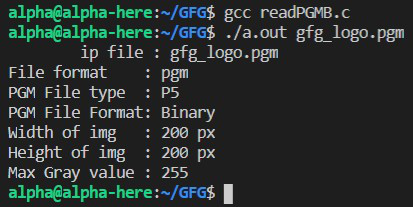
Output:
👁 Image
Explanation:
- Create a structure for storing the PGMB image details and allocate memory for the same.
- Take the file name input either as a command-line argument or by hard coding it in the program.
- The openPGM() function processes the input image files and takes the memory pointer and filename are input.
- The ignoreComments() function is used to skip any comments in the file. Comments are usually present in the header portion and thus, we check for them after reading every property.
- In openPGM() function, read the file header information, ie. file type, height, weight, etc as given above.
- Then allocate memory as per the height of the image and for each row, allocate memory for the width of the image.
- The fread() method reads the gray values and stores them in the allocated memory for the 2d character matrix of the pgm structure.
- printImageDetails() is used to print the values retrieved from the PGMB image file.