Google Cloud Data Catalog is a fully managed and scalable data discovery and metadata management service provided by Google Cloud. It enables organizations to quickly discover, understand, and manage their data assets across cloud environments. By providing a centralized metadata repository and powerful search capabilities, Data Catalog allows users to easily locate datasets, understand their structure, and securely access the data required for analytics.
- Centralized Metadata Management: Maintains metadata information for datasets across cloud services.
- Powerful Search Capabilities: Enables quick discovery of datasets using structured search.
- Tagging and Classification: Allows users to apply tags for better organization and governance.
- Integrated Security Controls: Respects source access controls for secure data discovery.
Core Components of Data Catalog
Understanding the core components of Data Catalog helps organizations efficiently manage and explore their data assets.
1. Data Assets
Data assets represent the datasets and resources that are indexed and managed within Data Catalog.
- Includes datasets from services like Google BigQuery and Google Cloud Pub/Sub.
- Stores metadata information such as dataset descriptions and schema details.
- Helps users quickly locate relevant datasets for analysis.
- Supports discovery across multiple projects and environments.
2. Search and Discovery
Data Catalog provides powerful search capabilities that enable users to quickly find relevant data assets.
- Allows searching across multiple datasets using a centralized search bar.
- Supports faceted search, enabling filtering by dataset type, tags, and columns.
- Helps users discover tables, topics, and datasets across projects.
- Reduces the time required to locate relevant enterprise data.
3. Tag Templates
Tag templates allow organizations to classify and organize datasets using structured metadata.
- Enables the creation of reusable metadata templates.
- Allows teams to define custom fields for data classification.
- Helps enforce data governance and metadata standards.
- Improves dataset discoverability and documentation.
4. Access Control Integration
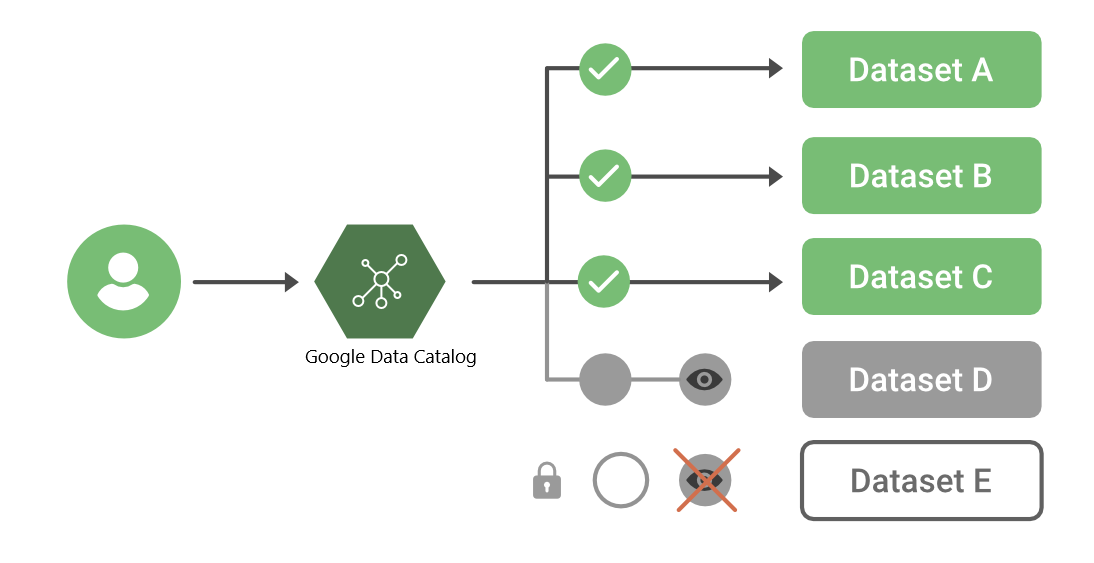
Data Catalog integrates with existing security policies to ensure safe data access.
- Honors access permissions defined in source systems.
- Prevents unauthorized users from viewing restricted data assets.
- Maintains secure data discovery across multiple services.
- Supports governance and compliance requirements.
How Data Discovery Works in Data Catalog
Data discovery often begins with a business question, such as identifying trends, operational issues, or performance metrics.
For example, an analyst might ask:
- Which dataset contains information about our supply chain performance?
- Which tables contain the most recent operational metrics?
Using the search bar in Data Catalog, users can quickly locate relevant datasets across services like Google BigQuery and Google Cloud Pub/Sub.
Key discovery features include:
- Searching datasets using keywords or metadata fields.
- Filtering results using faceted search options.
- Viewing dataset metadata and schema information.
- Accessing datasets directly through integrated services.
How to Search and Discover Data Using Google Cloud Data Catalog
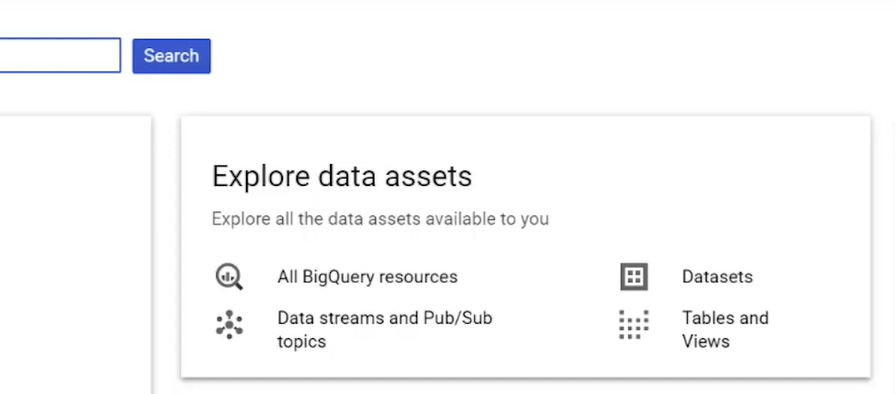
Google Cloud Data Catalog provides a powerful search interface that allows users to quickly locate datasets across multiple Google Cloud services. Using the centralized search bar, users can explore data assets stored in platforms such as Google BigQuery and Google Cloud Pub/Sub.
Step 1: Open the Data Catalog Search Interface
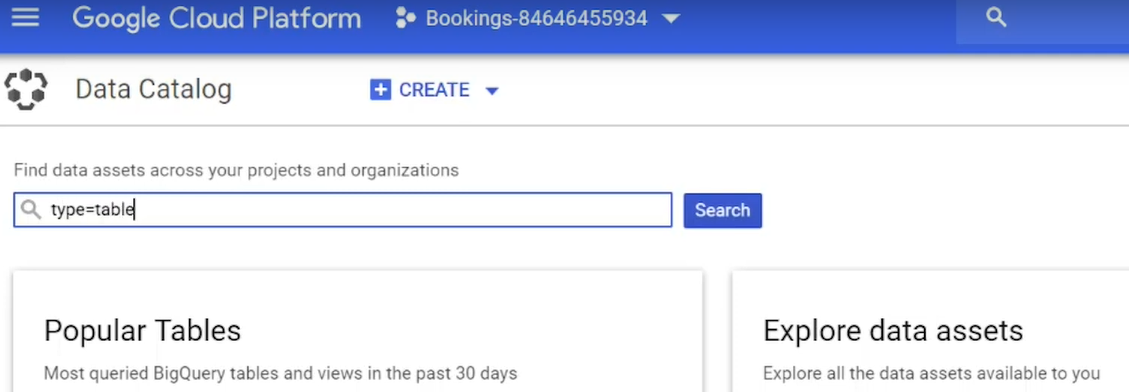
Navigate to Data Catalog in the Google Cloud Console.
At the top of the interface, you will find a centralized search bar that allows users to search across all indexed data assets.
👁 ImageStep 2: Search and Filter Data Assets
Enter a keyword, dataset name, or table name into the search bar. Data Catalog searches across multiple data sources, including Google BigQuery datasets and Google Cloud Pub/Sub topics.
To refine your results, you can apply faceted search filters, which allow you to narrow down the results based on specific attributes.
You can filter results by:
- Resource type such as tables, datasets, or topics.
- Column names or schema fields.
- Metadata tags applied to datasets.
- Project or data asset category.
These filters make it easier to locate the exact data asset even when searching across millions of resources.
👁 ImageStep 3: Explore Search Results
Once the results appear, you can explore detailed metadata for each asset.
The results page allows you to:
- View dataset descriptions and schema information.
- Check metadata tags associated with the dataset.
- Access the resource directly in services like Google BigQuery.
- Understand how the data asset is structured.
👁 ImageAdditional Data Exploration Features
Beyond basic search functionality, Data Catalog offers additional tools that help users explore and understand data assets.
- Popular Tables View: Displays the most frequently queried Google BigQuery tables over the last 30 days.
- Dataset Exploration: Allows users to browse tables, views, and messaging topics.
- Metadata Tagging: Enables teams to apply tags for classification and governance.
- Secure Data Access: Automatically respects source-level permissions and access controls.