How to Integrate Salesforce with Other Applications?
Last Updated : 26 Dec, 2024
Salesforce is one of the most widely used Customer Relationship Management (CRM) platforms globally. However, its true power lies in its ability to integrate seamlessly with third-party applications, enhancing functionality, streamlining operations, and enabling businesses to achieve more efficient workflows.
This guide explores the fundamentals of Salesforce app integration, its benefits, tools, challenges, and best practices for integrating third-party applications with Salesforce.
What is Salesforce Integration?
Salesforce integration refers to the process of connecting Salesforce with other systems or applications to enable seamless data exchange and synchronization. By leveraging APIs, middleware, or other integration tools, Salesforce can communicate effectively with third-party applications, providing a unified platform for managing data and workflows across various business functions.
Salesforce integration enhances collaboration, eliminates data silos, and ensures that businesses have a comprehensive, real-time view of their operations.
Why is Salesforce Integration Important?
Salesforce integration is essential for businesses aiming to streamline their processes, improve efficiency, and provide a better customer experience. Here’s why it matters:
Data Consistency: Integration ensures that data across different platforms remains consistent, reducing duplication and errors.
Enhanced Productivity: Automating workflows across systems minimizes manual efforts, allowing teams to focus on strategic tasks.
360-Degree Customer View: Integrating Salesforce with tools like marketing automation, ERP, or communication platforms provides a holistic view of customer interactions.
Real-Time Insights: Seamless data flow enables businesses to generate actionable insights and make informed decisions.
Improved Collaboration: Connecting Salesforce with tools like Slack or Zoom fosters better communication and teamwork.
Benefits of Salesforce App Integration
Here are the key benefits businesses can gain from Salesforce app integration:
Increased Accuracy: Data synchronization eliminates inconsistencies and ensures accurate reporting across platforms.
Improved Customer Engagement: Tools like WhatsApp or MailChimp integration enhance communication, keeping customers engaged.
Better Collaboration: Integration bridges communication gaps between departments, speeding up decision-making.
Revenue Growth: By reducing delays and streamlining processes, Salesforce integration can drive better customer conversion rates and increased revenue.
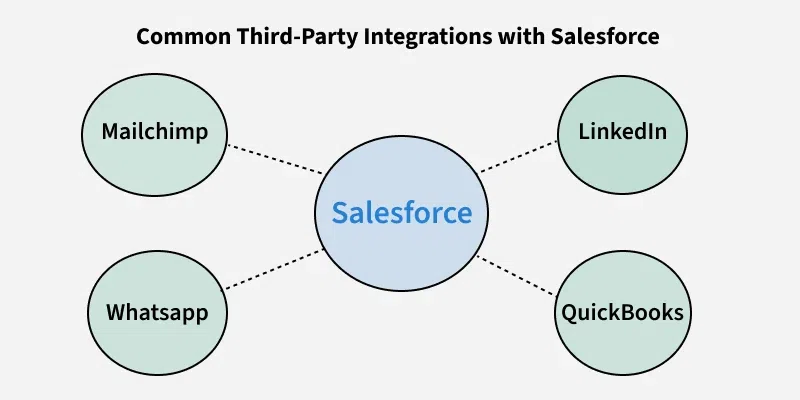
Common Third-Party Integrations with Salesforce
Salesforce offers integration with numerous third-party applications, catering to different business needs. Here are some popular examples:
Connect Salesforce with marketing platforms for enhanced lead management and campaign tracking.
Example: Sync leads from Marketo campaigns directly into Salesforce.
3. E-Commerce Platforms (e.g., Shopify, Magento)
Manage customer data, orders, and inventory in real-time by integrating Salesforce with e-commerce platforms.
Example: Pull order details from Shopify into Salesforce for better sales tracking.
4. Communication Tools (e.g., Slack, WhatsApp, Zoom)
Enable real-time communication within Salesforce workflows.
Example: Use WhatsApp to send automated order confirmations or updates directly from Salesforce.
5. Accounting Software (e.g., QuickBooks, Xero)
Streamline financial data management by connecting Salesforce with accounting systems.
Example: Sync Salesforce opportunities with QuickBooks to create invoices automatically.
Challenges of Salesforce Integration
Integrating Salesforce with third-party applications is not without its challenges. Here are some common issues you may encounter:
Data Mapping and Compatibility: Ensuring that data formats, structures, and validation rules match between Salesforce and external systems can be complex.
API Limits: Salesforce imposes API call limits, which can impact real-time integrations and large-scale data synchronization.
Security and Compliance: Ensuring compliance with Salesforce's security standards and data protection regulations is critical.
Performance and Latency: Real-time synchronization can lead to latency issues, affecting user experience.
Maintenance: Keeping integrations up to date with system upgrades or changes to APIs requires ongoing monitoring and effort.
Tools for Salesforce Integration
Choosing the right tools for integration is crucial. Here are the three main categories of tools for Salesforce integration:
1. Salesforce Native Tools
Designed by Salesforce for seamless integration within its ecosystem.
User Acceptance Testing (UAT): Confirm integration meets business needs.
6. Monitor and Maintain Integrations
Regularly monitor integrations for performance and ensure they remain up to date with system changes.
Example: Integrating Salesforce with Slack
Here’s a simple example of integrating Salesforce with Slack to improve communication:
Objective: Notify a Slack channel whenever a new opportunity is created in Salesforce.
Steps:
Use Zapier or MuleSoft as middleware.
Configure a trigger in Salesforce to detect new opportunities.
Set up an action in Slack to send a message to the desired channel.
Result:
A Slack notification is automatically generated whenever a new opportunity is logged in Salesforce, improving real-time collaboration.
Wrap-Up: Should You Opt for Salesforce Integration?
Salesforce integration with third-party applications has become a necessity for businesses aiming to streamline operations and enhance efficiency. By connecting with systems such as ERP platforms, marketing automation tools, or communication channels, organizations can unlock new possibilities for collaboration, automation, and data-driven decision-making.
However, achieving a successful integration involves:
Careful planning
Selecting the right integration tools
Adhering to best practices
Engaging certified Salesforce experts is highly recommended to mitigate risks and ensure a seamless execution. When implemented effectively, Salesforce integrations have the potential to transform business processes and deliver a substantial ROI.