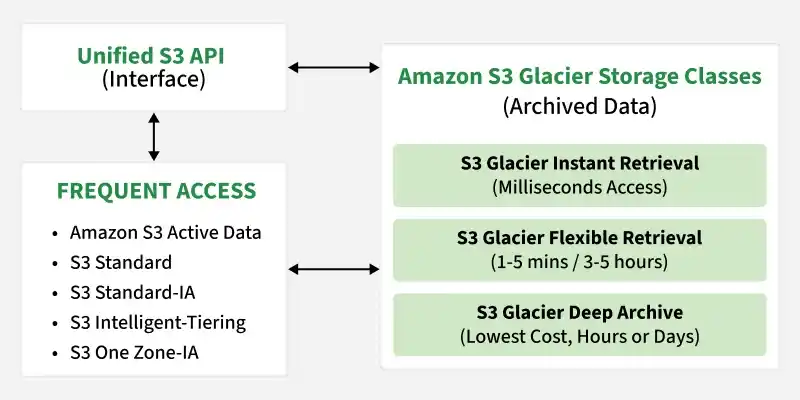
Amazon S3 Glacier is a family of secure, durable, and low-cost cloud storage classes provided by AWS for data archiving, long-term backups, and digital preservation. It is fully integrated with Amazon S3, allowing users to store archived data directly in S3 buckets without managing separate Glacier vaults and archives.
Storage rates start at fractions of a cent per GB, making S3 Glacier a cost-effective replacement for traditional tape backups.
S3 Glacier stores archived data directly as objects inside standard S3 buckets, removing the need for separate storage systems.
Uses standard S3 features, including S3 Bucket Policies, IAM controls, S3 Object Lock (WORM compliance), and S3 Lifecycle Policies.
S3 Glacier provides multiple retrieval options, ranging from milliseconds to several hours based on speed and cost requirements.
Evolution of S3 Glacier Storage
The original Amazon Glacier service used Vaults to store data called Archives. This legacy architecture has been deprecated for all new cloud deployments in favor of native S3 Glacier storage classes. The new S3 Glacier storage classes fully replace the legacy vault model, offering the following advantages:
Standard S3 Interface: All archival interactions are managed as standard objects inside S3 Buckets, eliminating the complex legacy Glacier Vault API.
Native Feature Compatibility: Supports native S3 security tools like fine-grained IAM roles, S3 Object Lock, and S3 Lifecycle Management rules.
Millisecond Access Performance: S3 Glacier Instant Retrieval allows archived data to be accessed within milliseconds. This feature was not available in the older Glacier model.
Although all modern uploads must target S3 Buckets, understanding legacy terminology is essential when maintaining older enterprise systems or executing migrations:
1. Vaults
Definition: Virtual containers that act like folders to organize and manage archives, behaving similarly to modern S3 buckets.
Security Management: Each vault is configured with its own resource-based access policies (Vault Lock or Access Policies) to manage user permissions and notifications.
Limits: Vaults are restricted to a single AWS region and cannot be moved across geographic borders directly. Each AWS account is limited to a maximum of 1,000 vaults per region.
2. Archives
Definition: The fundamental data blocks stored inside a Vault (representing files, backups, documents, videos, or zip packages), behaving similarly to S3 Objects.
Capacity and Limits: Standard accounts can store an unlimited number of archives within a vault, each receiving a unique archive ID upon upload. Individual archives can range from 1 byte up to 4 GB for single-operation uploads, and up to 40 TB when using multi-part upload protocols.
3. Vault Access Policies
Definition: Resource-based security policies that work alongside standard IAM controls to manage vault permissions.
Access Resolution: S3 evaluates both Vault Access Policies and user IAM roles; if either explicit deny or implicit deny exists, access is blocked.
Immutability Guardrail: Once a Vault Lock Policy is locked, the configuration becomes completely immutable and can never be altered or deleted, even by the AWS root account. This is ideal for protecting sensitive records.
S3 Glacier Storage Classes
Selecting the correct S3 Glacier storage class depends on the specific recovery speed, cost constraints, and access requirements of your workloads:
1. S3 Glacier Instant Retrieval
Ideal Workloads: Suited for rarely accessed datasets that must remain immediately accessible on-demand, such as healthcare imaging systems (archiving MRI scans and X-ray histories), historical news media repositories, and old user-generated design portfolios.
Retrieval Time: Millisecond access speeds, matching standard S3 Standard storage performance.
Cost Profile: Provides the lowest storage fees of any instant-access tier, but carries a higher retrieval fee per gigabyte compared to standard archive classes.
Constraints: Requires a minimum storage duration of 90 days and a minimum billing object size of 128 KB.
2. S3 Glacier Flexible Retrieval
Ideal Workloads: Optimized for standard archival needs where data can be queued, such as disaster recovery database backups, legacy ERP system backups, and infrequently accessed educational transcripts.
Retrieval Options: Supports Expedited (1–5 minutes), Standard (3–5 hours), and Bulk (5–12 hours) retrievals. Bulk retrievals are completely free of charge.
Cost Profile: Very cost-effective storage with flexible recovery fees matching operational urgency.
Constraints: Charges a minimum storage duration of 90 days and a minimum billing object size of 40 KB.
3. S3 Glacier Deep Archive
Ideal Workloads: Designed to replace magnetic tapes for long-term retention of rarely accessed data, such as legal records (HIPAA, SEC, GDPR compliance), original RAW cinematic master footage, and high-volume scientific or climate telemetry.
Retrieval Options: Supports Standard retrieval (within 12 hours) and Bulk retrieval (within 48 hours).
Cost Profile: The cheapest storage option available across all AWS services, offering up to 75% savings over S3 Glacier Flexible Retrieval.
Constraints: Charges a minimum storage duration of 180 days and a minimum billing object size of 40 KB.
Storage Comparison
The table below outlines the core billing constraints and recovery timelines of the S3 Glacier family (prices based on standard US East N. Virginia region):
S3 Glacier Storage Class
Retrieval Speed
Minimum Storage Duration
Minimum Object Size
Monthly Cost (per GB)
Data Retrieval Fees
S3 Glacier Instant Retrieval
Milliseconds
90 Days
128 KB
$0.0040
$0.03 per GB retrieved
S3 Glacier Flexible Retrieval
1 Minute - 12 Hours
90 Days
40 KB
$0.0036
$0.01 per GB retrieved (Bulk: Free)
S3 Glacier Deep Archive
12 Hours - 48 Hours
180 Days
40 KB
$0.00099
$0.002 per GB retrieved (Bulk: $0.00025)
How to Use Amazon S3 Glacier via AWS Console
AWS provides easy-to-use interface to upload files directly into S3 Glacier or initiate restorations on previously archived data. Follow these procedural steps:
1. Manually Uploading Files Directly to Glacier Tiers
While automated transitions are preferred, you can upload objects directly to a cold tier at any time:
Access S3 Bucket: Log in to the AWS Management Console, navigate to the Amazon S3 service, and click on your target bucket name.
Initialize Upload: Click on the orange "Upload" button to navigate to the upload workspace.
Add Files: Drag and drop your files or folders, or select the "Add files" button.
Access Destination Properties: Scroll down to the "Properties" accordion card and expand it.
Select Storage Class: Scroll to the "Storage class" options list. Select S3 Glacier Instant Retrieval, S3 Glacier Flexible Retrieval, or S3 Glacier Deep Archive.
Complete Upload: Scroll to the bottom of the page and click the "Upload" button to transmit your objects directly to the chosen S3 Glacier tier.
👁 glac Manually Uploading Files Directly to Glacier Tiers
2. Retrieving Archived Objects via S3 Console
Objects stored in Flexible Retrieval or Deep Archive cannot be accessed instantly. You must first initiate a restore request to bring them back to an active state:
Locate the Object: Navigate to your S3 bucket and click on the name of the archived object you wish to recover.
Initiate Restore: On the object detail page, notice the "Storage class" is marked as Glacier. Click on the "Action" button in the upper-right corner and select "Initiate restore".
Configure Recovery Options: Define the number of days you want the restored temporary copy to remain accessible (e.g., 5 days).
Select Retrieval Tier: Choose the retrieval speed tier (Expedited, Standard, or Bulk).
Submit Request: Click the "Initiate restore" confirmation button. The object status will change to "Restore in progress" until the recovery time frame completes.
👁 glac2 Retrieving Archived Objects via S3 Console
Automating S3 Glacier Transitions
Instead of manually copying or uploading objects to S3 Glacier tiers, organizations leverage S3 Lifecycle Policies to automate transitions. This process ensures data is handled dynamically as it ages:
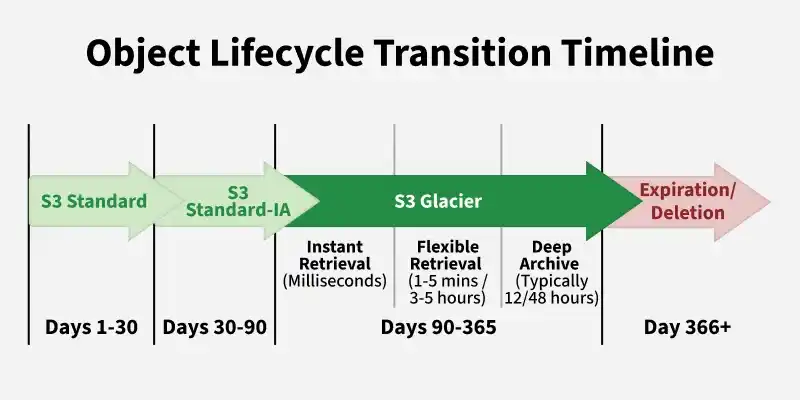
A typical S3 Lifecycle Rule sequence for log data behaves as follows:
Active Stage: New application logs are written to the high-performance S3 Standard class.
First Transition: After 30 days of inactivity, the lifecycle policy automatically shifts the logs to S3 Standard-IA to save costs.
Second Transition: After 90 days, the logs migrate to S3 Glacier Flexible Retrieval to benefit from archival rates.
Final Expiration: After 365 days, S3 executes an Expiration Action, permanently deleting the logs to optimize space.