VOOZH about

URL: https://www.geeksforgeeks.org/data-science/milvus/

⇱ Milvus - GeeksforGeeks


  • Courses
  • Tutorials
  • Interview Prep

Milvus

Last Updated : 16 Dec, 2025

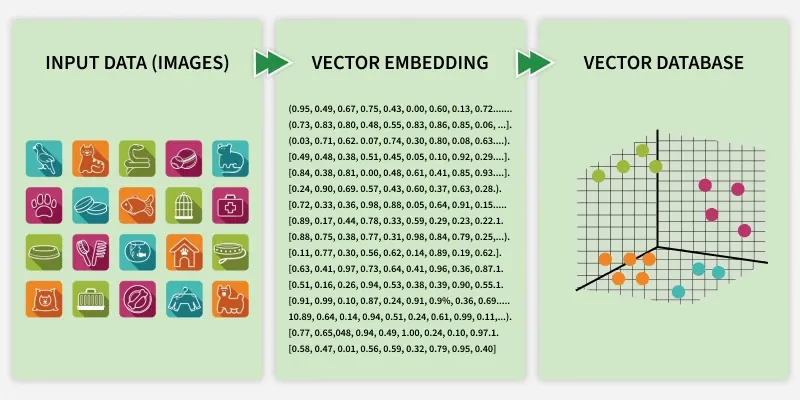
Milvus is an open-source vector database designed for managing and searching large-scale embedding data efficiently. It is widely used in AI, machine learning and semantic search applications where similarity search and retrieval play a key role.

👁 vector_db
Milvus

Key Features

  • Scalability: Supports a distributed architecture capable of handling billions of vectors.
  • Multiple Index Types: Integrates advanced similarity search algorithms like IVF, HNSW and ANNOY.
  • Hybrid Search: Combines vector search with scalar filters (metadata).
  • Multi-Modality: Works with embeddings from text, audio, video and images.
  • Multiple Language Support: It provides APIs for Python, Java and REST, making it easy to use in production systems.

Architecture

Milvus’s architecture is modular and distributed. It consists of several components:

  • Proxy: Manages requests from clients and handles authentication.
  • Coordinator: Controls query, data and index nodes ensuring consistency.
  • Data Node: Handles insert and delete operations.
  • Index Node: Builds and manages vector indexes.
  • Query Node: Executes search and retrieval operations.
  • Storage Layer: Uses object storage like MinIO or AWS S3 for persistent data.

Implementation of Milvus

Step 1: Install Dependencies

We will install the required dependencies,

Step 2: Connect to Milvus

We will connect to Milvus Lite:

  • Uses Milvus Lite which stores data in a local file (milvus.db) in Colab.
  • No need to specify host or port, the database runs embedded in our notebook.

Output:

Connected to Milvus Lite

Step 3: Create Collection

Defines a collection like a table with an auto-generated primary key (id) and a vector field (embedding). The vector field dimension (dim=128) must match our embedding size.

Output:

Collection created successfully

Step 4: Insert Sample Data

Creates synthetic vector data for demonstration. Each row is a 128-dimensional vector, typical for embeddings (e.g., sentence or image embeddings).

Output:

Inserted 100 vectors

Step 5: Create an Index for Faster Search

Here:

Output:

Index created successfully

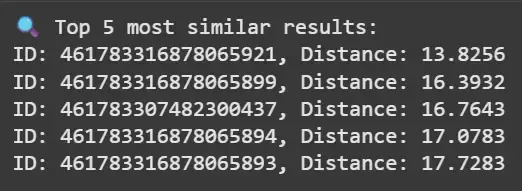
Step 6: Load Collection and Perform a Search

Here:

  • Loads the collection into memory before searching.
  • Searches for the top 5 most similar vectors using L2 distance.
  • Prints the IDs and their similarity scores (lower = more similar for L2).

Output:

👁 Screenshot-2025-10-27-181231
Results

Milvus vs. Other Vector Databases

Let's compare milvus with other vector databases,

Feature / DatabaseMilvusPineconeWeaviateChromaFAISS
Open Source YesNoYesYesYes
ScalabilityHigh (distributed)Very High (managed cloud)HighModerateLimited
Index TypesIVF, HNSW, ANNOY, DiskANNProprietaryHNSWHNSWIVF, Flat
Hybrid SearchYesYesYesNoNo
Metadata FilteringYesYesYesYesNo
Deployment OptionsOn-prem / CloudCloud onlyBothLocalLocal
Integration with ML ToolsExcellent (LangChain, PyMilvus)ModerateExcellentGoodGood
Best ForProduction-grade AI systemsEnterprise SaaSSemantic searchLightweight RAG setupsResearch and offline search

Use Cases

  • Semantic Search: Enables similarity search over text embeddings from models like OpenAI, Cohere or SentenceTransformers.
  • Recommendation Systems: Matches user embeddings to item embeddings for personalized recommendations.
  • Image & Video Retrieval: Finds visually similar content using feature embeddings from CNNs or CLIP models.
  • Anomaly Detection: Identifies unusual data points in high-dimensional feature space.
  • Generative AI & RAG Systems: Integrates with LangChain, LlamaIndex and LLMs for embedding-based retrieval augmentation.

Advantages

  • Open Source and Community-Driven: Regular updates and strong community support.
  • Scalable and Distributed: Handles billions of vectors across nodes.
  • High Performance: Millisecond-level query latency with optimized indexing.
  • Flexible Indexing: Supports multiple ANN algorithms for trade-offs between speed and accuracy.
  • Hybrid Search: Combines metadata and vector search seamlessly.
  • Rich Ecosystem: Integrates easily with AI frameworks like TensorFlow, PyTorch and LangChain.

Limitations

  • Operational Overhead: Requires setup and management of multiple components in production.
  • Resource Intensive: High memory and storage requirements for very large datasets.
  • Index Tuning Needed: Performance depends on careful tuning of index parameters.
  • Learning Curve: Understanding architecture and optimizing search performance may take time.
Comment

Explore