VOOZH about

URL: https://www.geeksforgeeks.org/devops/amazon-web-services-introduction-to-simple-workflow-service/

⇱ Amazon Web Services - Introduction to Simple Workflow Service - GeeksforGeeks


  • Courses
  • Tutorials
  • Interview Prep

Amazon Web Services - Introduction to Simple Workflow Service

Last Updated : 15 Jun, 2026

Amazon Simple Workflow Service (SWF) is a fully managed workflow orchestration service provided by AWS that helps developers coordinate distributed applications and background tasks. It enables reliable execution of long-running workflows by managing task scheduling, state tracking, retries, and inter-task dependencies automatically.

  • Decoupled Control Flow: Separates execution rules from the code running individual tasks.
  • State Tracking: Automatically records execution history without database overhead.
  • Long-Running Execution: Supports execution workflows running for up to one year.
  • Distributed Architecture: Coordinates tasks across local, cloud, and on-premises environments.
  • Reliable State Engine: Replaces complex custom state machines with a managed platform.

Core Workflow Functions

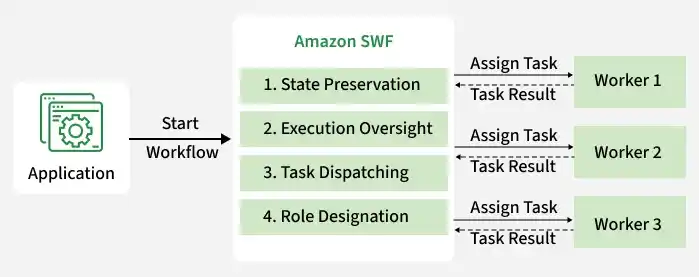
Amazon SWF maintains the execution flow of distributed systems through several automated operations:

  • State Preservation: Persistently records the current execution progress of active workflows.
  • Execution Oversight: Monitors task success and triggers recoveries if workers fail.
  • Task Dispatching: Holds tasks in centralized queues and assigns them to ready workers.
  • Role Designation: Determines which workers are permitted to execute specific activities.
👁 application

Core Concepts

The primary architectural building blocks of Amazon SWF include:

  • Workflow: A set of activities and coordination logic designed to achieve a business goal.
  • Domain: An isolated resource container that limits the scope of workflows within an account.
  • Activity: A single task or unit of work that must be registered before execution.
  • Activity Execution: Repeated runs of an activity, such as reprocessing an item order.

Amazon SWF Actors

Actors represent programs written in any language that interact with the SWF API to drive execution:

  • Workflow Starters: Applications like web portals or mobile apps that trigger a workflow run.
  • Deciders: Coordination logic programs that schedule next steps based on historical workflow data.
  • Activity Workers: Background processes that poll SWF, receive tasks, execute the business logic, and report results.

Execution History

SWF maintains a complete and consistent audit log of all events inside a workflow:

  • Comprehensive Records: Maintains a complete event history of workflow executions, including task scheduling, completion, failures, and retries.
  • Decider Input: Provides deciders with the source history needed to determine subsequent actions.
  • No Local State: Saves developers from managing database states within their custom code.

Executing a Workflow

Follow these steps to deploy and run an Amazon SWF workflow:

  • Register a domain in Amazon SWF.
  • Register workflow and activity types.
  • Develop activity workers to execute business tasks.
  • Create a decider program to control workflow execution.
  • Deploy workers and deciders on EC2 instances, containers, or on-premises systems.
  • Start workflow executions using applications or APIs.
👁 new_product_development_process

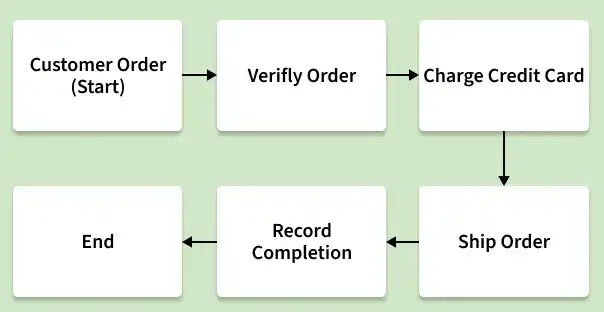
An e-commerce order-processing pipeline serves as a common workflow example consisting of four consecutive tasks:

  1. Validate the incoming order.
  2. Charge the customer's credit card.
  3. Ship the purchased merchandise.
  4. Record order completion logs.

Use Cases

  • Order processing systems
  • Media transcoding pipelines
  • Financial transaction processing
  • ETL and data-processing workflows
  • Human approval workflows
  • Machine learning task orchestration

Benefits

  • Workflow Reliability: Ensures durable execution using AWS-managed fault-tolerant infrastructure.
  • Scalable Architecture: Supports large-scale distributed applications efficiently.
  • Flexible Development: Works with applications written in different programming languages.
  • Reduced Operational Overhead: Eliminates the need to manage custom state machines and task queues.
  • Long-Running Workflow Support: Handles workflows running for months or even up to one year.
Comment