|
VOOZH | about |
|
VOOZH | about |
Terraform, developed by HashiCorp, is an industry-standard Infrastructure as Code (IaC) tool used to build, modify, and manage infrastructure safely and efficiently.
IaC is the practice of managing IT infrastructure using configuration files rather than manual, interactive configuration tools.
Terraform uses a declarative configuration language to define infrastructure and manage resources in a predictable, automated workflow. It allows teams to provision, update, and delete infrastructure consistently while supporting multiple cloud providers and environments. This flexibility makes Terraform a widely adopted tool for scalable and reusable infrastructure management.
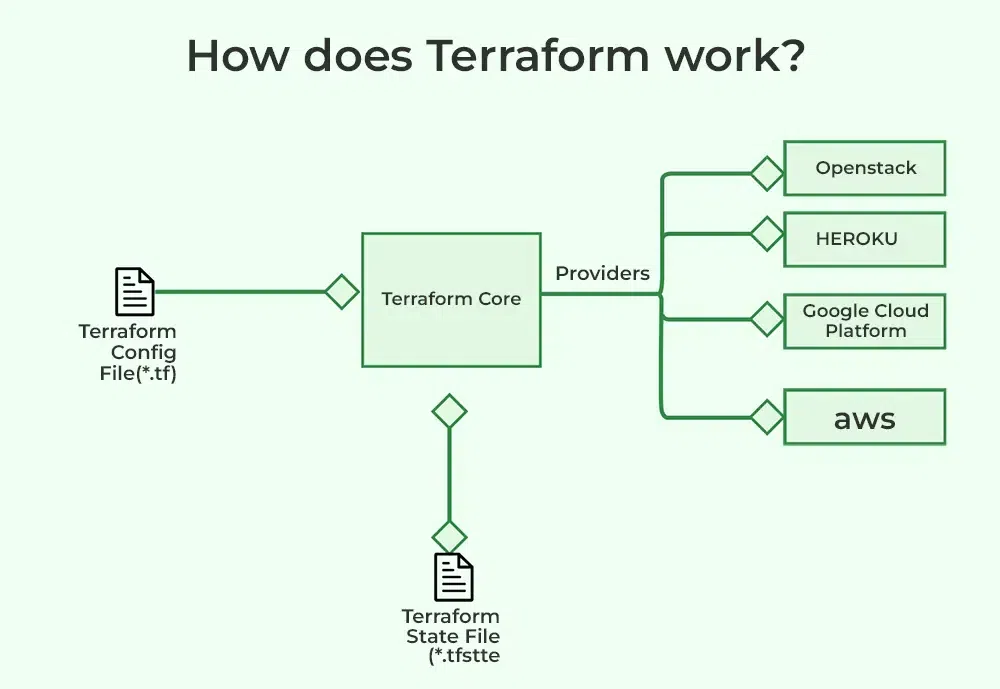
To understand how Terraform works, you need to understand its core components.
This is the binary you run on your laptop. It reads your configuration files and compares them to the current state of your infrastructure to calculate what needs to be done.
Terraform doesn't know how to talk to AWS or Azure directly. It uses Providers plugins that translate Terraform code into API calls for specific platforms.
terraform.tfstate)Terraform helps you automate the creation and management of infrastructure. To see a list of available commands in Terraform, you can run:
terraform --helpThis command will display all the available commands, with the most commonly used ones listed first. The primary Terraform commands include:
Terraform uses HashiCorp Configuration Language (HCL) to define infrastructure. HCL is designed to be both easy to read by humans and understandable by machines, making it a great fit for DevOps tools.
Infrastructure elements managed by Terraform are called resources. These can include virtual machines, S3 buckets, VPCs, and databases. Each resource is defined in a block, like this example for creating an AWS VPC:
resource "aws_vpc" "default_vpc" {
 cidr_block = "172.31.0.0/16"
 tags = {
 Name = "example_vpc"
 }
}
Terraform Provider defines the resource types and data sources Terraform can manage for that platform. Providers allow users to provision, configure, and manage cloud services, databases, networks, and more from a single workflow.
Key Points:
A Terraform module is a container for a set of related resources that perform a specific task, enabling organized and reusable infrastructure code.
Terraform Provisioners are useful for tasks like copying files or installing software on virtual machines. However, provisioners should be used sparingly, as they can introduce complexity and reduce the predictability of deployments.
Terraform state files allows Terraform to compare the current infrastructure with the desired state and apply only the necessary changes. While the state can be stored locally, remote storage is recommended for team environments to maintain consistency and prevent conflicts.
By default, Terraform stores the state file locally on the machine where it is executed. This approach is simple and effective for individual use or small projects but can introduce risks in collaborative environments
Limitations of Local State:
Remote state stores the Terraform state file in a shared backend such as AWS S3, Azure Storage, or Terraform Cloud. It is considered a best practice for production environments because it enhances security, collaboration, and reliability.
Common Remote Backends:
Private module Registry enables teams to manage, reuse, and distribute infrastructure code internally instead of relying on public registries. By configuring authentication, users can seamlessly reference these modules in their Terraform projects.
module block like public ones.$ terraform init👁 Terraform init$ terraform apply👁 Terraform apply$ terraform destroyImports an existing resource into the Terraform state, allowing it to be managed by Terraform.
$ terraform importOpens an interactive console for evaluating expressions in the Terraform configuration.
$ terraform consoleThis command updates the state of your infrastructure to reflect the actual state of your resources. It is useful when you want to ensure that your Terraform state is in sync with the actual state of your infrastructure.
$ terraform refreshBelow is a main.tf file that provisions a simple EC2 instance on AWS.
# 1. Define the Provider
provider "aws" {
 region = "us-east-1"
}

# 2. Define a Resource (The "What")
# Syntax: resource "type" "name"
resource "aws_instance" "my_web_server" {
 ami = "ami-0c55b159cbfafe1f0" # Ubuntu AMI ID
 instance_type = "t2.micro"

 tags = {
 Name = "DevOps-Server"
 }
}
resource: The keyword to define infrastructure.aws_instance: The type of resource (provided by the AWS plugin).my_web_server: The internal name Terraform uses to track this resource.{ } defines the properties (like ami and instance_type).Infrastructure as Code (IaC) tools are essential for automating and managing infrastructure. Terraform is a popular choice, but there are several other tools that serve similar purposes. Here’s a straightforward comparison to help you understand the differences.
The following is the comparison table between Terraform and Cloudformation:
| Feature | Terraform | AWS CloudFormation |
|---|---|---|
| Scope | Multi-Cloud (AWS, Azure, GCP, etc.). | AWS Only. |
| Language | HCL (Simple, clean, easy to read). | JSON or YAML (Can get very verbose and complex). |
| State | managed by user (Local or Remote). | Managed automatically by AWS. |
The following is the comparison table between Terraform and Ansible:
Feature | Terraform | Ansible |
|---|---|---|
Primary Use | Focuses on setting up and managing infrastructure. | Primarily for configuring systems and deploying applications. |
Language | Uses HCL for infrastructure definitions. | Uses YAML for defining tasks. |
Stability | Automatically ensures resources are created only if necessary. | Requires careful task definition to avoid duplication. |
Execution | Manages infrastructure changes using plans and state. | Executes tasks immediately without state tracking. |
Cloud Support | Excellent multi-cloud capabilities. | Useful for multi-cloud configurations but limited to system-level tasks. |