|
VOOZH | about |
|
VOOZH | about |
DNS (Domain Name System) converts domain names like www.google.com into IP addresses that computers use to communicate over the internet. Amazon Route 53 is AWS’s DNS service that helps route user requests to resources such as EC2 instances, Load Balancers, and S3 buckets. It also supports advanced traffic routing based on latency, health checks, and geographic location.
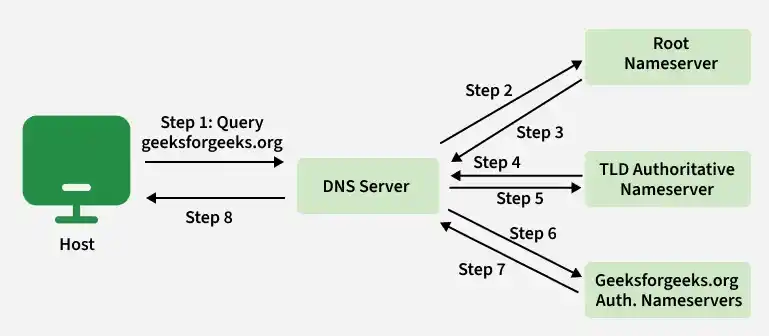
When a user types geeksforgeeks.org into a browser, DNS translates the domain name into an IP address so the browser can connect to the correct server.
The user’s computer sends a request to a Recursive Resolver (usually provided by the ISP or public DNS services like Google DNS 8.8.8.8) asking:
“What is the IP address of geeksforgeeks.org?”
The resolver contacts a Root Nameserver (.) and asks:
“Who manages the
.orgdomain?”
The root server replies with the address of the .com TLD server.
Next, the resolver asks the Top-Level Domain (TLD) server for .com:
“Who manages geeksforgeeks.org?”
The TLD server responds with the authoritative nameserver for amazon.com.
The resolver then queries the Authoritative Nameserver, such as Amazon Route 53:
“What is the IP address for geeksforgeeks.org?”
Route 53 returns the correct IP address, for example:
192.0.2.44
The resolver sends the IP address back to the user’s browser, and the browser connects to the web server hosting the website.
Let us walk through a common DNS troubleshooting scenario. Suppose a customer transferred the domain awskcvideos.com to Amazon Route 53, but the DNS records are not resolving after the transfer.
Step 1: After you sign an AWS management console, navigate to the Amazon Route53 console.
👁 ImageStep 2: In the navigation panel, choose Registered Domains.
👁 ImageStep 3: Click the desired domain name.
Step 4:Take note of the four nameservers.
Step 5: In the navigation panel choose the hosted zone and click the domain name.
👁 ImageStep 6: Take note of the four name servers in the hosted zone and verify the name servers listed in both sections marked.
👁 ImageIn this case, the customer with the domain "awskcvideos.com" will not be able to resolve any record in their hosted zone. The solution is to update the nameservers in the registered domain section with the nameservers in their Route53 hosted zone.
When DNS fails, it can be frustrating. Here is how to debug the most common errors.
Scenario: You transferred my-site.com to Route 53, but it's down.
Fix: Verify your Nameservers (NS).
SERVFAIL ErrorMeaning: The DNS server was unable to process this query due to a problem with the authoritative name server.
Common Fixes:
NXDOMAIN ErrorMeaning: "Non-Existent Domain." The domain name doesn't exist.
Common Fixes: