Ansible is a generally utilized open-source automation tool that works on the administration of complex IT systems. It helps in configuration management, application deployment, and task automation by utilizing playbooks, which are written in YAML (Yet Another Markup Language). YAML's human-readable format it simple to compose and comprehend playbooks, ensuring that automation assignments are clear and maintainable.
However, composing effective and efficient Ansible playbooks expects adherence to best practices. These prescribed procedures help in making modular, reusable, and secure automation scripts that can be effortlessly kept up with and scaled as your infrastructure develops. In this article, we will dig into the prescribed procedures for composing Ansible playbooks in YAML, giving rules and guides to assist you with composing better playbooks. Whether you are a beginner or an experienced user, these practices will improve the quality and viability of your automation work processes.
Primary Terminologies
Playbook: A playbook is a YAML file that defines a progression of tasks and roles for Ansible to execute on managed hosts. Playbooks are the center component of Ansible's configuration, deployment, and organization capacities.
Task: A task is a single unit of work in an Ansible playbook. Each task calls an Ansible module to play out a particular activity, like installing a package, copying a file, or designing a service.
Module: Modules are the structure blocks of Ansible. They are reusable, independent scripts that perform explicit activities. Models incorporate the adept module for managing packages on Debian-based systems and the help module for managing services.
Role: Roles are a method for putting together playbooks into reusable parts. A role regularly contains tasks, variables, files, layouts, and handlers, grouped to carry out a particular role, like setting up a web server or database.
Handler: Handlers are exceptional tasks that are triggered by different tasks. They are commonly used to restart benefits or perform different activities that need to happen provided that there is an adjustment of the system state.
Inventory: The inventory is a file that defines the hosts and groups of hosts on which Ansible will run undertakings. It very well may be a basic text document posting IP addresses or hostnames, or a more mind-boggling dynamic stock content that pulls information from an external source.
What is a Playbook in YAML?
An Ansible playbook is a basic piece of Ansible's architecture, written in YAML (Yet Another Markup Language). A playbook is basically a plan for defining and orchestrating tasks to be executed on managed nodes, it allows you to automate repetitive tasks, authorize system arrangements, and manage infrastructure efficiently.
Here are Key points to figure out about playbooks:
YAML Format:
YAML is a human readable serialization format. It is basic and instinctive, making it simple to write and understand playbooks.
YAML utilizes indentation to address structure, so it's vital to keep up with right space for the playbook to be parsed correctly.
Structure of a Playbook:
A playbook comprises of at least one "plays." Each play defines a set of tasks to be executed on specified hosts.
Plays can be considered segments of the playbook that target various groups of hosts or carry out various roles.
Parts of a Playbook:
Task: An task is a single unit of work in a playbook. Each task calls an Ansible module to play out a particular activity, like installing a package, copying a file, or designing a service.
Module: Modules are the structure blocks of Ansible. They are reusable, independent scripts that perform explicit activities. Models incorporate the adept module for managing packages on Debian-based systems and the help module for managing services.
Role: Roles are a method for putting together playbooks into reusable parts. A role regularly contains tasks, variables, files, layouts, and handlers, grouped to carry out a particular role, like setting up a web server or database.
Handler: Handlers are exceptional tasks that are triggered by different tasks. They are commonly used to restart benefits or perform different activities that need to happen provided that there is an adjustment of the system state.
Best Practices for Writing Ansible Playbooks
Use Clear and Descriptive Names
Ensure that your playbook names, task names, and variable names are clear and unmistakable, this improves readability and makes it simpler for others to understand the motivation behind each task.
- name: Install Nginx web server
hosts: webservers
tasks:
- name: Install Nginx package
apt:
name: nginx
state: present
Group Related Tasks into Roles
Use roles to group related tasks, making your playbooks modular and reusable, this further develops association and makes it more straightforward to manage complex configurations.
# Directory structure
roles/
webserver/
tasks/
main.yml
handlers/
main.yml
vars/
main.yml
templates/
files/
# Playbook using roles
- name: Configure web server
hosts: webservers
roles:
- webserver
Use Variables for Flexibility
Define variables to make your playbooks more adaptable and reusable. Variables can be defined in playbooks, roles, or inventory files.
# Playbook with variables
- name: Configure web server
hosts: webservers
vars:
http_port: 80
tasks:
- name: Install Nginx package
apt:
name: nginx
state: present
- name: Configure Nginx to listen on port {{ http_port }}
template:
src: nginx.conf.j2
dest: /etc/nginx/nginx.conf
Use Handlers to Manage Service States
Handlers allow you to define tasks that are triggered by different tasks. They are commonly used to restart services when a configuration change occurs.
- name: Configure web server
hosts: webservers
tasks:
- name: Install Nginx package
apt:
name: nginx
state: present
notify: Restart Nginx
handlers:
- name: Restart Nginx
service:
name: nginx
state: restarted
Step-by-Step Process to Writing an Ansible Playbooks in YAML
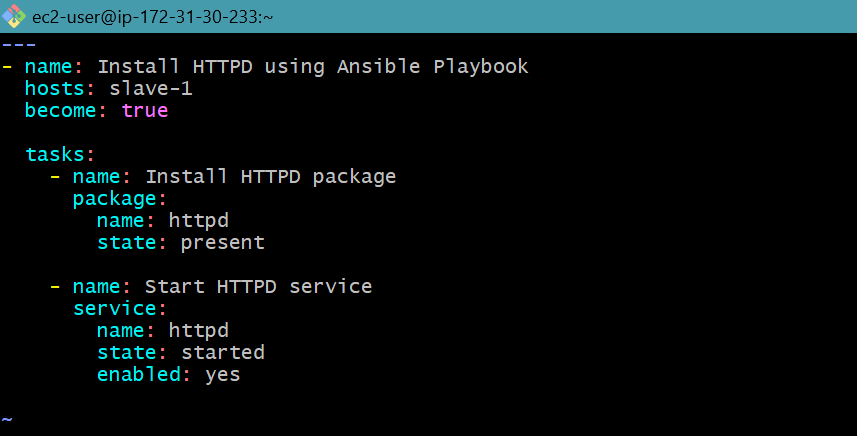
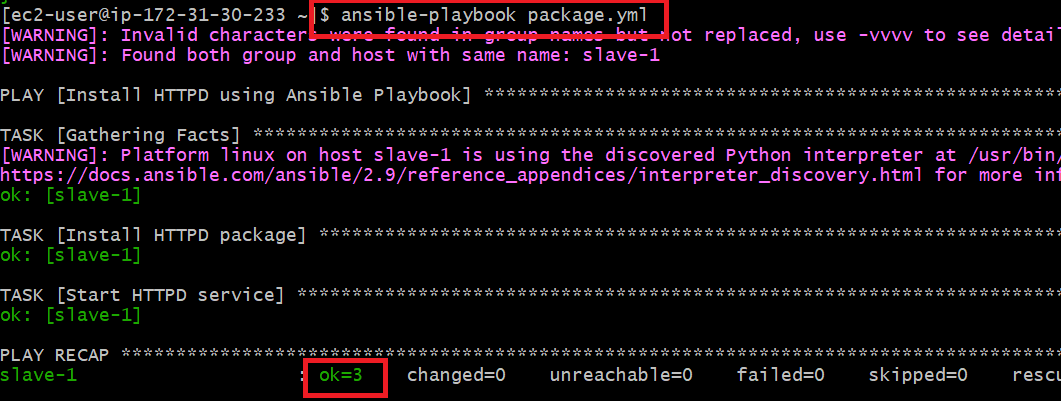
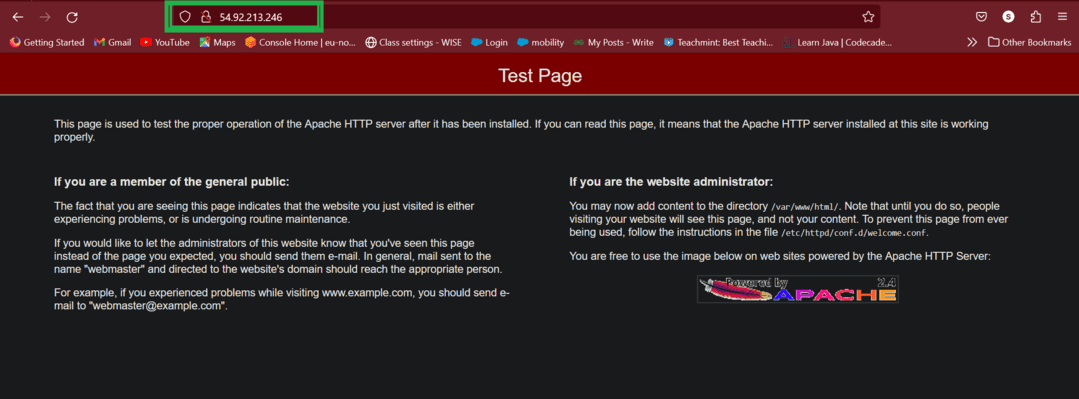
Here’s a step-by-step process to create a basic web server configuration playbook:
Writing Ansible playbooks in YAML is a fundamental expertise for anybody looking to automate IT tasks and manage infrastructure effectively. By following best procedures, you can ensure your playbooks are useful as well as viable, adaptable, and secure, using clear and descriptive names, grouping related tasks into roles, utilizing factors for adaptability, and utilizing controllers to manage service states are key techniques to improve your playbooks.
YAML's human-readable format, joined with Ansible's strong automation capacities, gives a vigorous structure to managing configuration, deployment, and orchestration tasks, by arranging your playbooks nicely and sticking to idempotent standards, you can make automation scripts that are both successful and versatile.
Understanding and carrying out these accepted procedures will assist you with composing cleaner, more productive playbooks, making it simpler to collaborate with colleagues and maintain with your automation scripts over the long run, whether you are a novice or an accomplished client, consistently refining your way to deal with composing playbooks will prompt more dependable and manageable infrastructure automation.