 |
VOOZH | about |
|
VOOZH | about |
In the realm of DevOps and IT automation, Ansible is a very strong tool utilized for automating the provision, configuration, and management of systems. One key feature of Ansible is the execution of tasks in an effective and repeatable manner through the use of loops, with the implementation of loops, users can perform repetitive tasks over a sequence of items or datasets, making playbooks much less complex and significantly shorter.
In this article, we will learn about using loops within Ansible to make our automation task more effective and scalable. Some major terminologies, a step-by-step guide, and some examples have been shown. By the end of this article, you will have a good grasp of how loops in Ansible can make your automation workflows much easier to manage.
Example:
- name: Example Playbook for Installing Packages
 hosts: all
 become: yes
 vars:
 packages:
 - httpd
 - mariadb
 - php
 tasks:
 - name: Install packages using loop
 yum:
 name: "{{ item }}"
 state: present
 loop: "{{ packages }}"
- name: Example Playbook for Creating Users
 hosts: all
 become: yes
 vars:
 users:
 alice:
 password: encrypted_password_for_alice
 bob:
 password: encrypted_password_for_bob
 tasks:
 - name: Create users using loop with_dict
 user:
 name: "{{ item.key }}"
 state: present
 password: "{{ item.value.password }}"
 with_dict: "{{ users }}"
 loop_control:
 label: "Creating user {{ item.key }}"
loop_control:
 label: "Creating user {{ item.key }}"
when: item == 'httpd'The following are the steps that helps in guiding on how to use ansible for efficient automation:
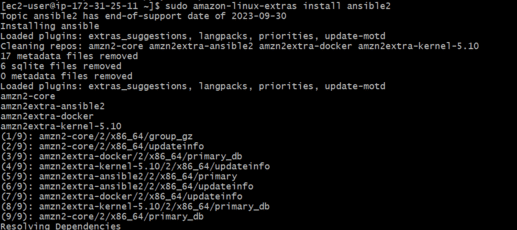
sudo amazon-extras-linux install ansible2 -yExample Playbook: Using Loops in Ansible
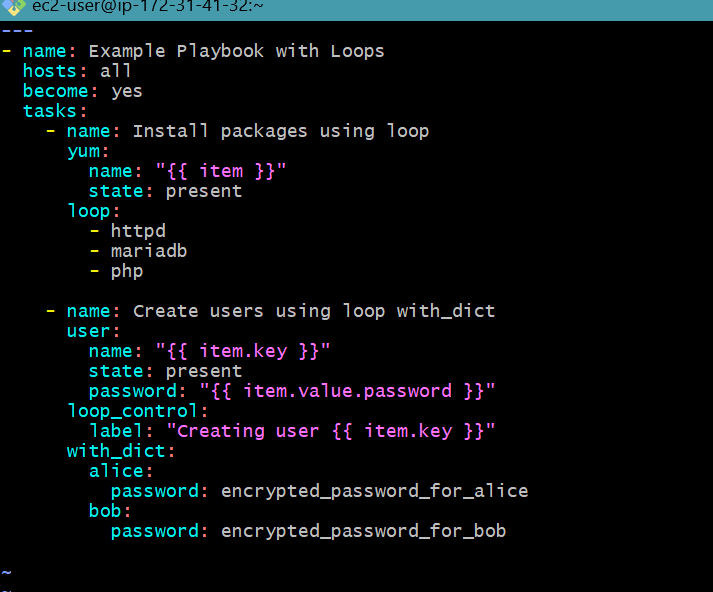
- name: Example Playbook with Loops
 hosts: all
 become: yes
 vars:
 packages:
 - httpd
 - mariadb
 - php
 users:
 alice:
 password: encrypted_password_for_alice
 bob:
 password: encrypted_password_for_bob
 tasks:
 - name: Install packages using loop
 yum:
 name: "{{ item }}"
 state: present
 loop: "{{ packages }}"

 - name: Create users using loop with_dict
 user:
 name: "{{ item.key }}"
 state: present
 password: "{{ item.value.password }}"
 with_dict: "{{ users }}"
 loop_control:
 label: "Creating user {{ item.key }}"
Install Packages
ansible-playbook <playbook name>Using loops in Ansible beefs up your automation tasks with efficiencies and scalability that are very significant. On using loops, you will have a way of reducing duplication in the activities you perform, making things consistent across all configurations of the same kind, and lowering playbook complexity, whether it's installing packages, creating users, or system configuration, loops help you deal with multiple items in a very concise and orderly manner.
In this article, we have dived into the basic ideas and terminologies that are associated with loops in Ansible, we have demonstrated detailed examples of working with loops to automate everyday tasks, indicating best practices and practical uses. Now you can optimize your Ansible playbooks to ensure your automation processes remain robust and maintainable.


.png)