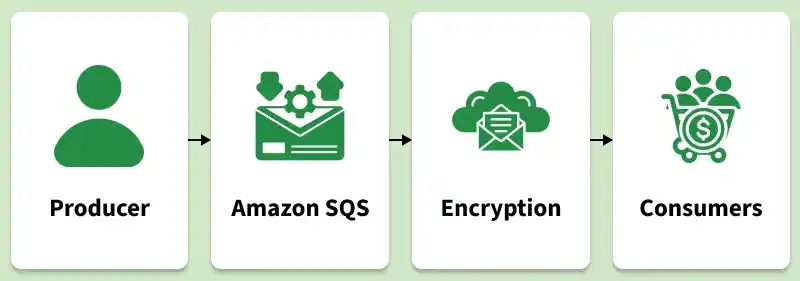
Modern distributed applications often experience traffic spikes, service failures, or uneven workloads. Amazon Simple Queue Service (SQS) is a fully managed message queuing service that helps applications remain reliable by acting as a buffer between services, enabling asynchronous message processing while decoupling and scaling microservices, distributed systems, and serverless applications without losing data.
Eliminates direct dependency bottlenecks by allowing application components to send and retrieve messages independently.
Automatically scales to handle varying workloads without requiring manual infrastructure management or provisioning.
Stores messages redundantly across multiple AWS Availability Zones to ensure high availability and durability.
Supports FIFO (First-In-First-Out) queues for ordered message processing and message deduplication.
Uses a flexible pay-as-you-go pricing model with a free tier that includes up to one million requests per month.
Lifecycle
Understanding SQS requires knowing the step-by-step lifecycle of a message as it moves through a distributed system:
Producer Sends Message: A producer (such as a web server) sends a message payload to an SQS queue. The message natively supports text payloads (JSON, XML, or plain text) up to 256 KB in size.
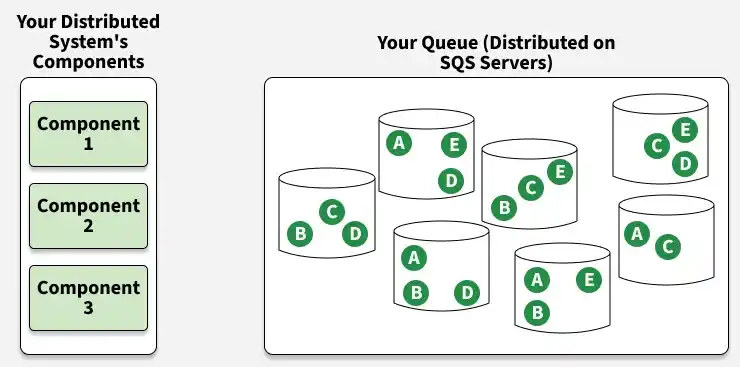
Message Storage: SQS redundantly distributes and stores the message across multiple SQS servers for high availability and durability.
Consumer Polls: A consumer (such as an EC2 instance or AWS Lambda function) polls the queue and retrieves the message.
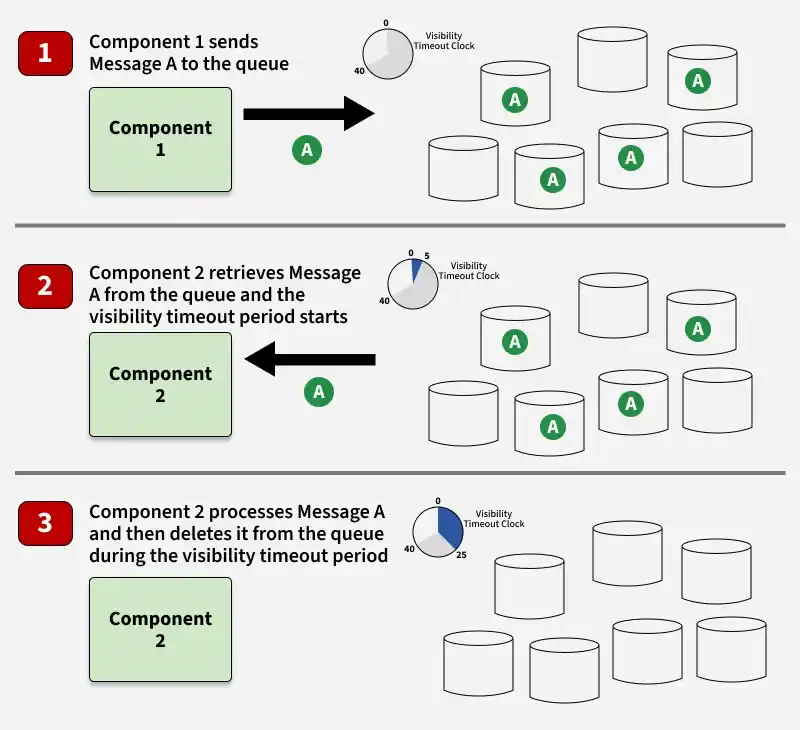
Visibility Timeout (In-Flight): When a message is retrieved, SQS starts a Visibility Timeout clock (defaulting to 30 seconds). During this period, the message is kept in the queue but is "invisible" to other polling consumers to prevent double-processing.
Success Deletion: If the consumer processes the message successfully, it issues a "DeleteMessage" API call using the receipt handle to permanently purge the message from the queue.
Failure Recovery: If the consumer crashes or fails before deleting the message, the Visibility Timeout expires, and the message automatically becomes visible again in the queue for another consumer to process.
A DLQ is a secondary queue targeting messages that repeatedly fail to process. If a message cannot be successfully consumed after a configured maximum receive count (e.g., 5 attempts), SQS moves it to the DLQ. This prevents "poison pill" messages (messages with bad payloads that crash consumers) from blocking main queue traffic.
2. Long Polling vs. Short Polling:
Short Polling (Default): The receive message request queries only a subset of SQS servers and returns immediately, even if no messages are found. This can result in empty responses and higher API transaction costs.
Long Polling: SQS waits up to 20 seconds for a message to arrive in the queue before sending a response. It is highly recommended to configure "WaitTimeSeconds > 0" to minimize empty API responses and lower transaction costs.
3. Delay Queues: This configuration postpones the delivery of newly added messages to the queue for a specified duration (up to 15 minutes). This is useful when background tasks require an initial cooling-off period before running.
4. Batch Operations: To reduce network overhead and lower transactional costs, SQS supports sending, receiving, and deleting messages in batches of up to 10 messages (or up to 256 KB) per single API call.
Batch Processing: Manages high-volume data workloads—such as image transcoding, generating reports, or data ingestion—by allowing multiple workers to process tasks concurrently.
Decoupled Microservices: Acts as the asynchronous communication link in microservice architectures, allowing services to pass messages without requiring direct knowledge of each other.
E-commerce Order Workflows: Manages order placement spikes by buffering orders in a queue, allowing checkout workers to process them sequentially without dropping data.
Notification Pipelines: Buffers and coordinates alert messages or push notifications across multi-tier application environments.
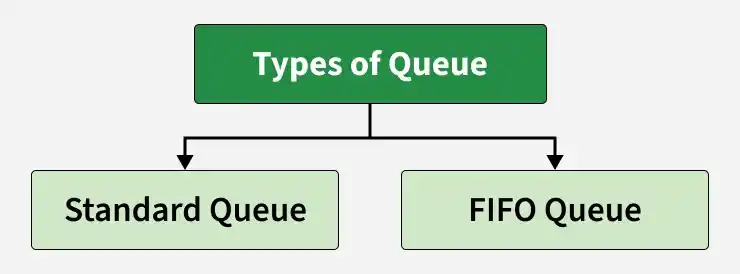
AWS SQS Queue Types
Selecting the correct queue type is a foundational architectural decision that impacts throughput, ordering, and data deduplication:
Supports up to 3,000 transactions per second (when using batching).
Best-effort ordering (messages are occasionally delivered out of order).
First-In-First-Out ordering (messages are strictly processed in order).
At-least-once delivery (occasional message duplication is possible).
Exactly-once delivery (built-in deduplication guarantees no duplicate messages).
Best for decoupling microservices, high-volume logs, and generic batching.
Best for financial transactions, flight booking, and inventory updates.
Can use any valid name (e.g., my-queue).
Must end in the `.fifo` suffix (e.g., my-queue.fifo).
Pricing Model
SQS operates under a pay-as-you-go pricing model with a generous free tier:
Free Tier: The first 1 million requests are free every month.
Standard Queues: Charged at approximately $0.40 per 1 million requests after the free tier.
FIFO Queues: Charged at approximately $0.50 per 1 million requests.
Data Egress: Data transferred out to the internet is subject to standard AWS transfer rates; transfers to EC2 or Lambda in the same region are free.
Note: An SQS request constitutes any single API action (such as Send, Receive, or Delete). Using SQS batch operations allows up to 10 messages to count as a single API request, optimizing costs.
AWS SQS Command Line Interface (CLI)
The AWS CLI allows you to manage queues and interact with messages directly from the terminal. Common commands include: