|
VOOZH | about |
|
VOOZH | about |
Some of the popular group chats like Slack and HipChat are now used commonly almost in every organization. For a more efficient and scalable method of communication, ChatOps is designed. With ChatOps we can bring teams together in a way the email and instant messaging apps never could.
In this article, we will explore what ChatOps is, its relationship with DevOps, the Benefits of ChatOps its impact on businesses, and the evolution of ChatOps with AI.
ChatOps is also known as "Conversation-driven collaboration" or "Conversation-driven DevOps". ChatOps is mainly designed for simple and fast messaging between the development team members. ChatOps is derived from DevOps and it uses chatbots that generally work with basic plugins and scripts. As we know it is a collaboration model that connects tools, people, processes, and automation into a transparent workflow.
ChatOps allows teams to perform tasks, manage workflows, and perform actions within a chat platform. So instead of switching between the different tools and interfaces, users can easily execute commands, and access the information from a chat interface. This method gives transparency, collaboration, and efficiency within teams by centralizing the operations and communication and providing a space where everyone can engage in managerial processes.
ChatOps is the integration of two digital-era technologies: chat platforms and activity automation. ChatOps and DevOps are intermixed concepts. DevOps is nothing but collaboration and integration between development and Operations teams to accelerate faster software development and delivery.
ChatOps is the extension of DevOps as it leverages real-time communication to enhance collaboration, tracking and execution of tasks related to the software development and operations. Furthermore DevOps aims to promote continuous integration and Continuous Delivery(CI/CD). Whereas ChatOps provides a platform for collaboration and automation, enabling the DevOps team to work more efficiently.
Some of the key benefits of ChatOps are described below:
ChatOps tools helps businesses to fulfill IT tasks by combining chat interfaces with intelligent bots, providing a platform to communicate and run commands.
Generally, there are three categories of tools for deploying a ChatOps working environment:
1. Chatbots such as AWS Chatbot and Hubot.
2. Chatroom integration tools, such as Slack and Mattermost.
3. Notification systems such as PagerDuty and Splunk On-Call.
Examples of ChatOps tools and vendors include VictorOps, StackStorm, xMatters, OpsGenie, Botkit, and many open source adaptors and bots. Most major IT ops, monitoring, and devops tools now provide chatbot integrations.
After selecting a ChatOps tool, all the collaborators are comfortable of working in the framework's language. For example, if your team is working on Ruby, then you might want to use Lita, which is written in the same language.
ChatOps has been recently used in a more collaborative manner. Below are some of the companies that are adopting ChatOps to enhance their communication and Operations.
1. Slack: It is a leading chat platform as a single place for messaging, tools and files. There are two methods of chat in slack Such as Group Chat(Channels) and direct message(Person-to-Person chat).
2. Microsoft Teams:Microsoft has integrated AI into Microsoft teams for better communication and collaboration to enhance productivity and automation. It is a hub that brings together chats, files, meetings and tools all in a single place.
3. Zoom: Zoom is a organization that gives an AI assistant for meetings. They use Ai to automate tasks like Scheduling, invitations and meeting documentation.
ChatOps, with or without AI, is an very efficient way to collaborate and automate tasks with increasing efficiency , transparency and agility. And its relationship with DevOps in businesses make it a valuable approach for companies to remain competetive and innovative.
Deploying a ChatOps environment involves several steps and can vary based on the tools and platforms you choose. It involves setting up a chatbot within a chat application that can execute operational tasks. The chatbot is typically integrated with various tools and services, allowing for automation of tasks and facilitating collaboration. Here is a step-by-step guide with screenshots for deploying a ChatOps environment:
Select a chat platform that supports bots and integrations, such as Slack, Microsoft Teams, or Discord.
👁 Slack web interfaceSign up and create a workspace on your chosen chat platform. Add team members who will participate in the ChatOps environment.
👁 Create a WorkspaceDecide which tools (Deployment, Monitoring, CI/CD, etc.) you want to integrate into the ChatOps environment. Find and install appropriate integrations or bots for these tools in your chat platform's app marketplace.
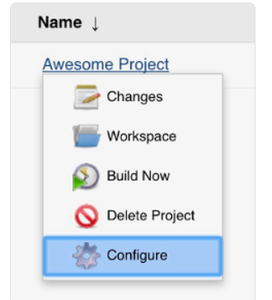
👁 Choose and install from this apps marketplaceWe need to configure integrations with tools and services, such as Jenkins, GitLab, and Kubernetes. This process typically involves adding webhooks or using APIs provided by these tools and services. For example, if you want to integrate your ChatOps environment with Jenkins, you can follow these steps:
Now that your ChatOps environment is integrated with the necessary tools and services, you'll need to configure it for deployments. This involves writing scripts that can be executed via the chat interface to perform various operations. For example, a deployment script triggered by a command in the chat platform.
Ensure that the configured commands in the chat platform trigger the expected actions in the integrated tools.
Create documentation for team members explaining how to use the ChatOps bot and the available commands. Conduct training sessions for your team to familiarize them with the ChatOps environment and best practices.
Finally, it's crucial to secure your ChatOps environment by limiting access to authorized users and ensuring that only authorized users can execute commands. This can be achieved by configuring your ChatOps environment's authentication and authorization settings, as well as using appropriate permissions for each user or team.
In summary, deploying a ChatOps environment involves deploying the environment itself, configuring integrations, configuring the environment for deployments, and securing it. By following these steps and leveraging the proper tools and services, you can successfully set up a ChatOps environment for your team.
Remember, specific steps and tools can vary widely based on your chosen chat platform, tools for integration, and the actions you want to perform via ChatOps.
ChatOps and chatbots are both related to communication in a digital environment, but they serve different purposes.
ChatOps: ChatOps is a term that combines two words: chat and operations. It refers to the integration of automated tools and systems into the communication platform, which enables better collaboration, decision-making, and automation. ChatOps enhances human-machine interaction and supports efficient and effective work.
ChatOps facilitates real-time communication, task execution, and access to operational data within the chat platform. It is often used to streamline DevOps workflows, incident management, and deployment processes.
Chatbots: On the other hand, Chatbots are programs designed to simulate human conversation through the use of AI. They are designed to automate simple, repetitive tasks or answer common questions.
In a ChatOps environment, Chatbots may play a supporting role, providing assistance and answering questions, while ChatOps provides the infrastructure for more complex interactions and operations.
ChatOps | Chatbots | |
|---|---|---|
Conversations | ChatOps handles fairly complex conversations to execute tasks. | while chatbots tend to have simpler, narrow conversations. |
Purpose | ChatOps focuses on facilitating operations and tool integration through conversations | while chatbots are used more for customer service and helpdesk automation. |
Integration | ChatOps platforms integrate deeply with other infrastructure tools and services to control them. | Chatbots have less integration and rely more on understanding natural language. |
Automation | ChatOps automates workflows through conversations. | whereas chatbots just aim to have natural language conversations. |
Target Users | ChatOps tools are designed for internal technical teams like devops engineers, SREs, etc. | Chatbots target end-users and customers. |
ChatOps is all about streamlining operations by bringing collaboration and automation into the chat environment. Here are some best practices to follow when implementing and using ChatOps:
ChatOps is a concept that revolutionizes the way development teams operate by leveraging the power of automation, collaboration, and communication. By incorporating best practices such as transparency, automation of repeatable tasks, clear communication, training, and continuous improvement, ChatOps can help organizations enhance productivity, improve team collaboration, and reduce errors.