|
VOOZH | about |
|
VOOZH | about |
Amazon Web Services is a leading cloud provider which provides us with plenty of Paas, and Iaas, and services that we can use to build and deploy our applications. we gonna build and Deploy a REST API with API Gateway which acts as a proxy to S3 and can be used to perform Read/Write on S3 without any intermediate service, here we gonna use an open-source framework Serverless for deploying our API.
Amazon API Gateway is a fully managed service that makes it easy for developers to create, publish, maintain, monitor, and secure APIs at any scale.
Amazon Simple Storage Service (Amazon S3) is an object storage service offering scalability, data availability, security, and performance.
Serverless is a framework that can be used to build applications on AWS, this will encapsulate things and provide us with a simple structure to create something in AWS. We can Code less and Build more with Serverless.
Install serverless by running the below command
npm i -g serverlessCheck the version of serverless
serverless -vTo invoke S3 from API Gateway, it must have the required IAM permissions, for that we need to create an IAM Role and attach it to API Gateway.
Best Practice: Write IAM policies as strictly as possible to avoid any security issues.
IAM Policy Statement:
{
 "Version": "2012-10-17",
 "Statement": [
 {
 "Action": "s3:PutObject",
 "Resource": "arn:aws:s3:::my-bucket/*",
 "Effect": "Allow"
 }
 ]
}
The above policy has one statement `s3:PutObject`, for resource `<S3 ARN>` which allows Put Object requests on S3 Bucket.
Trusted Policy: It is a policy in which we define the principals that we allow to assume the role, so here only the API Gateway service can assume this role based on the below policy.
{
 "Version": "2012-10-17",
 "Statement": [
 {
 "Effect": "Allow",
 "Principal": {
 "Service": "apigateway.amazonaws.com"
 },
 "Action": "sts:AssumeRole"
 }
 ]
}
Note: We'll be creating the above role using the serverless script given below.
To create a REST API, we need to do the following:
We can automate all the above things using the below script.
Write the below content serverless.yml
service: api-gateway-to-s3-rest-api

useDotenv: true

provider:
 name: aws
 stage: ${opt:stage, 'dev'}
 region: ap-south-1
 lambdaHashingVersion: 20201221
 logs:
 restApi: true
 level: INFO
 deploymentBucket:
 blockPublicAccess: true
 name: ${self:custom.config.CODE_DEPLOYMENT_BUCKET}
 maxPreviousDeploymentArtifacts: 3

custom:
 config:
 CODE_DEPLOYMENT_BUCKET: ${env:CODE_DEPLOYMENT_BUCKET}
 S3_BUCKET: ${env:S3_BUCKET}


resources:
 Resources:
 IAMRoleForAPIGateway:
 Type: AWS::IAM::Role
 Properties:
 AssumeRolePolicyDocument:
 Version: '2012-10-17'
 Statement:
 - Effect: Allow
 Principal:
 Service: apigateway.amazonaws.com
 Action: sts:AssumeRole
 Description: Role for ${self:service}
 Path: /
 Policies:
 - PolicyName: ${self:service}-role-policy
 PolicyDocument:
 Version: '2012-10-17'
 Statement:
 - Effect: Allow
 Action: s3:PutObject
 Resource: arn:aws:s3:::${self:custom.config.S3_BUCKET}/*
 RoleName: ${self:service}-${self:provider.stage}-Role
 RestAPI:
 Type: AWS::ApiGateway::RestApi
 Properties:
 Description: API to write request_body to S3
 EndpointConfiguration:
 Types:
 - REGIONAL
 Name: ${self:service}-${self:provider.stage}
 RestAPIResource:
 Type: AWS::ApiGateway::Resource
 Properties:
 ParentId: !GetAtt RestAPI.RootResourceId
 PathPart: api
 RestApiId: !Ref RestAPI
 RestAPIObjectPathResource:
 Type: AWS::ApiGateway::Resource
 Properties:
 ParentId: !Ref RestAPIResource
 PathPart: '{object_path+}'
 RestApiId: !Ref RestAPI
 RestAPIPutMethod:
 Type: AWS::ApiGateway::Method
 Properties:
 HttpMethod: PUT
 AuthorizationType: NONE
 Integration:
 Type: AWS
 IntegrationHttpMethod: PUT
 Uri: arn:aws:apigateway:${self:provider.region}
 :s3:path/${stageVariables.bucket_name}/{object_path}
 Credentials: !GetAtt IAMRoleForAPIGateway.Arn
 RequestParameters:
 "integration.request.path.object_path" : "method.request.path.object_path"
 IntegrationResponses:
 - StatusCode: 200
 - StatusCode: 400
 RequestParameters:
 "method.request.path.object_path": true
 OperationName: write-data-to-s3
 ResourceId: !Ref RestAPIObjectPathResource
 RestApiId: !Ref RestAPI
 MethodResponses:
 - StatusCode: 200
 ResponseModels:
 application/json: "Empty"
 - StatusCode: 400
 ResponseModels:
 application/json: "Error"

 RestAPIDeployment:
 Type: AWS::ApiGateway::Deployment
 Properties:
 RestApiId: !Ref RestAPI
 DependsOn:
 - RestAPIPutMethod

 RestAPIStage:
 Type: AWS::ApiGateway::Stage
 Properties:
 DeploymentId: !Ref RestAPIDeployment
 Description: ${self:provider.stage} stage
 RestApiId: !Ref RestAPI
 StageName: ${self:provider.stage}
 Variables:
 bucket_name : ${self:custom.config.S3_BUCKET}
In the provider, we configure cloud provider details like cloud provider name, region, logs config, etc.
In this section (not a default option, we can replace custom with any name) we gonna maintain any configuration variables required for this script.
resources to create, here in this case we're creating the REST API along with associated resources, methods, and its integration.
Here we'll not be creating a new bucket through this script, create an s3 bucket if not exists already.
Here in this script, we've below env variables:
To deploy our REST API, you can run the below command.
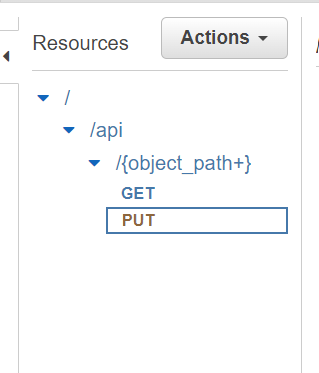
serverless deploy --stage alpha👁 Deploy Serverless ApplicationAfter running the above command successfully you can check API Gateway, you'll find REST API with GET and PUT methods configured with S3 as a proxy.
Here object_path+ (suffix +) indicates that we can pass as many folders in the place of object_path /dir_1/dir_2/..../dir_n/myfile.txt , without + we can only pass one string /myfile.txt .
👁 Resources in AWS API GatewayWe can invoke the API through any browser client to test out the API which will read/write a file in the S3.
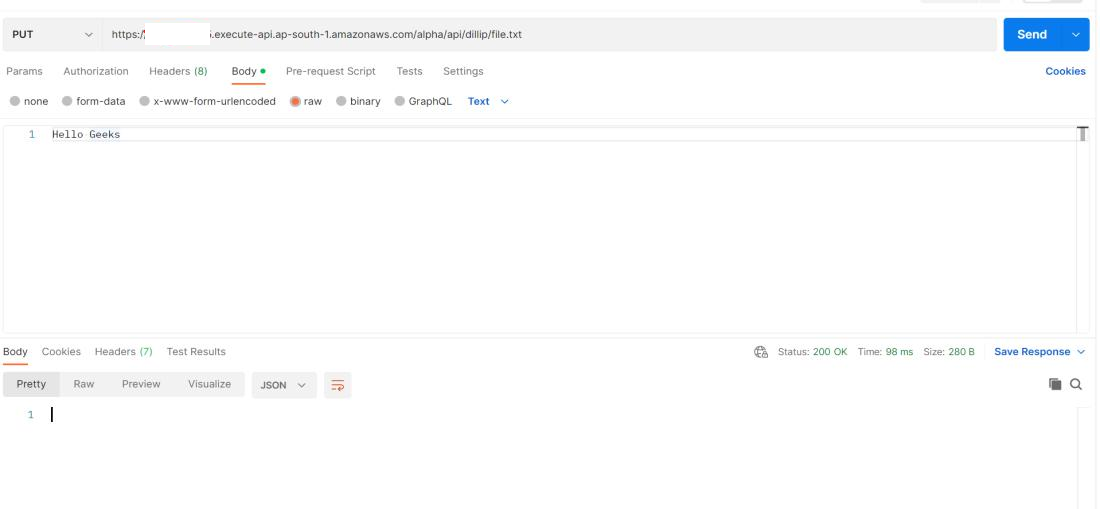
In the below image I've invoked an API with the PUT method, containing a request body Hello Geeks the new file will be created in our bucket with the object path dillip/file.txt in the below case.
Note: As we've set NONE for method authorization, no need to pass any authorization headers or data.
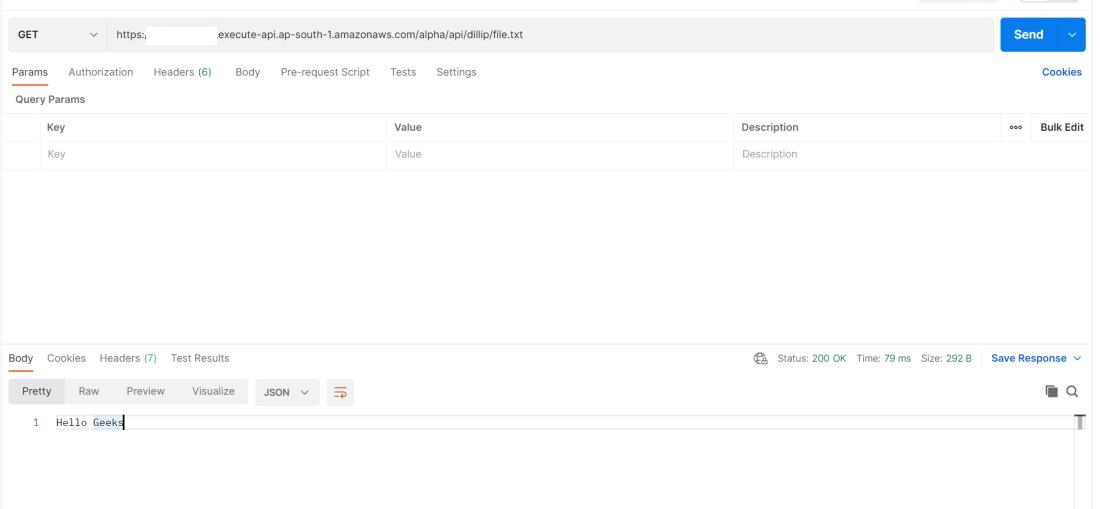
👁 Put methodIn the below image, I've invoked an API with the GET method, retrieving the file in our bucket with the object path dillip/file.txt we've created in the above PUT request.
👁 Get methodThere is an alternate way to do the above thing, i.e API Gateway REST API with Lambda integration, but we've to choose the approach based on our required outcome.
API Gateway -> AWS Lambda -> AWS S3 (Lambda as Intermediate), this approach is suitable if you wanna perform some complex logic upon objects before making a request to S3.
In this article, we've learned a simple way to build REST API which exposes GET and PUT methods to retrieve or manipulate the objects in the AWS S3, here AWS API Gateway acts as a proxy to AWS S3 Bucket.

.jpg)
-(1).jpg)