|
VOOZH | about |
|
VOOZH | about |
A load balancer in GCP (Google Cloud Platform) is a service that distributes incoming network traffic across multiple backend resources such as virtual machines (VMs), container instances, and managed instance groups.
The main purpose of a load balancer is to improve the availability and scalability of the backend resources by distributing the incoming traffic evenly among them. This helps to avoid overloading any single resource and provides better performance, reliability, and fault tolerance for the applications.
Pre-requisites: GCP
To create a load balancer in Google Cloud Platform (GCP), you can follow these general steps:
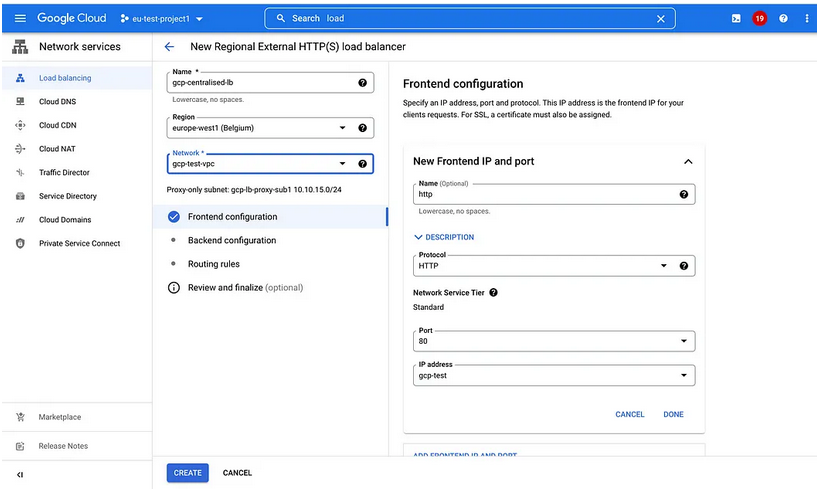
For example, to create an HTTP(S) Load Balancer, you can follow these steps:
You can check the status of your load balancer in the GCP Console by navigating to Navigation Menu > Networking Services > Load Balancing.
After entering Project ID and Backend Service name click on “Add backend Service” button to add cross service backend.
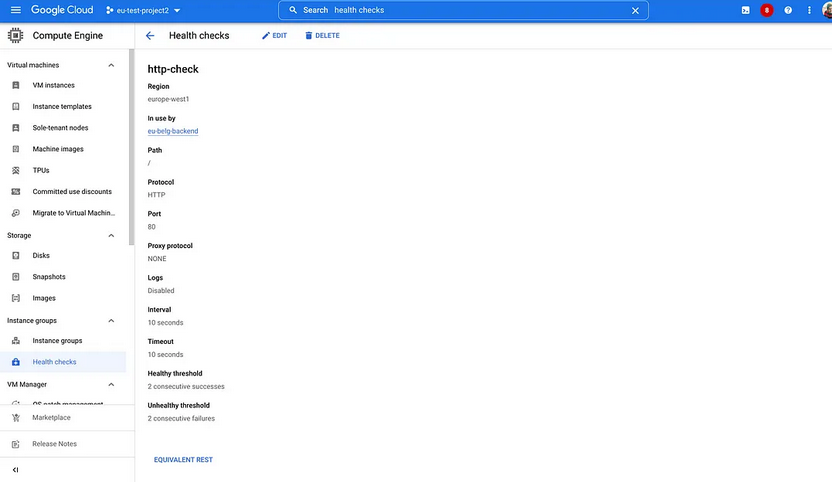
Healthcheck helps us to ensure backend is ready to accept traffic on specified port
Then,
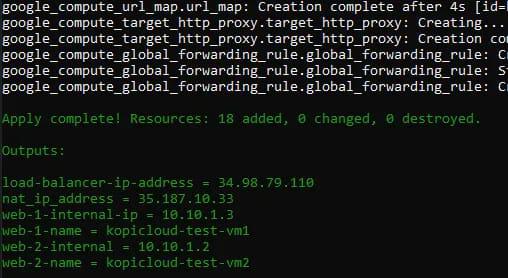
After you create your load balancer, you can test it by sending traffic to its IP address or DNS name. You can also monitor your load balancer's traffic and health using the GCP Console or command-line tools.
Note that these are general steps, and the exact steps to create a load balancer in GCP may vary depending on the load balancer type and your specific requirements.
If you got any error like: ModuleNotFoundError, then Check if the necessary modules are installed: In this case, make sure that you have installed the google-cloud-compute library. You can check this by running the following command in your terminal or command prompt:
If you see no output, it means the library is not installed. In that case, install it using the following command:
This code defines a backend service, target pool, and forwarding rule, then uses the insert_backend_service, insert_target_pool, and insert_forwarding_rule methods to create them in GCP.
Note: This code is just an example, and you may need to modify it to fit your specific requirements.
Output:
The output of the code depends on the success or failure of the API requests to create the backend service, target pool, and forwarding rule. If the requests are successful, the code should print the self-links of the created resources, similar to the following:
Backend service created:
https://www.googleapis.com/compute/v1/projects/my-project
/global/backendServices/my-backend-service
Target pool created:
https://www.googleapis.com/compute/v1/projects/my-project
/regions/us-central1/targetPools/my-target-pool
Forwarding rule created:
https://www.googleapis.com/compute/v1/projects/my-project
/regions/us-central1/forwardingRules/my-forwarding-rule
If the requests fail, the code may raise an exception with an error message explaining the reason for the failure. In that case, you may need to debug the issue by checking the error message and the API documentation to identify the problem and possible solutions.