|
VOOZH | about |
|
VOOZH | about |
Docker volumes are a crucial component in Docker that are used to manage persistent data for containerized applications. They are storage units that can be attached to one or more containers, allowing data to be shared and persist beyond the lifecycle of a single container. They are managed by Docker and are stored outside the container's writable layer.
They are prominently used for:
Unused volumes if accumulated over time, can consume disk space resulting in wastage of resources. To prevent this unnecessary docker volumes must be frequently removed. Removing Docker volumes helps free up space and keep your Docker environment clean. Here’s how you can manage and remove Docker volumes.
Unnecessary docker volumes can be removed as follows:
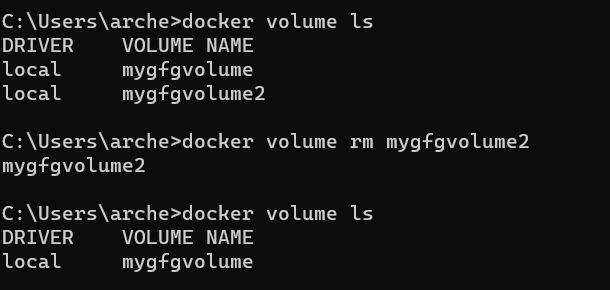
To see all docker volumes that are in use/ available use the following command:
docker volume lsAn unwanted volume can be removed by either using it's volume Id or volume name as follows:
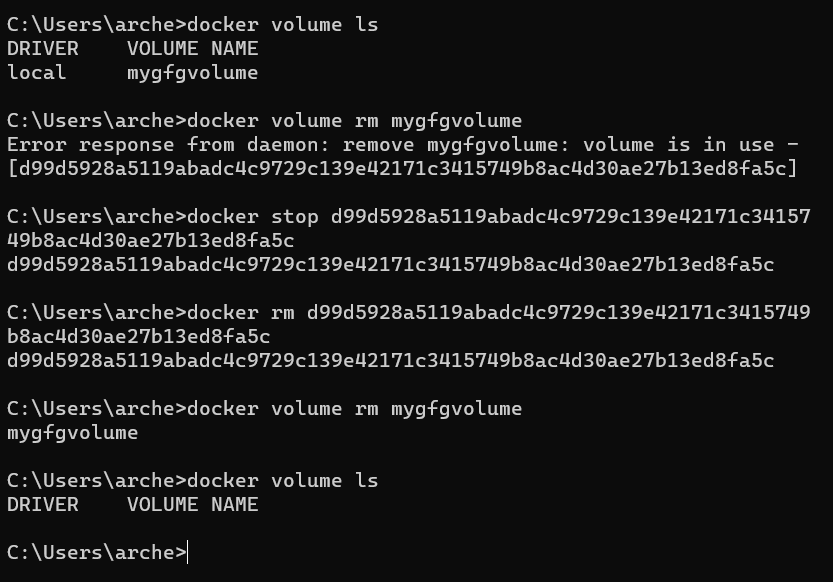
docker volume rm <volume_name>Sometimes, a volume may be in use by a container, and attempting to remove it will result in an error. To forcefully remove a volume, you must first ensure that no containers are using it. Stop and remove any containers that might be using the volume, then proceed to remove the volume as follows:
docker volume ls
docker volume rm <volume_name>
docker stop <container_id>
docker rm <container_id>
docker volume rm <volume_name>
To remove all unused anonynmous volumes the following command can be used:
docker volume pruneThis helps by freeing up space used by anonymous volumes that are not under use