VOOZH about

URL: https://www.geeksforgeeks.org/devops/kubernetes-ingress-controllers-routing-and-load-balancing-for-services/

⇱ Kubernetes Ingress Controllers - GeeksforGeeks


  • Courses
  • Tutorials
  • Interview Prep

Kubernetes Ingress Controllers

Last Updated : 16 Sep, 2025

The Ingress Controller acts like a smart receptionist, routing traffic to the correct service, handling HTTPS, and balancing loads across Pods. With a single entry point, it simplifies traffic management, keeps services secure, and ensures smooth operation even as your applications scale.

It manages external access to services in a cluster. It evaluates Ingress resources, enforces routing rules, performs SSL/TLS termination, and can provide load balancing, authentication, and URL-based traffic routing.

Key Components of Ingress Controllers

  1. Ingress Resource: This is a Kubernetes API object that defines how external HTTP/S traffic should be processed, including rules for routing to different services.
  2. Ingress Controller: The actual implementation of the Ingress resource. It can be implemented using various technologies like Nginx, Traefik, or HAProxy, each offering unique features and capabilities.
  3. Load Balancer: Often, cloud providers offer load balancing services that work in tandem with Ingress Controllers to distribute incoming traffic across multiple pods of a service.
  4. Rules and Paths: In the Ingress resource, rules and paths are defined to specify how different requests should be directed to different services. This includes setting up routing based on paths, domains, or header values.

Ingress Controllers Working

Request Flow in Kubernetes Ingress

Understanding the flow of an incoming request through the Ingress system is crucial for grasping the role of Ingress Controllers. Here's a simplified overview:

  1. Ingress Resource Creation: A user defines an Ingress resource, specifying rules for routing traffic to different services.
  2. Ingress Controller Watches for Changes: The Ingress Controller continuously monitors the Kubernetes API for changes in Ingress resources.
  3. Configuration Update: When a new Ingress resource is created or an existing one is modified, the Ingress Controller updates its configuration accordingly.
  4. Load Balancer Configuration (if applicable): In a cloud environment, the Ingress Controller may interact with the cloud provider's load balancer service to update the routing rules.
  5. Routing to Services: Incoming requests are directed to the appropriate service based on the rules defined in the Ingress resource.

Example: Nginx Ingress Controller

Let's explore a practical example using the Nginx Ingress Controller, one of the popular implementations.

Installation

Ensure you have kubectl configured to connect to your cluster.

kubectl apply -f https://raw.githubusercontent.com/kubernetes/ingress-nginx/main/deploy/static/provider/cloud/deploy.yaml

👁 Kubectl apply

This command deploys the Nginx Ingress Controller to your cluster.

Creating an Ingress Resource

Now, let's create a simple Ingress resource to route traffic to a specific service.

apiVersion: networking.k8s.io/v1
kind: Ingress
metadata:
name: example-ingress
namespace: default
spec:
rules:
- host: example.com
http:
paths:
- path: /app
pathType: Prefix
backend:
service:
name: app-service
port:
number: 80

In this example, any request to `example.com/app` will be directed to the `app-service` on port 80.

Apply this configuration to your cluster:

kubectl apply -f ingress.yaml

Expected/Similar Ouput: ingress.networking.k8s.io/example-ingress created

Testing the Ingress

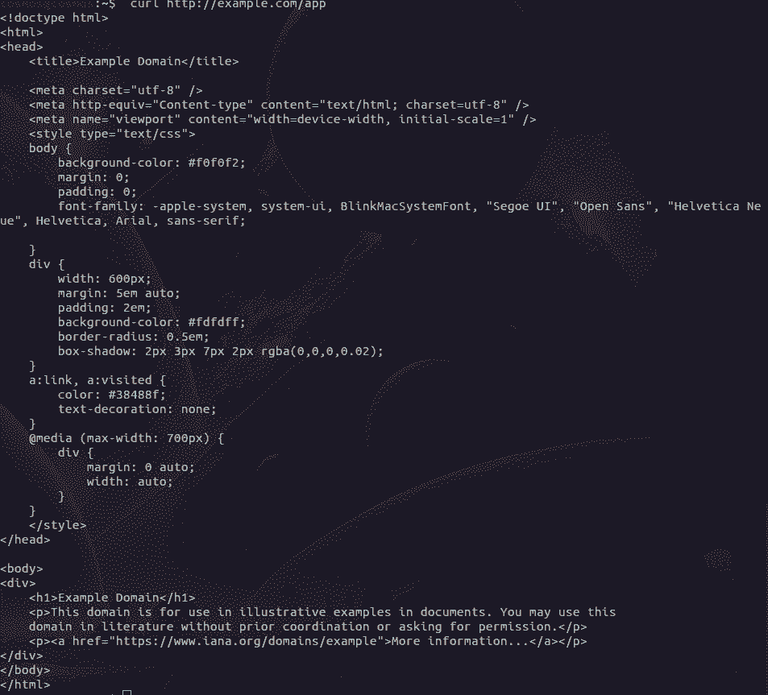
You can now test the Ingress by sending a request to the specified host and path. Ensure you have the necessary DNS configurations or modify your local hosts file to map `example.com` to the cluster's IP address.

curl http://example.com/app

👁 Testing ingress

  • If your output shows the HTML content from "Example Domain," the Ingress configuration is working correctly.
  • You successfully received a response from the app-service.
  • This indicates that requests are being correctly routed to the specified service.
  • Confirms that the Ingress Controller is functioning as expected.
  • Path-based routing, as defined in the Ingress resource, is directing traffic to the appropriate backend service.

Advanced Features of Ingress Controllers

SSL/TLS Termination

Ingress Controllers often provide the ability to terminate SSL/TLS encryption at the controller level, offloading the decryption process from individual services. This is achieved by specifying TLS settings in the Ingress resource.


Create the TLS Secret first

apiVersion: v1
kind: Secret
metadata:
name: example-tls-secret
type: kubernetes.io/tls
data:
tls.crt: <base64-encoded-cert>
tls.key: <base64-encoded-key>

Reference the TLS Secret in your Ingress

apiVersion: networking.k8s.io/v1
kind: Ingress
metadata:
name: example-ingress
spec:
tls:
- hosts:
- example.com
secretName: example-tls-secret
rules:
- host: example.com
http:
paths:
- path: /
pathType: Prefix
backend:
service:
name: app-service
port:
number: 80

Path-based Routing and Rewrites

Ingress Controllers support path-based routing, allowing you to direct requests to different services based on the specified paths. Additionally, URL rewrites can be configured to modify the requested path before forwarding it to the backend service.

...
paths:
- path: /v1
pathType: Prefix
backend:
service:
name: v1-service
port:
number: 80
...

Best Practices for Using Ingress Controllers

  • Keep Ingress rules simple and maintainable
    Avoid overly complex routing rules; break them into multiple Ingress resources if needed.
  • Use separate Ingress for public vs internal services
    Isolate internal services from external access to enhance security and clarity.
  • Always enable HTTPS/TLS termination
    Ensure secure communication between clients and your services by terminating TLS at the Ingress level.
  • Use annotations only when necessary
    Annotations are powerful but can make configurations harder to manage; apply them judiciously.
Comment
Article Tags:
Article Tags: