|
VOOZH | about |
|
VOOZH | about |
Effective log management enhances operational intelligence and the observability of an application running in a Kubernetes environment. Integrating Elasticsearch a very powerful search and analytics engine with Fluentd, an open-source data collector, gives a robust way for collecting and analyzing logs from every corner of a Kubernetes cluster.
Fluentd is a full, multi-platform, open-source data-collecting software project originally developed at Treasure Data. Most of it is written in the C programming language, with a thin Ruby wrapper added over the top to enhance flexibility. Fluentd was designed for "big data," or semi- or unstructured data sets. Together with event logs and application logs, it inspects clickstreams. The central concept behind Fluentd is that it should form a unification layer between various kinds of log inputs and outputs.
Here is the step-by-step implementation of Efficient Log Management in Kubernetes with Fluentd:
First, create a file called fluentd.conf and fill it out with the information below. To suit your needs, change the pathways and settings.
<source>
 @type tail
 path /var/log/containers/*.log
 pos_file /var/log/fluentd/container.pos
 tag kube.*
 format json
 read_from_head true
</source>

<filter kube.**>
 @type kubernetes_metadata
</filter>

<match kube.**>
 @type elasticsearch
 host elasticsearch-host
 port 9200
 logstash_format true
 include_tag_key true
 tag_key @log_name
</match>
Make a YAML file called fluent-config map. yaml and add the following information to it.
apiVersion: v1
kind: ConfigMap
metadata:
 name: fluentd-config
 namespace: kube-system
data:
 fluentd.conf: |
 # Paste the content of your fluentd.conf here
Fluentd-daemonset. yaml - This should be a YAML file that contains the following content.
apiVersion: apps/v1
kind: DaemonSet
metadata:
 name: fluentd
 namespace: kube-system
spec:
 selector:
 matchLabels:
 app: fluentd
 template:
 metadata:
 labels:
 app: fluentd
 spec:
 containers:
 - name: fluentd
 image: fluent/fluentd:v1.14-debian-1.0
 volumeMounts:
 - name: varlog
 mountPath: /var/log
 - name: fluentd-config
 mountPath: /fluentd/etc
 subPath: fluentd.conf
 volumes:
 - name: varlog
 hostPath:
 path: /var/log
 - name: fluentd-config
 configMap:
 name: fluentd-config
The status of the DaemonSet must now be checked.
kubectl get daemonset fluentd -n kube-systemOutput:
Verify that each pod is running or not do this type of the below command on your console.
kubectl get pods -n kube-system -l app=fluentdOutput:
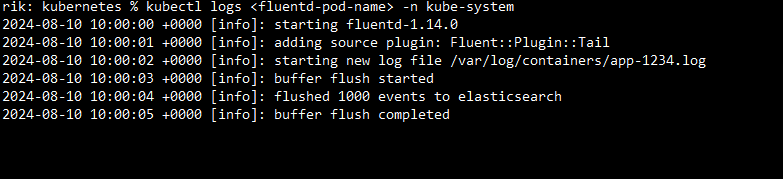
Next, you can retrieve the logs from any Fluentd pod with this command.
kubectl logs <fluentd-pod-name> -n kube-systemOutput:
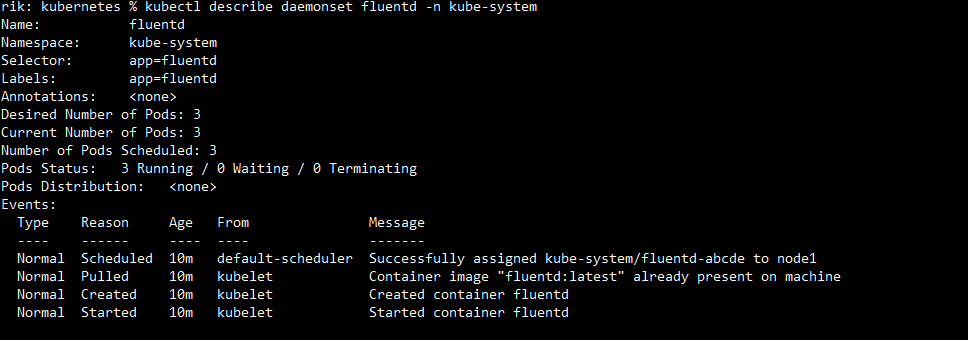
For further information regarding the DaemonSet and its implementation.
kubectl describe daemonset fluentd -n kube-systemOutput:
Lastly, As your requirements evolve, update the Fluentd configuration. Refresh the ConfigMap and make modifications to fluent. conf.
kubectl rollout restart daemonset/fluentd -n kube-systemOutput:
This article provides a comprehensive overview of Efficient Log Management in Kubernetes with Fluentd, complete with explanations, benefits, and output, specifically implementation from creating Fluentd to updating and maintaining.