 |
VOOZH | about |
|
VOOZH | about |
Azure Repos is a Git-based repository service available in the Azure DevOps portal and hosted by Microsoft Azure. It is fully integrated with other Azure DevOps services, providing a centralized platform to store, manage, and collaborate on source code.
Follow the steps below to rename an Azure DevOps repository from the Azure DevOps portal.
Step 1: Open the Azure DevOps project that contains the repository which you want to rename.
Step 2: Now click on "Project Settings" from button left on your screen. After you open the Project settings >> navigate to Repos >> select Repositories.
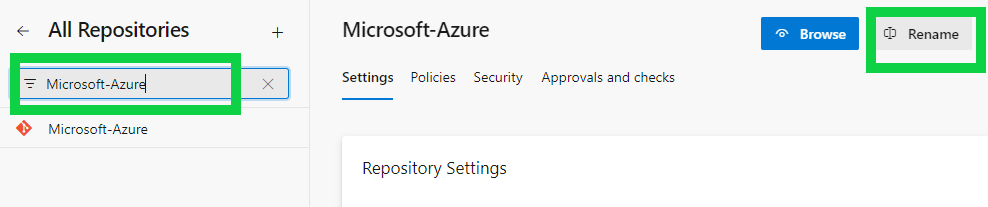
Step 3: Now search or select the repo which you want to rename >> click on Rename option from top right on your screen.
Step 4: Now, modify the name of Azure repository and click on Rename button to procced with renaming or click on Cancel button to discard the changes.
Step 5: This the final step. Go to your Azure DevOps project Repos and verify the re-named repository.
That's it. These are steps involved for renaming a repo in Azure DevOps. Down below we have mentioned the important points that we you should consider when renaming a repository in Azure DevOps. Do read them and understand.
These are the points that you should consider when renaming a repository in Azure DevOps:



.png)