Terraform Cloud is HashiCorp's managed service for infrastructure automation that is engineered to help teams manage infrastructure with Terraform in a collaborative and efficient manner. Terraform Cloud provides a cloud-based platform where users can securely run, manage, and collaborate on Terraform workflows. Unlike the open-source version of Terraform, Terraform Cloud simplifies the management of infrastructure by offering a hosted environment for IaC, leaving engineers free from local execution environments or infrastructure automation tooling.
What is Infrastructure as Code
The importance of Infrastructure as Code is that it makes possible automation, ensuring the infrastructure gets deployed faster and in a more reliable manner. Codifying infrastructure means that a team can manage, version, and replicate environments consistently across development, testing, and production. With IaC, human error becomes minimal since standardized configurations make repeatability a success. It's better to collaborate, since code can be reviewed, tested, and stored in version control. That way, IaC is likely to add the scalability aspect since it provides for the dynamic provisioning of infrastructure according to demand, thus utilising the resources more properly.
Key Features of Terraform Cloud
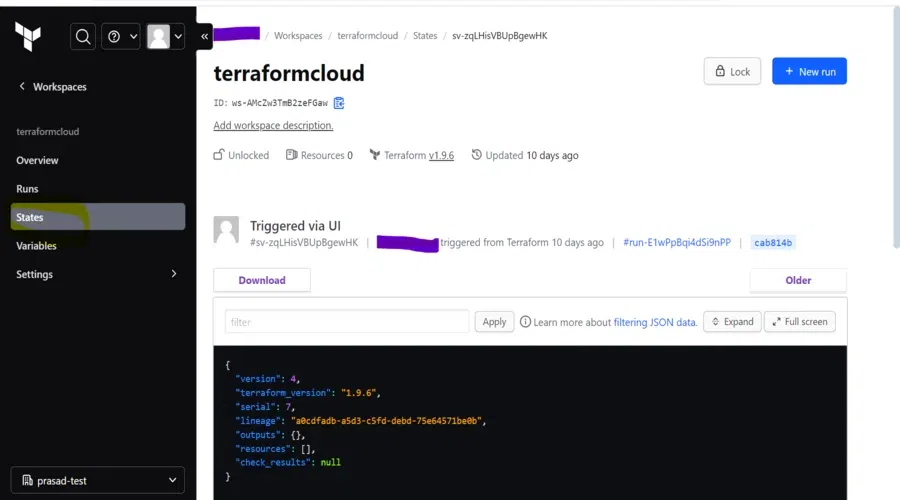
Remote State Management: Terraform Cloud enables teams to store their state files remotely making them secure and centralised. State locking prevents simultaneous changes, hence there will be no problem or conflict when more than one team is working on the infrastructure.
Collaboration and Governance: Working efficiently is offered by Terraform Cloud to teams because it makes shared access to Terraform configurations and environments easy. Role-based access control (RBAC) will ensure that only specified and authorized people are allowed to make the changes, making security and compliance much enhanced.
Workspace configurations can be used for handling various environments, such as dev, staging, and production. This way, teams could track changes across them.
VCS Integration: Terraform Cloud integrates with version control systems such as GitHub, GitLab, and Bitbucket. It automatically triggers runs as soon as there's a change in the repository. Therefore, it supports CI/CD infrastructure.
Automate Infrastructure Provisioning: Terraform Cloud runs Terraform in the cloud, automatically applying plans and deploying infrastructure rather than needing to do it locally. The design reduces manual overhead over infrastructure updates and management.
Policy as Code with Sentinel: Terraform Cloud comes with Sentinel, the policy-as-code framework. This ensures that infrastructure adheres to security, compliance, and operational guidelines. Policies can be written and enforced to stop unauthorized changes.
Cost Estimation: Among its unique features is the cost estimation feature directly within the product in Terraform Cloud. Before applying a plan by Terraform, users can get an estimate of the cost of the infrastructure resources they are provisioning to effectively manage their budgets on the cloud.
Private Module Registry: In Terraform Cloud, teams have the capability to create and use private modules that standardize and simplify infrastructure deployments. These modules reduce duplication of code and improve maintainability.
Notification and Monitoring: The teams receive notifications on infrastructure runs, failures, as well as status updates via Slack and email integrations. It keeps everyone informed in real time.
How Terraform Cloud Works
Terraform Cloud offers workspaces to maintain different environments for a project. This is how using Terraform Cloud works:
Create Workspaces: A workspace can be formed as an environment or a project. Workspaces apply Terraform configurations and store state within.
Connect the VCS Repositories: Have plans automatically triggered and applied with a link to your VCS repository.
Plan and Apply: Terraform Cloud automatically runs terraform plan to present the proposed changes and automatically receives approval before applying (terraform apply).
Monitor and Manage State: State files are automatically saved and managed and monitored via the workspace, and infrastructures are updated automatically.
Benefits of Terraform Cloud for Organizations
Scalability: Zero setup allows teams to manage at scale. Hundreds, thousands, or tens of thousands of resources have their complexity abstracted, and provisioning and controlling change across multiple environments are automated by Terraform Cloud.
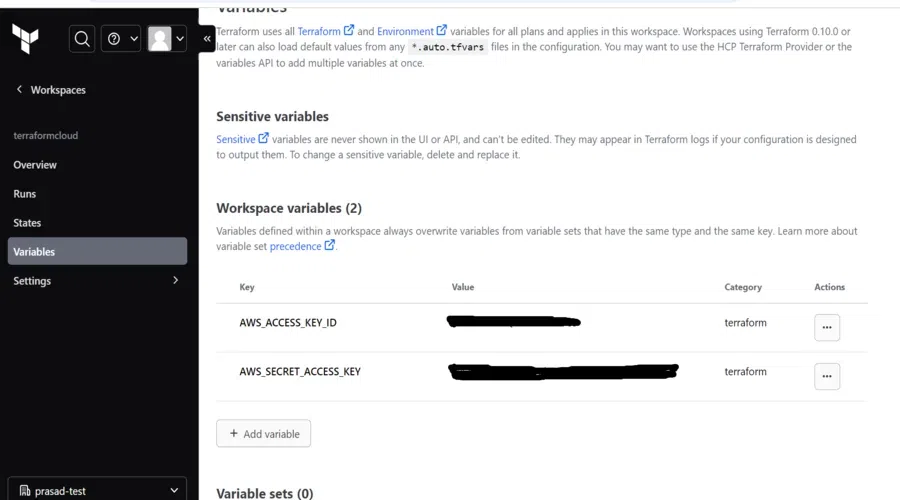
Security: It offers greater security over the traditional configuration within a local setup in the management of sensitive information, with encryption and controlled access policies through secret management.
Collaboration: It provides a platform of an effective working team in combination with managing the infrastructure. Hence, tools help in reviewing, approving, and auditing changes.
Advanced Features: Terraform Cloud vs. Terraform Enterprise
While Terraform Cloud has much value to add for teams, Terraform Enterprise (a paid, self-hosted solution) includes enterprise-grade features such as more robust policy management, audit logs, and custom integrations. Teams that require quite a lot of control over their infrastructure automation stack might prefer Terraform Enterprise.
Feature
Terraform Cloud
Terraform Enterprise
Deployment Model
SaaS (Managed by HashiCorp)
Self-hosted or SaaS (Customer-controlled)
Collaboration
Supports basic collaboration (workspaces, RBAC)
Enhanced collaboration (team management, RBAC)
Workspaces
Unlimited, with support for different environments
Unlimited, with advanced workspace management
Version Control Integration
GitHub, GitLab, Bitbucket
All VCS systems, including self-hosted options
State Management
Remote state with locking and consistency checks
Same as Terraform Cloud, plus more robust controls
Policy as Code (Sentinel)
Basic policy enforcement (standard policies)
Advanced Sentinel policy enforcement with custom policies
Cost Estimation
Built-in cost estimation for cloud resources
Same as Terraform Cloud, with additional reporting features
Private Module Registry
Available (private modules for teams)
Same as Terraform Cloud, with enhanced module sharing features
Infrastructure Automation
Runs Terraform in the cloud (managed service)
Runs Terraform locally or in customer-controlled environments
Audit Logging
Basic logging
Detailed logging with full audit trail for compliance
Role-Based Access Control (RBAC)
Basic roles (owner, viewer, etc.)
Fine-grained access controls and custom roles
Support and SLAs
Community support, basic HashiCorp support
Premium enterprise-grade support and SLAs
Advanced Security Features
Basic encryption of sensitive data
Full encryption, secrets management, and custom compliance controls
Custom Integrations
Limited to standard integrations (Slack, email, etc.)
Advanced governance, compliance integrations, and reporting tools
Scaling and Performance
Limited to SaaS resource availability
High scalability with resource tuning options in self-hosted deployments
Step-By-Step Processes to Setup Terraform Cloud
Getting started with Terraform Cloud is easy. Here's a basic example of how you set up your Terraform Cloud account, create a workspace, and deploy infrastructure using Terraform.
1. Create a Terraform Cloud Account
Step 1: Go to the Terraform Cloud website.
Step 2: Sign up for a free account or log in if you already have one.
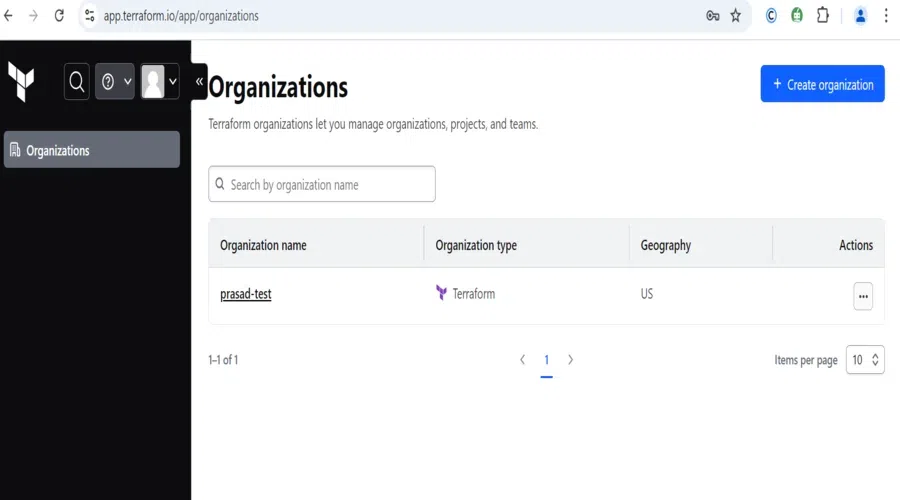
Step 3: Once logged in, you’ll be prompted to create or join an organization. Create an organization to group related workspaces and projects together.
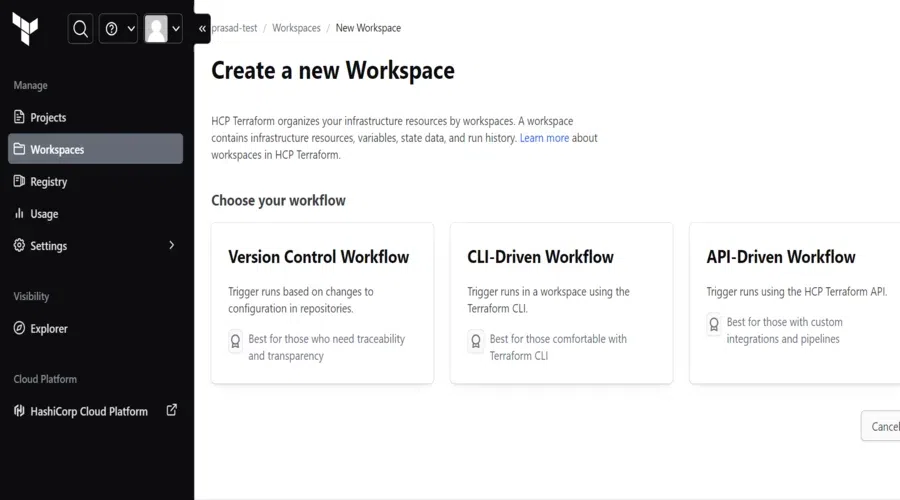
3. Create a Workspace: A workspace in Terraform Cloud is where your Terraform runs are executed, and state is stored.
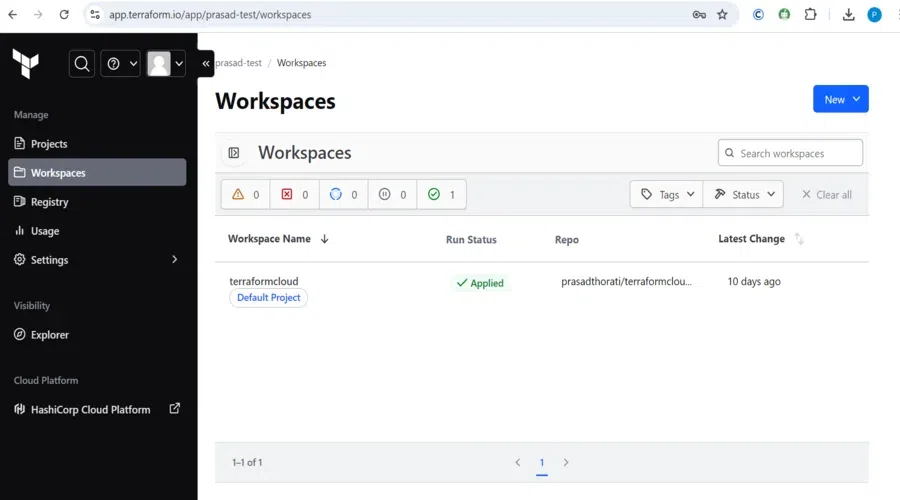
Step 1: In the Terraform Cloud dashboard, navigate to the "Workspaces" tab and click "Create Workspace."
Step 2: Select a workflow type. The typical choice is the "Version Control" workflow, where Terraform Cloud pulls configuration files from a VCS repository.
Step 3: Choose the VCS repository that you linked earlier, containing your Terraform configuration files.
This configuration creates an AWS S3 bucket in the us-west-2 region.
Step 1: Push this code to your VCS repository.
Step 2: Terraform Cloud will automatically detect this new commit and trigger a Terraform run.
5. Run Terraform Plan
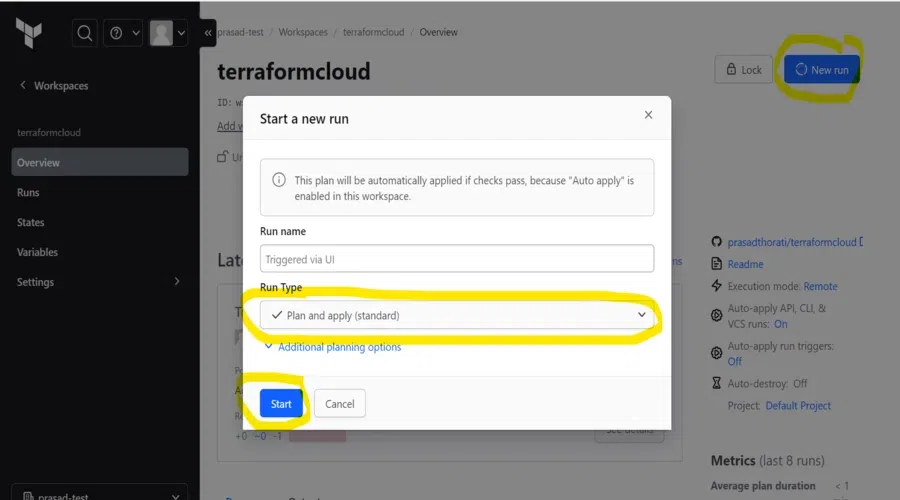
Step 1: Once the workspace is linked to your VCS and configuration is pushed, Terraform Cloud automatically runs a terraform plan to show what changes it will make to your infrastructure.
Step 2: Review the plan output in the Terraform Cloud dashboard, which details the resources to be added, modified, or destroyed.
Step 3: If everything looks good, click "Confirm & Apply" to approve the changes.
After reviewing the plan and approving it, Terraform Cloud will automatically run terraform apply to create the infrastructure specified in your configuration.
The status of the apply operation will be visible in the workspace, and you’ll receive notifications (if configured) once the operation completes.
7. Managing State in Terraform Cloud
Once the resources are applied, Terraform Cloud will save the state file securely in the cloud.
This state file is automatically updated every time you make changes to your infrastructure, ensuring that Terraform knows the current state of your resources.
9. Using Sentinel for Policy Enforcement (Optional): Terraform Cloud allows you to enforce compliance policies using Sentinel. This is useful for enforcing infrastructure standards.
Step 1: In your organization settings, go to "Policies" and write a Sentinel policy (e.g., to ensure all S3 buckets are private).
Step 2: Apply this policy to your workspace. Terraform Cloud will now enforce this policy during all future runs, blocking non-compliant infrastructure changes.
10. Monitoring and Notifications
You can set up notifications to receive updates on the status of your Terraform runs.
Step 1: Go to "Settings" in your workspace and configure Slack or email notifications.
Step 2: Notifications will alert you to any failed runs, changes, or applied plans.
TFC Pricing Plans
Free Plan: Essential Features for Individuals and Small Teams
For individuals and small teams that are just getting started with Terraform Cloud, the Free Plan is great because it provides basic features like remote state management and basic notifications with very limited monthly runs.
Team & Governance Plan: Enhanced Collaboration and Control
The Team & Governance Plan is for a medium-sized team, introducing unlimited Terraform runs, role-based access control (RBAC), and policy enforcement with Sentinel.
Business Plan: Advanced Governance and Security
It provides Single Sign-On (SSO), private module registry, and premium support together with advanced policy management as well as compliance in its Business Plan to the larger organizations.
Enterprise Plan: Full Control and Customizability
Enterprise Plan for enterprises allows for self-hosting, detailed audit logs, custom integrations, as well as personalized SLAs giving the maximum level of control and scalability.
Conclusion
Terraform Cloud is the SaaS offering from HashiCorp that automates Terraform workflows, making it easier to manage infrastructure. Features include remote state management, version control integration and team collaboration, to efficiently manage infrastructure across environments. It provides a feature of policy enforcement, cost estimation as well as compliance so that the infrastructure is secure as well as scalable. For the size of your team or any kind of requirement of the organization, there is a range of pricing plans. In general, the Terraform Cloud simplifies the infrastructure provisioning process and also hardens security, governance, and collaboration.