Managing infrastructure as code (IaC) has become a basic practice in modern DevOps. Terraform, being one of the most popular IaC tools, allows us to define and provision our cloud infrastructure using a high-level configuration language. One of the critical components of using Terraform is the state file, holding the state of your managed infrastructure. The state file is a critical file in carrying out the mapping between your configuration and the natural resources in the world, plus determining what changes it requires to satisfy some sort of configuration files' descriptions to achieve the desired final state. Working in a team or even managing extensive infrastructure requires this state file to be secured, accessible, and consistent. This is where remote state management comes into play. Terraform state management can be configured to be remote, thus enabling collaboration, security, and reliability for Terraform state files.
Amazon Web Services feature excellent remote state management by using S3 buckets for storing the state file and DynamoDB for state locking, plus consistency checks of said state file. This setup ensures that your state file gets stored securely, is highly available, and is protected from concurrent modifications. This article is going to take you through the process of setting up Terraform remote state management in an AWS environment. We will reveal the necessary terminologies, step-by-step configuration, and examples that would give you a clear understanding of how remote state management is done.
Primary Terminologies
Terraform State: A file that maintains the state of infrastructure resources managed by Terraform. It maps the configuration defined within your .tf files and real-world resources.
Remote State: Storing the Terraform statefile in a remote backend rather than locally on your machine, enabling collaboration and better security.
Backend: In Terraform, a backend is a definition that contains the configuration for storing the state file. Examples are local files, AWS S3, and Google Cloud Storage, among others, remote state manager is most likely an S3 bucket.
AWS S3: Simple storage service from AWS that is used to store and retrieve data. The reason for AWS resilience and availability led many to host their Terraform state files in this storage.
AWS DynamoDB: An AWS NoSQL database service. When used with S3 for Terraform state, this can be a great help in locking the state and checking for consistency in the state to prevent multiple modifications of the state file simultaneously.
What is Terraform Remote State Management in AWS?
Terraform remote state management represents storing a Terraform state file in remote backend features rather than placing it on local filesystems. In an AWS context, the standard is to use Amazon S3 (Simple Storage Service) for storing the state file and Amazon DynamoDB for state locking and consistency checking.
S3: Scalable object storage to store and retrieve any amount of data, from anywhere. It is a place in which Terraform stores its state file.
DynamoDB: A fast, flexible NoSQL database service for single-digit millisecond performance at any scale used along with S3 for state locking and consistency checking.
How Terraform Remote State Management in AWS Works?
State File Storage: An S3 bucket stores the state file that holds the current state of your infrastructure.
State Locking: The state locking is defined with a DynamoDB lock table to ensure that operations do not run concurrently and compromise the state file. The actual approach for this goal is that the terraform state can be modified by precisely one operation at a given time.
Access Control: Through the IAM policies, one has control over users who can access the state file for either reading or writing; hence, there is another layer of security.
Benefits of Terraform Remote State Management in AWS
Collaboration: Stateful remote work makes collaboration easier between team members, with a centralized state file accessible to all. This would prevent conflicts and ensure consistency across infrastructure deployments.
Security: Added to AWS are robust features for security, such as IAM policies, encryption, and access controls, which allow only those users intended to read and write to the state file to do so. This adds an extra layer of security to the information and helps keep compliance with security standards.
Backup and versioning: The state file can store several versions securely and accurately due to the high durability and capability of S3 in versioning. This is helpful for quickly getting back from accidental deletions or changes and serves as a reliable backup mechanism.
Scalability: When infrastructure grows too large, S3 has the desired scalability capability of dealing with big data in a state file most efficiently. The fast and reliable state locking with DynamoDB supports all concurrent operations, so using it at a large scale is perfectly fine.
Disaster Recovery: storing the state file on a highly available and durable service such as S3 helps teams be back on their feet in case of local failures or disasters. Cross-region replication further bolsters the disaster recovery capabilities for business continuity.
Step-by-Step Process
Step 1: Launch an Instance
Go to AWS Console and login with credentials
Now navigate to EC2 Instance dashboard and launch an instance
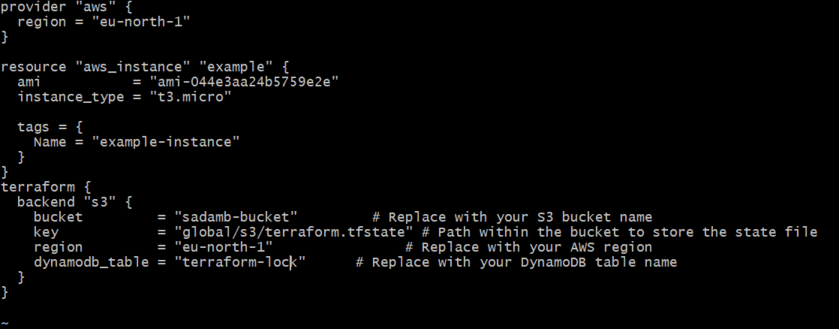
Create a Terraform configuration file main.tf. Inside this file we are providing configuration details
This script for to create EC2 instance
provider "aws" {
 region = "eu-north-1" # modify accordingly to your region
}
resource "aws_instance" "example" {
 ami = "ami-0c55b159cbfafe1f0" # modify AMI id
 instance_type = "t3.micro" #modify type also
}
Creating a backend configuration file.
 terraform {
 backend "s3" {
 bucket = "my-terraform-state-bucket" #replace with your bucket name
 key = "ec2/terraform.tfstate"
 region = "eu-north-1"
 dynamodb_table = "terraform-locks"
 }
}


-(1).png)



.png)