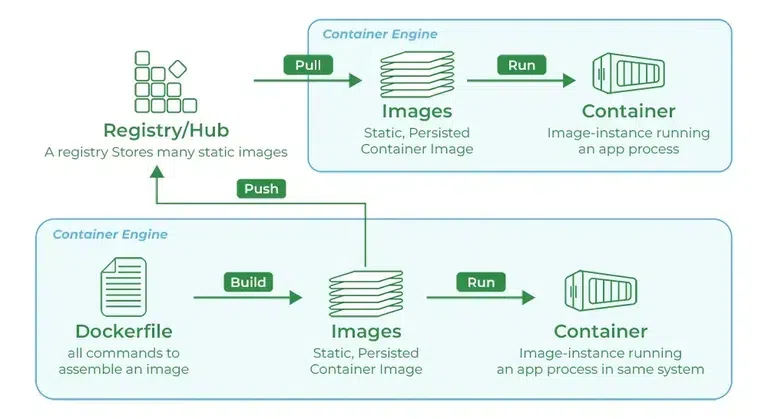
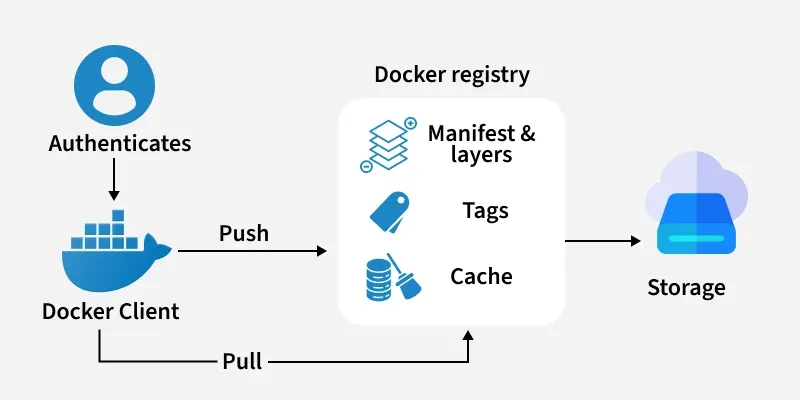
Docker Registry is a centralized storage and distributed system for collecting and managing Docker images. It acts as a server-side application that stores, manages, and distributes container images across environments. It is an essential component in the containerization workflow for streamlining the deployment and management of applications. Features of a Docker Registry are :
Stateless and scalable
Organized into repositories, where each repository contains multiple versions (tags) of an image.
Accessible to users for pushing (uploading) and pulling (downloading) images.
Docker Image : A Docker Image is a template (blueprint) used to create Docker Containers.
Docker Images Registry : A Docker Registry is a storage system where Docker Images are pushed (uploaded) and pulled (downloaded).
Docker Hub : It is the official cloud-based Docker Registry service provided by Docker Inc. It is the default registry where Docker looks for images when you run docker pull or docker run without specifying a registry.
Docker Login : It is a Docker CLI command used to authenticate your local Docker client with a Docker Registry (like Docker Hub, AWS ECR, GCP GCR, Azure ACR, or a private registry). It allows you to push (upload) and pull (download) Docker images securely by verifying your username and password or access token.
Authentication of Dockerhub : Authentication in Docker Hub ensures secure pushing and pulling of Docker images, especially when dealing with private repositories and DevOps pipelines.
Different Types of Docker Registries
Cloud-Hosted / Public Registries: These are managed services that are easy to use and integrate with other cloud platforms.
Docker Hub: The default and largest public registry, hosting millions of official and community images.
Amazon Elastic Container Registry (ECR): AWS's managed registry, integrated with its cloud ecosystem.
Google Artifact Registry (GAR): Google Cloud's recommended registry for container images and other artifacts. (Note: Google Container Registry (GCR) is deprecated).
Azure Container Registry (ACR): Microsoft's registry service for its Azure platform.
GitLab Container Registry: Integrated directly into the GitLab CI/CD platform.
Private / Self-Hosted Registries: These are registries you run on your own infrastructure for maximum control, security, and speed.
Docker Registry Image: Docker provides an official open-source image (registry:2) that allows you to run a basic registry yourself.
Harbor: An open-source, enterprise-grade registry with advanced features like vulnerability scanning and role-based access control.
Basic commands for Docker registry
The following are the basic commands for Docker registry:
1. Starting your registry
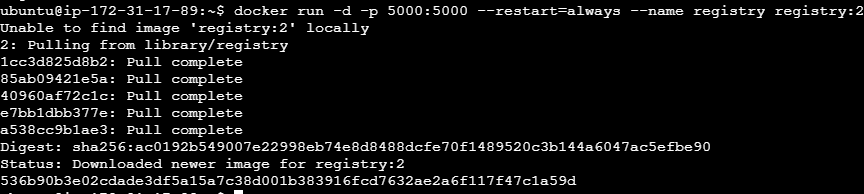
This command effectively starts a Docker registry on your local machine or server, accessible via port 5000.
docker run -d -p 5000:5000 --restart=always --name registry registry:2
It instructs Docker to start a registry named registry:2 in detached mode with the name registry. Map the registry's port 5000 to a local port 5000 and restart it immediately if it dies.
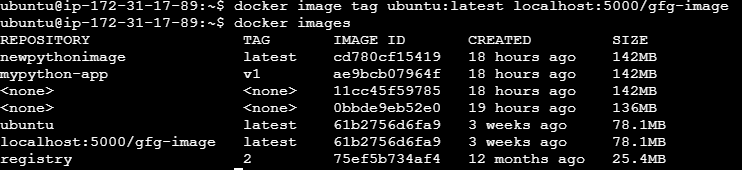
2. Pulling some images from the hub
The following is the command used for pulling the image from the public docker registry, Here we pulling the ubuntu image.
Docker Registry provides a storage and distribution platform for Docker images.
Users can upload their Docker images to the registry, and these images can be tagged with a version number and a name.
Other users can then search for and download these images from the registry.
Docker Registry can be self-hosted or used as a cloud-based service.
Docker Registry helps the administrators to implement access controls and permissions ensuring only authorized users and systems.
Docker Registry facilitates with seamless integration through Continuous Integration/Continuous Deployment (CI/CD) pipelines.
Registries Importantance
Docker registries are a cornerstone of modern software development for several key reasons:
CI/CD Automation: Registries are the bridge in CI/CD pipelines. A CI process builds a new image and pushes it to the registry; a CD process then pulls that image to deploy it to staging or production environments.
Centralized Management & Collaboration: They provide a single source of truth for all container images, making it easy for teams to share and collaborate on applications.
Version Control: By using tags, registries allow you to version your images, ensuring you can track changes and roll back to previous versions if needed.
Enhanced Security: Private registries give you full control over who can access your images. Many hosted registries also offer built-in vulnerability scanning to detect security issues before deployment.