 |
VOOZH | about |
|
VOOZH | about |
A DocumentDB is known as a "Document Database" which is a cloud-based database service offered by Microsoft Azure. It is designed in such a way that it can store and manage data easily in JSON (JavaScript Object Notation) format. The DocumentDB allows its users to store data in a more natural, document-like format. It is a powerful and flexible database solution that is built to work for modern, cloud-based applications that require the ability to store and manage semi-structured data at a large scale.
A DocumentDB supports an automatic indexing feature which means that the user doesn't have to worry about defining indexes or managing them manually because it automatically indexes all the data the user stores, making it easy to query and retrieve information quickly.
Amazon DocumentDB (with MongoDB compatibility) is a fast, reliable, and fully managed database service. An Amazon DocumentDB makes it easy for users to set up and operate with scale MongoDB-compatible databases in the cloud. With Amazon DocumentDB, users can run the same application code and use the same drivers and tools we use with MongoDB. As the application grows, users need to store more data which can scale seamlessly to accommodate the user's needs. This means users don't have to worry about running out of storage space or having to manually manage database scaling.
A DocumentDB cluster consists of 0 to 16 instances and a cluster storage volume that manages the data for those instances. All operations are done through the primary instance and all the instances (primary and replicas) support reads. The cluster's data is stored in the cluster volume with copies in three different Availability Zones.
A DocumentDB Cluster can be created in two ways-
Using the AWS Management Console
Step 1: Open the Amazon DocumentDB management console and go to the "Clusters" section. If creating a new cluster, click "Create." If modifying an existing cluster, select the cluster and click "Actions," then choose "Modify."
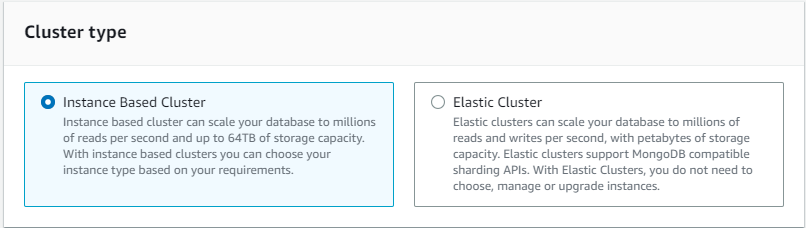
👁 Amazon DocumentDB management console and go to the "Clusters" section.Step 2: If creating a new cluster, make sure to select "Instance Based Clusters" as the cluster type (this is the default option).
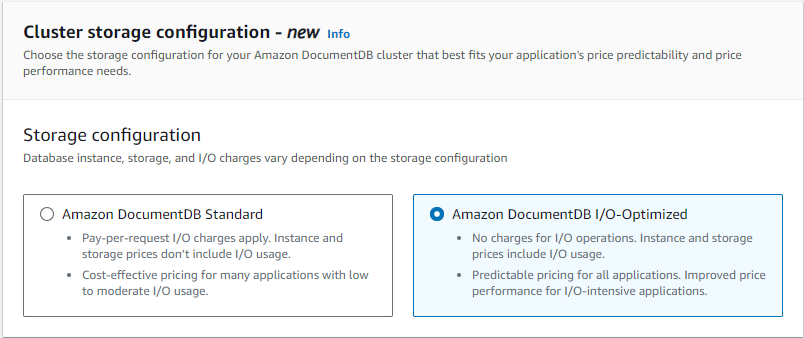
👁 select "Instance Based Clusters" as the cluster typeStep 3: In the "Configuration" section, under "Cluster storage configuration," choose the choice "Amazon DocumentDB I/O Optimized."
👁 choose the option "Amazon DocumentDB I/O Optimized.Step 4: Complete the remaining steps for creating or modifying your cluster, and click "Create cluster" or "Modify cluster" when finished.
👁 click "Create cluster"The use of DocumentDB clusters fast, reliable and fully managed database service that work nicely with other AWS services. But there are some things to think about. They can get costly according to our application size, especially for big setups or high availability. It difficult for us to manage clusters with multiple servers and we need to have knowledge about the technical setup, scaling, monitoring, and troubleshooting. At last, they might be limited to only a few AWS locations, which could impact relativity. However, we also can't ignore that DocumentDB has awesome speed and convenience are worth these potential drawbacks. We can integrates with it seamlessly with other AWS services and we don't have to worry about maintenance tasks. DocumentDB cluster provides point-in-time recovery for up to 35 days, allowing you to restore your cluster to any second within that period. Backups are incremental, continuous, and stored durably in Amazon S3. So we can conclude that it saves, both the time and effort of the user.

.jpg)
.jpg)