|
VOOZH | about |
|
VOOZH | about |
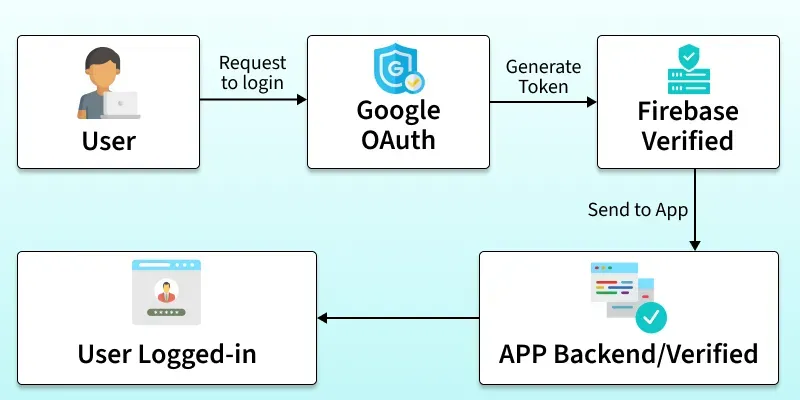
Google Authentication is a secure way for users to log in using their existing Google accounts. With Firebase, developers can easily integrate this authentication into their apps, removing the need for separate usernames and passwords. It ensures both simplicity for users and strong security for applications.
signInWithPopup or signInWithRedirect to let users log in.Before understanding the implementation, we will need to set up a Firebase project and integrate it into your app. Follow these steps:
For a web app, include Firebase and Google SDKs in our HTML file:
<!-- Firebase App (the core Firebase SDK) -->
<script src="https://www.gstatic.com/firebasejs/9.6.4/firebase-app.js"></script>

<!-- Firebase Auth (specifically for authentication) -->
<script src="https://www.gstatic.com/firebasejs/9.6.4/firebase-auth.js"></script>

<!-- Firebase UI for Google Authentication -->
<script src="https://cdn.jsdelivr.net/npm/firebaseui@5.1.2/dist/firebaseui.js"></script>
<link type="text/css" rel="stylesheet" href="https://cdn.jsdelivr.net/npm/firebaseui@5.1.2/dist/firebaseui.css" />
Explanation:
firebaseConfig object contains the configuration information required to initialize Firebase, including the API key, authentication domain, project ID and app ID. firebase.initializeApp(firebaseConfig) function initializes Firebase using the provided configuration. The googleAuthProvider variable creates a new instance of the GoogleAuthProvider class from the Firebase Auth module, which is used for Google sign-in authenticationconst firebaseConfig = {
apiKey: "YOUR_API_KEY",
authDomain: "YOUR_AUTH_DOMAIN",
projectId: "YOUR_PROJECT_ID",
appId: "YOUR_APP_ID"
};
// Initialize Firebase
firebase.initializeApp(firebaseConfig);
// Create a Google provider instance
const googleAuthProvider = new firebase.auth.GoogleAuthProvider();
Explanation:
firebaseConfig), including the API key, authentication domain, project ID, and app ID. It sets up Firebase in the application using firebase.initializeApp(firebaseConfig). GoogleAuthProvider class from the Firebase Auth module, which is used for Google sign-in authentication, and stores it in the googleAuthProvider variable for later use in the authentication process.Explanation:
signInWithGoogle is used to sign in a user using Google authentication. It uses the signInWithPopup method from the firebase.auth() object to initiate the Google sign-in process. Explanation:
if (user)), it logs "User is signed in" to the console. If no user is signed in (else), it logs "No user is signed in" to the console. Let's consider a simple web application where users can sign in using their Google accounts.
Output:
Explanation
signInWithGoogle function. This function uses the signInWithPopup method from the Firebase Authentication SDK to initiate the Google sign-in process.