|
VOOZH | about |
|
VOOZH | about |
Slices in Go are a flexible and efficient way to represent arrays, and they are often used in place of arrays because of their dynamic size and added features. A slice is a reference to a portion of an array. It's a data structure that describes a portion of an array by specifying the starting index and the length of the portion. This allows you to work with a portion of an array as if it were an independent array. In Go language slice is more powerful, flexible, convenient than an array, and is a lightweight data structure. Slice is a variable-length sequence that stores elements of a similar type, you are not allowed to store different type of elements in the same slice. It is just like an array having an index value and length, but the size of the slice is resized they are not in fixed-size just like an array. Internally, slice and an array are connected with each other, a slice is a reference to an underlying array. It is allowed to store duplicate elements in the slice.
The first index position in a slice is always 0 and the last one will be (length of slice - 1).
Output:
Array: [1 2 3 4 5]
Slice: [2 3 4]
In this example, the array is created with 5 elements, and the slice is created by specifying the starting index 1 and the length 4. The slice now contains the elements 2, 3, and 4 from the original array.
Slices are dynamic, which means that their size can change as you add or remove elements. Go provides several built-in functions that allow you to modify slices, such as append, copy, and delete.
Output:
Slice: [1 2 3 4 5 6]
In this example, the function append is used to add the elements 4, 5, 6 to the slice slice. The result is a new slice that contains the elements 1, 2, 3, 4, 5, 6.
Slices in Go are a powerful and flexible data structure that can be used to represent arrays. They provide a more dynamic and efficient way to work with arrays, and they are widely used in Go programs.
A slice is declared just like an array, but it doesn't contain the size of the slice. So it can grow or shrink according to the requirement.
Syntax:
[]T
or
[]T{}
or
[]T{value1, value2, value3, ...value n}
Here, T is the type of the elements. For example:
var my_slice[]int
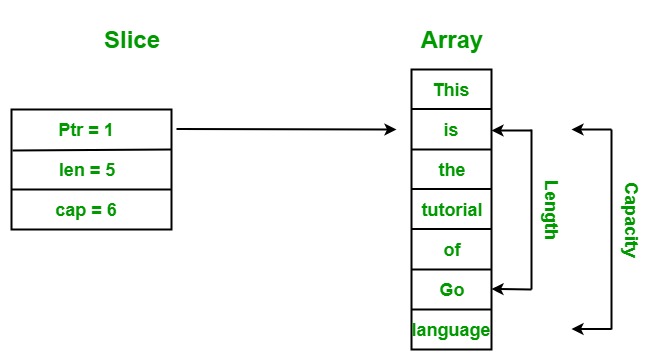
A slice contains three components:
Let us discuss all these components with the help of an example:
Example:
Output:
Array: [This is the tutorial of Go language]
Slice: [is the tutorial of Go]
Length of the slice: 5
Capacity of the slice: 6
Explanation: In the above example, we create a slice from the given array. Here the pointer of the slice pointed to index 1 because the lower bound of the slice is set to one so it starts accessing elements from index 1. The length of the slice is 5, which means the total number of elements present in the slice is 5 and the capacity of the slice 6 means it can store a maximum of 6 elements in it.
In Go language, a slice can be created and initialized using the following ways:
var my_slice_1 = []string{"Geeks", "for", "Geeks"}
Note: Always remember when you create a slice using a string literal, then it first creates an array and after that return a slice reference to it.
Example:
Output:
My Slice 1: [Geeks for Geeks]
My Slice 2: [12 45 67 56 43 34 45]
Syntax:
array_name[low:high]
This syntax will return a new slice.
Note: The default value of the lower bound is 0 and the default value of the upper bound is the total number of the elements present in the given array.
Example:
Output:
My Array: [Geeks for Geeks GFG]
My Slice 1: [for]
My Slice 2: [Geeks for Geeks GFG]
My Slice 3: [Geeks for]
My Slice 4: [Geeks for Geeks GFG]
slice_name[low:high]
This syntax will return a new slice.
Note: The default value of the lower bound is 0 and the default value of the upper bound is the total number of the elements present in the given slice.
Example:
Output:
Original Slice: [90 60 40 50 34 49 30]
New Slice 1: [60 40 50 34]
New Slice 2: [90 60 40 50 34 49 30]
New Slice 3: [90 60 40 50 34 49]
New Slice 4: [90 60 40 50 34 49 30]
New Slice 5: [40 50]
Using make() function: You can also create a slice using the make() function which is provided by the go library. This function takes three parameters, i.e, type, length, and capacity. Here, capacity value is optional. It assigns an underlying array with a size that is equal to the given capacity and returns a slice which refers to the underlying array. Generally, make() function is used to create an empty slice. Here, empty slices are those slices that contain an empty array reference.
Syntax:
func make([]T, len, cap) []T
Example:
Output:
Slice 1 = [0 0 0 0],
length = 4,
capacity = 7
Slice 2 = [0 0 0 0 0 0 0],
length = 7,
capacity = 7
You can iterate over slice using the following ways:
Output:
This
is
the
tutorial
of
Go
language
Using range in for loop: It is allowed to iterate over a slice using range in the for loop. Using range in the for loop, you can get the index and the element value as shown in the example:
Example:
Output:
Index = 3 and element = This
Index = 4 and element = is
Index = 5 and element = the
Index = 6 and element = tutorial
Index = 7 and element = of
Index = 8 and element = Go
Index = 9 and element = language
Using a blank identifier in for loop: In the range for loop, if you don't want to get the index value of the elements then you can use blank space(_) in place of index variable as shown in the below example:
Example:
Output:
Element = This
Element = is
Element = the
Element = tutorial
Element = of
Element = Go
Element = language
Zero value slice: In Go language, you are allowed to create a nil slice that does not contain any element in it. So the capacity and the length of this slice is 0. Nil slice does not contain an array reference as shown in the below example:
Example:
Output:
Length = 0
Capacity = 0
Modifying Slice: As we already know that slice is a reference type it can refer an underlying array. So if we change some elements in the slice, then the changes should also take place in the referenced array. Or in other words, if you made any changes in the slice, then it will also reflect in the array as shown in the below example:
Example:
Output:
Original_Array: [55 66 77 88 99 22]
Original_Slice: [55 66 77 88]

New_Array: [100 1000 1000 88 99 22]
New_Slice: [100 1000 1000 88]
Comparison of Slice: In Slice, you can only use == operator to check the given slice is nill or not. If you try to compare two slices with the help of == operator then it will give you an error as shown in the below example:
Example:
Output:
false
true
Note: If you want to compare two slices, then use range for loop to match each element or you can use DeepEqual function.
Multi-Dimensional Slice: Multi-dimensional slice are just like the multidimensional array, except that slice does not contain the size.
Example:
Output:
Slice 1 : [[12 34] [56 47] [29 40] [46 78]]
Slice 2 : [[Geeks for] [Geeks GFG] [gfg geek]]
Sorting of Slice: In Go language, you are allowed to sort the elements present in the slice. The standard library of Go language provides the sort package which contains different types of sorting methods for sorting the slice of ints, float64s, and strings. These functions always sort the elements available is slice in ascending order.
Example:
Output:
Before sorting:
Slice 1: [Python Java C# Go Ruby]
Slice 2: [45 67 23 90 33 21 56 78 89]

After sorting:
Slice 1: [C# Go Java Python Ruby]
Slice 2: [21 23 33 45 56 67 78 89 90]