|
VOOZH | about |
|
VOOZH | about |
The AVERAGE function calculates the arithmetic mean of a set of numbers by summing all values in a specified range and dividing by the count of numeric values. It automatically ignores text, empty cells, and errors, making it reliable for real-world datasets.
Key Feature: Unlike manual averaging, AVERAGE handles irregular datasets gracefully by skipping non-numeric entries.
=AVERAGE(value1, [value2,])
Parameters:
Return Value: A single numeric value representing the average.
To calculate the average of a range of numbers in Google Sheets, follow these steps:
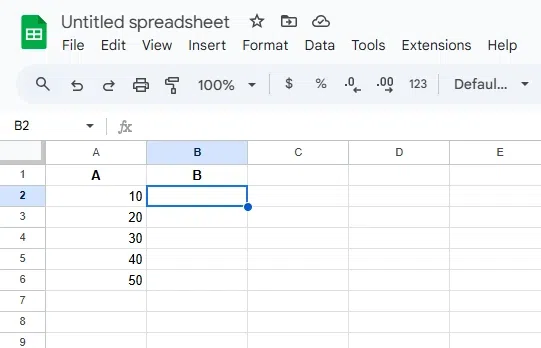
Choose the cell where you want the average result to appear. For example, select cell B2.
Decide which range of cells contains the numbers for which you want to calculate the average. For example, A2 to A6.
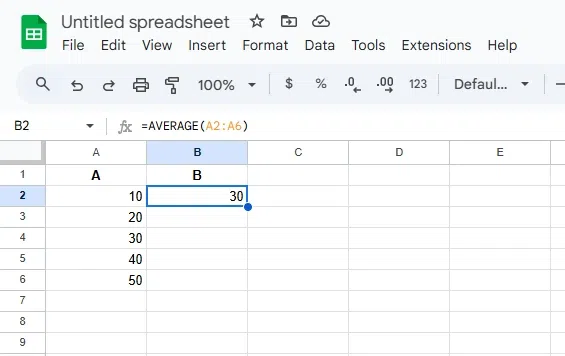
In the selected cell (B1), type the formula:
=AVERAGE(A2:A6)where,
Hit Enter to apply the formula. The result in B1 will display the average of the values in A1 to A5.
Also Read:
The Google Sheets AVERAGE function is a powerful tool for quickly calculating the mean of a range of numbers. By using the formula =AVERAGE(range), users can easily compute the average of selected data. This function helps in various contexts, such as analyzing performance metrics, summarizing data, and identifying trends. Whether working with small or large data sets, the AVERAGE function simplifies the process and ensures accurate results. Its ease of use and versatility make it an essential function in Google Sheets for both basic and advanced data analysis.
Here is the syntax of Google Sheets AVERAGE Formula:
=AVERAGE(value1, [value2, ...])To calculate the average of a range of numbers in Google Sheets, follow these steps:
Choose the cell where you want the average result to appear. For example, select cell B2.
Decide which range of cells contains the numbers for which you want to calculate the average. For example, A2 to A6.
In the selected cell (B1), type the formula:
=AVERAGE(A2:A6)where,
Hit Enter to apply the formula. The result in B1 will display the average of the values in A1 to A5.
Also Read:
The Google Sheets AVERAGE function is a powerful tool for quickly calculating the mean of a range of numbers. By using the formula =AVERAGE(range), users can easily compute the average of selected data. This function helps in various contexts, such as analyzing performance metrics, summarizing data, and identifying trends. Whether working with small or large data sets, the AVERAGE function simplifies the process and ensures accurate results. Its ease of use and versatility make it an essential function in Google Sheets for both basic and advanced data analysis.