|
VOOZH | about |
|
VOOZH | about |
Next.js installation sets up a React framework with built-in routing, server-side rendering, and performance optimizations, allowing you to quickly create fast, production-ready web applications.
Here are the steps for installation:
Select the appropriate Node.js installer based on your operating system:
Create a folder for your project on the desktop, navigate to the folder through your code editor, and run the following command on the terminal.
npx create-next-app@latest
#OR
yarn create next-app
#OR
pnpm create next-app
Note: This article uses the Pages Router (pages/ directory). While installing Next.js using create-next-app@latest, select “No” for App Router to ensure compatibility with the examples.
Write the project name (default my-app) and choose other configuration options.
√ What is your project named? my-app
√ Would you like to use TypeScript? No / Yes
√ Would you like to use ESLint? No / Yes
√ Would you like to use Tailwind CSS? No / Yes
√ Would you like to use `src/` directory? No / Yes
√ Would you like to use App Router? (recommended) No / Yes
√ Would you like to customize the default import alias (@/*)? No / Yes
√ What import alias would you like configured? @/*
Move to the project folder to install any other dependencies. Use the command given below
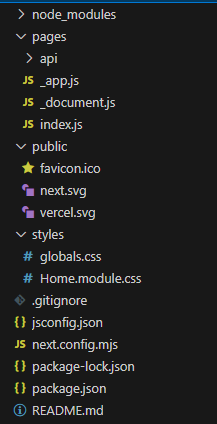
cd my-appProject Structure:
Write the command below to run the Next.js Application, and then open the URL in the browser.
npm run devAfter the successful run, the default page of next.js will be shown in the browser.
The application displays Hello, GeeksforGeeks Learner!! by rendering the default component from index.js.
Output:
In the Pages-based approach, Next.js automatically creates routes based on files placed in the pages directory, rendering components when their corresponding URLs are visited.
We are going to create three components here, this will be the folder structure.
Inside the functional component, there is a div in starting which contains some text and bold text inside the b tag.
Creating [id].js inside the dynamicpage folder enables dynamic routing for URLs like /dynamicpage/123.
Here we have combined all three pages inside the entry point of the next.js app.
Output: