|
VOOZH | about |
|
VOOZH | about |
This covers key advanced Java interview topics with questions and in-depth answers
An Exception is an Event that interrupts the normal flow of the program and requires special processing. During the execution of a program, errors and unplanned occurrences can be dealt with by using the Java Exception Handling mechanism. Below are some reasons why Exceptions occur in Java:
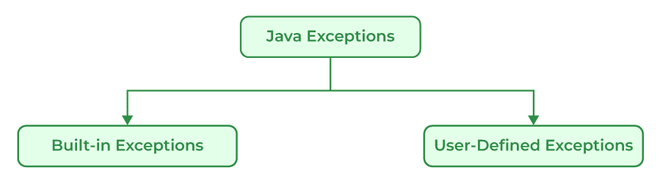
There are generally two types of exceptions in Java:
- ArrayIndexOutOfBoundsExceptions
- ClassNotFoundException
- FileNotFoundException
- IOException
- NullPointerException
- ArithmeticException
- InterruptedException
- RuntimeException
Errors | Exceptions |
|---|---|
Recovering from Errors is not possible. | Recover from exceptions by either using a try-catch block or throwing exceptions back to the caller. |
Errors are all unchecked types in Java. | It includes both checked as well as unchecked types that occur. |
Errors are mostly caused by the environment in which the program is running. | The program is mostly responsible for causing exceptions. |
Errors occur at runtime (e.g., OutOfMemoryError, StackOverflowError). Compile-time syntax mistakes are not Errors | All exceptions occur at runtime but checked exceptions are known to the compiler while unchecked are not. |
They are defined in java.lang.Error package. | They are defined in java.lang.Exception package |
Examples: java.lang.StackOverflowError, java.lang.OutOfMemoryError | Examples: Checked Exceptions: SQLException, IOException Unchecked Exceptions: ArrayIndexOutOfBoundException, NullPointerException, ArithmeticException. |
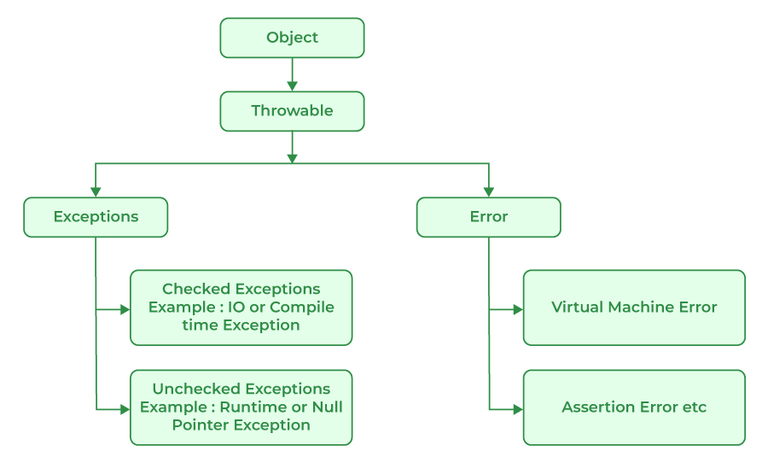
All exception and error types in Java are subclasses of the class throwable, which is the base class of the hierarchy. This class is then used for exceptional conditions that user programs should catch. NullPointerException is an example of such an exception. Another branch, error is used by the Java run-time system to indicate errors having to do with the JRE. StackOverflowError is an example of one of such error.
Runtime Exceptions are exceptions that occur during the execution of a code, as opposed to compile-time exceptions that occur during compilation. Runtime exceptions are unchecked exceptions, as they aren't accounted for by the JVM.
Examples of runtime exceptions in Java include:
Unlike checked exceptions, runtime exceptions do not require a declaration in the throws clause or capture in a try-catch block. However, handling runtime exceptions is advisable in order to provide meaningful error messages and prevent a system crash. Because runtime exceptions provide more specific information about the problem than checked exceptions, they enable developers to detect and correct programming errors more easily and quickly.
It is a runtime exception thrown when a program tries to use an object reference that is null. It usually indicates that no value has been assigned to a reference variable.
ArrayStoreException is thrown when an attempt is made to store the wrong type of object in an array of objects.
Example: Java Program to implement ArrayStoreException
Example:
Exception in thread "main" java.lang.ArrayStoreException: java.lang.Integer
at GFG.main(GFG.java:6)
Checked Exception:
Unchecked Exception:
Both Error and Exception classes inherit from the common parent class java.lang.Throwable.
No, It is not necessary to use catch block after try block in Java as we can create another combination with finally block. Finally is the block which runs despite the fact that the exception is thrown or not.
Exception propagation is a process in which the exception is dropped from to the top to the bottom of the stack. If not caught once, the exception again drops down to the previous method, and so on until it gets caught or until it reaches the very bottom of the call stack.
System.exit(int) has the capability to throw SecurityException. So, if in case of security, the exception is thrown then finally block will be executed otherwise JVM will be closed while calling System. exit(0) because of which finally block will not be executed.
It is the process of creating an exact copy of any object. In order to support this, a java class has to implement the Cloneable interface of java.lang package and override the clone() method provided by the Object class the syntax of which is:
Protected Object clone() throws CloneNotSupportedException{ return (Object)super.clone();}In case the Cloneable interface is not implemented and just the method is overridden, it results in CloneNotSupportedException in Java.
Exceptions are responsible for abruptly terminating the running of the program while executing and the code written after the exception occurs is not executed.
Example: Java Program to use final keyword
Output:
./GFG.java:6: error: cannot assign a value to final variable x
x=50;
^
1 error
Example: Java Program to implement finally
Try block
Always runs even without exceptions
Example:
Main function running
this( ) | super( ) |
|---|---|
It represents the current instance of the class. | It represents the current instance of the parent class. |
Calls the default constructor of the same class. | Calls the default constructor of the base class. |
Access the methods of the same class. | Access the methods of the parent class. |
Points current class instance. | Points the superclass instance. |
Multitasking in Java refers to a program's capacity to carry out several tasks at once. Threads, which are quick operations contained within a single program, can do this. Executing numerous things at once is known as multitasking.
Example: Java program for multitasking
Multithreaded programs in Java contain threads that run concurrently instead of running sequentially. A computer can use its resources more efficiently by combining multiple tasks at once. Any program with multithreading allows more than one user to simultaneously use the program without running multiple copies. A multithreaded program is designed to run multiple processes at the same time which can improve the performance of a program and allows the program to utilize multiple processors and improves the overall throughput.
There are multiple advantages of using multithreading which are as follows:
Multithreading is a Java feature that allows concurrent execution of two or more parts of a program for maximum utilization of the CPU. In general, threads are small, lightweight processes with separate paths of execution. These threads use shared memory, but they act independently, thus if any one thread fails it does not affect the other threads. There are two ways to create a thread:
By extending the Thread class: We create a class that extends the java.lang.Thread class. This class overrides the run() method available in the Thread class. A thread begins its life inside run() method.
Syntax:
public class MyThread extends Thread {
public void run() {
// thread code goes here
}
}
We create a new class that implements java.lang.Runnable interface and override run() method. Then we instantiate a Thread object and call the start() method on this object.
Syntax:
public class MyRunnable implements Runnable {
public void run() {
// thread code goes here
}
}
Threads in Java are subprocess with lightweight with the smallest unit of processes and also has separate paths of execution. These threads use shared memory but they act independently hence if there is an exception in threads that do not affect the working of other threads despite them sharing the same memory. A thread has its own program counter, execution stack, and local variables, but it shares the same memory space with other threads in the same process. Java provides built-in support for multithreading through the Runnable interface and the Thread class.
A process and a thread are both units of execution in a computer system, but they are different in several ways:
Process | Thread |
|---|---|
A process is a program in execution. | A thread is a single sequence of instructions within a process. |
The process takes more time to terminate. | The thread takes less time to terminate. |
The process takes more time for context switching. | The thread takes less time for context switching. |
The process is less efficient in terms of communication. | Thread is more efficient in terms of communication. |
The process is isolated. | Threads share memory. |
The process has its own Process Control Block, Stack, and Address Space. | Thread has Parents’ PCB, its own Thread Control Block, and Stack and common Address space. |
The process does not share data with each other. | Threads share data with each other. |
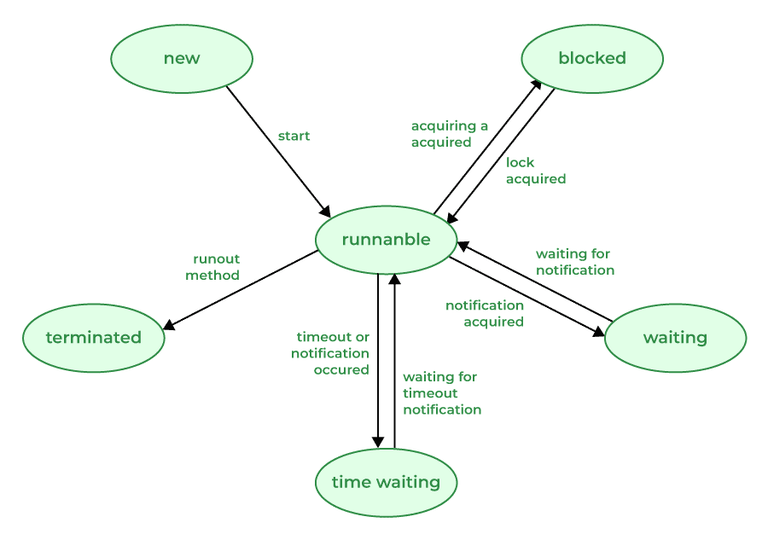
A thread in Java at any point in time exists in any one of the following states. A thread lies only in one of the shown states at any instant:
The suspend() method pauses a thread’s execution and keeps it blocked until resume() is called. This method is deprecated because it can cause deadlocks. Modern Java recommends using wait()/notify() or java.util.concurrent utilities instead.
Syntax:
public final void suspend();
Example: Java program to show thread suspend() method
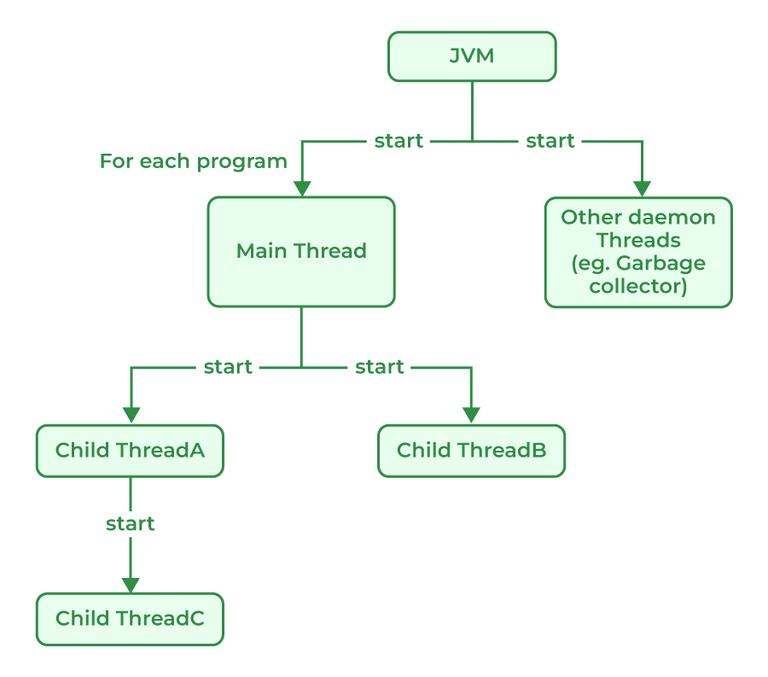
Java provides built-in support for multithreaded programming. The main thread is considered the parent thread of all the other threads that are created during the program execution. The main thread is automatically created when the program starts running. This thread executes the main method of the program. It is responsible for executing the main logic of the Java program as well as handling the user input operations. The main thread serves as the base thread from which all other child threads are spawned.
👁 Thread-Class-Execution-768A daemon thread in Java is a low-priority thread that is used to perform background operations or tasks which are used to perform continuously. such as Garbage collection, Signal dispatches, Action listeners, etc. Daemon threads in Java have lower priority than user threads, which means they can only execute when no user threads are running. Daemon threads in Java are useful features that are required for background tasks that do not require explicit shutdown or finalization. It allows more efficient use of system resource and are used to simplify resources and can simplify long-running tasks.
Thread is a lightweight process that runs concurrently with the other thread inside a single process. Each thread can execute a different task and share the resources within a single process. Thread in Java can enter the waiting state in many different ways:
On a single CPU, multi-threading works through time-slicing, where the CPU rapidly switches between threads. This creates the illusion of parallel execution. The OS schedules and allocates time slices to each thread. Java ensures correctness using synchronization and locking to avoid race conditions.
Priorities in threads is a concept where every thread is having a priority which in layman’s language one can say every object is having priority here which is represented by numbers ranging from 1 to 10. There are different types of thread properties in Java mentioned below:
By default, the thread is assigned NORM_PRIORITY.
For Java, Garbage collection is necessary to avoid memory leaks which can cause the program to crash and become unstable. There is no way to avoid garbage collection in Java. Unlike C++, Garbage collection in Java helps programmers to focus on the development of the application instead of managing memory resources and worrying about memory leakage. Java Virtual Machine (JVM) automatically manages the memory periodically by running a garbage collector which frees up the unused memory in the application. Garbage collection makes Java memory efficient because it removes unreferenced objects from the heap memory.
Apart from many advantages, Garbage Collector has certain drawbacks mentioned below:
The Java Virtual Machine (JVM) removes objects that are no longer in use using a garbage collector which periodically checks and removes these objects. There are different types of garbage collection in the JVM, each with different characteristics and performance implications. The main types of garbage collection are:
Major garbage collection works on the survivor space and Minor garbage collection works on the Eden space to perform a mark-and-sweep routine. And we can identify both of them based on the output where the minor collection prints "GC", whereas the major collection prints "Full GC" for the case where the garbage collection logging is enabled with "-XX:PrintGCDetails" or "verbose:gc".
In Java, memory leaks occur when objects are no longer needed but still hold valid references, preventing garbage collection. Common causes include not closing resources, keeping unused references, or creating too many objects. These unused but referenced objects waste memory, slow down performance, and may lead to system failure. Proper resource and reference management is essential to avoid leaks.
Example: Java Program to demonstrate memory leaks
Output:
Exception in thread "main" java.lang.OutOfMemoryError: Java heap space
at java.base/java.util.Vector.<init>(Vector.java:142)
at java.base/java.util.Vector.<init>(Vector.java:155)
at GFG.main(GFG.java:9)
Regular Expressions or Regex in Java is an API used for searching and manipulating of strings in Java. It creates String patterns that can extract the data needed from the strings or can generalize a pattern. There are 3 Classes present in java.util.regex mentioned below:
Also, apart from the 3 classes package consists of a single interface MatchResult Interface which can be used for representing the result of a match operation.
A password must start with an alphabet and followed by alphanumeric characters; Its length must be in between 8 to 20.
^(?=.*[0-9])(?=.*[a-z])(?=.*[A-Z])(?=.*[@#$%^&+=])[A-Za-z][A-Za-z0-9@#$%^&+=]{7,19}$
Explanation:
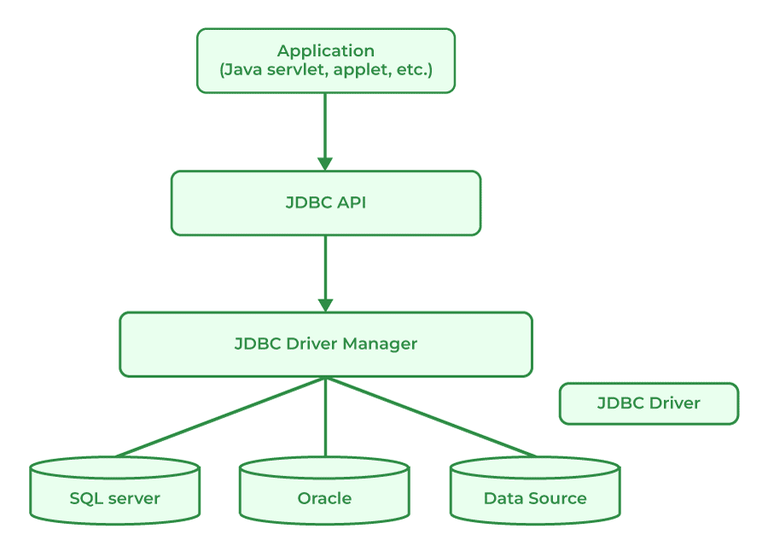
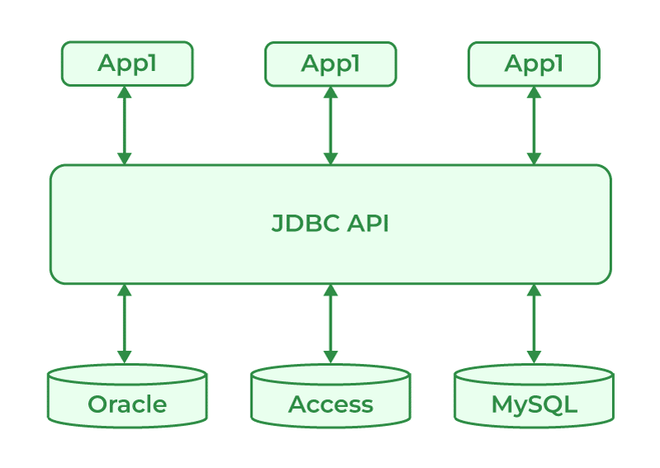
JDBC standard API is used to link Java applications and relational databases. It provides a collection of classes and interfaces that let programmers to use the Java programming language to communicate with the database. The classes and interface of JDBC allow the application to send requests which are made by users to the specified database. There are generally four components of JDBC by which it interacts with the database:
JDBC Driver is a software component that is used to enable a Java application to interact with the database. JDBC provides the implementation of the JDBC API for a specific database management system, which allows it to connect the database, execute SQL statements and retrieve data. There are four types of JDBC drivers:
There are certain steps to connect the database and Java Program as mentioned below:
JDBC API components provide various methods and interfaces for easy communication with the databases also it provides packages like java Se and java EE which provides the capability of write once run anywhere (WORA).
Syntax:
java.sql.*;
Java database connectivity interface (JDBC) is a software component that allows Java applications to interact with databases. To enhance the connection, JDBC requires drivers for each database.
JDBC ResultSet interface is used to store the data from the database and use it in our Java Program. We can also use ResultSet to update the data using updateXXX() methods. ResultSet object points the cursor before the first row of the result data. Using the next() method, we can iterate through the ResultSet.
A JDBC RowSet provides a way to store the data in tabular form. RowSet is an interface in java that can be used within the java.sql package. The connection between the RowSet object and the data source is maintained throughout its life cycle. RowSets are classified into five categories based on implementation mentioned below:
JDBC DriverManager class acts as an interface for users and Drivers. It is used in many ways as mentioned below: