VOOZH about

URL: https://www.geeksforgeeks.org/java/driver-interface-in-jdbc/

⇱ Driver Interface in JDBC - GeeksforGeeks


  • Courses
  • Tutorials
  • Interview Prep

Driver Interface in JDBC

Last Updated : 6 Apr, 2026

The Driver interface in JDBC is a core interface that enables Java applications to communicate with databases. It acts as a bridge between the application and the database by handling connection requests and translating them into database-specific operations.

  • Defined in java.sql package
  • Implemented by all JDBC drivers
  • Works with DriverManager to establish database connections
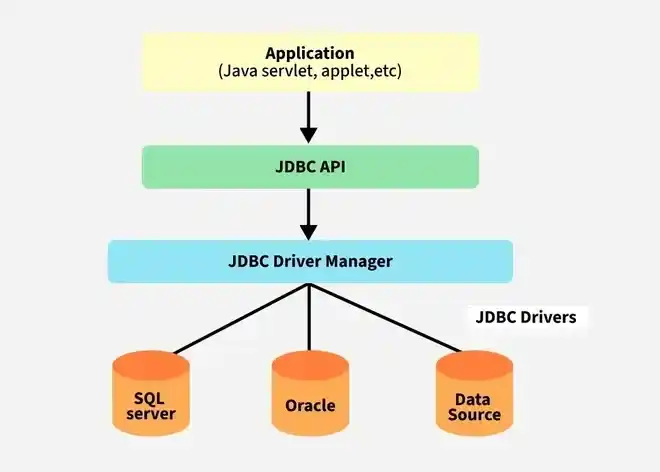
👁 JDBC-Architecture-

Working of Driver Interface

The working of the Driver interface follows a structured flow:

  • Java application sends a request using JDBC API
  • DriverManager loads all available drivers
  • Each driver checks the JDBC URL using acceptsURL()
  • The suitable driver establishes connection using connect()
  • Connection is returned to the application

Important Methods of Driver Interface

1. connect(): Establishes a connection to the database.

Connection connect(String url, Properties info) throws SQLException;

2. acceptsURL(): Checks whether the driver can handle the given JDBC URL.

boolean acceptsURL(String url) throws SQLException;

3. getPropertyInfo(): Provides information about connection properties.

DriverPropertyInfo[] getPropertyInfo(String url, Properties info) throws SQLException;

4. getMajorVersion() and getMinorVersion(): Returns driver version details.

5. jdbcCompliant(): Checks whether the driver follows JDBC standards.

Example: Using DriverManager with Driver Interface

Explanation:

  • DriverManager.getConnection() is used to establish a connection with the database.
  • It internally uses the Driver interface implementation to connect to the database.
  • The JDBC URL (jdbc:mysql://localhost:3306/testdb) specifies the database location.
  • If the connection is successful, a Connection object is returned.
  • Finally, con.close() is used to close the database connection.
Comment
Article Tags:
Article Tags: