|
VOOZH | about |
|
VOOZH | about |
java.time.LocalDateTime class, introduced in Java 8, represents a local date-time object without timezone information. The LocalDateTime class in Java is an immutable date-time object that represents a date in the yyyy-MM-dd-HH-mm-ss.zzz format. It implements the ChronoLocalDateTime interface and inherits the object class.
Wherever we need to represent time without a timezone reference, we can use the LocalDateTime instances. LocalDateTime, for example, can be used to start batch jobs in any application. Jobs will be run at a fixed time in the timezone in which the server is located. Note LocalDateTime instances are immutable and thread.
Syntax: Class declaration
public final class LocalDateTime
extends Object
implements Temporal, TemporalAdjuster, ChronoLocalDateTime<LocalDate>, Serializable
Methods of this class are as follows:
| Method | Description |
|---|---|
| format() | It is used to format this date-time using the specified formatter. |
| get() | It is used to get the value of the specified field from this date-time as an int. |
| minusMinutes() | Returns a copy of this LocalDateTime with the specified number of minutes subtracted. |
| minusYears() | Returns a copy of this LocalDateTime with the specified number of years subtracted. |
| minusDays() | Returns a copy of this LocalDateTime with the specified number of days subtracted. |
| now() | It is used to obtain the current date-time from the system clock in the default time zone. |
| plusHours() | Returns a copy of this LocalDateTime with the specified number of hours added. |
| plusYears() | Returns a copy of this LocalDateTime with the specified number of years added. |
| plusDays() | Returns a copy of this LocalDateTime with the specified number of days added. |
Some more methods to modify local time are as follows in LocalDateTime can be used to get to a new localdatetime instance relative to an existing localdatetime instance. They are namely as follows:
plusYears(), plusMonths(), plusDays(), plusHours(), plusMinutes(), plusSeconds(), plusNanos(), minusYears(), minusMonths(), minusDays(), minusHours(), minusMinutes(), minusSeconds(), minusNanos()
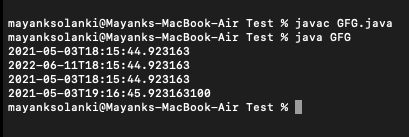
Examples 1:
Output:
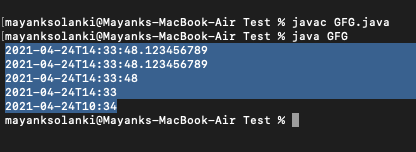
👁 ImageExample 2: Creating a specified time
Output:
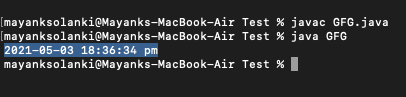
👁 ImageExample 3: Format LocalDateTime to string
To format a local time to the desired string representation, use the LocalDateTime.format(DateTimeFormatter) method.
Output:
👁 ImageNote: In order to parse a string to LocalDateTime, convert time in a string to a local time instance, the LocalDateTime class has two overloaded parse() methods.
- parse(CharSequence text)
- parse(CharSequence text, DateTimeFormatter formatter)