|
VOOZH | about |
|
VOOZH | about |
ResultSetMetaData is an interface in java.sql used to retrieve structural information about a ResultSet. It allows developers to understand the database table format dynamically without prior knowledge of its schema.
To get metadata from a ResultSet:
ResultSet rs = statement.executeQuery("SELECT * FROM employees");
ResultSetMetaData rsmd = rs.getMetaData();
Here:
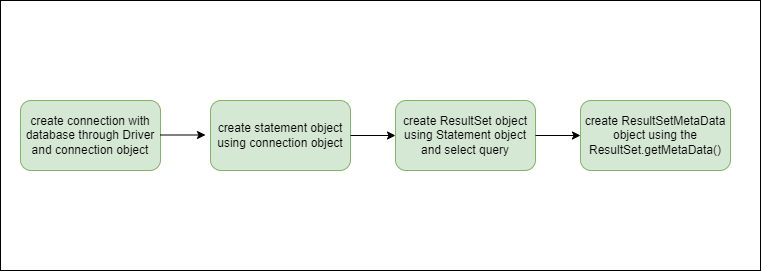
Below are the steps to use the RSMD (ResultSetMetaData) in JDBC to retrieve information about ResultSet Columns.
Import the required interface
import java.sql.ResultSetMetaData;
Connect Java application to database
Connection con = DriverManager.getConnection(url, user, password);
it is used to execute SQL queries
Statement stmt = con.createStatement();
Run SELECT query and store result
ResultSet rs = stmt.executeQuery("SELECT * FROM table");
Retrieve metadata from ResultSet
ResultSetMetaData rsmd = rs.getMetaData();
Access column details (count, name, type, etc.)
int count = rsmd.getColumnCount();
String name = rsmd.getColumnName(1);
String type = rsmd.getColumnTypeName(1);
getMetaData:The getMetaData() method of ResultSet is used to obtain a ResultSetMetaData object that describes the structure of the data returned by the query. It provides information about columns without modifying the actual data.
👁 Steps to Create ResultSetMetaData Object
Before we go on with the Java program, We should have set up our database beforehand set up with the required JDBC connectors up and working.
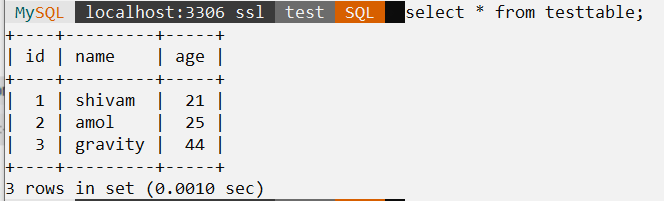
we took the sample database we are going to extract metadata of this database.
👁 Sample Database ExampleReturns the name of the specified column in the ResultSet
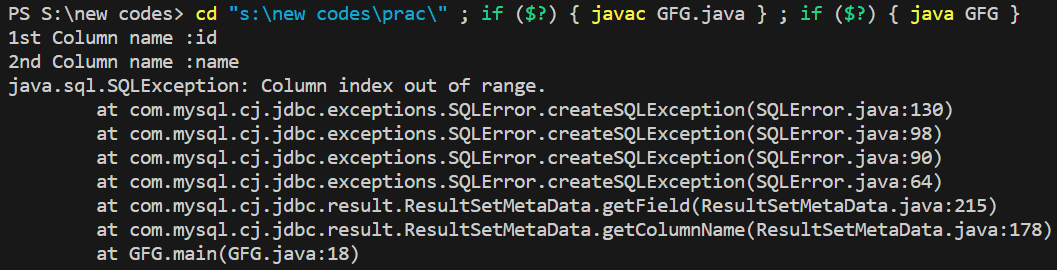
Note: Column index starts from 1, and invalid index → runtime exception.
Explanation:This program connects to a database, executes a query, and uses ResultSetMetaData to retrieve column names from the result. It also demonstrates that accessing a non-existing column index causes a runtime exception.
This method, returns an integer value of total column count in the ResultSet.
Explanation:This program executes a query on testtable and uses ResultSetMetaData to get and print the total number of columns using getColumnCount().
Returns the data type of the specified column as a String; throws an exception if the column index is invalid.
Explanation:This program executes a query on testtable and uses ResultSetMetaData to print the data type of each column using getColumnTypeName(), which is useful for data validation.
Returns the size or precision of the specified column as an integer; useful for handling input length and data validation.
Note: The value returned by getPrecision() depends on the column type: for numeric → max digits, for character -> length in characters, for date/time → string length, and 0 if size cannot be determined
Explanation:This program retrieves data from testtable and uses ResultSetMetaData.getPrecision() to determine the size or precision of each column. It helps handle variable-length data and validate input dynamically, with the returned value depending on the column type (numeric, character, or date/time).
Below is the list of some frequently used method in RSMD:
Method Name | Return Type |
|
|---|---|---|
getColumnCount() | int | returns the number of columns in the ResultSet object. |
isNullable(int column) | int | returns 0(no null values allowed) ,1(null allowed),2(unknown nullability). |
getColumnDisplaySize(int column) | int | returns column's maximum width in characters. |
getScale(int column) | int | returns the number of digits after decimal point in the column ,0 if not applicable. |
getPrecision(int column) | int | returns the designated column length. |
getColumnLabel(int column) | String | returns the alias specified for the column, if no alias specified returns the column name. |
getColumnName(int column) | String | returns the specified column name. |
getSchemaName(int column) | String | returns the schema for the designated column's table. |
getTableName(int column) | String | returns the name of the table. |
getColumnTypeName(int column) | String | returns the column's datatype name. |
isAutoIncrement(int column) | boolean | returns if the column automatically increments. |
isWritable(int column) | boolean | returns true if the column is writable, false otherwise. |
isReadOnly(int column) | boolean | returns true if column is not writable, false otherwise. |