JDBC makes it straightforward to perform CRUD (Create, Read, Update, Delete) operations by providing standard APIs to interact with relational databases. It allows developers to execute SQL queries and manage data efficiently within Java applications.
- Provides simple methods like executeQuery() and executeUpdate() for database operations
- Supports prepared statements for secure and efficient query execution
- Enables easy connection management and transaction handling
CRUD stands for:
- C (Create) -> Insert new records into the database.
- R (Read) -> Retrieve records from the database.
- U (Update) -> Modify existing records.
- D (Delete) -> Remove records from the database.
Prerequisites:
CRUD Operations in JDBC with MySQL
CRUD operations in JDBC with MySQL involve using Java code to perform Create, Read, Update, and Delete actions on a MySQL database through SQL queries executed via JDBC APIs.
Step 1. Database Setup in MySQL
- In this step, we create a database and a table where student records will be stored.
- Run the following commands in MySQL Workbench / CLI:
Step 2. Maven Dependency for MySQL
- We add the MySQL connector dependency in pom.xml so Java can talk to MySQL.
- This downloads the driver automatically from Maven Central.
pom.xml:
Step 3. Create JDBC connection
- This utility class sets up a connection with MySQL using JDBC.
- Change username and password as per your local MySQL setup.
Step 4. Create Operation (Insert Student)
- Use INSERT query to add new student records into the database.
- We use PreparedStatement to prevent SQL Injection.
This will add new student records into the database.
Step 5 Read Operation (Fetch Students)
- Use SELECT query to retrieve student details from the table.
- Results are stored in a ResultSet which we loop through to display records.
Step 6. Update Operation (Modify Student Email)
- Use UPDATE query to change existing student details.
- Here we update a student’s email by using their id.
Step 7. Delete Operation (Remove Student)
- Use DELETE query to remove student records by ID.
- Once deleted, the record will no longer appear in the table.
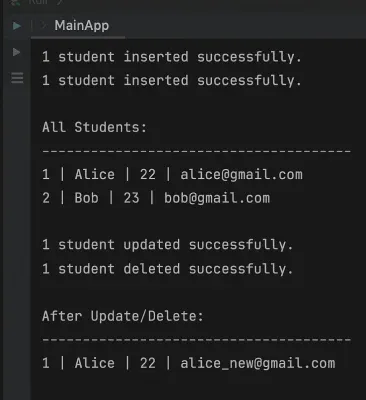
Step 8. Main Class (Testing All CRUD Operations)
- This is the driver class where we test all four operations step by step.
- Insert -> Display -> Update -> Delete -> Display again.