|
VOOZH | about |
|
VOOZH | about |
JSON (JavaScript Object Notation) is a widely-used, lightweight data format for representing structured data.
When it comes to data formats, JSON and XML are the two most common choices. JSON is generally preferred for web applications due to its smaller size, ease of use, and better performance. Here's a quick comparison:
| Feature | JSON | XML |
|---|---|---|
| Readability | Human-readable | Human-readable but more verbose |
| Data Size | Smaller and more compact | Larger due to extra markup |
| Parsing | Easier to parse in most languages | More complex parsing |
| Support | Broad support across languages | Initially JavaScript, but now widely supported |
| Use Cases | Web APIs, configuration files, data transfer | Data storage, document formatting |
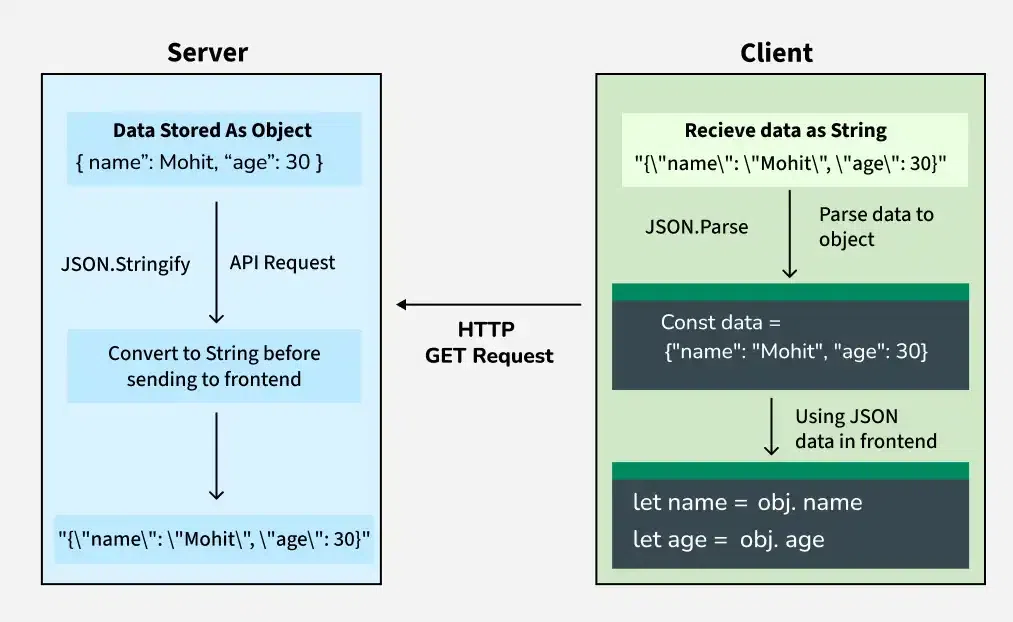
In a typical web application, JSON (JavaScript Object Notation) is used to transfer data between the server and the client (frontend). JSON is language-independent, which makes it ideal for communication between different technologies.
Example JSON String Received from Server
{"name":"Mohit", "age":30}
This JSON data contains:
Parsing JSON in Different Programming Languages
Although the JSON data is the same, each language uses its own method or library to parse it.
The basic structure of JSON consists of two primary components:
A JSON object is a collection of key-value pairs enclosed in curly braces {}. The key is always a string, and the value can be a variety of data types, including strings, numbers,arrays and even other objects.
Example:
{ "name": "Mohit Kumar",
"age": 30,
"isStudent": false }
In this example, name, age, and isStudent are keys, and "John Doe", 30, and false are their respective values.
A JSON array is an ordered collection of values enclosed in square brackets []. These values can be of any type, including objects, arrays, or primitive data types.
Example:
{ "fruits": ["apple", "banana", "cherry"] }
Here, fruits is a key, and the value is an array containing the elements "apple", "banana", and "cherry".
JSON supports the following data types:
In JavaScript, we can easily parse JSON data into a JavaScript object and vice versa using built-in methods like JSON.parse() and JSON.stringify().
To parse a JSON string into a JavaScript object, use JSON.parse().
To convert a Javascript object into a JSON string, use JSON.stringify()
Python provides a built-in json module to work with JSON data. We can use the json.loads() method to convert a JSON string to a dictionary and json.dumps() to convert a dictionary to a JSON string.
In Python, a JSON string can be converted into a dictionary using the built-in json module using json.loads().
In Python, a dictionary can be converted into a JSON string using the json.dumps() method.