|
VOOZH | about |
|
VOOZH | about |
Python JSON (JavaScript Object Notation) is a data format for storing and transferring data, supported via the built-in json module for parsing, serializing and deserializing.
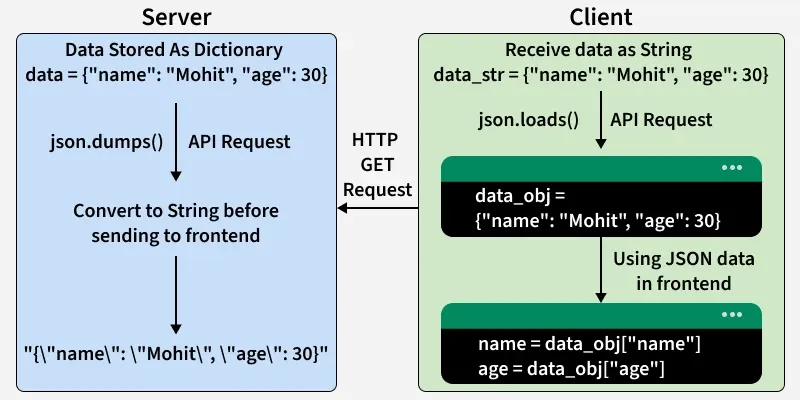
This below diagram shows JSON flows from server to client as a string via json.dumps(), then parsed back to a dictionary with json.loads() for data access.
Let's see some examples where we convert the JSON objects to Python objects and vice versa.
Let's see an example where we convert the JSON objects to Python objects. Here, json.loads() method can be used to parse a valid JSON string and convert it into a Python Dictionary.
This is JSON <class 'str'>
Now convert from JSON to Python
Converted to Python <class 'dict'>
{'id': '09', 'name': 'Nitin', 'department': 'Finance'}
Let's see an example where we convert Python objects to JSON objects. Here json.dumps() function will convert a subset of Python objects into a JSON string.
This is Python <class 'dict'>
Now Convert from Python to JSON
Converted to JSON <class 'str'>
{
 "id": "09",
 "name": "Nitin",
 "department": "Finance"
}
In this section, we will cover the basics of JSON, its data types, and how to work with, read, write, and parse JSON data in Python.
You can read, write, and append JSON data to files in Python using the json module. It makes handling JSON data in files simple and efficient.
You can parse JSON data in Python to access or manipulate it, convert dictionaries to JSON strings, and transform JSON strings back into Python objects. This allows easy data exchange and customization.
Serializing converts Python objects to JSON, and deserializing converts JSON back to Python objects using json.dump(), json.dumps(), json.load(), and json.loads().
Convert and transform data between JSON, XML, CSV, and text formats in Python, enabling easy storage, sharing, and interoperability across different applications.
Perform additional JSON operations in Python, including formatting, pretty-printing, flattening nested objects, validating JSON strings, and sorting JSON data by values.