|
VOOZH | about |
|
VOOZH | about |
The full form of JSON is Javascript Object Notation.
Reading JSON in Python means retrieving JSON data from a file or string and converting it into Python objects like dictionaries or lists. This process is called deserialization. Python offers two main ways to read JSON data:
The JSON package has json.load() function that loads the JSON content from a JSON file into a dictionary. It takes one parameter:
File pointer: A file pointer that points to a JSON file.
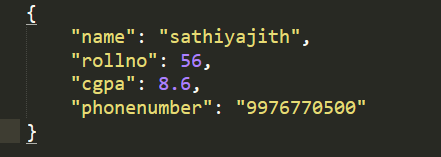
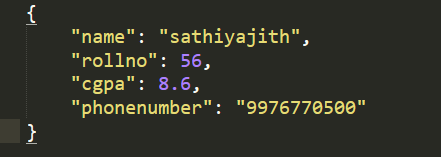
Example: Read a JSON file and convert its contents to a Python dictionary.
Output:
Explanation: We open sample.json in read mode and use json.load() to parse its content into a Python dictionary, which we then print along with its data type.
json.loads() function is used to parse a JSON string and convert it into a Python object. It takes one parameter:
JSON string: A valid JSON-formatted string.
Example: Convert a JSON-formatted string into a Python dictionary.
Explanation: We define a JSON string and use json.loads() to parse it into a Python dictionary, then print the resulting object and its type.
Writing data to a JSON file in Python involves converting Python objects like dictionaries into JSON format and saving them to a file. This process is called serialization. Let's explore two methods to write a JSON file in Python.
The JSON package in Python has a function called json.dumps() that helps in converting a dictionary to a JSON object. It takes two parameters:
After converting the dictionary to a JSON object, simply write it to a file using the "write" function.
Example: Convert a dictionary to a JSON string and write it to a file.
Output:
Explanation: We create a dictionary, convert it to a JSON-formatted string using json.dumps() with 4-space indentation and write it to sample.json using the write() method.
Another way of writing JSON to a file is by using json.dump() method. The JSON package has "dump" function which directly writes the dictionary to a file in the form of JSON, without needing to convert it into an actual JSON object. It takes 2 parameters:
Example: Directly write a dictionary to a JSON file without converting it first.
Output
Explanation: We create a dictionary and use json.dump() to directly write it to sample.json, skipping the need to manually convert it to a JSON string.
| PYTHON OBJECT | JSON OBJECT |
|---|---|
| Dict | object |
| list, tuple | array |
| str | string |
| int, long, float | numbers |
| True | true |
| False | false |
| None | null |