|
VOOZH | about |
|
VOOZH | about |
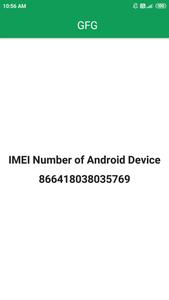
Android applications many times require the unique identity of the user while developing applications. This unique identity is used to identify the user of the application. Many android apps use the IMEI number as the unique identity of each user. In this article, we will take a look at How to get Device IMEI and ESN Programmatically in android using Jetpack Compose.
Important: From Android 10+, we can no longer access the IMEI number of an android device. This required the permission READ_PRIVILEGED_PHONE_STATE which is only accessible to system apps.
To create a new project in Android Studio please refer to How to Create/Start a New Project in Android Studio. While choosing the template, select Empty Compose Activity. If you do not find this template, try upgrading the Android Studio to the latest version. We demonstrated the application in Kotlin, so make sure you select Kotlin as the primary language while creating a New Project.
Navigate to app > manifests > AndroidManifest.xml and add the below permissions to it in the manifest tag.
<uses-permission android:name="android.permission.READ_PRIVILEGED_PHONE_STATE" />
<uses-permission android:name="android.permission.READ_PHONE_STATE" />
Go to the MainActivity.kt file and refer to the following code. Below is the code for the MainActivity.kt file. Comments are added inside the code to understand the code in more detail.
MainActivity.kt: