|
VOOZH | about |
|
VOOZH | about |
Room is one of the Jetpack Architecture Components in Android. This provides an abstract layer over the SQLite Database to save and perform the operations on persistent data locally. This is recommended by Google over SQLite Database although the SQLite APIs are more powerful they are fairly low-level, which requires a lot of time and effort to use. But Room makes everything easy and clear to create a Database and perform the operations on it.
Room | SQLite |
|---|---|
| No need of writing raw queries. | Need to write raw queries. |
| Compile Time verification of SQL queries. | No, compile-time boilerplate verification of SQL queries. |
| No need of converting the Data to Java Objects. As Room internally maps the Database objects to Java objects. | Need to write SQL queries to convert the Data to Java Objects. |
| This conveniently supports the integration with other Architecture components. | This needs a lot of boiler plate code to integrate with the other Architecture Components. |
| Room provides easier way to work with LiveData and perform the operations. | SQLite doesn't provide a direct way to access the LiveData, it needs external code to be written to access the LiveData. |
| There is no need to change the code when the database schema gets changes. | This needs to change its queries whenever the database schema gets changes |
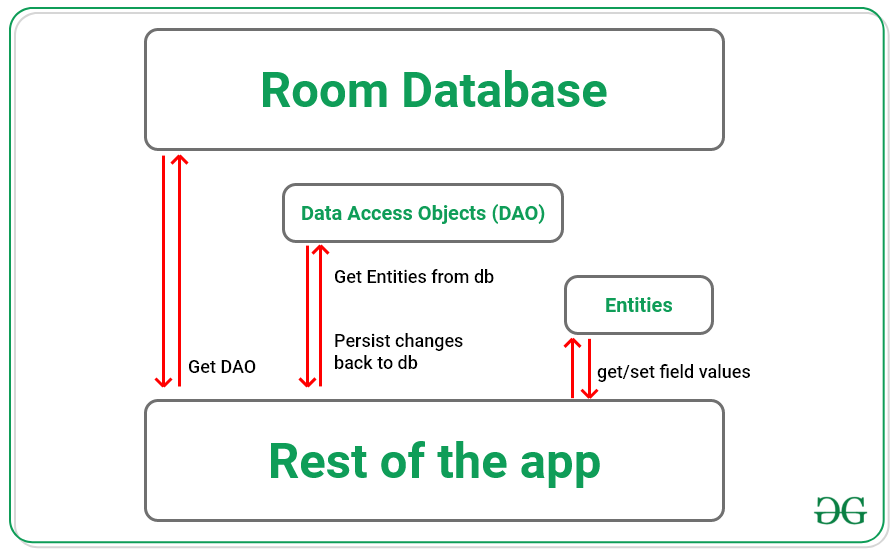
From the image below we can conclude the working of the Room database as The application first gets the Data Access Objects (DAOs) associated with the existing Room Database. After getting DAOs, through DAOs it accesses the entities from the Database Tables. And then it can perform the operations on those entities and persist back the changes to the Database.
👁 ImageStep 1: Create an Empty Activity project
Step 2: Adding the required dependencies
// room_version may vary
def room_version = "2.3.0"
implementation "androidx.room:room-runtime:$room_version"
kapt "androidx.room:room-compiler:$room_version"
implementation "androidx.room:room-ktx:$room_version"
testImplementation "androidx.room:room-testing:$room_version"
Now creating the components of Room one by one:
Note: Here the entities for every interface and classes created are important and to be taken care of.
Step 3: Creating Data Entity
Step 4: Creating Data Access Objects (DAOs):
Step 5: Creating the Database
Step 6: Usage of the Room database
Note: By using this basic knowledge about Room Database one can build a basic CRUD application using Room Database by referring to How to Perform CRUD Operations in Room Database in Android?.