|
VOOZH | about |
|
VOOZH | about |
An Operating System (OS) is a system software that manages computer hardware, software resources, and provides common services for computer programs. It acts as an interface between the user and the computer hardware.
Batch OS
Multiprogramming OS
Time-Sharing / Multitasking OS
Multiprocessing OS
Multi-user OS
Distributed OS
Network OS
Real-Time OS (RTOS)
A lightweight process and the basic unit of CPU execution.
Features:
Creation :Using fork() system call.
Based on number:
Based on level:
Examples: Java Threads, POSIX Threads, Windows Threads, Solaris Threads
Process is a program in execution.
Key Points:
The OS uses schedulers to manage which process gets CPU time.
Responsible for loading the selected process onto the CPU.
Performs context switching:
Arrival Time (AT)
Completion Time (CT)
Burst Time (BT)
Turnaround Time (TAT)
Waiting Time (WT)
1. First Come First Serve (FCFS): First Come, First Serve (FCFS) is one of the simplest types of CPU scheduling algorithms. It is exactly what it sounds like: processes are attended to in the order in which they arrive in the ready queue, much like customers lining up at a grocery store.
2. Shortest Job First (SJF):Shortest Job First (SJF) or Shortest Job Next (SJN) is a scheduling process that selects the waiting process with the smallest execution time to execute next.
3. Shortest Remaining Time First (SRTF): It is preemptive mode of SJF algorithm in which jobs are scheduled according to the shortest remaining time.
4. Round Robin (RR) Scheduling: It is a method used by operating systems to manage the execution time of multiple processes that are competing for CPU attention.
5. Priority Based scheduling: In this scheduling, processes are scheduled according to their priorities, i.e., highest priority process is schedule first. If priorities of two processes match, then scheduling is according to the arrival time.
6. Highest Response Ratio Next (HRRN): In this scheduling, processes with highest response ratio is scheduled. This algorithm avoids starvation.
Some useful facts about Scheduling Algorithms:
A solution for the critical section problem must satisfy the following three conditions:
Mutual Exclusion
Progress
Bounded Waiting
A semaphore is a synchronization tool used by the OS to control access to shared resources in a concurrent system.
Operations that execute in one indivisible CPU step:
Two Atomic Operations:
Types of Semaphores:
Counting Semaphore
Mutex
Misconception: There is an ambiguity between binary semaphore and mutex. We might have come across that a mutex is binary semaphore. But they are not! The purpose of mutex and semaphore are different. May be, due to similarity in their implementation a mutex would be referred as binary semaphore.
Deadlock is a situation where a set of processes are permanently blocked because:
There are three ways to handle deadlock
To ensure the system never enters a deadlock state, at least one of the conditions for deadlock must be prevented:
Mutual Exclusion: This condition cannot be removed because some resources (non-shareable resources) must be exclusively allocated to one process at a time.
Hold and Wait: This condition can be avoided using the following strategies:
Pre-emption:If a process P1P1P1 requests a resource RRR that is held by another process P2P2P2:
Circular Wait: This condition can be avoided using the following method:
The Deadlock Avoidance Algorithm prevents deadlocks by monitoring resource usage and resolving conflicts before they occur, like rolling back processes or reallocating resources. It minimizes deadlocks but doesn’t fully guarantee their prevention. The two key techniques are:
The Banker’s Algorithm is a resource allocation and deadlock avoidance algorithm used in operating systems. It ensures that the system remains in a safe state by simulating the allocation of resources to processes without running into a deadlock.
The following Data structures are used to implement the Banker’s Algorithm:
1. Available: It is a 1-D array of size ‘m’ indicating the number of available resources of each type. Available[ j ] = k means there are ‘k’ instances of resource type R j.
2. Max: It is a 2-d array of size ‘ n*m’ that defines the maximum demand of each process in a system. Max[ i, j ] = k means process Pi may request at most ‘k’ instances of resource type Rj.
3.Allocated: It is a 2-d array of size ‘n*m’ that defines the number of resources of each type currently allocated to each process. Allocation[ i, j ] = k means process Pi is currently allocated ‘k’ instances of resource type Rj.
4. Need: It is a 2-d array of size ‘n*m’ that indicates the remaining resource need of each process. Need [ i, j ] = k means process Pi currently needs ‘k’ instances of resource type Rj Need [ i, j ] = Max [ i, j ] – Allocation [ i, j ].
Detection: A cycle in the resource allocation graph represents deadlock only when resources are of single-instance type. If the resources are of multiple instance type, then the safety algorithm is used to detect deadlock.
Recovery: A system can recover from deadlock through adoption of the following mechanisms:
In the Deadlock ignorance method the OS acts like the deadlock never occurs and completely ignores it even if the deadlock occurs. This method only applies if the deadlock occurs very rarely. The algorithm is very simple. It says, ” if the deadlock occurs, simply reboot the system and act like the deadlock never occurred.” That’s why the algorithm is called the Ostrich Algorithm.
In multiprogramming system, the task of subdividing the memory among the various processes is called memory management. The task of the memory management unit is the efficient utilization of memory and minimize the internal and external fragmentation.
Loading a process into the main memory is done by a loader. There are two different types of loading :
(a) Single Partition Allocation Schemes - The memory is divided into two parts. One part is kept to be used by the OS and the other is kept to be used by the users.
(b) Multiple Partition Schemes -
Variable partition allocation schemes:
Note:
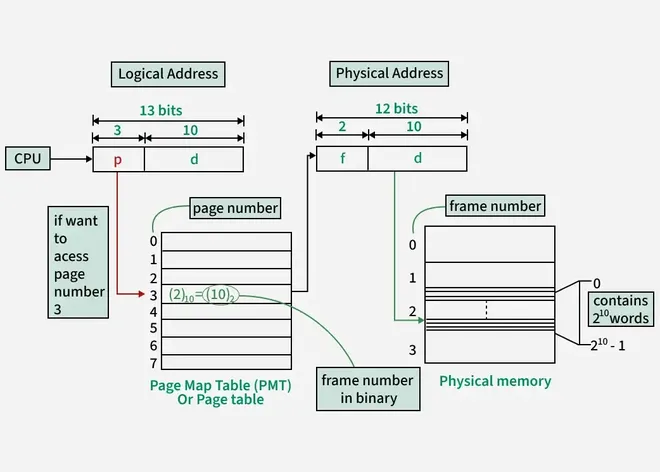
In paging, physical memory is divided into fixed-size frames and virtual memory is divided into fixed-size pages. The size of a page is equal to the size of a frame.
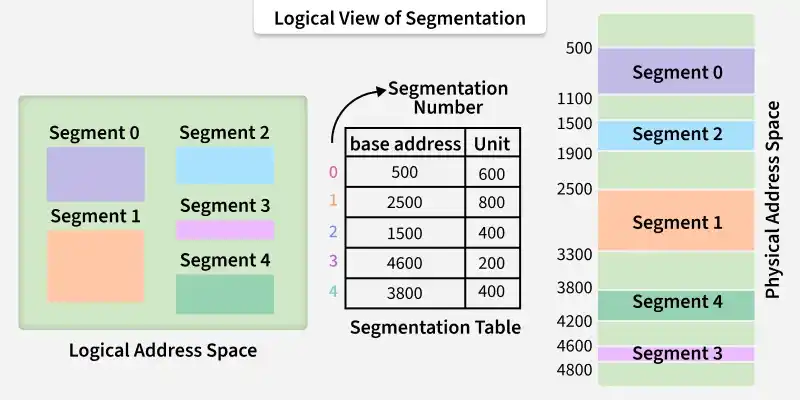
Segmentation is implemented to give users view of memory. The logical address space is a collection of segments. Segmentation can be implemented with or without the use of paging.
Page Fault: A page fault is a type of interrupt, raised by the hardware when a running program accesses a memory page that is mapped into the virtual address space, but not loaded in main/virtual memory.
1. First In First Out (FIFO)
This is the simplest page replacement algorithm. In this algorithm, operating system keeps track of all pages in the memory in a queue, oldest page is in the front of the queue. When a page needs to be replaced page in the front of the queue is selected for removal.
For example, consider page reference string 1, 3, 0, 3, 5, 6 and 3 page slots.
Belady’s anomaly: Belady’s anomaly proves that it is possible to have more page faults when increasing the number of page frames while using the First in First Out (FIFO) page replacement algorithm.
For example, if we consider reference string 3 2 1 0 3 2 4 3 2 1 0 4 and 3 slots, we get 9 total page faults, but if we increase slots to 4, we get 10 page faults.
2. Optimal Page replacement
In this algorithm, pages are replaced which are not used for the longest duration of time in the future.
Let us consider page reference string 7 0 1 2 0 3 0 4 2 3 0 3 2 and 4 page slots.
Initially, all slots are empty, so when 7 0 1 2 are allocated to the empty slots —> 4 Page faults.
0 is already there so —> 0 Page fault.
When 3 came it will take the place of 7 because it is not used for the longest duration of time in the future.—> 1 Page fault.
0 is already there so —> 0 Page fault.
4 will takes place of 1 —> 1 Page Fault.
Now for the further page reference string —> 0 Page fault because they are already available in the memory.
Optimal page replacement is perfect, but not possible in practice as an operating system cannot know future requests. The use of Optimal Page replacement is to set up a benchmark so that other replacement algorithms can be analyzed against it.
3. Least Recently Used (LRU)
In this algorithm, the page will be replaced which is least recently used.
Let say the page reference string 7 0 1 2 0 3 0 4 2 3 0 3 2 .
Initially, we have 4-page slots empty. Initially, all slots are empty, so when 7 0 1 2 are allocated to the empty slots —> 4 Page faults.
0 is already their so —> 0 Page fault.
When 3 came it will take the place of 7 because it is least recently used —> 1 Page fault.
0 is already in memory so —> 0 Page fault. 4 will takes place of 1 —> 1 Page Fault.
Now for the further page reference string —> 0 Page fault because they are already available in the memory.
4. Most Recently Used (MRU)
In this algorithm, page will be replaced which has been used recently. Belady’s anomaly can occur in this algorithm.
Example: Consider the page reference string 7, 0, 1, 2, 0, 3, 0, 4, 2, 3, 0, 3, 2, 3 with 4-page frames. Find number of page faults using MRU Page Replacement Algorithm.
- Initially, all slots are empty, so when 7 0 1 2 are allocated to the empty slots —> 4 Page faults
- 0 is already their so–> 0 page fault
- when 3 comes it will take place of 0 because it is most recently used —> 1 Page fault
- when 0 comes it will take place of 3 —> 1 Page fault
- when 4 comes it will take place of 0 —> 1 Page fault
- 2 is already in memory so —> 0 Page fault
- when 3 comes it will take place of 2 —> 1 Page fault
- when 0 comes it will take place of 3 —> 1 Page fault
- when 3 comes it will take place of 0 —> 1 Page fault
- when 2 comes it will take place of 3 —> 1 Page fault
- when 3 comes it will take place of 2 —> 1 Page fault
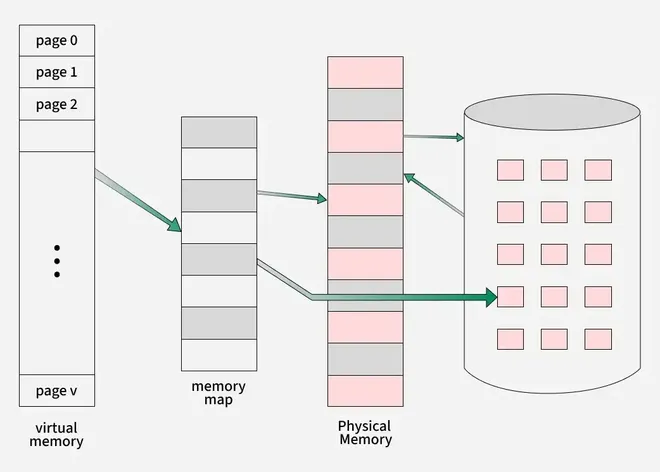
Virtual memory is a memory management technique used by operating systems to give the appearance of a large, continuous block of memory to applications, even if the physical memory (RAM) is limited. It allows larger applications to run on systems with less RAM.
Demand paging is a memory management technique used in operating systems where a page (a fixed-size block of memory) is only loaded into the computer's RAM when it is needed, or "demanded" by a process.
Thrashing is a situation in which the operating system spends more time swapping data between RAM (main memory) and the hard drive (secondary memory) than actually executing processes. This happens when there isn't enough physical memory (RAM) to handle the current workload, causing the system to constantly swap pages in and out of memory.
Cause
Effects
Techniques to Handle Thrashing
A file system is a method an operating system uses to store, organize, and manage files and directories on a storage device.
The collection of files is a file directory. The directory contains information about the files, including attributes, location, and ownership. Much of this information, especially that is concerned with storage, is managed by the operating system.
Below are information contained in a device directory.
The operation performed on the directory are:
There are several types of file allocation methods. These are mentioned below.
Continuous Allocation: A single continuous set of blocks is allocated to a file at the time of file creation. Thus, this is a pre-allocation strategy, using variable size portions. The file allocation table needs just a single entry for each file, showing the starting block and the length of the file.
👁 Continuous-allocationLinked Allocation(Non-contiguous allocation): Allocation is on an individual block basis. Each block contains a pointer to the next block in the chain. Again the file table needs just a single entry for each file, showing the starting block and the length of the file. Although pre-allocation is possible, it is more common simply to allocate blocks as needed. Any free block can be added to the chain.
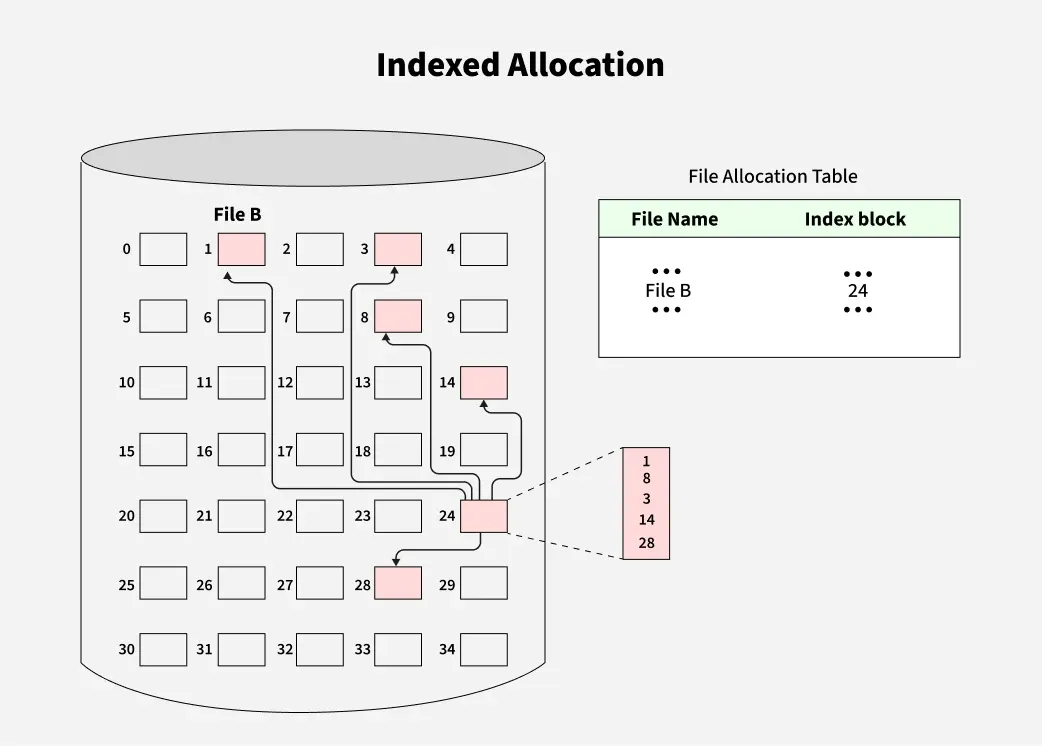
👁 Linked-AllocationIndexed Allocation: Indexed Allocation allocates disk blocks non-contiguously. A separate index block is used to store the addresses of all the data blocks of a file. The file table contains the address of the index block. Data blocks do not point to each other.
👁 Indexed-AllocationDisk scheduling algorithms decide which disk request to service next to reduce seek time and improve performance.