Microsoft's system design interviews challenge your ability to build scalable, efficient systems. In this guide, we'll explore common questions, strategies for tackling them, and key tips to succeed. Whether you're new or experienced, mastering these concepts will help you demonstrate your skills and meet Microsoft's high standards for system design.
How to Approach Microsoft System Design Questions?
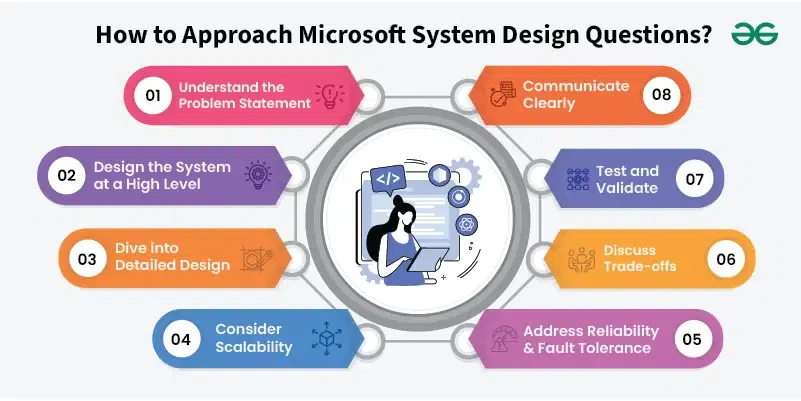
When tackling system design questions in an Microsoft interview, follow a structured approach to demonstrate your ability to design scalable, reliable, and efficient systems. Here’s a step-by-step guide:
👁 Approach How to Approach Microsoft System Design Questions?
Step 1. Understand the Problem Statement
Clarify Requirements: Start by asking questions to fully understand the problem. Determine the core requirements, constraints, and goals.
Define Scope: Establish what features and functionalities need to be included. Clarify any ambiguities with the interviewer.
Step 2. Design the System at a High Level
Outline Architecture: Sketch a high-level architecture diagram. Identify major components such as clients, servers, databases, and APIs.
Choose Technologies: Select appropriate technologies and tools for each component based on scalability, reliability, and ease of maintenance.
Step 3. Dive into Detailed Design
Component Design: Break down the system into smaller components. Define the responsibilities and interactions of each component.
Data Modeling: Design the schema for databases, specifying how data will be stored, accessed, and managed.
APIs and Interfaces: Specify how components will communicate with each other. Define API endpoints, data formats, and protocols.
Redundancy: Plan for redundancy to ensure system availability in case of component failures. Consider strategies like replication and failover.
Monitoring and Alerts: Implement monitoring to detect and respond to issues. Set up alerts for critical failures or performance degradations.
Step 6. Discuss Trade-offs
Trade-offs: Be prepared to discuss trade-offs between different design choices. For example, choosing between consistency and availability in a distributed system.
Cost Considerations: Address potential cost implications of your design decisions, including infrastructure and maintenance costs.
Step 7. Test and Validate
Simulate Usage: Discuss how you would test the system under different scenarios. Describe methods for load testing and stress testing.
Validation: Ensure that the design meets all requirements and can handle real-world usage effectively.
Step 8. Communicate Clearly
Explain Your Design: Clearly articulate your design choices and rationale. Use diagrams to illustrate your architecture.
Seek Feedback: Engage with the interviewer, asking for feedback or clarification on any points of your design.
Important Concepts to know for Microsoft System Design Interview Questions
Before diving into the system design interview questions listed below, it’s crucial to familiarize yourself with these key topics:
Real-time communication techniques (WebSockets, long polling, server-sent events).
Real-time location tracking and communication (e.g., in ride-sharing apps).
Search Algorithms and Data Structures:
Data structures like tries for search autocomplete.
Inverted indexes for search systems.
These topics provide a foundational understanding of how to design and manage complex systems effectively.
Microsoft system design interviews feature challenges like creating scalable platforms, optimizing performance, and managing large-scale systems, testing candidates' skills in building robust and efficient architectures. Below are some main questions that have been asked in microsoft system design interviews.
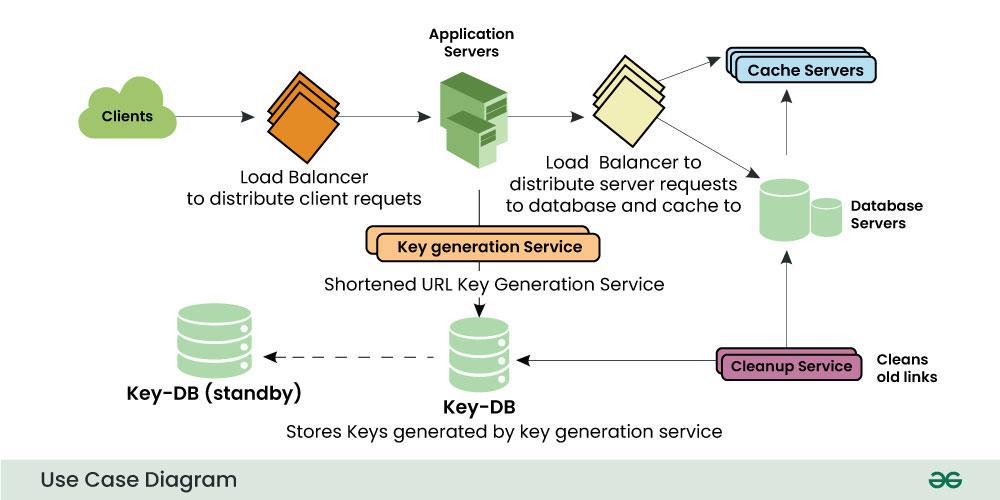
Q 1. Design a Scalable URL Shortening Service (e.g. Bit.ly)
Approach: Use Base 62 encoding to map long URLs into short unique strings. Store mappings in a database. For scalability, distribute the workload across multiple servers with load balancers.
Key Components:
Database for storing URL mappings.
Redirection service for resolving short URLs to original URLs.
Load balancers to distribute incoming traffic.
Considerations: Horizontal scaling for the database, caching frequently accessed URLs to reduce database load.
Example architecture:
User inputs URL.
Service checks for the availability of the short URL and saves it to the database.
On access, redirect the user from the shortened URL to the original.
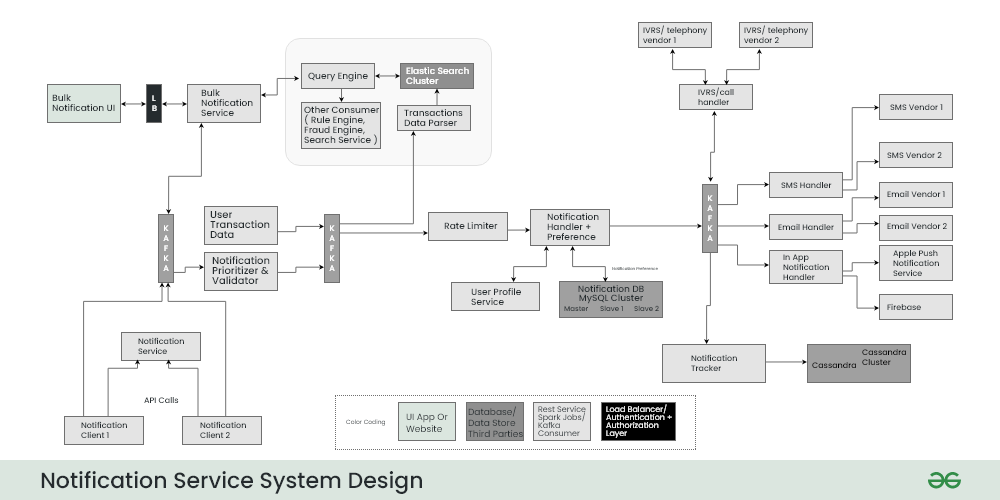
Requirements: Send notifications to millions of users with low latency.
Approach: Use a distributed message queue system (e.g., Kafka) to handle notification dispatching. Each notification event is pushed to the queue, and consumer services process these events.
Key Components:
Message queues (Kafka or RabbitMQ) for decoupling the sender from the receiver.
Workers to consume from the queue and dispatch notifications.
Redundant servers to ensure high availability.
Considerations: Ensure message ordering, retries for failed deliveries, and fault tolerance by replicating queues across multiple data centers.
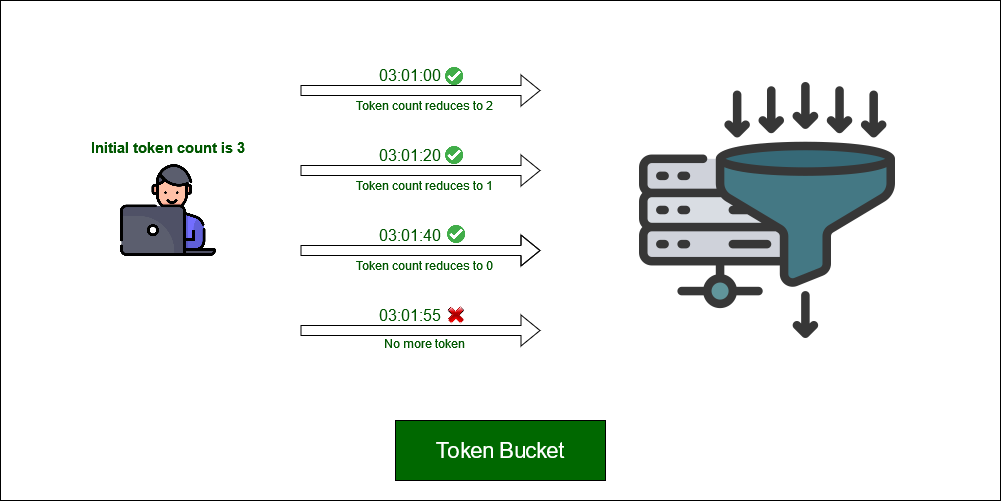
Requirements: Limit the number of API requests per user to prevent abuse.
Approach: Implement a token bucket or sliding window counter for each user. The counter is stored in a distributed in-memory store (e.g., Redis), which checks and updates the counter with every request.
Key Components:
Distributed cache (Redis) to store request counts.
Middleware to intercept requests and check against rate limits.
Considerations: Ensure consistency across distributed instances and deal with burst traffic efficiently.
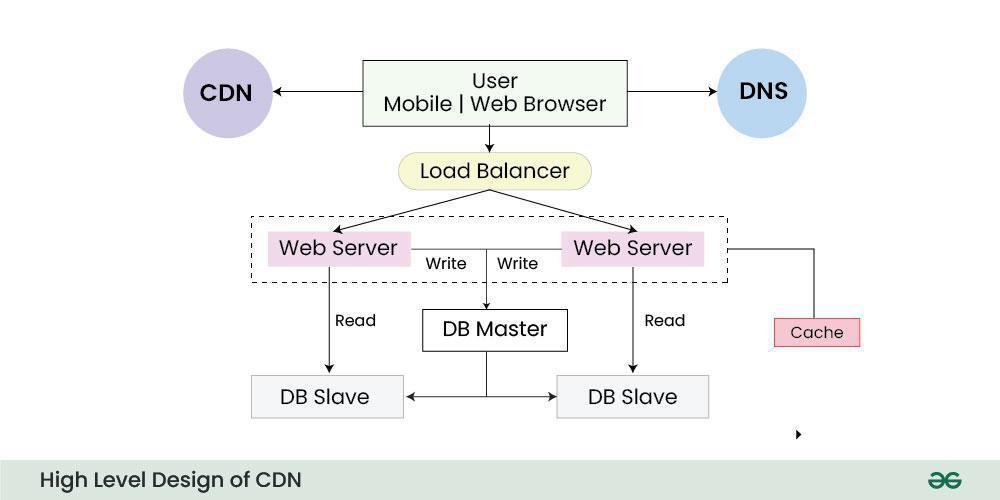
Requirements: Efficiently distribute content to users worldwide.
Approach: Use geographically distributed edge servers to cache content closer to users. Implement a reverse proxy to direct users to the nearest server.
Key Components:
DNS-based load balancing to route traffic to the closest data center.
Edge servers to cache static content like images and videos.
A mechanism to update caches when content changes.
Considerations: Cache eviction policies and consistency when serving dynamic content.
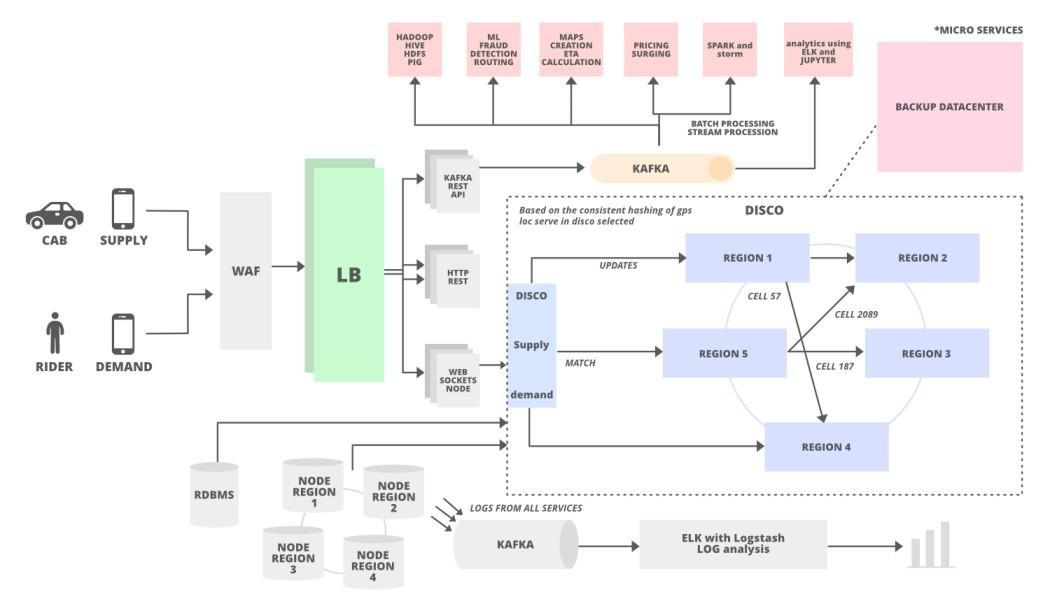
Requirements: Real-time tracking of rides, handling millions of concurrent users, and route optimization.
Approach: Use a distributed architecture where user locations are stored and updated in real-time using WebSockets or long polling. A central service matches drivers with riders based on proximity and availability.
Key Components:
Real-time geolocation tracking with distributed databases (e.g., Cassandra).
Algorithms for matching riders with nearby drivers.
Load balancers to distribute requests evenly.
Considerations: Data consistency for location updates, real-time communication channels, and scaling the matching service.
Requirements: Manage seat inventory, handle concurrent bookings, and optimize searches.
Approach: Use microservices for different functionalities like searching, booking, and payment processing. For handling concurrency, use database transactions to lock seat inventory during booking.
Key Components:
Microservices architecture for scalability.
Database locking mechanisms for inventory control.
Queue systems to handle high traffic during peak times.
Considerations: Database sharding for scaling, ensuring consistent transactions across distributed systems.
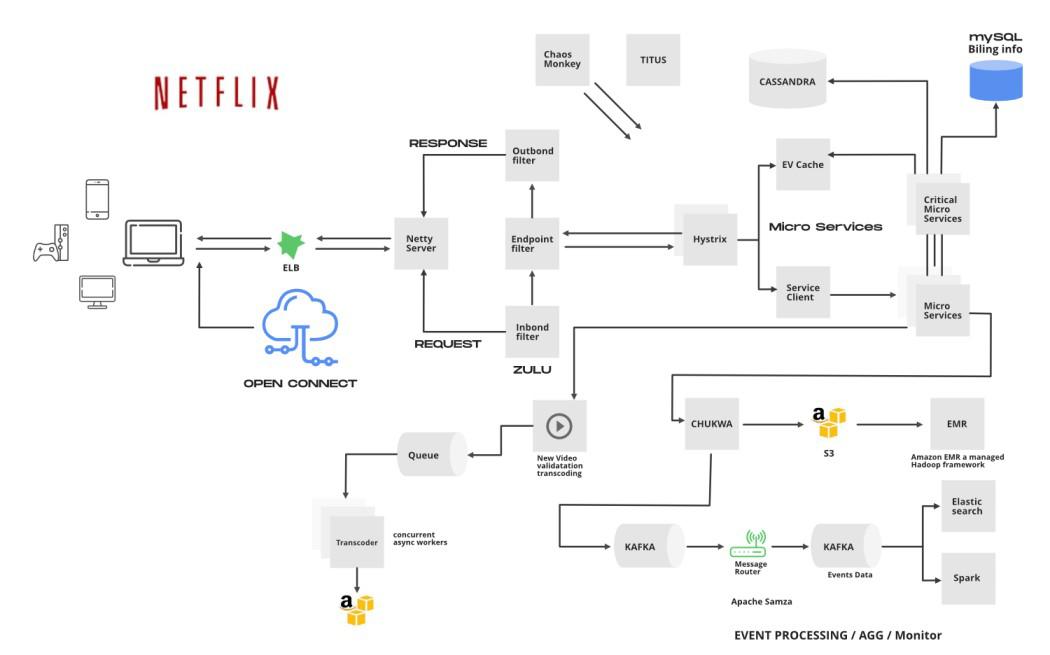
Q 7. Design a Video Streaming Platform (e.g. Netflix)
Requirements: Stream high-quality video content to users across the globe.
Approach: Use a distributed system with multiple edge servers to cache video content. Implement adaptive bitrate streaming based on network conditions.
Key Components:
Content Distribution Network (CDN) for caching videos.
Streaming protocols (HLS, MPEG-DASH) for adaptive bitrate streaming.
Load balancing to handle traffic across servers.
Considerations: Efficient video encoding, ensuring low-latency streaming, and handling network fluctuations.
Tips and Tricks for Microsoft System Design Interview Questions
Here are some valuable tips and tricks for handling Microsoft System Design Interview questions:
1. Clarify Requirements Early On
Ask Questions: Start by gathering detailed requirements. Clarify ambiguous points like scale, expected traffic, latency requirements, data consistency, and system constraints.
Functional vs. Non-Functional Requirements: Identify both the functional (e.g., user features) and non-functional requirements (e.g., scalability, availability, consistency).
2. Think Big Picture First
High-Level Overview: Begin with a broad overview of the system architecture. Focus on the core components (e.g., databases, cache, APIs) before diving into the specifics.
Break It Down: Once you have a high-level design, break it into smaller, manageable components. For example, in a URL shortening service, start with the database, then move on to the redirection logic, then caching.
Horizontal vs. Vertical Scaling: When discussing scaling, emphasize horizontal scaling (adding more servers) over vertical scaling (upgrading a server).
High Availability: Discuss redundancy, failover mechanisms, and replication to ensure that the system remains available even if some components fail.
Consistency vs. Availability: Be prepared to discuss trade-offs between consistency and availability (e.g., in a distributed system, strong consistency may reduce availability).
4. Use Common Design Patterns
Caching: Mention the use of caching to reduce load on the database (e.g., Redis, Memcached). Explain cache invalidation strategies.
Load Balancing: Discuss the use of load balancers to distribute traffic across servers, ensuring even load distribution.
Message Queues: For asynchronous processing (e.g., notification services), mention message queues (Kafka, RabbitMQ) to decouple components and ensure smooth traffic handling.
CAP Theorem: Know when to prioritize consistency, availability, or partition tolerance based on the requirements.
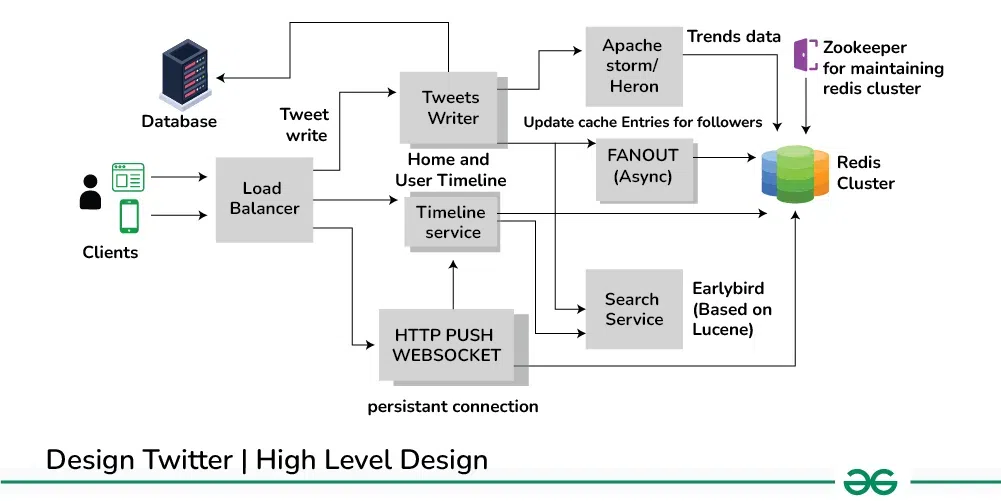
Eventual Consistency: In distributed systems, consider eventual consistency for better performance and availability (especially in systems like social media feeds).
6. Consider Security from the Start
Data Encryption: Mention securing data at rest and in transit (e.g., using SSL/TLS, database encryption).
Authentication and Authorization: Discuss OAuth, JWT, or similar mechanisms for securing APIs.
Prevent Attacks: Mention ways to secure the system against common attacks (DDoS protection, SQL injection, rate limiting, etc.).
CDN Usage: For content-heavy systems (e.g., video streaming), discuss using CDNs to cache content closer to the user, reducing latency.
Sharding and Data Partitioning: For large databases, mention sharding (partitioning data across servers) to distribute the load.
8. Be Ready to Discuss Trade-offs
Trade-offs are Key: Every design decision comes with trade-offs (e.g., consistency vs. availability, cost vs. performance). Be prepared to discuss why you chose one approach over another.
Explain Why: If you mention a specific technology (like Redis, Kafka), explain why it's suitable for the scenario, keeping trade-offs in mind.
9. Use a Whiteboard-Friendly Approach
Draw Diagrams: Use simple boxes and arrows to diagram the architecture, showing the flow of data through the system.
Component Labels: Clearly label each component (databases, load balancers, caches, services) and describe the interaction between them.
Start Simple: Start with a minimal design and iterate as you address additional concerns (e.g., scaling, failover).
10. Handle Failures Gracefully
Fault Tolerance: Discuss how to handle failures. For example, if a service goes down, how will the system recover? Use strategies like retries, fallbacks, or failovers.
Data Backup and Recovery: Talk about how to back up data (e.g., replication) and restore it in case of disaster.
By following these tips, you can approach system design questions methodically and demonstrate your problem-solving skills effectively.