Hospital Management System Project in Software Development
Last Updated : 23 Jul, 2025
Hospital Management System (HMS) is one of the most common software development projects. In this article, we will make the Hospital Management System software development project, from scratch, for final-year students. We will cover all the steps you must do while developing this project.
Project Development is a multiphase process in which every process is equally important. Here in this post, we are also going to develop our Hospital Management System Project in multiple phases, such as:
Team Formation
Topic Selection
Creating Project Synopsys
Requirement Gathering
Coding or Implementation
Testing
Project Presentation
Let us look into the steps one by one.
Team formation for a final-year project is a crucial aspect that can significantly impact the success and efficiency of the project. In the final year, students often have diverse academic backgrounds, skills, and interests. Therefore, forming a well-balanced team becomes essential to leverage the strengths of each member and address any potential weaknesses.
In Our project as we will be exploring about web application for Hospital Management System so we will be required below skill sets.
While making our project of Hospital Management System this will be our second step in which we will find an interesting problem statement and try to generate an idea to solve that problem using our knowledge.
Choose a topic related to your field of study that is of great interest to you. It is advised that you pick a topic that has a powerful motive. For instance, a project that helps humankind will truly be unmatched. Another factor to keep in mind is to choose topics that aren’t very common.
: In this phase team will gather and try to search a topic or problem statement by brainstorming , reverse thinking or any other strategy and select a problem which is challenging in nature and solvable by using their combined knowledge of tech.
: After planning the problem statement we will define clear problem statement and its objectives.
: In the end of this phase we will be having a problem statement for our project.
In our example we are selecting the topic ” Hospital Management System ” .
After the selection of the topic we are going to start our project work in the following steps:
A project synopsis serves as a concise overview or summary of a proposed project, offering a brief but comprehensive insight into its objectives, scope, methodology, and expected outcomes. It typically acts as a preliminary document, providing supervisors, or evaluators with a quick understanding of the project before they delve into more detailed documentation.
The project synopsis usually includes key elements such as the project title, problem statement or context, objectives, scope and limitations, methodology or approach, expected outcomes, and the significance of the project in the broader context. It serves as a roadmap, guiding readers through the fundamental aspects of the project and helping them grasp its purpose and potential impact.
Below are some of the points we have to cover in the synopsis report :
Project Title
Introduction of Project
Problem Statement
Proposed Solution
Objective of the Project
Scope of the Project
Methodologies used
ER Model
Use case Diagram
Dataflow Diagram
Features of the project
For Users
For Admin
Impact of the project
Limitations of the project
Future scope of the project
Let’s create a Synopsys Report for Hospital Management System:
Hospitals play a vital role in our lives by offering the greatest medical care to those with a variety of illnesses, whether brought on by stress, emotional trauma, a change in the weather, or other causes. Hospital staff members who are essential to the proper operation of the facility must maintain detailed records of their daily activities and interactions with patients, physicians, nurses, ward boys, and other staff members. However, it is exceedingly time-consuming and prone to error to keep track of all the actions and their records on paper. Not to mention that it takes a lot of time and is highly inefficient given the ongoing rise in both the population and hospital visits. Keeping track of all these documents is extremely unpredictable, ineffective, and prone to mistakes.
3.1.1 :
The broken and manual processes used by hospital management today create inefficiencies and make it difficult to provide high-quality patient care. Unorganised communication lines, outdated technology, and paper-based record-keeping all lead to mistakes, omissions, and delays in obtaining vital patient data. Furthermore, the absence of integrated solutions makes it more difficult to analyse data for resource optimisation and well-informed decision-making. A comprehensive hospital management system (HMS) that centralises and automates critical functions is desperately needed in this situation to address these issues. In addition to streamlining administrative duties and facilitating smooth patient management, the system should enhance provider communication and offer strong analytics tools for ongoing performance evaluation and enhancement.
3.1.2 :
Our suggested Hospital Management System (HMS) provides a simplified approach to improve patient care and hospital operations. Our intuitive software assists in effective workflow management by integrating billing, analytics, appointment scheduling, and patient management. Decision-making accuracy and speed are increased by automated procedures, electronic health record (EHR) administration, and real-time data access. The technology protects data security and guarantees adherence to healthcare rules. Our Health Care Management System (HMS) enables healthcare providers to achieve better patient outcomes, optimise resource utilisation, and deliver high-quality care by centralising functions and offering powerful features.
3.1.3 :
The objective of the Hospital Management System (HMS) project is to design and implement an efficient and user-friendly system that automates the various tasks associated with managing a hospital.
To computerise every detail related to hospital and patient information.
Arranging patient appointments with physicians in a way that is convenient for both parties.
Appropriately scheduling emergency room visits and specialised medical appointments to ensure that hospital resources are completely and effectively utilised.
The medical store's stock level should decrease if it provides patients with medications, and vice versa.
It ought to be capable of managing patient test findings from the hospital's pathology lab.
Every time a transaction is completed, the inventory ought to be updated automatically.
Patients' information should be current, and their records should be preserved in the system for future reference.
3.1.4 :
The scope of the project "hospital management system" typically includes various aspects related to the efficient functioning of a hospital. This may involve managing patient records, appointments, staff schedules, inventory, billing, and other administrative tasks. Additionally, it might encompass features like electronic health records (EHR), laboratory and pharmacy management, and integration with medical devices. The scope can vary depending on the specific requirements of the hospital and the functionalities desired in the management system.
The scope of the project of Hospital Management System typically covers the following aspects:
Functional Scope:
Patient Management:
Register patients
Maintain patient records including personal information, medical history, and treatment details
Schedule appointments and manage patient queues
Staff Management:
Register staff members including doctors, nurses, administrative staff, etc.
Manage staff schedules and assignments
Track staff attendance and performance
Inventory Management:
Maintain inventory of medical supplies, equipment, and medications
Track usage and order supplies when needed
Manage stock levels to avoid shortages or excess inventory
Billing and Accounting:
Generate bills for services rendered to patients
Manage insurance claims and payments
Track financial transactions and generate reports
Appointment Management:
Schedule and manage patient appointments with doctors and other healthcare providers
Send reminders to patients about upcoming appointments
Medical Records Management:
Create and maintain electronic health records (EHR) for patients
Ensure the security and privacy of patient information
Allow authorized personnel to access and update medical records as needed
Non-Functional Scope:
Usability:
Ensure the system is user-friendly and easy to navigate for both staff and patients
Provide clear instructions and guidance for using different features of the system
Reliability:
Ensure the system is reliable and available whenever needed, with minimal downtime
Implement backup and recovery mechanisms to prevent data loss in case of system failures
Performance:
Ensure fast response times for accessing patient records and performing other tasks
Optimize system performance to handle a large number of concurrent users and transactions
Security:
Implement robust authentication and authorization mechanisms to prevent unauthorized access to patient records and sensitive information
Encrypt data transmission to protect patient privacy
Regularly update and patch the system to address security vulnerabilities
Scalability:
Design the system to scale easily as the hospital grows and the number of patients and staff increases
Ensure the system can handle additional workload without significant performance degradation
Interoperability:
Ensure the system can integrate with other healthcare systems and external services such as laboratories, pharmacies, and insurance providers
Implement standard protocols and interfaces to facilitate data exchange and communication between different systems.
In HMS we are using various technologies and new methodologies to solve our problems. Below are the detailed description about the technology used and methods we are applying in our project.
:
Here we are developing a Hospital Management System (HMS) usingHTML,Bootstrap for the frontend, andMySQL, PHP, andJavaScript for the backend involves a structured methodology.
:
An Entity-Relationship Diagram (ERD) for a Hospital Management System (HMS) models the entities and their relationships within the system. Below is a simplified ERD for a Hospital Management System. In Synopsys we make a rough ER Diagram to give a idea about the working of the project.
Let’s Draw an ER Model of Hospital Management System:
Patient: Stores information about patients such as patient ID, name, contact details, and address.
Doctor: Contains details about doctors including doctor ID, name, specialty, contact information, and department.
Appointment: Represents appointments made by patients with doctors. It includes attributes like appointment ID, appointment date and time, patient ID, doctor ID, and any additional notes.
Staff: Stores information about hospital staff members such as staff ID, name, position, and contact details.
Department: Contains details about different departments in the hospital. Each department has a department ID and name.
Medical Record: Stores medical records for patients, including patient ID, doctor ID, diagnosis, treatment, and other relevant medical information.
Relationships:
Patient-Appointment (Many-to-Many): A patient can have multiple appointments, and each appointment can involve multiple patients.
Doctor-Appointment (One-to-Many): A doctor can have multiple appointments, but each appointment is associated with only one doctor.
Doctor-Department (Many-to-One): Many doctors can work in one department, but each doctor belongs to only one department.
Staff-Department (Many-to-One): Many staff members can work in one department, but each staff member belongs to only one department.
Medical Record-Patient (One-to-One): Each patient has one medical record, and each medical record is associated with only one patient.
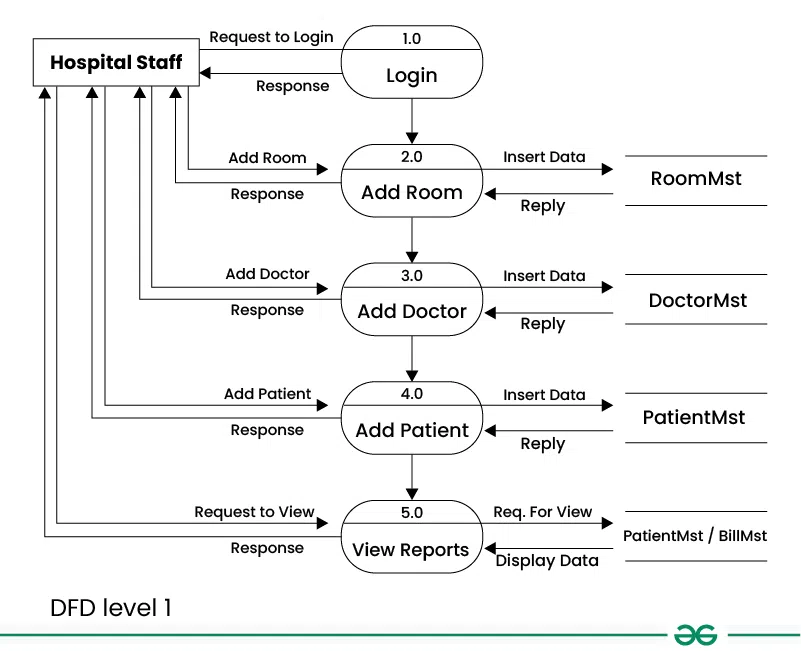
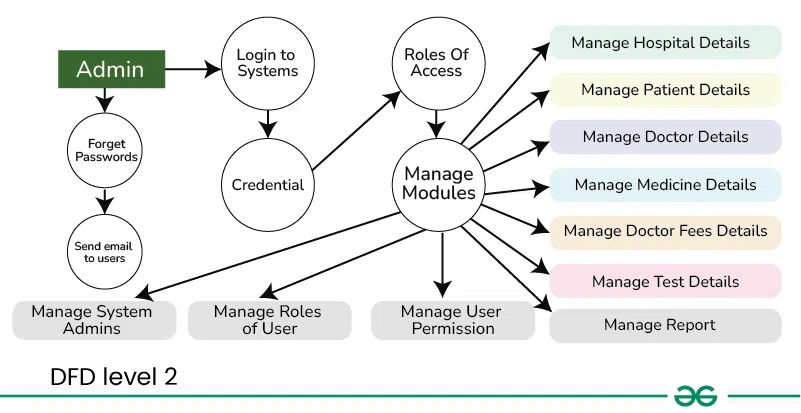
Data Flow Diagram (DFD) serves as a visual representation of the flow of information within the system.Here's a simplified Data Flow Diagram (DFD) for a hospital management system:
Patient Information: Flow of personal and medical information from patients to the hospital system.
Medical Records Data: Transfer of patient health records between the medical records system and healthcare providers.
Appointment Requests: Submission of appointment requests by patients or staff to schedule appointments.
Billing Information: Flow of billing data from the billing system to patients for payment processing.
Prescriptions/Orders: Transmission of prescription orders from doctors to pharmacies or medical supply departments.
Staff Schedules: Exchange of staff schedules and assignments between the staff management system and departments.
The DFD provides a concise yet comprehensive overview of the HMS's data flow and interactions, aiding in the analysis, design, and communication of the system’s functional aspects.
Use case diagram referred as a Behaviour model or diagram. It simply describes and displays the relation or interaction between the users or customers and providers of application service or the system. It describes different actions that a system performs in collaboration to achieve something with one or more users of the system. Use case diagram is used a lot nowadays to manage the system.
Here is a Use Case Diagram for Hospital Management System:
Many features are usually included in a hospital management system to enhance patient care and simplify processes. A project summary for a hospital management system may contain the following typical elements:
Handling Patients:
Enrollment and access Records of electronic health (EHR)
Scheduling appointments tracking of patient histories
Employee Relations:
Roles and profiles of employees Modify the schedule
Assessment of performance
Monitoring certifications and training
Management of Inventory:
prescription drugs and medical equipment monitoring and equipment administration
Reordering and stock alerts
Finance and Invoicing:
Invoicing and billing Management of insurance Analytics and financial reporting
Management of Labs:
Tracking test orders and outcomes
Tracking samples Quality assurance
Pharmacy Supervision:
Management of prescriptions tracking of inventories
Labelling and dispensing
Electronic Orders and Prescriptions:
electronic prescriptions Order entry and processing
Booking and Appointments:
Staff and physician scheduling
Automated appointment reminders
Analytics and Reporting:
Metrics of performance results for patients
Efficiency in operations
Safety and Adherence:
Control of access HIPAA adherence
Data security and privacy precautions
A Hospital Management System (HMS) project overview must include a description of the system's possible effects. The following are some ideas for inclusions:
Better Patient Care: By optimising workflows, cutting down on errors, and promoting improved provider communication, the HMS seeks to improve the standard of patient care. As a result, patients may receive better care more quickly and with greater efficacy.
Enhanced Efficiency: The HMS can greatly increase operational efficiency by digitising a number of hospital operations processes, including appointment scheduling, patient records administration, and inventory tracking. This entails cutting back on paperwork, minimising administrative effort, and making the most use of available resources.
Cost Savings: The hospital may experience cost savings as a result of implementing an effective HMS. Hospitals can save operating expenses and better distribute resources by automating procedures, decreasing manual errors, and improving inventory management.
Enhanced Accessibility: By permitting online appointment booking, telemedicine consultations, and remote access to medical records, a well-designed HMS can enhance accessibility to healthcare services. Patients with mobility challenges or those who live in rural places may find this to be extremely helpful.
Data-Driven Decision Making: The HMS gathers and examines enormous volumes of data, offering insightful information on a range of hospital activities, patient characteristics, and treatment results. Initiatives for quality improvement, resource allocation, and strategic decision-making can all benefit from this data.
Regulatory Compliance: It is imperative for hospitals to guarantee adherence to healthcare legislation and standards. By automating documentation, monitoring regulatory standards, and putting security measures in place to safeguard patient data, the HMS can aid in streamlining compliance activities.
Better Communication: Providing coordinated care requires effective communication between healthcare providers. By offering a centralised platform for exchanging patient data, test findings, and treatment plans amongst various departments and care teams, the HMS promotes communication.
Patient Satisfaction: By offering easy access to healthcare services, cutting down on wait times, minimising errors, and enhancing contact with healthcare providers, the HMS ultimately seeks to improve the whole patient experience. Increased patient satisfaction can result in better word-of-mouth recommendations, greater loyalty, and eventually a better reputation for the hospital.
A Hospital Management System (HMS) project overview must address any potential constraints or difficulties that might occur. The following are some typical restrictions that might be present:
Initial Investment: A substantial upfront investment in technical infrastructure, software development, employee training, and system integration is necessary for the implementation of a full HMS. Hospitals with inadequate funding may find it difficult to cover this upfront expense.
Integration Challenges: It can be difficult and time-consuming to integrate the HMS with the hospital's current systems, including the billing, laboratory, and electronic health record (EHR) systems. During the integration phase, problems with interoperability, compatibility, and data migration could surface.
User Adoption: The effective deployment and uptake of the HMS may be impeded by staff members' resistance to change. Employees may be reluctant to switch to a new digital platform if they are used to manual procedures or outdated technology. Enough training and continued assistance are necessary to guarantee a seamless user adoption process.
Data Security Issues: Hospital management systems are susceptible to cyberattacks and data breaches because they hold sensitive patient data. To preserve patient privacy and adhere to legal obligations, it is essential to have strong data security measures in place, including as encryption, access limits, and frequent security assessments.
Technical Problems: The HMS may experience technical problems including software flaws, system outages, or performance problems, just like any other software system. It is imperative that technical problems are resolved quickly in order to minimise hospital operations disturbance and preserve patient care quality.
Scalability: The HMS must to be scalable in order to support changes in organisational structure, an increase in patient load, and new services as the hospital expands or changes. Careful planning and continuous investment in system upgrades and additions are necessary to ensure scalability.
Regulatory Compliance: Hospitals have to abide by a number of laws and guidelines pertaining to the security, privacy, and interoperability of healthcare data. It can be difficult and possibly time-consuming to stay on top of evolving regulations and make sure that standards like HIPAA (Health Insurance Portability and Accountability Act) are followed.
By acknowledging these limitations upfront, stakeholders can develop strategies to mitigate risks, address challenges, and ensure the successful implementation and utilization of the Hospital Management System.
The future scope and possibility for expansion and development should be outlined in the project description for a hospital management system (HMS). The following ideas could be included in the section on future scope:
Enhanced Features: Constantly enhancing and expanding the HMS's functionality to better serve patients' and healthcare professionals' changing demands. Features like telemedicine capabilities, sophisticated analytics for predictive modelling, and interaction with cutting-edge technology like AI and machine learning are a few examples of what this may contain.
Mobile Accessibility: Increasing the HMS's usability by including mobile applications that let medical professionals consult patient data, make appointments, and get in touch with colleagues whenever and wherever they are. Patients can also manage their appointments, view their medical information, and get alerts and reminders through mobile apps.
Interoperability: Increasing interoperability with external stakeholders, including pharmacies, labs, insurance companies, and government health agencies, as well as other healthcare systems. The efficiency of healthcare delivery may be increased overall, redundant jobs can be decreased, and care coordination can be better with seamless data interchange and integration.
Remote Monitoring and IoT Integration: Real-time monitoring of patient vital signs, medication adherence, and other health data is made possible by integrating Internet of Things (IoT) sensors and remote monitoring devices into the HMS. This can help with proactive interventions, early health issue detection, and the provision of individualised care.
Population Health Management: Identifying trends, patterns, and risk factors within patient populations by utilising data analytics and population health management tools in the HMS. This can help guide public health programmes, illness management plans, and preventative care tactics that aim to enhance the health of entire populations.
Patient Education and Engagement: Improving patient education within the HMS by use of interactive tools, educational materials, and personalised health information. Giving patients the tools they need to actively manage their health can enhance treatment compliance, produce better results, and boost patient happiness.
This is the next phase after the submission of the synopsis report. We can do this process before the Synopsys report creation as well , It is all depends upon the project and their requirements. Here after getting an overview about the project now we can easily do the requirement gathering for our project.
Requirement analysis, also known as requirements engineering or elicitation, is a critical phase in the software development process. It involvesgathering,documenting, andanalysing the needs and constraints of a project to define its scope and guide subsequent development.
👁 hspital-managements Requirement Gathering and Designing Phase of Hospital Management System
We develop a detailed Software Requirement Specification for Hospital Management System, in this process which will have all the details about the project from Technical to Non Technical Requirements.
Below are some of the key points in a Software Requirement Specification Document:
Let’s Start building a Software Requirement Specification for Hospital Management System Document for our project:
4.1.1
Efficient management of the clinical, financial, and administrative aspects of a healthcare facility is the aim of a hospital management system (HMS). HMS seeks to improve patient care, simplify procedures, and maximise resource use. It functions as a centralised platform for the management of appointments, patient data, inventory, billing, and provider-to-provider communication. Through the automation of repetitive operations and provision of decision support tools, HMS enhances workflow effectiveness, minimises errors, and guarantees regulatory compliance. It also encourages patient participation, backs data-driven decision-making, and makes it easier for healthcare delivery to continuously improve quality. All things considered, HMS is essential to improving the general efficacy, efficiency, and calibre of hospital healthcare services.
4.1.2
A Hospital Management System (HMS) project's scope includes, but is not limited to, developing software modules for electronic health records (EHR), patient management, appointment scheduling, billing and invoicing, inventory management, and reporting. It also involves integrating these modules into an organised structure that satisfies the particular demands and specifications of the medical facility. In addition, user training, data migration from current systems, customisation to fit certain workflows, and continuous technical support and maintenance are all included in the project scope. In addition, the scope might include putting in place security measures to protect patient data, making sure that laws and regulations like HIPAA (Health Insurance Portability and Accountability Act) are followed, and making sure that the system is scalable to allow for future expansion and technological improvements.
4.1.3 :
Books:
Software Requirements (Microsoft) Second Edition By Karl E. Wiegers
Fundamentals of Database System By Elmasri
Software Requirements and Specifications: A Lexicon of Practice, Principles and Prejudices (ACM Press) by Michael Jackson
Fundamentals of Software Engineering By Rajib Mall
Software Engineering: A Practitioner’s Approach Fifth Edition By Roger S. Pressman
4.2.1 :
The future scope of the Hospital Management System includes continuous enhancements for improved interoperability with emerging healthcare technologies, integration of artificial intelligence for predictive analytics and personalized care, and expansion of telemedicine capabilities to enhance remote patient monitoring and virtual consultations.
4.2.2 :
The Hospital Management System's product functions are explained in further detail below:
Patient Registration:
Admins can oversee and manage the registration process for new patients.
They have the authority to create and manage unique patient identifiers.
Appointment Scheduling:
Admins can have control over the overall appointment scheduling system.
They manage the appointment calendar for doctors and other staff members.
Electronic Health Record Management:
Admins have access to and manage the storage of electronic health records (EHRs) for patients.
Inventory Tracking:
Admins handle inventory tracking for medical supplies, medications, and equipment.
They facilitate efficient stock management and automatic reordering.
Billing and Invoicing:
Admins generate bills and invoices for services rendered.
They oversee the integration with insurance systems for claims processing and manage billing and payment transactions.
Staff Management:
Admins manage employee profiles, roles, and schedules.
They handle shift assignments, leave management, and performance evaluation for staff.
Appointment Scheduling:
Doctors can view and manage their appointment schedules.
Electronic Health Record Management:
Doctors have access to patient EHRs, including medical history, diagnoses, medications, lab results, and treatment plans.
Laboratory Management:
Doctors can place test orders, track samples, and access and interpret laboratory test results.
Pharmacy Management:
Doctors can view and manage prescription orders, as well as access patient medication histories.
Patient Registration:
Users (patients) can register and provide essential demographic information.
Appointment Scheduling:
Users can schedule appointments with healthcare providers.
Electronic Health Record Access:
Users have access to their own electronic health records.
Billing and Invoicing:
Users may interact with the system for billing inquiries and payments.
Pharmacy Management:
Users can view their prescription orders and medication histories.
4.2.3 :
Class Diagram for Hospital Management System simply describes structure of Hospital Management System class, attributes, methods or operations, relationship among objects.
For a Hospital Management System (HMS), the class diagram and its characteristics would typically include:
Classes: Representing entities such as Patient, Doctor, Nurse, Administrator, Appointment, MedicalRecord, Department, and Billing.
Attributes: Each class would have attributes representing its properties. For example, the Patient class might have attributes like patientID, name, gender, dateOfBirth, and contactDetails.
Operations (Methods): These would define the behaviors associated with each class. For instance, the Appointment class might have methods like scheduleAppointment(), cancelAppointment(), and rescheduleAppointment().
Associations: Relationships between classes would be depicted to show how they are connected. For instance, an association between Patient and Doctor classes would show that a patient can be associated with one or more doctors.
Multiplicity: Multiplicity would specify how many instances of one class are associated with instances of another class. For example, a Doctor can have multiple patients, indicating a one-to-many relationship.
Inheritance (Generalization): If there are common attributes or methods shared between classes, inheritance can be used to depict this relationship. For example, Doctor and Nurse classes might inherit from a common super class called Healthcare Professional.
Composition and Aggregation: These relationships would show how one class contains or is composed of another class. For example, a Hospital class may have a composition relationship with the Department class, indicating that a hospital consists of multiple departments.
Dependency: This would show when one class relies on another class, usually through method parameters or return types. For example, the Billing class may have a dependency on the Patient class to retrieve patient information for billing purposes.
A Use Case Diagram for a Hospital Management System (HMS) depicts the interactions between actors (users or external systems) and the system to achieve specific goals. Here's a simplified version of a Use Case Diagram for an HMS:
ER Diagram is known as Entity-Relationship Diagram, it is used to analyze the structure of the Database. It shows relationships between entities and their attributes. An ER Model provides a means of communication.
One doctor can be associated with only one department, but one department can have multiple doctors.
Nurse - Department (One-to-Many):
One nurse can be associated with only one department, but one department can have multiple nurses.
Administrator - Department (One-to-Many):
One administrator can be associated with only one department, but one department can have multiple administrators.
A Data Flow Diagram (DFD) for a Hospital Management System (HMS) illustrates the flow of data within the system and between external entities. Here's a simplified DFD for an HMS:
External Entities: These represent entities outside the system that interact with it, such as patients, doctors, and administrators.
Processes: Processes represent functions or operations performed within the Hospital Management System, such as Patient Records, Appointment Scheduler, Patient Billing, Doctor Records, and Medical Records.
Data Flows: Arrows represent the flow of data between external entities, processes, and the database. For example, patient information flows from the Patient Records process to the Database, and medical records flow from the Medical Records process to the Database.
Data Stores: These represent repositories where data is stored, such as the Hospital Management Database. Patient information, appointment details, doctor records, and medical records are stored in the database.
This DFD provides a high-level overview of how data flows within the Hospital Management System, showing the interactions between external entities, processes, and the database.
Creating a sequence diagram for a Hospital Management System involves depicting the interactions between various components or actors within the system. Here's a simplified version:
Receptionist assigns a unique identifier (ID) to the patient.
Medical Assessment:
Nurse or medical assistant escorts the patient to the examination room.
Nurse takes vital signs and records patient history.
Nurse updates patient's medical record in the system.
Consultation with Doctor:
Doctor reviews patient's medical history and current condition.
Doctor performs physical examination and orders further tests if necessary.
Doctor discusses diagnosis and treatment plan with the patient.
Treatment and Procedures:
Nurse administers medications or treatments as prescribed by the doctor.
Nurse schedules any necessary procedures (e.g., X-rays, scans, surgeries).
Patient Discharge:
Doctor determines when the patient is ready for discharge.
Nurse provides discharge instructions and medications.
Receptionist handles billing and insurance claims.
Patient leaves the hospital.
This sequence diagram illustrates the flow of interactions between various components involved in the patient admission process, including receptionists, nurses, doctors, and patients. Each step represents a specific action or task performed as part of the admission process within the Hospital Management System.
This activity diagram outlines the main activities and interactions within the Hospital Management System, including booking appointments, patient check-in, accessing medical records, billing, inventory management, staff management, and report generation. Each activity represents a specific task or function performed by users or the system.
Receptionist greets the patient and verifies their appointment.
Receptionist checks the patient in and assigns a queue number.
View Medical Records:
User selects "View Medical Records."
System prompts user to enter patient ID or name.
System retrieves and displays the patient's medical history.
Pay Bills:
User selects "Pay Bills."
System displays a list of outstanding bills for the user.
User selects the bill(s) to pay and enters payment details.
System processes the payment and updates the billing records.
Manage Inventory:
Authorized staff member selects "Manage Inventory."
System displays options to add, update, or remove items from inventory.
Staff member performs the desired inventory management tasks.
System updates the inventory database accordingly.
Manage Staff:
Authorized administrator selects "Manage Staff."
System displays options to add, update, or remove staff members.
Administrator performs the desired staff management tasks.
System updates the staff database accordingly.
Generate Reports:
Authorized user selects "Generate Reports."
System provides options to generate various reports such as patient statistics, financial summaries, etc.
User selects the type of report to generate.
System generates the report and displays it to the user.
Functional requirements for a Hospital Management System (HMS) typically include a wide range of features and capabilities to ensure efficient operations and effective patient care. Here are some common functional requirements for an HMS:
Patient Management:
Registration: Ability to register new patients, including capturing personal and medical information.
Appointment Scheduling: Allow patients to schedule appointments with doctors or departments.
Admission/Discharge: Manage the admission and discharge process for patients.
Staff Management:
User Authentication: Secure login for staff members with different access levels (admin, doctors, nurses, etc.).
Staff Roster: Manage staff schedules, including doctors, nurses, and administrative personnel.
Medical Records Management:
Electronic Health Records (EHR): Store and manage patient medical history, diagnoses, treatments, and test results.
Medical Imaging: Integration with systems for storing and viewing medical images such as X-rays, MRIs, and CT scans.
Billing and Insurance:
Billing: Generate bills for services rendered, including consultation fees, procedures, medications, and room charges.
Insurance Claims: Manage insurance information and submit claims to insurance providers.
Pharmacy Management:
Medicine Inventory: Track medication stock levels and manage inventory.
Prescription Management: Record prescriptions, dispense medications, and manage refill requests.
Laboratory Management:
Test Orders: Accept requests for laboratory tests from doctors.
Test Results: Record and provide access to test results for medical staff.
4.4.1 :
This software package is developed using html , bootstrap for front end . Php and MY SQL Server as the back end to store the database for backend we are using Xampp server.
Operating System: Windows 7, 8, 9, 10 .
Language: Html , Css , Javascript , Php , sql
Database: MS SQL Server (back end)
4.4.2 :
Processor: Intel core i3 or above for a stable experience and fast retrieval of data.
Hard Disk: 40GB and above
RAM: 256 MB or more, recommended 2 GB for fast reading and writing capabilities which will result in better performance time.
4.5.1 :
Our user interface should be interactive simple and easy to understand . The system should prompt for the user and administrator to login to the application for proper input criteria.
Hospital Management System shall handle expected and non – expected errors in ways that prevent loss in information and long downtime period.
4.5.2 :
System should use secured Database.
Normal users can just read information but they cannot edit or modify anything except their personal and some other information.
System will have different types of users and every user has access constraints.
Proper user authentication should be provided.
No one should be able to hack users password .
There should be separate accounts for admin and members such that no member can access the database and only admin has the rights to update the database.
4.5.3 :
The system shall accommodate high number of booking and users without any fault.
Responses to view information shall take no longer than 5 seconds to appear on the screen.
4.5.4 :
HMS product shall handle expected and non-expected errors in ways that prevent loss in information and long downtime period.
At this stage, the fundamental development of the product starts. For this, developers use a specific programming code as per the design. Hence, it is important for the coders to follow the protocols set by the association. Conventional programming tools like compilers, interpreters, debuggers, etc. are also put into use at this stage.
In Our project as we will be using php and mysql so we will install all required software’s:
:
Required Softwares:
Xampp software ( for php and mysql )
VS Code ( you can use any other suitable editor as well )
Install Bootstrap or download bootstrap extension on vscode.
After we downloaded the above required software now we will start creating our project . In the following article We will discuss about different different modules compiled with same category.
We will discuss it stepwise :
:
Go to your favourite browser and write localhost/dashboard >> phpmyadmin
Now you can create your own database by using New button.
DatabaseUsed in this project:
Below is the SQL code to create those tables in the database, You can modify the code to create your own database for the project.
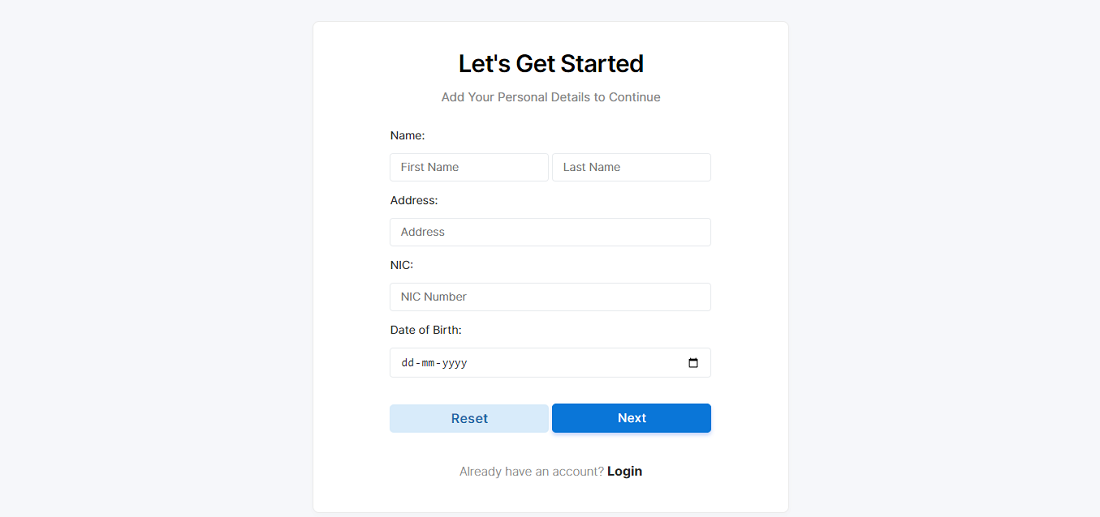
After creating the database we can now start building the frontend of our project.
These are the basic modules we require to make our HMS Project , you can add some more exiting features using your own new idea as well.
Coding phase is the most important and time consuming phase after this phase we will be having a source code for our project and it will be through for testing phase.
Testing is a crucial phase in the development of a Hospital management system (HMS) to ensure that it meets its intended requirements, functions correctly, and is free of bugs. Below are some key steps and considerations for the testing phase of a hospital management system:
Unit Testing:
Test individual modules or components of the system in isolation to ensure they function as intended.
Identify and fix any bugs or issues found at the module level.
Integration Testing:
Verify that different modules and components of the HMS work together seamlessly.
Test data flow and interactions between various parts of the system.
User Interface (UI) Testing:
Ensure that the user interface is user-friendly, intuitive, and visually appealing.
Check for consistency in design elements and responsiveness across different devices.
Performance Testing:
Assess the system’s performance under normal and peak load conditions.
Check response times, scalability, and overall system stability.
Security Testing:
Identify and rectify any security vulnerabilities in the system.
Ensure that user data is handled securely, and unauthorized access is prevented.
Usability Testing:
Evaluate the HMS from an end-user perspective to ensure ease of use.
Gather feedback on user interfaces, navigation, and overall user experience.
Compatibility Testing:
Test the HMS on various browsers, operating systems, and devices to ensure cross-platform compatibility.
Regression Testing:
Conduct tests to ensure that new changes or fixes do not negatively impact existing functionalities.
Re-run previously executed test cases to verify the overall system stability.
Deployment Testing:
Conduct tests in the production environment to ensure a smooth transition from the testing phase to live operation.
Step 7- Creating Project Presentation on Hospital Management System:
In this phase of software development, Team will have to present their work in front of authorities and they will judge your work and give suggestions on the improvement areas.
The ideal length of the ppt should be min 10 slides and maximum 15 slides , you will not have too much time to explain your project so prepare your presentation carefully using important key points.
Check Out Some Other CS Relate Projects down below:


.webp)


.webp)




.png)
.png)
.png)
.png)

.png)
.png)
.png)
.png)
.png)
.png)
.png)