|
VOOZH | about |
|
VOOZH | about |
Weather Forecasting Application is one of the most common mini project in Software Development . In this article, we are going to make a Weather Forecasting Application from scratch which will tell us the weather of any location using its name . We will be covering all the steps you have to do while developing this mini project. The title of our project will be Todays Weather App.
Before Diving into the Implementation of the Project Let us look into the End Result of our project. Its Features and Functionalities:
Table of Content
A Project Development is a multiphase process in which each and every process are equally important. Here in this post we are also going to develop our Weather Application in multiple phases, such as:
Let us look into the steps one by one.
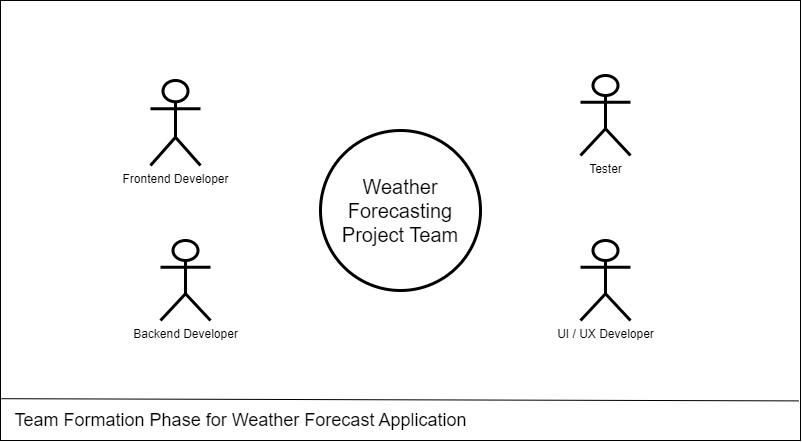
Team formation is a crucial step in any project it significantly impact on your project . In our project as we will be exploring about the web application for weather app so will will be going to require following skill sets.
A project synopsis serves as a concise overview or summary of a proposed project, offering a brief but comprehensive insight into its objectives, scope, methodology, and expected outcomes.
Let’s create a Synopsys Report for Weather Application:
Todays Weather app is a web application which will tell the users about the weather details of any particular city . The easy and Interactive User Interface will help our users to easily know about the temperature , wind speed , humidity and description about the weather .
Current weather apps lack simplicity and speed, making it challenging for users to quickly access accurate information for specific cities. There is a need for a streamlined web application that prioritizes user-friendly interfaces, delivering real-time, precise weather details for informed decision-making in travel, planning, and daily activities.
To overcome this the problem , We are going to make an web application using Html , CSS and JavaScript in which we will be providing user-friendly interface for easy navigation , Efficient weather searching , accurate and fast data collection.
The objective of the Todays weather project is to design and implement an efficient and user-friendly system that helps user to know about weather details of any city using its name only.
Primary Goals of the project:
In Weather App we are using various methodologies to solve our problems. Below are the detailed description about the technology used and methods we are applying in our project.
Here we are developing a Weather application usingHTML,CSSfor the frontend, andJavaScript for the backend involves a structured methodology. We are using OpenWeatherMap's API for the weather details .
An Entity-Relationship Diagram (ERD) for a Weather Application is the entities and their relationships within the system.
Let's Draw an ER Diagram for our Weather Application:
Entities:
Relation:
Data Flow Diagram (DFD) serves as a visual representation of the flow of information within the system. This diagram illustrates how data, such as weather information, user details, and API Transactions in Weather Application.
Let's Draw a Dataflow Diagram for our project:
The proposed Weather Application is designed to simplify the way to get weather details about any city . These are the priority features for our project:
Weather Application can offer many benefits, it may also have certain limitations. Here are some potential constraints associated with such a system:
1. The accuracy of weather information heavily depends on the reliability of the data source. If the application relies on a single source, discrepancies or inaccuracies in that source can impact the reliability of the weather data.
2. : If the application relies on third-party APIs for weather data, it's subject to the availability and performance of those APIs. Downtime or changes to the external service can affect the functionality of the application.
3. The availability and accuracy of weather data may vary for different cities. Some locations may have more comprehensive and accurate data than others, potentially leading to incomplete or less reliable information for certain areas.
4. : The user experience can be affected by the device's capabilities and network conditions. Slow internet connections or outdated devices may impact the responsiveness of the application.
5. : Handling user data, such as location information, requires attention to privacy and security. Ensuring secure data transmission and storage is crucial to protect user information.
The future scope of a Our Weather Application developed using HTML, CSS, JS is promising, with opportunities for enhancement and expansion.
Some potential future avenues for the project include:
1. Explore the integration of emerging technologies such as artificial intelligence (AI) and machine learning (ML) for intelligent future weather predictions using past dataset.
2. : We can develop mobile applications for the same. As there are more mobile users than website users.
3. : Expand the system’s reach by incorporating multi-language support to cater to diverse user populations and potentially attract a global user base.
4. : Stay abreast of evolving cybersecurity threats and implement advanced security measures to safeguard user data 'location' and ensure the integrity of the system.
5. : Strengthen user feedback mechanisms to continuously gather input on system performance, identify areas for improvement, and enhance user satisfaction.
This is the next phase after the submission of the synopsis report. We can do this process before the Synopsys report creation as well , It is all depends upon the project and their requirements. Here after getting an overview about the project now we can easily do the requirement gathering for our project.
The Software Requirement Specification document of any project is the detailed description of the both functional and non-functional requirements proposed by the client.
Below are some of the key points in a Software Requirement Specification Document:
- Introduction
- Purpose
- Scope
- Overall Description
- Product Perspective
- System Interface
- Product Function
- Operating Environment
- Assumptions and Dependencies
- Functional Requirements
- Software Requirements
- Hardware Requirements
- Database Requirements
- Non-Functional Requirement
- Usability Requirements
- Security Requirements
- Availability Requirements
- Scalability Requirements
- Performance Requirements
- Design
- Control Flow Diagram
- ER Model of LMS
- Use Case Diagram
- System Features
Note: To know more about What is a SRS Document or How to write a good SRS for your Project follow these articles.
Let’s Start building a Software Requirement Specification for Weather Application:
The main objective of this document is to illustrate the requirements of the project Weather Forecasting . The document gives the detailed description of the both functional and non-functional requirements proposed by the client.
Developing a comprehensive weather forecasting application that provides accurate and real-time weather information to users. The app aims to offer a user-friendly interface with a focus on reliability, precision, and a wide range of features to enhance the overall user experience.
A weather forecasting application is a software tool designed to provide users with up-to-date and accurate information about current and future weather conditions. These applications leverage data from meteorological sources, satellites, and weather stations to deliver forecasts, real-time weather updates, and other related information.
The primary goal of a weather forecasting app is to offer users the ability to plan their activities based on anticipated weather conditions.
This app provides commercial weather forecasting services worldwide . it will utilize ideas passed by openweathermap and national weather services.
The user interface for the task will have a site that will have the live feed alongside the data about the climate. This site will utilize html , CSS , JavaScript and API requests for site.
Todays weather app is an web application which you can run using your favourite browser. In the application provided details and information is provided by the open weather map website which will help us for api data fetching.
Assumptions and dependencies play a crucial role in the development and operation of any application, including a weather forecasting web application. These factors influence the accuracy, reliability, and overall performance of the application.
Here are some key assumptions and dependencies for a weather forecasting web application:
This software package is developed using html , CSS for frontend and JavaScript for the backend. Using Vs Code as a text editor and Google Chrome for the execution of our code.
Required Specifications for our Device:
Availability requirements for a weather application using APIs are crucial to ensure that the service is consistently accessible and operational.
Here are key availability requirements:
Weather app shall handle expected and non-expected errors in ways that prevent loss in information and long downtime period.
An alert should be shown if the API is not working properly which will improve the uptime of the service.
The design phase in weather forecasting app development is a crucial stage where the conceptual ideas and requirements are transformed into a detailed and visually appealing blueprint. This phase involves creating the Data flow Diagrams, ER model design, and the overall architecture of the weather application
Data Flow Diagram (DFD) serves as a visual representation of the flow of information within the system. This diagram illustrates how data, such as weather information, user details, and API Transactions in Weather Application.
Let's Draw a Dataflow Diagram for our project:
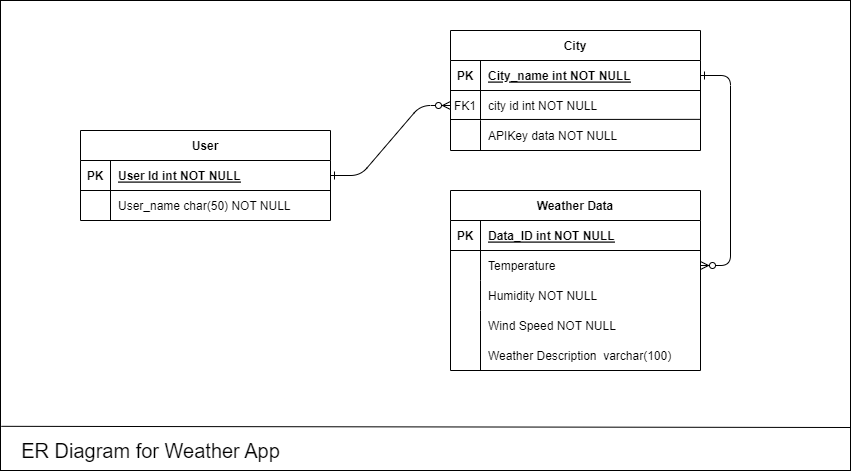
An Entity-Relationship Diagram (ERD) for a Weather Application is the entities and their relationships within the system.
Let's Draw an ER Diagram for our Weather Application:
Entities:
Relation:
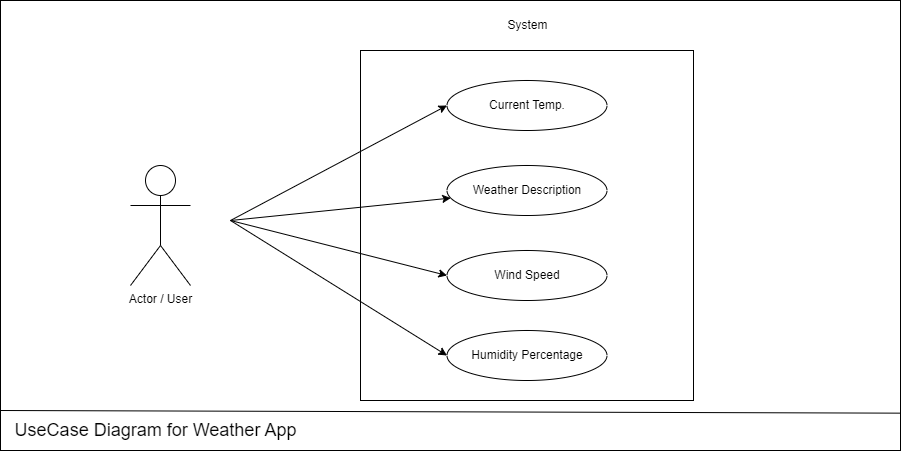
A use case diagram is a visual representation of the functional requirements of a system, illustrating how users interact with the system and the system's responses. For a weather forecasting app, the use case diagram will include actors such as "User," "Weather Data Provider," or "Administrator".
Here's a simplified use case diagram for a weather forecasting app:
:
At this stage, the fundamental development of the product starts. For this, developers use a specific programming code as per the design. Hence, it is important for the coders to follow the protocols set by the association. Conventional programming tools like compilers, interpreters, debuggers, etc. are also put into use at this stage.
In our project we are using html , CSS and JavaScript to build the project so in this stage we are going to code our project. Before going further lets talk about the environment we need for the project.
In this stage we are going to create the environment to build our project, We will install all required software and extensions for ease in the coding part.
:
In this stage we are going to develop our frontend part of the project .
This is how our page will looks like:
👁 Screenshot-2024-01-25-181155
Functionalities of this page:
Code:
Below is the Code for Creating above page:
Testing is a crucial phase in the development of a weather forecasting project to ensure that it meets its intended requirements, functions correctly, and is free of bugs.
Below are some key steps and considerations for the testing phase of a weather forecasting application:
In this phase of software development, Team will have to present their work in front of authorities and they will judge your work and give suggestions on the improvement areas.
The ideal length of the ppt should be min 10 slides and maximum 15 slides , you will not have too much time to explain your project so prepare your presentation carefully using important key points.
Some of the key points (slides) which your presentation should have are given below: