

This is a free Chrome extension that allows users to manage their ChatGPT conversation history efficiently.
It has the ability to delete multiple ChatGPT conversations at once instead of one by one.
This can be useful for removing sensitive conversations or clearing out old chats that are no longer needed.
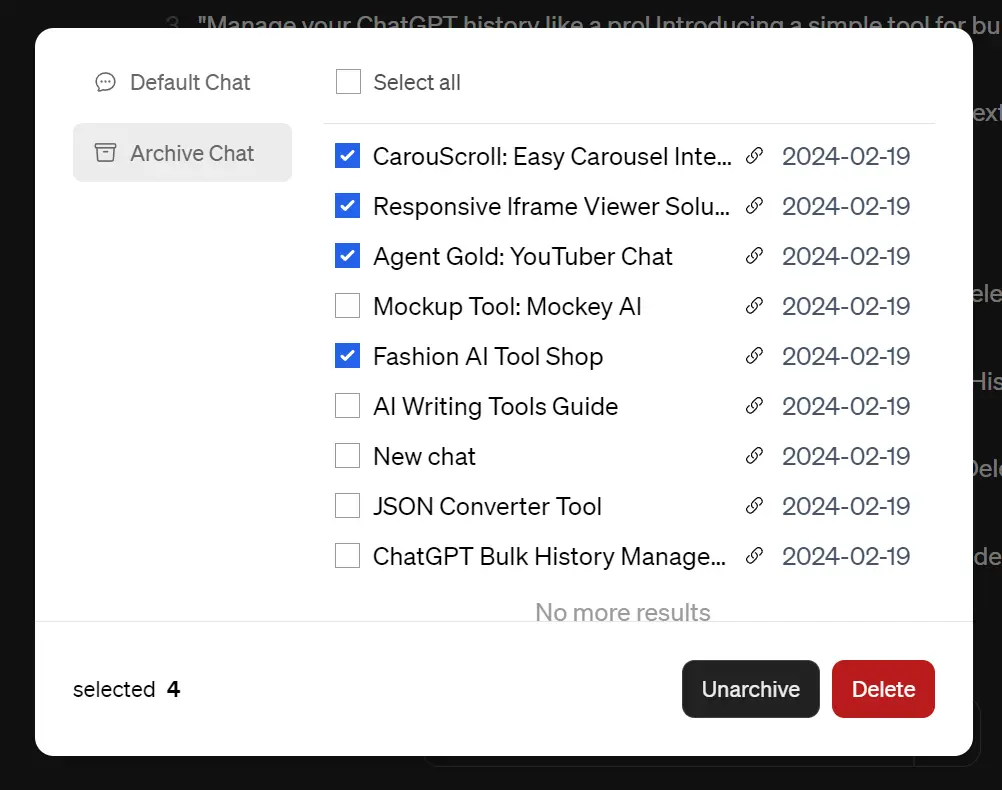
The bulk archive feature also allows users to quickly save conversations for future reference without tedious manual archiving.
How to use it:
1. Install the ChatGPT Batch Delete History Bulk extension from the Chrome Web Store.
2. Refresh your ChatGPT web app to see a new ‘Manage History’ link on the sidebar.

3. Click this link to view your entire conversation history in a modal popup.
4. Select the conversations you wish to delete or archive in bulk.

5. For archived conversations, click the ‘Unarchive’ button to swiftly restore them to your active chat list.






Leave a ReplyCancel Reply