

ChatGPT Conversation History Search is a lightweight Chrome extension that lets you quickly search through your ChatGPT chats by conversation titles and messages.
We’ve all been there—you have a burning question, but you can’t quite recall if you’ve already asked ChatGPT about it. Instead of endlessly scrolling and sifting through conversations, this extension lets you cut straight to the chase.
All your data stays safe and private. Your search data are stored locally on your device and never leave your computer.
How to use it:
1. Go to the Google Chrome Web Store and install the ChatGPT Conversation History Search extension.
2. Once activated, you’ll notice a new search bar appear at the top of your ChatGPT window, conveniently located next to the model selection dropdown. If you already had ChatGPT open, you may need to refresh the page.

3. Access the search feature by clicking the search bar or by using the shortcuts cmd+J (for Mac users) or ctrl+J (for Windows users).
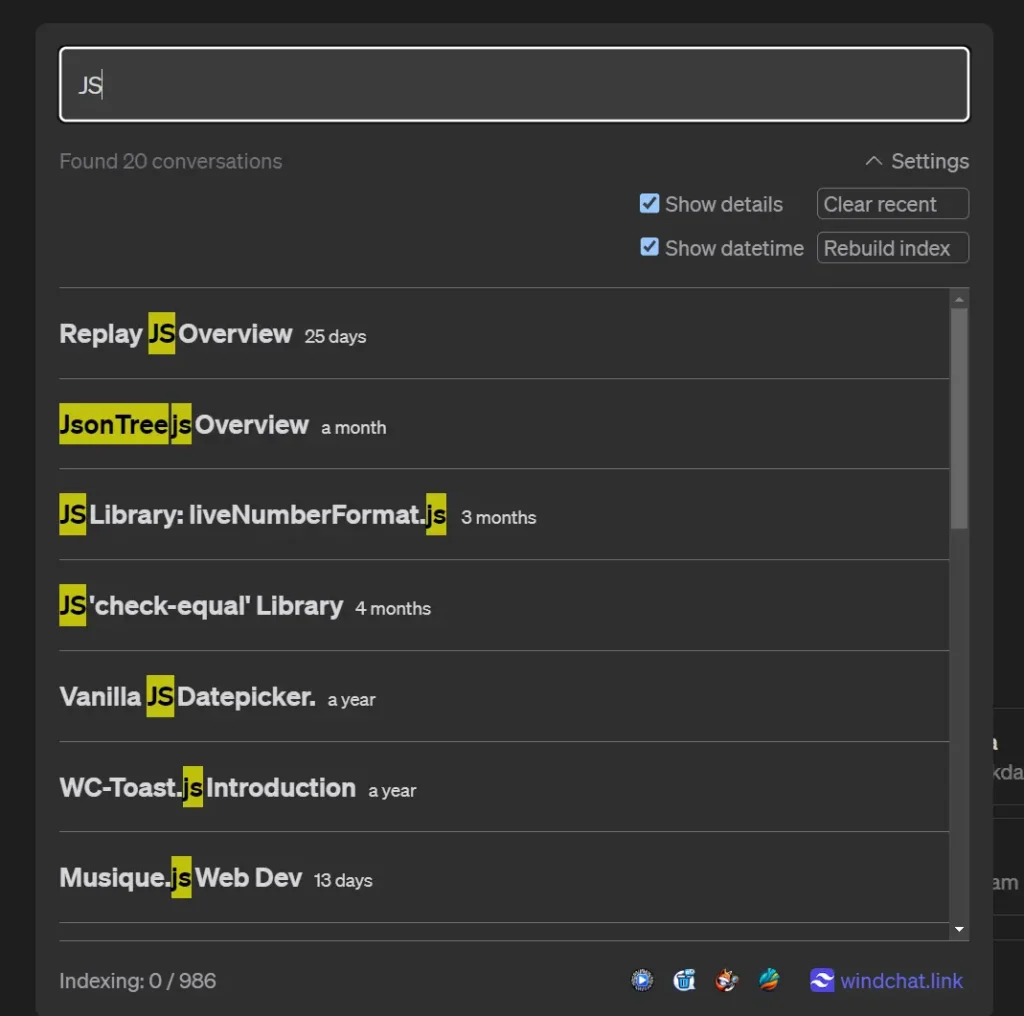
4. Type in your search terms. The extension will instantly search all your conversations and show you matching results, highlighting your keywords and displaying the last date each conversation was active.








Leave a ReplyCancel Reply