

Build Faster with Syncfusion Agentic UI Builder & Agent Skills
Angular Circular Gauge - Data Visualization in a Circular Scale
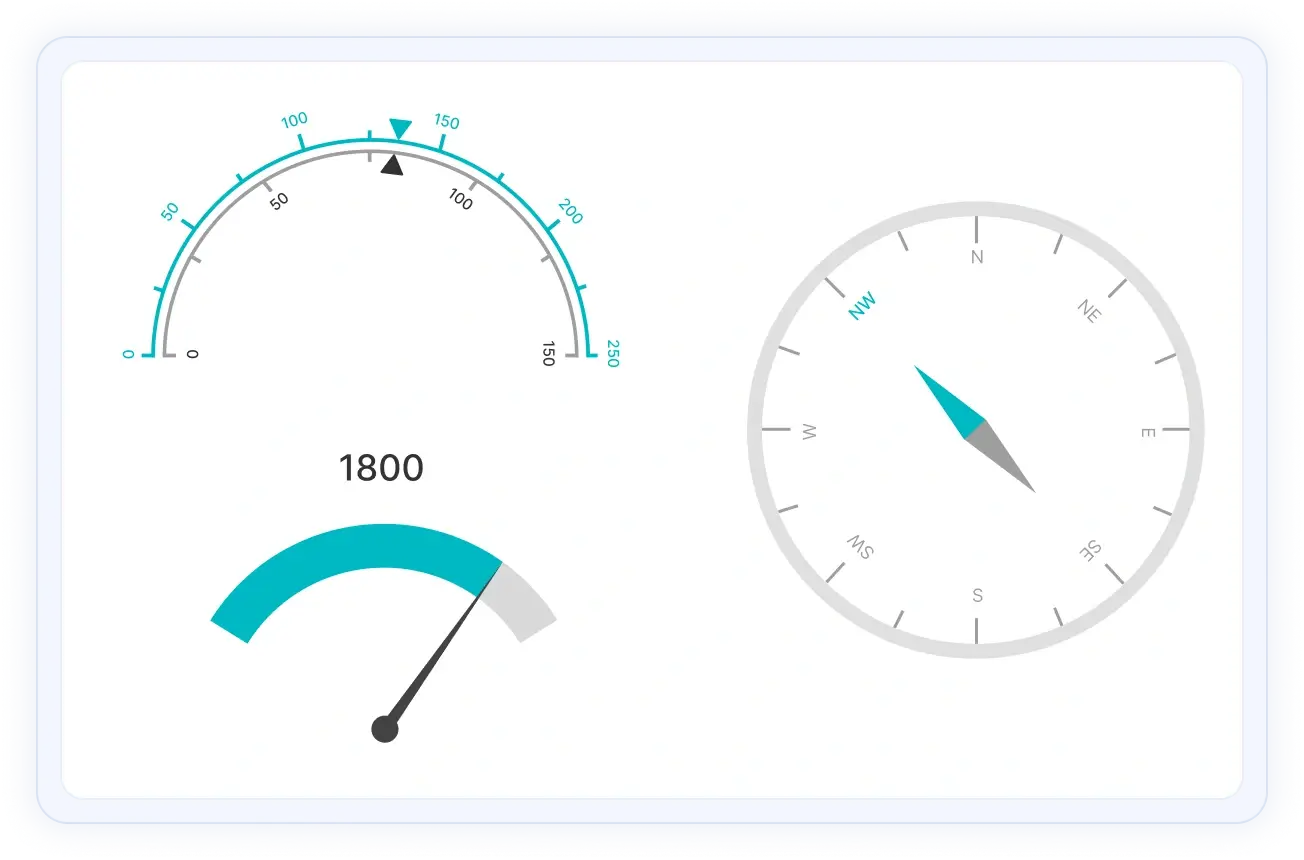
- Easily visualize numeric values in a circular scale with features like multiple axes, rounded corners, and more.
- Customize the appearance of a gauge completely to simulate a speedometer, meter gauge, analogue clock, etc.
- Create half or quarter circular gauges to visualize data in a small area. Do this by modifying the start and end angles.
Trusted by the world’s leading companies
Overview
The Angular Circular Gauge is a component for visualizing numeric values on a circular scale with features like multiple axes and rounded corners. Completely customize the appearance of the gauge to simulate a speedometer, meter gauge, analog clock, etc.
Angular Circular Gauge Code Example
Easily get started with Angular Circular Gauge using a few simple lines of HTML and TS code, as demonstrated below. Also explore our Angular Circular Gauge Example that shows you how to render the Circular Gauge in Angular.
<div class="control-section">
 <ejs-circulargauge style='display:block;' (load)='load($event)'>
 <e-axes>
 <e-axis radius='80%' startAngle=230 endAngle=130 [majorTicks]='ticks' [minorTicks]='ticks' [lineStyle]='lineStyle' [labelStyle]="labelStyle">
 <e-pointers>
 <e-pointer value=60 radius='60%' pointerWidth=7 [cap]="cap" [needleTail]="tail">
 </e-pointer>
 </e-pointers>
 </e-axis>
 </e-axes>
 </ejs-circulargauge>
</div>
import { Component, ViewEncapsulation } from '@angular/core';
import { ILoadedEventArgs, GaugeTheme } from '@syncfusion/ej2-angular-circulargauge';
@Component({
 selector: 'control-content',
 templateUrl: 'default.html',
 encapsulation: ViewEncapsulation.None
})
export class DefaultComponent {
 public ticks: Object = {
 width: 0
 };
 public lineStyle: Object = {
 width: 8
 };
 public load(args: ILoadedEventArgs): void {
 let selectedTheme: string = location.hash.split('/')[1];
 selectedTheme = selectedTheme ? selectedTheme : 'Material';
 args.gauge.theme = <GaugeTheme>(selectedTheme.charAt(0).toUpperCase() +
 selectedTheme.slice(1)).replace(/-dark/i, 'Dark').replace(/contrast/i, 'Contrast');
 }
 public labelStyle: Object = {
 font: {
 fontFamily: 'Roboto',
 size: '12px',
 fontWeight: 'Regular'
 },
 offset: -5
 };
 public cap: Object = {
 radius: 8,
 border: { width: 0 }
 };
 public tail: Object = {
 length: '25%',
 }
 constructor() {
 // code
 };
}
Axes customization
The gauge axes are circular scales where a set of values can be plotted based on any business logic. You can easily customize the appearance of the axes.
Label customization
Customize the look and feel of the default labels in a gauge by changing the font style, size, and color. Prefix or suffix text can also be added to the labels.
Ticks customization
Define the desired style for major and minor ticks in the gauge by changing their height, width, and color.
Offset
To enhance readability, change the position of the default axes in the gauge by setting the offset value for the labels, ticks, and axis lines.
Axis line
Add a border to the gauge by using axis lines. The appearance of the default axis in the Circular Gauge can also be customized.
Multiple axes
The Angular Circular Gauge allows you to add multiple axes to design it like a clock, speedometer, meter gauge, etc.
Direction
Render the axes in the Circular Gauge either clockwise or counterclockwise.
Range customization
A range in an Angular Circular Gauge is a visual element that helps to quickly visualize where a value falls on the axis.
Range position
Change the position of a range or move it to any place inside the gauge.
Range width
The range width varies based on the values to enhance usage and readability.
Multiple ranges
You can add multiple ranges inside the axes to show color variations.
Pointer types
Indicate values on an axis using pointers. The Angular Circular Gauge component supports three categories of pointers: needle, marker, and range bar.
Needle pointer
Point out the current value in the Circular Gauge using a highly customizable needle-type element.
Pointer type
Change the needle pointer shape to a triangle or arrow to point out or highlight values.
Pointer cap
The pointer cap is a rounded ball at the end of the arrow pointer that can also be customized to enhance the pointer’s appearance.
Tail
Add extra styling to the pointer cap by adding a tail.
Multiple needle pointers
You can add more than one needle pointer to the gauge axes to indicate multiple values.
Marker pointer
Point out the current value by using the following different types of marker pointers.
Pointer type
Change the marker pointer type to built-in shapes such as a triangle, inverted triangle, square, or circle to highlight values.
Marker pointer position
You can change or move the marker pointer to any place inside the gauge.
Range bar pointer
Use the range bar pointer to point to the current value from the start value of the axes.
Pointer position
You can change or move the range bar pointer to any place inside the gauge.
Multiple pointers
You can add more than one range bar pointer to the axes to indicate multiple values.
Pointer animation
The Angular Circular Gauge component provides a visually appealing way to view its pointers with animated transitions for a certain duration. Experience smooth pointer transitions by moving the pointer from one place to another.
Pointer interaction
The interactive Angular Circular Gauge component lets you drag the pointer from one place to another. Swipe gestures can be used to control the pointer, and the value is changed at runtime.
Arc gauges
The ranges and range bar pointer corners in a circular gauge can be rounded to form arc gauges.
Legend
A legend provides additional information that is helpful in identifying the ranges in a Circular Gauge. It can be docked at the left, right, top, and bottom positions around the plot area.
Tooltip
Display details about a pointer value in the interactive Angular Circular Gauge component through a tooltip when hovering the mouse over the pointer.
Half and quarter gauges
Form half or quarter circular gauges by modifying the start and end angles of a gauge. This allows the gauge to render in a very small area.
Annotations
Display any HTML element as an annotation at a specific point of interest in the Angular Circular Gauge. You can also add multiple annotations in a gauge.
Appearance
The appearance of each element in a Circular Gauge, such as axes, ranges, axis intervals, pointer positions, label positions, and tick positions, can be customized easily.
Gradient color
Colors applied to the range and pointer can change gradually to create a smooth color transition.
Gauge title
Add a title to visualize additional information on the Circular Gauge. You can also customize the font of the title
Globalization
Users from different locales can personalize the Circular Gauge component by formatting numbers, currency, and more to suit their preferences.
Right to left (RTL)
Render Angular Circular Gauge along with its legend and tooltip in the right-to-left direction.
Exporting
Export or print the rendered Angular Circular Gauge to save a local copy for further use.
Export
Export the Angular Circular Gauge to a PDF document or in image formats such as SVG, PNG, and JPEG in client-side.
Print the rendered Angular Circular Gauge directly from the browser.
Touch and Browser support
The interactive Circular Gauge component supports touch interactions.
Touch support
All the features in Circular Gauge will work on touch devices with zero configuration. Use touch features such as tooltip and pointer drag without any customization.
Responsive
You can view the Circular Gauge on various devices. It is also possible to hide specific elements in the gauges for particular screen sizes by making a minimal change in the gauge events.
Cross browser support
You can render the Circular Gauge component in all modern browsers.
Other supported frameworks
The circular gauge is also available in Blazor, React, Vue, and JavaScript frameworks. Check out the different Circular Gauge platforms from the links below,
Angular version compatibility
With continuous improvement in Angular versions, the Angular Circular Gauge is kept up to date to make it compatible with the latest version.
Not sure how to create your first Angular Circular Gauge? Our documentation can help.
I’d love to read it now150+ ANGULAR UI COMPONENTS
Build Document Workflows in Angular
Embed PDF viewing, Word document editing, and Excel-like spreadsheet processing in your Angular app to streamline document workflows and help teams collaborate on files without context switching or external dependencies.
Frequently Asked Questions
✅ Why should you choose Syncfusion’s Angular Circular Gauge?
The Syncfusion Angular Circular Gauge component supports the following features:
Easy visualization of numeric values in a circular scale with features like multiple axes and rounded corners.
Completely customizable appearance.
- Half or quarter circular gauges can visualize data in a small area. Create them by modifying the start and end angles.
- One of the best Angular Circular Gauge in the market that offers a feature-rich UI.
Simple configuration and API.
- Support for all modern browsers.
- Touch-friendly and responsive UI.
Expansive learning resources such as demos and documentation to let you get started quickly with Angular Circular Gauge.
✅ Where can I find the Syncfusion Angular Circular Gauge demo?
You can find our Angular Circular Gauge demo, which demonstrates how to render and configure the Circular Gauge.
✅ Can I download and utilize the Syncfusion Angular Circular Gauge for free?
No, this is a commercial product and requires a paid license. However, a free community license is also available for companies and individuals whose organizations have less than $1 million USD in annual gross revenue, 5 or fewer developers, and 10 or fewer total employees.
✅ How do I get started with Syncfusion Angular Circular Gauge component?
A good place to start would be our comprehensive getting started documentation.
Our Customers Love Us
Here are some of their experiences.


See Real Success Stories
Developers around the world trust Syncfusion’s Essential Studio to simplify complex projects and speed up delivery. With a vast library of UI controls, powerful SDKs, and reliable support, Essential Studio helps teams build enterprise-ready applications with confidence.
Read Our Customer StoriesIndustry
Software development
75% Cost reduction
50% Faster development

“If somebody is looking for a great tool to work with? Yes. I would definitely recommend Syncfusion for anyone who is trying to develop something meaningful.”
- Somnath Maji (Founder of Igniatek Consultancy)
Read StoryIndustry
Utilities (oil and gas)


Advanced, flexible features
Empowered users through robust and versatile functionality.
“Syncfusion’s tools have taken care of many things so I can focus on developing the application, instead of developing tools for the application.”
- James Athyal (Software developer, McDaniel & Associates Consultants Ltd)
Read StoryIndustry
Software and technology

Efficient file management
Streamlined workflows with document libraries without building them from scratch.
“We really love when the magic happens.”
- Irvin Dominin (BUILDER WEB Development Manager at Sistemi)
Read StoryIndustry
Software and technology


“We are Syncfusion fans because of the way Syncfusion treats the support.”
- Dr. Howard Rybko (CEO of Synchrony Digital)
Read StoryIndustry
IT services and IT consulting

Improved performance
Large datasets handled with easy customization and quick debugging.

“I will surely recommend Syncfusion to others as a third-party control because I think it’s very easily customizable.”
- Jayesh (Technical Team Lead, Capita)
Read StoryIndustry
Professional services
“We definitely wanted Syncfusion to help us with our document processing functionality, and we were happy with and satisfied with Syncfusion.”
- Arvind Naik (Engineering Lead, Vialto Partners)
Read StoryRated by users across the globe



Transform your applications today by downloading our free evaluation version
Download Free Trial
No credit card required.


Awards
Greatness—it’s one thing to say you have it, but it means more when others recognize it. Syncfusion® is proud to hold the following industry awards.





