

Build Faster with Syncfusion Agentic UI Builder & Agent Skills
Angular File Manager - Lightweight, Modern User Interface Component
- A modern user interface for easy and effective management of files and folders in the file system.
- Performs all file operations like upload, download, delete, create, sort, search, and rename along with preview images.
- Adaptive and responsive design built to be touch-friendly for easy interactions.


Trusted by the world’s leading companies
Overview
The Angular File Manager (a.k.a. File Explorer) is a graphical user interface component for managing the file system that allows users to perform most common file operations like accessing, editing, and sorting files or folders. This component also provides easy navigation to select a file or folder from the file system.
Why choose Syncfusion Essential Studio® Angular File Manager?
Easy to customize
With customization options, the entire layout can be customized and modified easily, and initial views switched.
AI-Assisted Development
Build file management experiences faster with the Agentic UI Builder and Syncfusion Agent Skills. Generate navigation layouts, file operations, and cloud-style management workflows with minimal manual effort.
Easy to interact
An intuitive and easy-to-interact interface that includes a toolbar, treeview, breadcrumb, and menu.
Localization
Localize the text values of the context menu and tooltips displayed in the user interface using the localization library.
Integration with other components
Integrate with Syncfusion’s PDF Viewer, Word Editor, and Spreadsheet component to open and view PDF, Excel, and Word files.
Connect with cloud storage services
Easily connect and manage data stored in a various storage services, including local, cloud, and database.
Adapts to any resolution
The File Manager is designed to be responsive and adaptable, with a layout that works well on devices including desktops, touch screens, and smart phones.
Attractive, customizable themes
Cutting edge design with 5+ built-in themes such as Fluent, Tailwind CSS, Bootstrap, Material, Fabric, and more. Utilize the online Theme Studio tool to customize themes easily.
Angular File Manager Code Example
Easily get started with the Angular File Manager using a few simple lines of HTML and TS code example as demonstrated below. Also explore our Angular File Manager Example that shows you how to render and configure a File Manager in Angular.
<div class="sample-container">
 <ejs-filemanager id='overview' [ajaxSettings]='ajaxSettings' [view]='view'>
 </ejs-filemanager>
</div>
import { Component, ViewEncapsulation } from '@angular/core';
import { FileManagerComponent, NavigationPaneService, ToolbarService, DetailsViewService } from '@syncfusion/ej2-angular-filemanager';
/**
 * File Manager full functionalities sample
 */
@Component({
 selector: 'control-content',
 templateUrl: 'overview.html',
 styleUrls: ['overview.css'],
 encapsulation: ViewEncapsulation.None,
	providers: [ NavigationPaneService, ToolbarService, DetailsViewService]
})

export class OverViewController {
 public ajaxSettings: object;
 public view: string;
 public hostUrl: string = 'https://ej2-aspcore-service.azurewebsites.net/';
 public ngOnInit(): void {
 this.ajaxSettings = {
 url: this.hostUrl + 'api/FileManager/FileOperations',
 getImageUrl: this.hostUrl + 'api/FileManager/GetImage',
 uploadUrl: this.hostUrl + 'api/FileManager/Upload',
 downloadUrl: this.hostUrl + 'api/FileManager/Download'
 };
 this.view = "Details";
 }
}
AI-assisted development
Build feature-rich Angular File Manager experiences faster
Accelerate file management application development with Syncfusion AI tools that turn requirements into fully configured file exploration experiences with minimal manual setup.
Agentic UI Builder
Turn prompts into ready-to-use UI screens, layouts, and workflows with Syncfusion Angular components.
Example Prompt Create a cloud storage interface with folder navigation and file previews.
Agent Skills
Accelerate development with Syncfusion AI Agent Skills for faster implementation and integration.
Example Prompt Generate a Angular file manager with context menus, previews, and drag-and-drop support.
AI Coding Assistant
Accelerate development with AI that generates, configures, and troubleshoots component code directly in your IDE.
Example Prompt Show how to connect cloud storage to the Syncfusion Angular File Manager.
Flat JSON data binding
The File Manager component supports rendering flat JSON data objects, eliminating the need for HTTP client requests and back-end URL configuration. All file operations can be handled within the component itself through file action events.
Customizable layout design
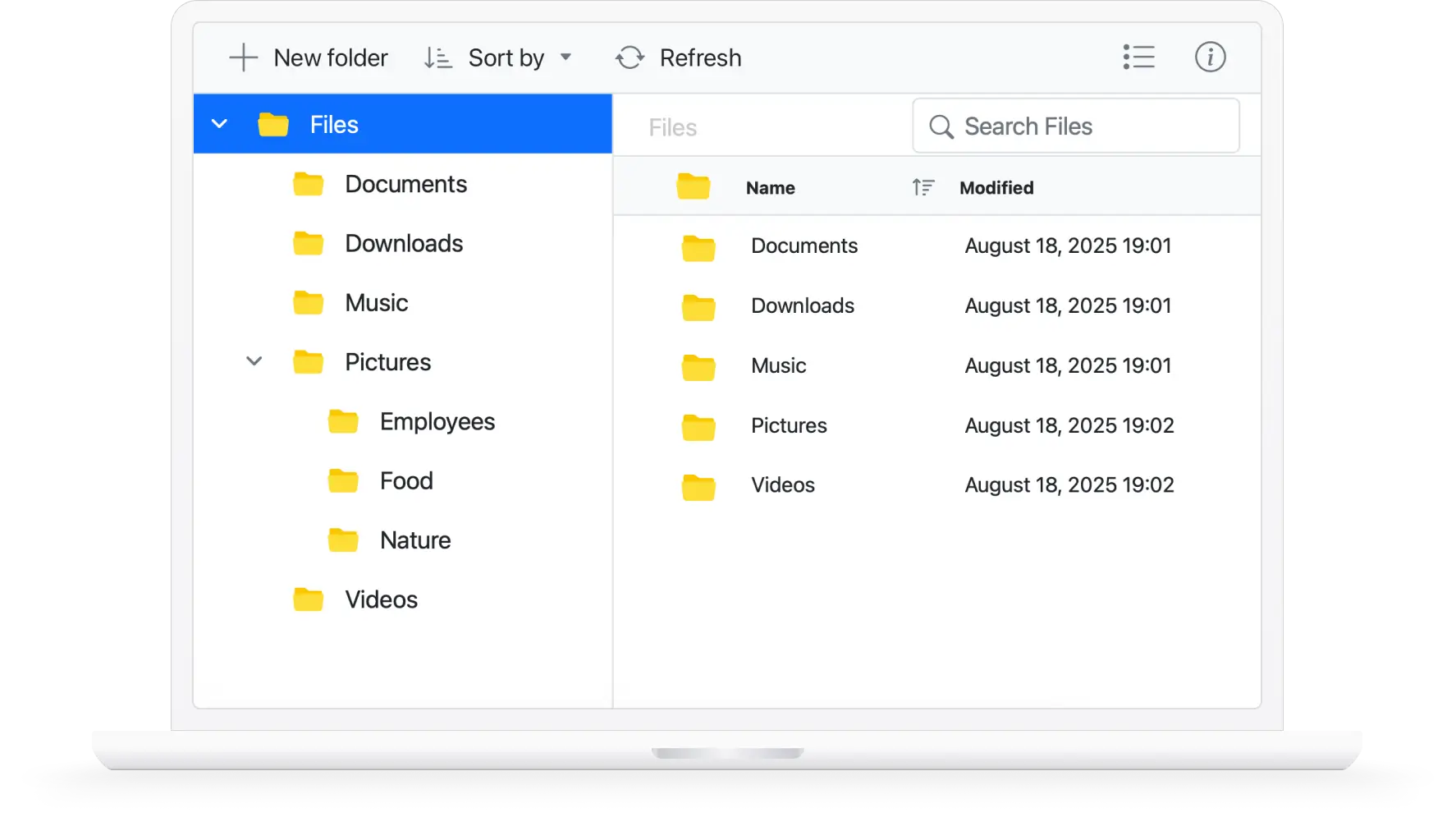
The Angular File Manager UI consists of a toolbar, navigation pane, and content pane through which the files or folders in the file system can be accessed and managed. The entire layout can be customized with features like right-to-left alignment, enabling or disabling the toolbar and navigation pane, and switching between views.
Toolbar
The toolbar contains a list of tools for performing various operations like upload file, download file, and switch views. The toolbar can be configured with any custom functionality to be performed on the file system.
Navigation pane
The Angular File Manager navigation pane allows quick and direct access to a file or folder in a file system where the entire folder hierarchy is listed using a tree view. This can be made visible or hidden as needed.
Content pane
The content pane displays the files and folders in the file system. The files in the content pane can be displayed in either a large icon view or a details view.
File operations
The Angular File Manager component includes all the common operations needed for managing a file system: copy, move, upload, download, edit, create, delete, and sort.
File upload and download
The File Manager control allows easy file uploading and downloading in a file system.
Sorting
Files and folders in the file system can be sorted in ascending or descending order by clicking the column header. Files and folders can be sorted based on name, date created, size, and other details. The default sorting functionality can also be customized in the File Manager.
Searching
The File Manager control contains built-in search functionality that allows you to search for and access a file or folder in the current path and its child folders.
Moving files and folders with drag and drop
Files and folders can be moved within the file system by dragging and dropping them. Drag-and-drop support can be turned on or off.
Access control restriction
Restrict access to files and folders by defining a set of rules for them. Only authorized users will be able to access them.
Restrict upload file types
You can specify the types of files that can be uploaded in the File Manager. Other file types will be restricted from uploading.
Multiple file selection
The Angular File Manager control has built-in support for the selection of multiple files or folders. Multiple file selection is effective when a single operation like download or delete needs to be performed for multiple files in the file system.
Directory upload
The Angular File Manager control has support to upload a directory (folder) with its subfolders and files.
Chunk upload
The File Manager supports the chunk upload feature, which allows large files to be split into smaller chunks based on the specified chunk size and uploaded sequentially to the server. This improves reliability and performance when handling massive file uploads.
Quick access menu
The Angular File Manager component provides a context menu to list the operations that can be performed with files and folders. It appears when a file or folder is right-clicked. Context menu items can be customized according to user preferences.
Manage storage service providers
The File Manager control allows you to manage data from storage services.
Cloud storage
Amazon S3 bucket cloud storage file provider
Microsoft Azure cloud storage file provider
Google Drive cloud storage file provider
Database storage
Network protocol service (FTP)
Additional features
Keyboard navigation
The Angular File Manager control ensures that every cell is accessible using the keyboard. Major features like sort, select, and edit can be performed using keyboard commands alone; no mouse interaction is required. This helps in creating highly accessible applications using this control.
Developer-friendly APIs
Developers have control over all the UI elements and behaviors of the components to provide the best experience to end users.
Right to left (RTL)
Supports right-to-left (RTL) direction for users working in right-to-left languages like Hebrew and Arabic.
Angular version compatibility
With continuous improvement in Angular versions, the Angular File Manager is kept up to date to make it compatible with versions starting from 4 to the latest version.
Other supported frameworks
The File Manager layout is available for the Blazor, React, JavaScript, and Vue frameworks. Explore its platform-specific options through the following links:
Supported browsers
The Angular File Manager works well with all modern web browsers, including Chrome, Firefox, Edge, Safari, and Opera.
Not sure how to create your first Angular File Manager? Our tutorial videos and documentation can help.
I’d love to watch it now I’d love to read it now150+ ANGULAR UI COMPONENTS
Build Document Workflows in Angular
Embed PDF viewing, Word document editing, and Excel-like spreadsheet processing in your Angular app to streamline document workflows and help teams collaborate on files without context switching or external dependencies.
Frequently Asked Questions
✅ Why should you choose Syncfusion Essential Studio® Angular File Manager?
A lightweight, modern user interface for easy and effective file management in a file system.
Support for all basic file operations, like upload, download, delete, create, sort, search, and rename, along with an out-of-the-box option to preview images in the file system.
Support for different kinds of file system providers like physical, FTP, SQL, Node.js, Azure, Amazon S3, Firebase, and Google Drive.
- One of the best Angular File Manager components on the market offering a feature-rich UI.
- Built-in support for access control.
Simple configuration and API.
- Support for all modern browsers.
- Touch-friendly and responsive.
Expansive learning resources such as demos, documentation, and videos to learn quickly and get started with Angular File Manager.
✅ Where can I find the Syncfusion Angular File Manager demo?
You can find our Angular File Manager demo, which demonstrates how to render and configure the File Manager.
✅ Can I download and utilize the Syncfusion Angular File Manager for free?
No, this is a commercial product and requires a paid license. However, a free community license is also available for companies and individuals whose organizations have less than $1 million USD in annual gross revenue, 5 or fewer developers, and 10 or fewer total employees.
✅ How do I get started with Syncfusion Angular File Manager?
A good place to start would be our comprehensive getting started documentation.
Our Customers Love Us
Here are some of their experiences.


See Real Success Stories
Developers around the world trust Syncfusion’s Essential Studio to simplify complex projects and speed up delivery. With a vast library of UI controls, powerful SDKs, and reliable support, Essential Studio helps teams build enterprise-ready applications with confidence.
Read Our Customer StoriesIndustry
Software development
75% Cost reduction
50% Faster development

“If somebody is looking for a great tool to work with? Yes. I would definitely recommend Syncfusion for anyone who is trying to develop something meaningful.”
- Somnath Maji (Founder of Igniatek Consultancy)
Read StoryIndustry
Utilities (oil and gas)


Advanced, flexible features
Empowered users through robust and versatile functionality.
“Syncfusion’s tools have taken care of many things so I can focus on developing the application, instead of developing tools for the application.”
- James Athyal (Software developer, McDaniel & Associates Consultants Ltd)
Read StoryIndustry
Software and technology

Efficient file management
Streamlined workflows with document libraries without building them from scratch.
“We really love when the magic happens.”
- Irvin Dominin (BUILDER WEB Development Manager at Sistemi)
Read StoryIndustry
Software and technology


“We are Syncfusion fans because of the way Syncfusion treats the support.”
- Dr. Howard Rybko (CEO of Synchrony Digital)
Read StoryIndustry
IT services and IT consulting

Improved performance
Large datasets handled with easy customization and quick debugging.

“I will surely recommend Syncfusion to others as a third-party control because I think it’s very easily customizable.”
- Jayesh (Technical Team Lead, Capita)
Read StoryIndustry
Professional services
“We definitely wanted Syncfusion to help us with our document processing functionality, and we were happy with and satisfied with Syncfusion.”
- Arvind Naik (Engineering Lead, Vialto Partners)
Read StoryRated by users across the globe



Transform your applications today by downloading our free evaluation version
Download Free Trial
No credit card required.


Awards
Greatness—it’s one thing to say you have it, but it means more when others recognize it. Syncfusion® is proud to hold the following industry awards.





