VOOZH about

URL: https://www.tecmint.com/colourised-disk-space-usage-in-linux/

⇱ Discus - Show Colourised Disk Space Usage in Linux


Skip to content

In our last article, we have explained how to use df (disk filesystem) utility to report file system disk space usage in Linux. We have discovered yet a another great utility for the same purpose but with a prettier output, called discus.

Discus is a df-like, highly configurable utility for checking disk space utilization in Linux, intended to make df prettier with fancy features such as colored output, bar graphs, and smart formatting of numbers. To configure it, you may copy its main configuration file /etc/discusrc to ~/.discusrc and do your customization in there.

Read Also: Pydf an Alternative β€œdf” Command to Check Disk Usage in Different Colours

The package discus is available to install from the default system repositories using package manager on Linux distribution as shown.

$ sudo apt install discus	#Debian/UBuntu
$ sudo yum install discus	#RHEL/CentOS
$ sudo dnf install discus	#Fedora 22+

After installing discus, learn how to use discus with the following examples.

Discus Command Examples

Run the discus command with the default settings.

$ discus
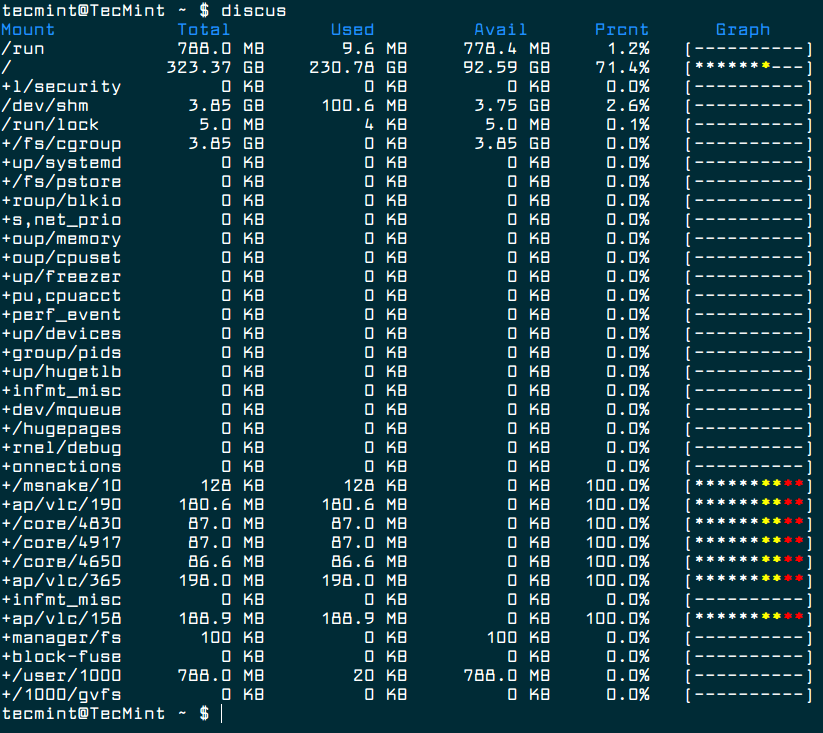
πŸ‘ Check Linux Filesystem Disk Space
Check Linux Filesystem Disk Space

To disable the color, use the -c flag.

$ discus -c

To display device names instead of graphs, use the -d flag:.

$ discus -d
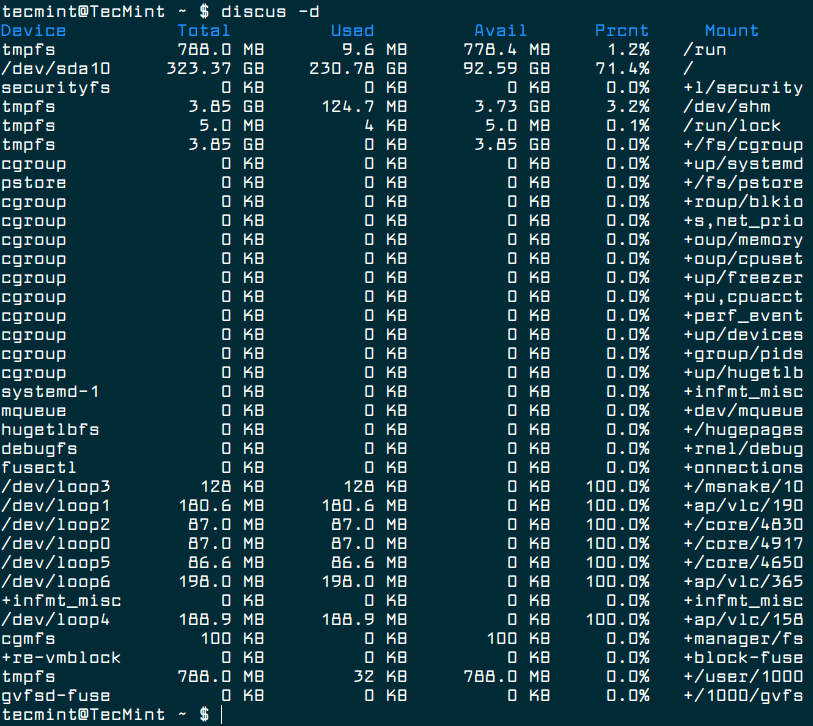
πŸ‘ Check Disk Space Usage By Devices
Check Disk Space Usage By Devices

If do not want to use smart formatting, you can disable it using the -s switch as shown.

$ discus -s

You can specify the number of digits to right of decimal place using the -p flag.

$ discus -p 3

To display sizes in kilobytes, gigabytes, megabytes, or terabytes use the -k, -g, -m, or -t flags respectively. For example.

$ discus -m

Last but not least, if you want to configure it to your preference, copy its main configuration file /etc/discusrc to ~/.discusrc as shown.

$ sudo cp /etc/discusrc ~/.discusrc

Then open the newly created file and perform your customization.

$ vim ~/.discusrc
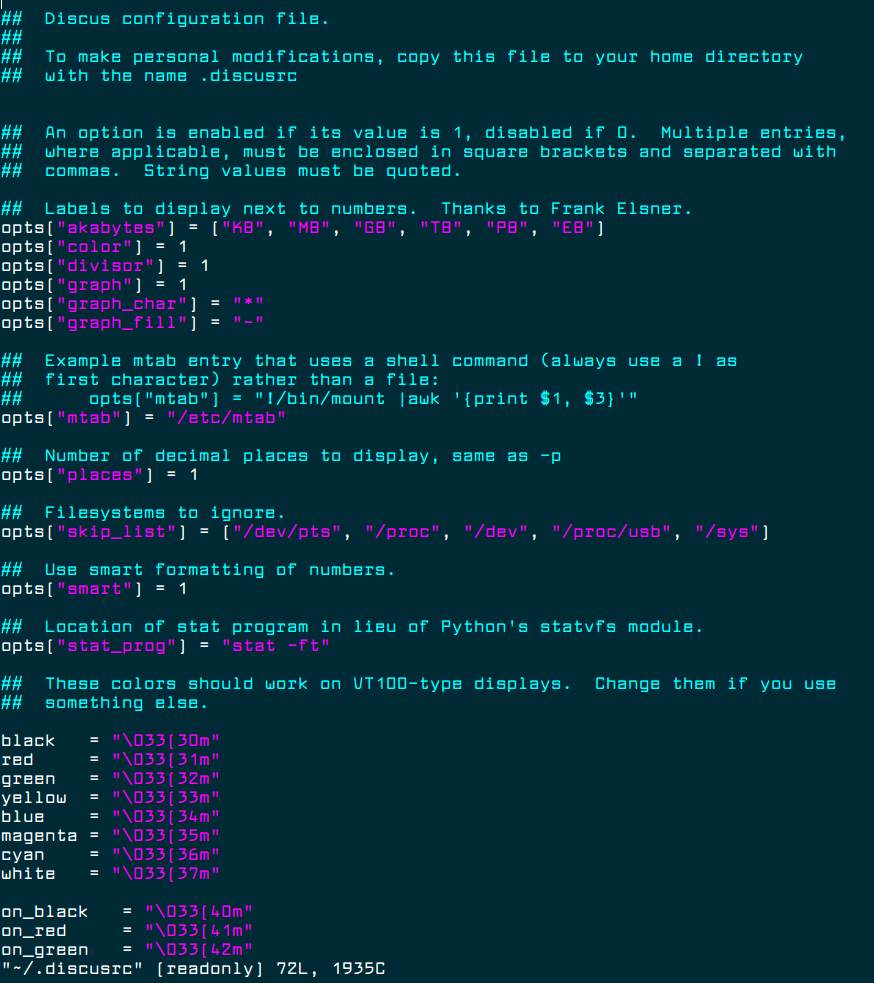
πŸ‘ Discus Configuration Customization
Discus Configuration Customization

For more information, see the discus man page.

$ man discus 

You may also like to read these following useful articles on Linux disk space usage.

  1. 10 Useful du (Disk Usage) Commands to Find Disk Usage of Files and Directories
  2. How to Find Out Top Directories and Files (Disk Space) in Linux

That’s all! Discus is a simple utility intended to make df command prettier. Try it out and let us know of thoughts in the comments section below.

If this article helped, share it with someone on your team.
TecMint Weekly Newsletter
Get the Learn Linux 7 Days Crash Course free when you join 34,000+ Linux professionals reading every Thursday.
Check your email for a magic link to get started.
Something went wrong. Please try again.
β˜•
TecMint has been free for 14 years. Help keep it that way.
Google AI Overviews and tools like ChatGPT have cut into search traffic for independent tech sites like TecMint. Running this site costs over $2,000 every month for hosting, infrastructure, and paying authors to keep the content accurate and tested.

If this article helped you solve a problem, consider buying a coffee. It helps keep TecMint free, supports the authors, and keeps the project going.
β˜• Buy Me a Coffee
Aaron Kili
Aaron Kili is a Linux and F.O.S.S enthusiast, an upcoming Linux SysAdmin, web developer, and currently a content creator for TecMint who loves working with computers and strongly believes in sharing knowledge.

Each tutorial at TecMint is created by a team of experienced Linux system administrators so that it meets our high-quality standards.

11 Comments

Leave a Reply
  1. discus is not in any of the default system repositories. both CentOS 7 & 8 doesn’t have it.

    Reply
    • @nobleaxis

      Allow us to check if this is the case.

      Reply
  2. Hey guys I can’t install it on Fedora:

    $ sudo yum provides discus
    Last metadata expiration check: 0:00:20 ago on Di 02 Okt 2018 10:54:21 CEST.
    Error: No Matches found
    

    Can you guys help me?

    Reply
  3. Wow, I had no idea anyone still used this. I wrote Discus in 2000. I haven’t thought about it in years, yet here is a brand-new review of it.

    Thanks!

    Reply
    • @Stormy Henderson

      Welcome. Maybe you should consider getting back to it.

      Reply
  4. This package is not available in CentOS 7 or EPEL repositories. Tecmint, why do you hurt me so? This is the second thing I have tried from this site this month that does not work on CentOS. Recommend testing before writing.

    Reply
  5. Aaron, I tried installing Discus on a Centos 7.5 but it wont work, previously you suggested to enable EPEL but this still not working.

    https://www.tecmint.com/how-to-enable-epel-repository-for-rhel-centos-6-5/

    Do you know what other Repository I can use to download Discus?

    [root@tst-cent7 ~]# yum repolist | grep epel
     * epel: mirror.cogentco.com
     * epel-source: mirror.cogentco.com
    epel/x86_64 Extra Packages for Enterprise Linux 7 - x86_64 12,639
    
    Reply
  6. This really fills out a very much-needed gap in the Linux world.

    Reply
    • @DFD

      Many thanks for sharing your thoughts with us.

      Reply
  7. Nice terminal font! What’s the name? Thanks!

    Reply
    • @raphaelmsx

      Larabie Font

      Reply

Got Something to Say? Join the Discussion... Cancel reply

Free Course
Get a free Linux course before you go.
Subscribe to TecMint Weekly and get the Learn Linux 7 Days Crash Course free. Read by 34,000+ Linux professionals every Thursday.
Check your email for a magic link to get started.